
- JavaFX 教程
- JavaFX - 首頁
- JavaFX - 概述
- JavaFX 安裝和架構
- JavaFX - 環境
- JavaFX - 使用 Netbeans 安裝
- JavaFX - 使用 Eclipse 安裝
- JavaFX - 使用 Visual Studio Code 安裝
- JavaFX - 架構
- JavaFX - 應用程式
- JavaFX 二維形狀
- JavaFX - 二維形狀
- JavaFX - 繪製線條
- JavaFX - 繪製矩形
- JavaFX - 繪製圓角矩形
- JavaFX - 繪製圓形
- JavaFX - 繪製橢圓
- JavaFX - 繪製多邊形
- JavaFX - 繪製折線
- JavaFX - 繪製三次貝塞爾曲線
- JavaFX - 繪製二次貝塞爾曲線
- JavaFX - 繪製弧形
- JavaFX - 繪製 SVG 路徑
- JavaFX 二維物件的屬性
- JavaFX - 描邊型別屬性
- JavaFX - 描邊寬度屬性
- JavaFX - 描邊填充屬性
- JavaFX - 描邊屬性
- JavaFX - 描邊線連線屬性
- JavaFX - 描邊斜接限制屬性
- JavaFX - 描邊線端點屬性
- JavaFX - 平滑屬性
- JavaFX 路徑物件
- JavaFX - 路徑物件
- JavaFX - LineTo 路徑物件
- JavaFX - HLineTo 路徑物件
- JavaFX - VLineTo 路徑物件
- JavaFX - QuadCurveTo 路徑物件
- JavaFX - CubicCurveTo 路徑物件
- JavaFX - ArcTo 路徑物件
- JavaFX 顏色和紋理
- JavaFX - 顏色
- JavaFX - 線性漸變圖案
- JavaFX - 徑向漸變圖案
- JavaFX 文字
- JavaFX - 文字
- JavaFX 特效
- JavaFX - 特效
- JavaFX - 顏色調整特效
- JavaFX - 顏色輸入特效
- JavaFX - 圖片輸入特效
- JavaFX - 混合特效
- JavaFX - 光暈特效
- JavaFX - 輝光特效
- JavaFX - 方框模糊特效
- JavaFX - 高斯模糊特效
- JavaFX - 運動模糊特效
- JavaFX - 反射特效
- JavaFX - 棕褐色特效
- JavaFX - 陰影特效
- JavaFX - 投影陰影特效
- JavaFX - 內陰影特效
- JavaFX - 光照特效
- JavaFX - 遠光源特效
- JavaFX - 聚光燈特效
- JavaFX - 點光源特效
- JavaFX - 位移貼圖
- JavaFX - 透視變換
- JavaFX 動畫
- JavaFX - 動畫
- JavaFX - 旋轉轉換
- JavaFX - 縮放轉換
- JavaFX - 平移轉換
- JavaFX - 淡入淡出轉換
- JavaFX - 填充轉換
- JavaFX - 描邊轉換
- JavaFX - 順序轉換
- JavaFX - 並行轉換
- JavaFX - 暫停轉換
- JavaFX - 路徑轉換
- JavaFX 圖片
- JavaFX - 圖片
- JavaFX 三維形狀
- JavaFX - 三維形狀
- JavaFX - 建立長方體
- JavaFX - 建立圓柱體
- JavaFX - 建立球體
- JavaFX 事件處理
- JavaFX - 事件處理
- JavaFX - 使用便捷方法
- JavaFX - 事件過濾器
- JavaFX - 事件處理程式
- JavaFX UI 控制元件
- JavaFX - UI 控制元件
- JavaFX - 列表檢視
- JavaFX - 手風琴
- JavaFX - 按鈕欄
- JavaFX - 選擇框
- JavaFX - HTML 編輯器
- JavaFX - 選單欄
- JavaFX - 分頁
- JavaFX - 進度指示器
- JavaFX - 滾動面板
- JavaFX - 分隔符
- JavaFX - 滑塊
- JavaFX - 微調器
- JavaFX - 分割面板
- JavaFX - 表格檢視
- JavaFX - 標籤頁面板
- JavaFX - 工具欄
- JavaFX - 樹檢視
- JavaFX - 標籤
- JavaFX - 複選框
- JavaFX - 單選按鈕
- JavaFX - 文字欄位
- JavaFX - 密碼欄位
- JavaFX - 檔案選擇器
- JavaFX - 超連結
- JavaFX - 工具提示
- JavaFX - 警報框
- JavaFX - 日期選擇器
- JavaFX - 文字區域
- JavaFX 圖表
- JavaFX - 圖表
- JavaFX - 建立餅圖
- JavaFX - 建立折線圖
- JavaFX - 建立區域圖
- JavaFX - 建立條形圖
- JavaFX - 建立氣泡圖
- JavaFX - 建立散點圖
- JavaFX - 建立堆疊區域圖
- JavaFX - 建立堆疊條形圖
- JavaFX 佈局面板
- JavaFX - 佈局面板
- JavaFX - HBox 佈局
- JavaFX - VBox 佈局
- JavaFX - BorderPane 佈局
- JavaFX - StackPane 佈局
- JavaFX - TextFlow 佈局
- JavaFX - AnchorPane 佈局
- JavaFX - TilePane 佈局
- JavaFX - GridPane 佈局
- JavaFX - FlowPane 佈局
- JavaFX CSS
- JavaFX - CSS
- JavaFX 多媒體
- JavaFX - 處理多媒體
- JavaFX - 播放影片
- JavaFX 有用資源
- JavaFX - 快速指南
- JavaFX - 有用資源
- JavaFX - 討論
JavaFX - 平移變換
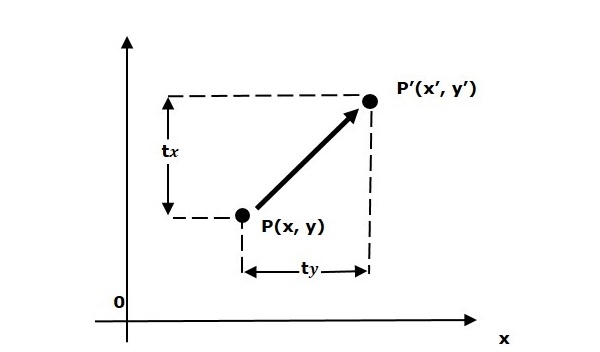
平移變換將物件移動到螢幕上的不同位置。可以透過將平移座標 (tx, ty) 新增到原始座標 (X, Y) 來平移二維點,從而得到新的座標 (X’, Y’)。
示例
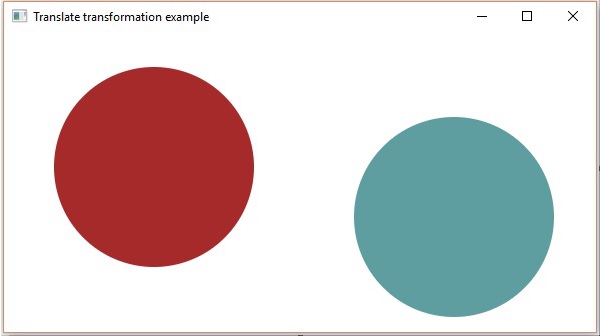
以下程式演示了 JavaFX 中的平移變換。這裡,我們建立了兩個在相同位置、具有相同尺寸但顏色不同的圓形(節點),顏色分別為棕色和海藍色。我們還在海藍色的圓形上應用了平移變換。
將此程式碼儲存到名為 **TranslationExample.java** 的檔案中。
import javafx.application.Application;
import javafx.scene.Group;
import javafx.scene.Scene;
import javafx.scene.paint.Color;
import javafx.scene.shape.Circle;
import javafx.scene.transform.Translate;
import javafx.stage.Stage;

public class TranslationExample extends Application {
   @Override
   public void start(Stage stage) {
      //Drawing Circle1
      Circle circle = new Circle();

      //Setting the position of the circle
      circle.setCenterX(150.0f);
      circle.setCenterY(135.0f);

      //Setting the radius of the circle
      circle.setRadius(100.0f);

      //Setting the color of the circle
      circle.setFill(Color.BROWN);

      //Setting the stroke width of the circle
      circle.setStrokeWidth(20);

      //Drawing Circle2
      Circle circle2 = new Circle();

      //Setting the position of the circle
      circle2.setCenterX(150.0f);
      circle2.setCenterY(135.0f);

      //Setting the radius of the circle
      circle2.setRadius(100.0f);

      //Setting the color of the circle
      circle2.setFill(Color.CADETBLUE);

      //Setting the stroke width of the circle
      circle2.setStrokeWidth(20);

      //Creating the translation transformation
      Translate translate = new Translate();

      //Setting the X,Y,Z coordinates to apply the translation
      translate.setX(300);
      translate.setY(50);
      translate.setZ(100);

      //Adding transformation to circle2
      circle2.getTransforms().addAll(translate);

      //Creating a Group object
      Group root = new Group(circle,circle2);

      //Creating a scene object
      Scene scene = new Scene(root, 600, 300);

      //Setting title to the Stage
      stage.setTitle("Translation transformation example");

      //Adding scene to the stage
      stage.setScene(scene);

      //Displaying the contents of the stage
      stage.show();
   }
   public static void main(String args[]){
      launch(args);
   }
}
使用以下命令在命令提示符下編譯並執行儲存的 Java 檔案。
javac TranslationExample.java
java TranslationExample
執行後,上述程式將生成如下所示的 JavaFX 視窗。
javafx_transformations.htm
廣告