- Mahotas 教程
- Mahotas - 首頁
- Mahotas - 簡介
- Mahotas - 計算機視覺
- Mahotas - 歷史
- Mahotas - 特性
- Mahotas - 安裝
- Mahotas 處理影像
- Mahotas - 處理影像
- Mahotas - 載入影像
- Mahotas - 載入灰度影像
- Mahotas - 顯示影像
- Mahotas - 顯示影像形狀
- Mahotas - 儲存影像
- Mahotas - 影像的質心
- Mahotas - 影像卷積
- Mahotas - 建立 RGB 影像
- Mahotas - 影像的尤拉數
- Mahotas - 影像中零的比例
- Mahotas - 獲取影像矩
- Mahotas - 影像中的區域性最大值
- Mahotas - 影像橢圓軸
- Mahotas - 影像拉伸 RGB
- Mahotas 色彩空間轉換
- Mahotas - 色彩空間轉換
- Mahotas - RGB 到灰度轉換
- Mahotas - RGB 到 LAB 轉換
- Mahotas - RGB 到 棕褐色轉換
- Mahotas - RGB 到 XYZ 轉換
- Mahotas - XYZ 到 LAB 轉換
- Mahotas - XYZ 到 RGB 轉換
- Mahotas - 增加伽馬校正
- Mahotas - 拉伸伽馬校正
- Mahotas 標記影像函式
- Mahotas - 標記影像函式
- Mahotas - 標記影像
- Mahotas - 過濾區域
- Mahotas - 邊界畫素
- Mahotas - 形態學操作
- Mahotas - 形態學運算元
- Mahotas - 查詢影像平均值
- Mahotas - 裁剪影像
- Mahotas - 影像的偏心率
- Mahotas - 疊加影像
- Mahotas - 影像的圓度
- Mahotas - 調整影像大小
- Mahotas - 影像的直方圖
- Mahotas - 膨脹影像
- Mahotas - 腐蝕影像
- Mahotas - 分水嶺
- Mahotas - 影像的開運算
- Mahotas - 影像的閉運算
- Mahotas - 填充影像中的孔洞
- Mahotas - 條件膨脹影像
- Mahotas - 條件腐蝕影像
- Mahotas - 影像的條件分水嶺
- Mahotas - 影像中的區域性最小值
- Mahotas - 影像的區域最大值
- Mahotas - 影像的區域最小值
- Mahotas - 高階概念
- Mahotas - 影像閾值化
- Mahotas - 設定閾值
- Mahotas - 軟閾值
- Mahotas - Bernsen 區域性閾值化
- Mahotas - 小波變換
- 製作影像小波中心
- Mahotas - 距離變換
- Mahotas - 多邊形實用程式
- Mahotas - 區域性二值模式
- 閾值鄰域統計
- Mahotas - Haralic 特徵
- 標記區域的權重
- Mahotas - Zernike 特徵
- Mahotas - Zernike 矩
- Mahotas - 排序濾波器
- Mahotas - 2D 拉普拉斯濾波器
- Mahotas - 多數濾波器
- Mahotas - 均值濾波器
- Mahotas - 中值濾波器
- Mahotas - Otsu 方法
- Mahotas - 高斯濾波
- Mahotas - 擊中與不擊中變換
- Mahotas - 標記最大陣列
- Mahotas - 影像的平均值
- Mahotas - SURF 密集點
- Mahotas - SURF 積分
- Mahotas - Haar 變換
- 突出顯示影像最大值
- 計算線性二值模式
- 獲取標籤的邊界
- 反轉 Haar 變換
- Riddler-Calvard 方法
- 標記區域的大小
- Mahotas - 模板匹配
- 加速魯棒特徵
- 刪除帶邊框的標記
- Mahotas - Daubechies 小波
- Mahotas - Sobel 邊緣檢測
Mahotas - XYZ 到 LAB 轉換
我們在之前的教程中討論了 XYZ 和 LAB 色彩空間。現在讓我們討論一下如何將 XYZ 色彩空間轉換為 LAB 色彩空間。
要將 XYZ 轉換為 LAB,我們需要使用特定的公式進行一些計算。這些公式涉及根據參考白點調整 XYZ 值,參考白點代表了觀察顏色的標準。
然後使用數學方程將調整後的值轉換為 LAB 分量。
簡單來說,XYZ 到 LAB 的轉換使我們能夠以更符合人眼感知的方式來表示顏色,從而更容易準確地分析和比較顏色。
Mahotas 中的 XYZ 到 LAB 轉換
在 Mahotas 中,我們可以使用 **colors.xyz2lab()** 函式將 XYZ 影像轉換為 LAB 影像。
Mahotas 中的 XYZ 到 LAB 轉換涉及以下步驟:
**規範化 XYZ 值** - 首先,我們需要透過將 XYZ 值除以白點值來規範化它們。白點表示被認為是純白色的參考顏色。
此規範化步驟確保顏色值相對於白點。
**計算 LAB 值** - 一旦 XYZ 值被規範化,Mahotas 使用特定的轉換矩陣將它們轉換為 LAB。這種轉換考慮了人類顏色感知中的非線性,並相應地調整顏色值。
**獲得 LAB 值** - 最後,Mahotas 提供了您開始使用的顏色的 LAB 值。然後可以使用生成的 LAB 值根據其亮度和兩個顏色軸來描述顏色。
**L 分量** - LAB 中的 L 分量表示顏色的亮度,範圍從 0 到 100。較高的值表示較亮的顏色,而較低的值表示較暗的顏色。
**A 和 B 分量** - LAB 中的 A 和 B 分量表示顏色資訊。A 分量範圍從綠色 (-) 到紅色 (+),而 B 分量範圍從藍色 (-) 到黃色 (+)。
這些分量提供了有關 XYZ 值的顏色特徵的資訊。
使用 mahotas.colors.xyz2lab() 函式
mahotas.colors.xyz2lab() 函式以 XYZ 影像作為輸入,並返回影像的 LAB 版本。
生成的 LAB 影像保留了原始 XYZ 影像的結構和整體內容,但更新了每個畫素的顏色。
語法
以下是 Mahotas 中 xyz2lab() 函式的基本語法:
mahotas.colors.xyz2lab(xyz, dtype={float})
其中,
**xyz** - 它是 XYZ 色彩空間中的輸入影像。
**dtype(可選)** - 它是返回影像的資料型別(預設為浮點數)。
示例
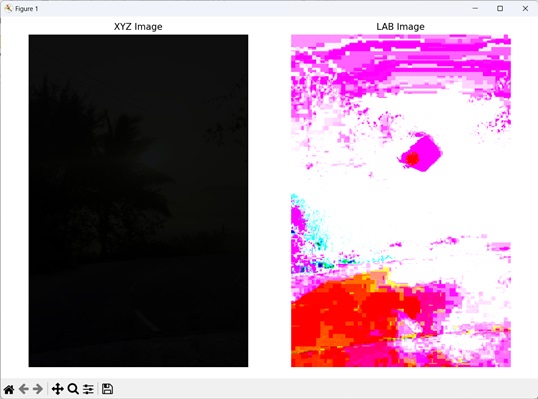
在以下示例中,我們使用 mh.colors.xyz2lab() 函式將 XYZ 影像轉換為 LAB 影像:
import mahotas as mh
import numpy as np
import matplotlib.pyplot as mtplt
# Loading the image
image = mh.imread('sun.png')
# Converting RGB to XYZ
xyz_image = mh.colors.rgb2xyz(image)
# Converting XYZ to LAB
lab_image = mh.colors.xyz2lab(xyz_image)
# Creating a figure and axes for subplots
fig, axes = mtplt.subplots(1, 2)
# Displaying the XYZ image
axes[0].imshow(xyz_image)
axes[0].set_title('XYZ Image')
axes[0].set_axis_off()
# Displaying the LAB image
axes[1].imshow(lab_image)
axes[1].set_title('LAB Image')
axes[1].set_axis_off()
# Adjusting spacing between subplots
mtplt.tight_layout()
# Showing the figures
mtplt.show()
輸出
以下是上述程式碼的輸出:
隨機影像的 XYZ 到 LAB 轉換
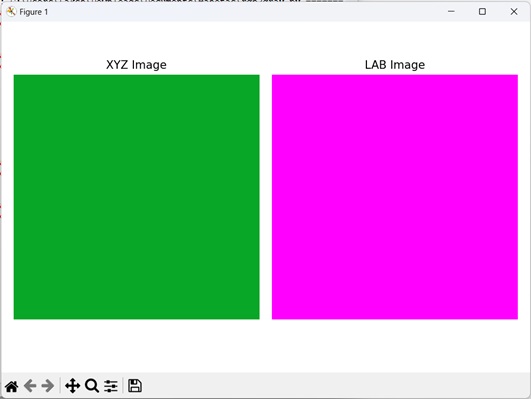
我們可以透過首先建立具有任何所需尺寸的影像,然後將隨機值分配給每個畫素的 X、Y 和 Z 通道,將隨機生成的 XYZ 影像轉換為 LAB 色彩空間。
X、Y 和 Z 通道表示不同的顏色分量。獲得 XYZ 影像後,就可以將其轉換為 LAB 影像。
生成的影像將位於 LAB 色彩空間中,具有不同的亮度和顏色通道。
示例
以下示例顯示了將隨機生成的 XYZ 影像轉換為 LAB 影像:
import mahotas as mh
import numpy as np
import matplotlib.pyplot as mtplt
# Function to create XYZ image
def create_xyz_image(width, height):
   xyz_image = np.zeros((height, width, 3), dtype=np.float32)
   for y in range(height):
      for x in range(width):
         # Assign XYZ values to the pixel
         xyz_image[y, x, 0] = 0.035319468
         xyz_image[y, x, 1] = 0.655582062
         xyz_image[y, x, 2] = 0.157362328
   return xyz_image
# Defining the dimensions of the image
width = 512
height = 512
# Generating the XYZ image
xyz_image = create_xyz_image(width, height)
# Converting XYZ to LAB
lab_image = mh.colors.xyz2lab(xyz_image)
# Creating a figure and axes for subplots
fig, axes = mtplt.subplots(1, 2)
# Displaying the XYZ image
axes[0].imshow(xyz_image)
axes[0].set_title('XYZ Image')
axes[0].set_axis_off()
# Displaying the LAB image
axes[1].imshow(lab_image)
axes[1].set_title('LAB Image')
axes[1].set_axis_off()
# Adjusting spacing between subplots
mtplt.tight_layout()
# Showing the figures
mtplt.show()
輸出
上述程式碼的輸出如下: