

- Android 基礎
- Android - 首頁
- Android - 概述
- Android - 環境設定
- Android - 架構
- Android - 應用程式元件
- Android - Hello World 示例
- Android - 資源
- Android - 活動
- Android - 服務
- Android - 廣播接收器
- Android - 內容提供器
- Android - 片段
- Android - 意圖/過濾器
- Android - 使用者介面
- Android - UI 佈局
- Android - UI 控制元件
- Android - 事件處理
- Android - 樣式和主題
- Android - 自定義元件
- Android 高階概念
- Android - 拖放
- Android - 通知
- 基於位置的服務
- Android - 傳送電子郵件
- Android - 傳送簡訊
- Android - 電話呼叫
- 釋出 Android 應用程式
- Android 實用示例
- Android - 警報對話方塊
- Android - 動畫
- Android - 音訊捕獲
- Android - AudioManager
- Android - 自動完成
- Android - 最佳實踐
- Android - 藍牙
- Android - 相機
- Android - 剪貼簿
- Android - 自定義字型
- Android - 資料備份
- Android - 開發者工具
- Android - 模擬器
- Android - Facebook 整合
- Android - 手勢
- Android - Google 地圖
- Android - 影像效果
- Android - ImageSwitcher
- Android - 內部儲存
- Android - JetPlayer
- Android - JSON 解析器
- Android - Linkedin 整合
- Android - 載入微調器
- Android - 本地化
- Android - 登入螢幕
- Android - MediaPlayer
- Android - 多點觸控
- Android - 導航
- Android - 網路連線
- Android - NFC 指南
- Android - PHP/MySQL
- Android - 進度圓圈
- Android - 進度條
- Android - 推送通知
- Android - RenderScript
- Android - RSS 閱讀器
- Android - 螢幕錄製
- Android - SDK 管理器
- Android - 感測器
- Android - 會話管理
- Android - 共享首選項
- Android - SIP 協議
- Android - 拼寫檢查器
- Android - SQLite 資料庫
- Android - 支援庫
- Android - 測試
- Android - 文字轉語音
- Android - TextureView
- Android - Twitter 整合
- Android - UI 設計
- Android - UI 模式
- Android - UI 測試
- Android - WebView 佈局
- Android - Wi-Fi
- Android - 小部件
- Android - XML 解析器
- Android 實用資源
- Android - 問答
- Android - 實用資源
- Android - 討論
Android - 主題演示示例
以下示例演示瞭如何為應用程式使用主題。為了演示目的,我們將修改預設的AppTheme,其中預設文字、大小、字型、陰影等將被更改。讓我們按照以下步驟開始建立一個簡單的 Android 應用程式:
| 步驟 | 描述 |
|---|---|
| 1 | 您將使用 Eclipse IDE 建立一個 Android 應用程式,並在 com.example.themedemo 包下將其命名為 ThemeDemo,如Hello World 示例章節中所述。 |
| 2 | 修改 src/MainActivity.java 檔案以新增點選事件監聽器和兩個定義按鈕的處理程式。 |
| 3 | 在全域性樣式檔案res/values/style.xml中定義您的樣式,以定義按鈕的自定義屬性,並更改應用程式的預設主題以更改文字。 |
| 4 | 修改 res/layout/activity_main.xml 檔案的預設內容,以包含一組 Android UI 控制元件並使用定義的樣式。 |
| 5 | 在 res/values/strings.xml 檔案中定義所需的常量 |
| 6 | 執行應用程式以啟動 Android 模擬器並驗證對應用程式所做的更改的結果。 |
以下是修改後的主活動檔案src/com.example.themedemo/MainActivity.java的內容。此檔案可以包含每個基本生命週期方法。
package com.example.themedemo;

import android.os.Bundle;
import android.app.Activity;
import android.view.Menu;
import android.view.View;
import android.widget.Button;
import android.widget.TextView;

public class MainActivity extends Activity {
   @Override
   protected void onCreate(Bundle savedInstanceState) {
      super.onCreate(savedInstanceState);
      setContentView(R.layout.activity_main);

      //--- find both the buttons---
      Button sButton = (Button) findViewById(R.id.button_s);
      Button lButton = (Button) findViewById(R.id.button_l);

      // -- register click event with first button ---
      sButton.setOnClickListener(new View.OnClickListener() {
         public void onClick(View v) {
            // --- find the text view --
            TextView txtView = (TextView) findViewById(R.id.text_id);

            // -- change text size --
            txtView.setTextSize(20);
         }
      });

      // -- register click event with second button ---
      lButton.setOnClickListener(new View.OnClickListener() {
         public void onClick(View v) {
            // --- find the text view --
            TextView txtView = (TextView) findViewById(R.id.text_id);

            // -- change text size --
            txtView.setTextSize(24);
         }
      });
   }

   @Override
   public boolean onCreateOptionsMenu(Menu menu) {
      getMenuInflater().inflate(R.menu.main, menu);
      return true;
   }
}
以下是res/values/style.xml檔案的內容,其中將定義附加樣式CustomButtonStyle:
<resources>

   <!--
      Base application theme, dependent on API level. This theme is replaced
      by AppBaseTheme from res/values-vXX/styles.xml on newer devices.
   -->

   <style name="AppBaseTheme" parent="android:Theme.Light">
     <!--
         Theme customizations available in newer API levels can go in
         res/values-vXX/styles.xml, while customizations related to
         backward-compatibility can go here.
      -->
   </style>

   <!-- Application theme. -->
   <style name="AppTheme" parent="AppBaseTheme">
      <!-- All customizations that are NOT specific to a particular API-level can go here. -->
      <item name="android:capitalize">characters</item>
      <item name="android:typeface">monospace</item>
      <item name="android:shadowDx">1.2</item>
      <item name="android:shadowDy">1.2</item>
      <item name="android:shadowRadius">2</item>
      <item name="android:textColor">#494948</item>/>
      <item name="android:gravity" >center</item>
      <item name="android:layout_margin" >3dp</item>
      <item name="android:textSize" >5pt</item>
      <item name="android:shadowColor" >#000000</item>
   </style>

   <!-- Custom Style defined for the buttons. -->
   <style name="CustomButtonStyle">
      <item name="android:layout_width">100dp</item>
      <item name="android:layout_height">38dp</item>
   </style>

</resources>
以下是res/layout/activity_main.xml檔案的內容:
<?xml version="1.0" encoding="utf-8"?>
<LinearLayout xmlns:android="http://schemas.android.com/apk/res/android"
   android:layout_width="fill_parent"
   android:layout_height="fill_parent"
   android:orientation="vertical" >

   <Button
      android:id="@+id/button_s"
      style="@style/CustomButtonStyle"
      android:text="@string/button_small"
      android:onClick="doSmall"/>

   <Button
      android:id="@+id/button_l"
      style="@style/CustomButtonStyle"
      android:text="@string/button_large"
      android:onClick="doLarge"/>

   <TextView
      android:id="@+id/text_id"
      android:layout_width="wrap_content"
      android:layout_height="wrap_content"
      android:capitalize="characters"
      android:text="@string/hello_world" />

</LinearLayout>
以下是res/values/strings.xml的內容,用於定義兩個新常量:
<?xml version="1.0" encoding="utf-8"?>
<resources>
   <string name="app_name">ThemeDemo</string>
   <string name="action_settings">Settings</string>
   <string name="hello_world">Hello world!</string>
   <string name="button_small">Small Font</string>
   <string name="button_large">Large Font</string>
</resources>
以下是AndroidManifest.xml的預設內容。在這裡,我們不需要更改任何內容,因為我們保持主題名稱不變。但是,如果您定義了新的主題或繼承了具有不同名稱的預設主題,則必須將AppTheme名稱替換為新主題名稱。
<?xml version="1.0" encoding="utf-8"?>
<manifest xmlns:android="http://schemas.android.com/apk/res/android"
   package="com.example.guidemo"
   android:versionCode="1"
   android:versionName="1.0" >

   <uses-sdk
      android:minSdkVersion="8"
      android:targetSdkVersion="17" />

   <application
      android:allowBackup="true"
      android:icon="@drawable/ic_launcher"
      android:label="@string/app_name"
      android:theme="@style/AppTheme" >

      <activity
         android:name="com.example.guidemo.MainActivity"
         android:label="@string/app_name" >

         <intent-filter>
            <action android:name="android.intent.action.MAIN" />
            <category android:name="android.intent.category.LAUNCHER" />
         </intent-filter>

      </activity>

   </application>
</manifest>
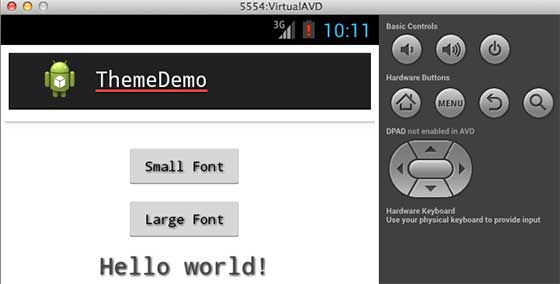
讓我們嘗試執行您的ThemeDemo應用程式。我假設您在進行環境設定時建立了AVD。要從 Eclipse 執行應用程式,請開啟專案的活動檔案之一,然後單擊工具欄中的執行 圖示。Eclipse 將應用程式安裝到您的 AVD 並啟動它,如果您的設定和應用程式一切正常,它將顯示以下模擬器視窗:
android_styles_and_themes.htm
廣告