
- Android 基礎
- Android - 首頁
- Android - 概述
- Android - 環境設定
- Android - 架構
- Android - 應用程式元件
- Android - Hello World 示例
- Android - 資源
- Android - 活動
- Android - 服務
- Android - 廣播接收器
- Android - 內容提供程式
- Android - 片段
- Android - 意圖/過濾器
- Android - 使用者介面
- Android - UI 佈局
- Android - UI 控制元件
- Android - 事件處理
- Android - 樣式和主題
- Android - 自定義元件
- Android 高階概念
- Android - 拖放
- Android - 通知
- 基於位置的服務
- Android - 傳送電子郵件
- Android - 傳送簡訊
- Android - 電話呼叫
- 釋出 Android 應用程式
- Android 實用示例
- Android - 警報對話方塊
- Android - 動畫
- Android - 音訊捕獲
- Android - AudioManager
- Android - 自動完成
- Android - 最佳實踐
- Android - 藍牙
- Android - 相機
- Android - 剪貼簿
- Android - 自定義字型
- Android - 資料備份
- Android - 開發人員工具
- Android - 模擬器
- Android - Facebook 整合
- Android - 手勢
- Android - Google 地圖
- Android - 影像效果
- Android - ImageSwitcher
- Android - 內部儲存
- Android - JetPlayer
- Android - JSON 解析器
- Android - Linkedin 整合
- Android - 載入微調器
- Android - 本地化
- Android - 登入螢幕
- Android - MediaPlayer
- Android - 多點觸控
- Android - 導航
- Android - 網路連線
- Android - NFC 指南
- Android - PHP/MySQL
- Android - 進度圓圈
- Android - 進度條
- Android - 推送通知
- Android - RenderScript
- Android - RSS 閱讀器
- Android - 螢幕錄製
- Android - SDK 管理器
- Android - 感測器
- Android - 會話管理
- Android - 共享首選項
- Android - SIP 協議
- Android - 拼寫檢查器
- Android - SQLite 資料庫
- Android - 支援庫
- Android - 測試
- Android - 文字轉語音
- Android - TextureView
- Android - Twitter 整合
- Android - UI 設計
- Android - UI 模式
- Android - UI 測試
- Android - WebView 佈局
- Android - Wi-Fi
- Android - 小部件
- Android - XML 解析器
- Android 實用資源
- Android - 常見問題解答
- Android - 實用資源
- Android - 討論
Android - 意圖和過濾器
Android 的意圖是對要執行的操作的抽象描述。它可以與startActivity一起使用以啟動活動,與broadcastIntent一起使用以將其傳送到任何感興趣的 BroadcastReceiver 元件,以及與startService(Intent)或bindService(Intent, ServiceConnection, int)一起使用以與後臺服務進行通訊。
意圖本身,一個 Intent 物件,是一個被動的資料結構,包含要執行的操作的抽象描述。
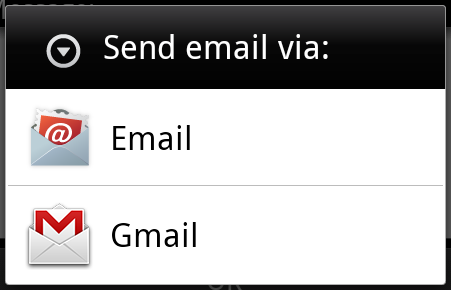
例如,假設您有一個活動需要啟動電子郵件客戶端並使用您的 Android 裝置傳送電子郵件。為此,您的活動將與適當的選擇器一起傳送 ACTION_SEND 到 Android 意圖解析器。指定的 選擇器為使用者提供了合適的介面來選擇如何傳送您的電子郵件資料。
Intent email = new Intent(Intent.ACTION_SEND, Uri.parse("mailto:"));
email.putExtra(Intent.EXTRA_EMAIL, recipients);
email.putExtra(Intent.EXTRA_SUBJECT, subject.getText().toString());
email.putExtra(Intent.EXTRA_TEXT, body.getText().toString());
startActivity(Intent.createChooser(email, "Choose an email client from..."));
以上語法呼叫 startActivity 方法來啟動電子郵件活動,結果應如下所示:
例如,假設您有一個活動需要在您的 Android 裝置上的 Web 瀏覽器中開啟 URL。為此,您的活動將 ACTION_WEB_SEARCH 意圖傳送到 Android 意圖解析器以在 Web 瀏覽器中開啟給定的 URL。意圖解析器會解析活動列表並選擇最匹配您的意圖的活動,在本例中為 Web 瀏覽器活動。然後,意圖解析器將您的網頁傳遞給 Web 瀏覽器並啟動 Web 瀏覽器活動。
String q = "tutorialspoint";
Intent intent = new Intent(Intent.ACTION_WEB_SEARCH );
intent.putExtra(SearchManager.QUERY, q);
startActivity(intent);
以上示例將在 Android 搜尋引擎上搜索tutorialspoint,並在您的活動中顯示 tutorialspoint 的結果。
有單獨的機制將意圖傳遞到每種型別的元件:活動、服務和廣播接收器。
| 序號 | 方法和描述 |
|---|---|
| 1 |
Context.startActivity() 將 Intent 物件傳遞給此方法以啟動新的活動或讓現有活動執行新的操作。 |
| 2 |
Context.startService() 將 Intent 物件傳遞給此方法以啟動服務或向正在進行的服務傳遞新指令。 |
| 3 |
Context.sendBroadcast() 將 Intent 物件傳遞給此方法以將訊息傳遞給所有感興趣的廣播接收器。 |
Intent 物件
Intent 物件是一個資訊包,接收意圖的元件以及 Android 系統使用它來進行資訊傳遞。
根據 Intent 物件正在通訊或將要執行的操作,它可以包含以下元件:
操作
這是 Intent 物件的必須部分,是一個字串,命名要執行的操作——或者,對於廣播意圖,命名已發生並正在報告的操作。操作在很大程度上決定了 Intent 物件的其餘結構。Intent 類定義了許多對應於不同意圖的操作常量。這是一個Android 意圖標準操作列表。
Intent 物件中的操作可以透過 setAction() 方法設定,並透過 getAction() 方法讀取。
資料
向意圖過濾器新增資料規範。規範可以只是一個數據型別(mimeType 屬性),只是一個 URI,或者資料型別和 URI 都是。
這些指定 URL 格式的屬性是可選的,但也是相互依賴的:
- 如果未為意圖過濾器指定方案,則會忽略所有其他 URI 屬性。
- 如果未為過濾器指定主機,則會忽略埠屬性和所有路徑屬性。
setData() 方法僅將資料指定為 URI,setType() 方法僅將資料指定為 MIME 型別,setDataAndType() 方法將其指定為 URI 和 MIME 型別。URI 透過 getData() 讀取,型別透過 getType() 讀取。
一些操作/資料對的示例:
| 序號。 | 操作/資料對和描述 |
|---|---|
| 1 | ACTION_VIEW content://contacts/people/1 顯示有關識別符號為“1”的人的資訊。 |
| 2 |
ACTION_DIAL content://contacts/people/1 顯示電話撥號器,並填寫人員資訊。 |
| 3 |
ACTION_VIEW tel:123 顯示電話撥號器,並填寫給定的號碼。 |
| 4 |
ACTION_DIAL tel:123 顯示電話撥號器,並填寫給定的號碼。 |
| 5 |
ACTION_EDIT content://contacts/people/1 編輯有關識別符號為“1”的人的資訊。 |
| 6 |
ACTION_VIEW content://contacts/people/ 顯示人員列表,使用者可以瀏覽。 |
| 7 |
ACTION_SET_WALLPAPER 顯示選擇牆紙的設定 |
| 8 |
ACTION_SYNC 將同步資料,常量值為android.intent.action.SYNC |
| 9 |
ACTION_SYSTEM_TUTORIAL 它將啟動平臺定義的教程(預設教程或啟動教程) |
| 10 |
ACTION_TIMEZONE_CHANGED 當時區更改時會通知 |
| 11 |
ACTION_UNINSTALL_PACKAGE 用於執行預設解除安裝程式 |
類別
類別是 Intent 物件的可選部分,它是一個字串,包含有關應處理意圖的元件型別的其他資訊。addCategory() 方法將類別放入 Intent 物件中,removeCategory() 刪除先前新增的類別,getCategories() 獲取物件中當前的所有類別集。這是一個Android 意圖標準類別列表。
您可以在下面的部分中檢視有關意圖過濾器的詳細資訊,以瞭解我們如何使用類別來選擇與意圖相對應的適當活動。
額外資訊
這將以鍵值對的形式提供其他資訊,這些資訊應傳遞給處理意圖的元件。可以使用 putExtras() 和 getExtras() 方法分別設定和讀取額外資訊。這是一個Android 意圖標準額外資料列表。
標誌
這些標誌是 Intent 物件的可選部分,指示 Android 系統如何啟動活動,以及如何在啟動後處理它等。
| 序號 | 標誌和描述 |
|---|---|
| 1 |
FLAG_ACTIVITY_CLEAR_TASK 如果在傳遞給 Context.startActivity() 的 Intent 中設定,此標誌將導致在啟動活動之前清除與該活動關聯的任何現有任務。也就是說,該活動成為其他空任務的新根,任何舊活動都將結束。這隻能與 FLAG_ACTIVITY_NEW_TASK 結合使用。 |
| 2 |
FLAG_ACTIVITY_CLEAR_TOP 如果設定,並且要啟動的活動已經在當前任務中執行,那麼它將不會啟動該活動的新的例項,而是關閉其上方的所有其他活動,並將此 Intent 作為新的 Intent 傳遞給(現在位於頂部)舊活動。 |
| 3 |
FLAG_ACTIVITY_NEW_TASK 此標誌通常由想要呈現“啟動器”樣式行為的活動使用:它們為使用者提供一系列可以執行的不同操作,這些操作在其他情況下完全獨立於啟動它們的活動執行。 |
元件名稱
此可選欄位是一個 Android ComponentName 物件,表示 Activity、Service 或 BroadcastReceiver 類。如果設定了它,則 Intent 物件將傳遞到指定類的例項,否則 Android 會使用 Intent 物件中的其他資訊來定位合適的目標。
元件名稱由 setComponent()、setClass() 或 setClassName() 設定,並由 getComponent() 讀取。
意圖型別
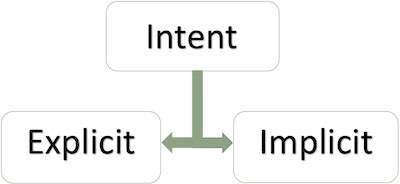
Android 支援以下兩種型別的意圖
顯式意圖
顯式意圖連線應用程式的內部世界,假設您想將一個活動連線到另一個活動,您可以透過顯式意圖來實現這一點,下圖是透過點選按鈕將第一個活動連線到第二個活動。
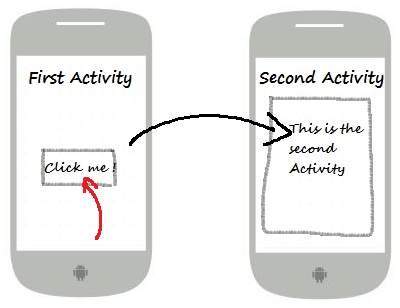
這些意圖透過其名稱指定目標元件,它們通常用於應用程式內部訊息——例如活動啟動下級服務或啟動姐妹活動。例如:
// Explicit Intent by specifying its class name
Intent i = new Intent(FirstActivity.this, SecondActivity.class);

// Starts TargetActivity
startActivity(i);
隱式意圖
這些意圖不命名目標,並且元件名稱欄位留空。隱式意圖通常用於啟用其他應用程式中的元件。例如:
Intent read1=new Intent();
read1.setAction(android.content.Intent.ACTION_VIEW);
read1.setData(ContactsContract.Contacts.CONTENT_URI);
startActivity(read1);
以上程式碼將給出如下結果
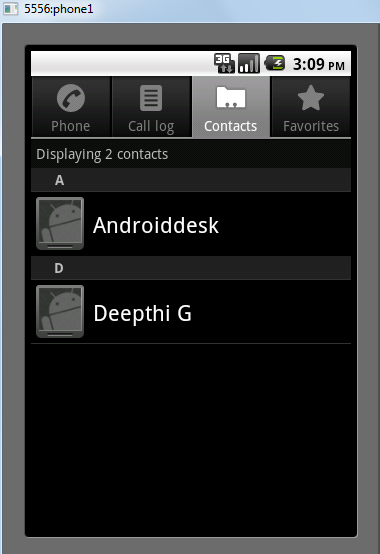
接收意圖的目標元件可以使用getExtras()方法獲取源元件傳送的額外資料。例如:
// Get bundle object at appropriate place in your code
Bundle extras = getIntent().getExtras();

// Extract data using passed keys
String value1 = extras.getString("Key1");
String value2 = extras.getString("Key2");
示例
以下示例顯示了 Android 意圖啟動各種 Android 內建應用程式的功能。
| 步驟 | 描述 |
|---|---|
| 1 | 您將使用 Android Studio IDE 建立一個 Android 應用程式,並將其命名為My Application,位於包com.example.saira_000.myapplication下。 |
| 2 | 修改src/main/java/MainActivity.java檔案,並新增程式碼以定義兩個對應於兩個按鈕的監聽器,即“啟動瀏覽器”和“啟動電話”。 |
| 3 | 修改佈局 XML 檔案res/layout/activity_main.xml,線上性佈局中新增三個按鈕。 |
| 4 | 執行應用程式以啟動 Android 模擬器,並驗證對應用程式所做更改的結果。 |
以下是修改後的主活動檔案src/com.example.My Application/MainActivity.java的內容。
package com.example.saira_000.myapplication;

import android.content.Intent;
import android.net.Uri;
import android.support.v7.app.AppCompatActivity;
import android.os.Bundle;
import android.view.View;
import android.widget.Button;

public class MainActivity extends AppCompatActivity {
   Button b1,b2;

   @Override
   protected void onCreate(Bundle savedInstanceState) {
      super.onCreate(savedInstanceState);
      setContentView(R.layout.activity_main);

      b1=(Button)findViewById(R.id.button);
      b1.setOnClickListener(new View.OnClickListener() {

         @Override
         public void onClick(View v) {
            Intent i = new Intent(android.content.Intent.ACTION_VIEW,
               Uri.parse("http://www.example.com"));
            startActivity(i);
         }
      });

      b2=(Button)findViewById(R.id.button2);
      b2.setOnClickListener(new View.OnClickListener() {
         @Override
         public void onClick(View v) {
            Intent i = new Intent(android.content.Intent.ACTION_VIEW,
               Uri.parse("tel:9510300000"));
            startActivity(i);
         }
      });
   }
}
以下是res/layout/activity_main.xml檔案的內容:
<?xml version="1.0" encoding="utf-8"?>
<RelativeLayout xmlns:android="http://schemas.android.com/apk/res/android"
   xmlns:tools="http://schemas.android.com/tools"
   android:layout_width="match_parent"
   android:layout_height="match_parent"
   android:paddingLeft="@dimen/activity_horizontal_margin"
   android:paddingRight="@dimen/activity_horizontal_margin"
   android:paddingTop="@dimen/activity_vertical_margin"
   android:paddingBottom="@dimen/activity_vertical_margin"
   tools:context=".MainActivity">

   <TextView
      android:id="@+id/textView1"
      android:layout_width="wrap_content"
      android:layout_height="wrap_content"
      android:text="Intent Example"
      android:layout_alignParentTop="true"
      android:layout_centerHorizontal="true"
      android:textSize="30dp" />

   <TextView
      android:id="@+id/textView2"
      android:layout_width="wrap_content"
      android:layout_height="wrap_content"
      android:text="Tutorials point"
      android:textColor="#ff87ff09"
      android:textSize="30dp"
      android:layout_below="@+id/textView1"
      android:layout_centerHorizontal="true" />

   <ImageButton
      android:layout_width="wrap_content"
      android:layout_height="wrap_content"
      android:id="@+id/imageButton"
      android:src="@drawable/abc"
      android:layout_below="@+id/textView2"
      android:layout_centerHorizontal="true" />

   <EditText
      android:layout_width="wrap_content"
      android:layout_height="wrap_content"
      android:id="@+id/editText"
      android:layout_below="@+id/imageButton"
      android:layout_alignRight="@+id/imageButton"
      android:layout_alignEnd="@+id/imageButton" />

   <Button
      android:layout_width="wrap_content"
      android:layout_height="wrap_content"
      android:text="Start Browser"
      android:id="@+id/button"
      android:layout_alignTop="@+id/editText"
      android:layout_alignRight="@+id/textView1"
      android:layout_alignEnd="@+id/textView1"
      android:layout_alignLeft="@+id/imageButton"
      android:layout_alignStart="@+id/imageButton" />

   <Button
      android:layout_width="wrap_content"
      android:layout_height="wrap_content"
      android:text="Start Phone"
      android:id="@+id/button2"
      android:layout_below="@+id/button"
      android:layout_alignLeft="@+id/button"
      android:layout_alignStart="@+id/button"
      android:layout_alignRight="@+id/textView2"
      android:layout_alignEnd="@+id/textView2" />
</RelativeLayout>
以下是res/values/strings.xml檔案的內容,用於定義兩個新的常量:
<?xml version="1.0" encoding="utf-8"?>
<resources>
   <string name="app_name">My Applicaiton</string>
</resources>
以下是AndroidManifest.xml的預設內容:
<?xml version="1.0" encoding="utf-8"?>
<manifest xmlns:android="http://schemas.android.com/apk/res/android"
   package="com.example.saira_000.myapplication">

   <application
      android:allowBackup="true"
      android:icon="@mipmap/ic_launcher"
      android:label="@string/app_name"
      android:supportsRtl="true"
      android:theme="@style/AppTheme">
      <activity android:name=".MainActivity">
         <intent-filter>
            <action android:name="android.intent.action.MAIN" />
            <category android:name="android.intent.category.LAUNCHER" />
         </intent-filter>
      </activity>
   </application>
</manifest>
讓我們嘗試執行您的My Application應用程式。我假設您在進行環境設定時已建立了AVD。要從 Android Studio 執行應用程式,請開啟專案中的一個活動檔案,然後單擊工具欄中的執行 圖示。Android Studio 會將應用程式安裝到您的 AVD 並啟動它,如果您的設定和應用程式一切正常,它將顯示以下模擬器視窗:
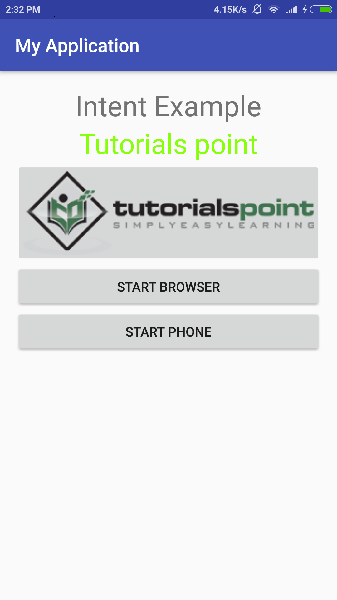
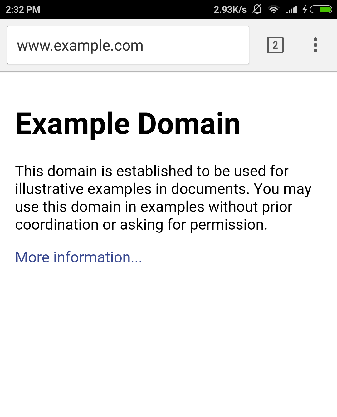
現在,點選啟動瀏覽器按鈕,這將啟動已配置的瀏覽器並顯示http://www.example.com,如下所示:
類似地,您可以使用“啟動電話”按鈕啟動電話介面,這將允許您撥打已提供的電話號碼。
Intent 過濾器
您已經瞭解瞭如何使用 Intent 呼叫另一個活動。Android 作業系統使用過濾器來確定可以處理 Intent 的活動、服務和廣播接收器的集合,藉助於與 Intent 關聯的一組指定的動作、類別和資料方案。您將在清單檔案中使用<intent-filter>元素列出與任何活動、服務或廣播接收器關聯的動作、類別和資料型別。
以下是一個AndroidManifest.xml檔案的一部分示例,用於指定一個活動com.example.My Application.CustomActivity,該活動可以透過上面提到的兩個動作之一、一個類別和一個數據來呼叫:
<activity android:name=".CustomActivity"
   android:label="@string/app_name">

   <intent-filter>
      <action android:name="android.intent.action.VIEW" />
      <action android:name="com.example.My Application.LAUNCH" />
      <category android:name="android.intent.category.DEFAULT" />
      <data android:scheme="http" />
   </intent-filter>

</activity>
一旦此活動與上述過濾器一起定義,其他活動將能夠使用android.intent.action.VIEW或使用com.example.My Application.LAUNCH動作來呼叫此活動,前提是它們的類別為android.intent.category.DEFAULT。
<data>元素指定要呼叫的活動期望的資料型別,對於上面的示例,我們的自定義活動期望資料以“http://”開頭。
可能存在一種情況,即一個 Intent 可以透過多個活動或服務的過濾器,使用者可能會被詢問要啟用哪個元件。如果找不到目標,則會引發異常。
在呼叫活動之前,Android 會執行以下測試檢查:
一個過濾器<intent-filter>可以列出多個動作,如上所示,但此列表不能為空;過濾器必須至少包含一個<action>元素,否則它將阻止所有 Intent。如果提到了多個動作,則 Android 會嘗試在呼叫活動之前匹配其中一個動作。
一個過濾器<intent-filter>可以列出零個、一個或多個類別。如果沒有提及類別,則 Android 始終透過此測試,但如果提到了多個類別,則對於 Intent 要透過類別測試,Intent 物件中的每個類別都必須與過濾器中的一個類別匹配。
每個<data>元素可以指定一個 URI 和一個數據型別(MIME 媒體型別)。對於 URI 的每個部分,都有單獨的屬性,如scheme、host、port和path。包含 URI 和資料型別的 Intent 物件僅當其型別與過濾器中列出的型別匹配時,才透過測試的資料型別部分。
示例
以下示例是對上述示例的修改。在這裡,我們將看到如果一個 Intent 呼叫在中定義的兩個活動,Android 如何解決衝突,接下來是如何使用過濾器呼叫自定義活動,第三個是如果 Android 未找到為 Intent 定義的適當活動,則會出現異常情況。
| 步驟 | 描述 |
|---|---|
| 1 | 您將使用 Android Studio 建立一個 Android 應用程式,並將其命名為My Application,位於包com.example.tutorialspoint7.myapplication下。 |
| 2 | 修改src/Main/Java/MainActivity.java檔案,並新增程式碼以定義三個對應於佈局檔案中定義的三個按鈕的監聽器。 |
| 3 | 新增一個新的src/Main/Java/CustomActivity.java檔案,以包含一個將由不同的 Intent 呼叫的自定義活動。 |
| 4 | 修改佈局 XML 檔案res/layout/activity_main.xml,線上性佈局中新增三個按鈕。 |
| 5 | 新增一個佈局 XML 檔案res/layout/custom_view.xml,以新增一個簡單的<TextView>來顯示透過 Intent 傳遞的資料。 |
| 6 | 修改AndroidManifest.xml以新增<intent-filter>,以定義 Intent 呼叫自定義活動的規則。 |
| 7 | 執行應用程式以啟動 Android 模擬器,並驗證對應用程式所做更改的結果。 |
以下是修改後的主活動檔案src/MainActivity.java的內容。
package com.example.tutorialspoint7.myapplication;

import android.content.Intent;
import android.net.Uri;
import android.support.v7.app.AppCompatActivity;
import android.os.Bundle;
import android.view.View;
import android.widget.Button;

public class MainActivity extends AppCompatActivity {
   Button b1,b2,b3;
   @Override
   protected void onCreate(Bundle savedInstanceState) {
      super.onCreate(savedInstanceState);
      setContentView(R.layout.activity_main);
      b1=(Button)findViewById(R.id.button);
      b1.setOnClickListener(new View.OnClickListener() {

         @Override
         public void onClick(View v) {
            Intent i = new Intent(android.content.Intent.ACTION_VIEW,
               Uri.parse("http://www.example.com"));
            startActivity(i);
         }
      });

      b2 = (Button)findViewById(R.id.button2);
      b2.setOnClickListener(new View.OnClickListener() {
         @Override
         public void onClick(View v) {
            Intent i = new Intent("com.example.
               tutorialspoint7.myapplication.
                  LAUNCH",Uri.parse("http://www.example.com"));
            startActivity(i);
         }
      });

      b3 = (Button)findViewById(R.id.button3);
      b3.setOnClickListener(new View.OnClickListener() {
         @Override
         public void onClick(View v) {
            Intent i = new Intent("com.example.
               My Application.LAUNCH",
                  Uri.parse("https://www.example.com"));
            startActivity(i);
         }
      });
   }
}
以下是修改後的主活動檔案src/com.example.My Application/CustomActivity.java的內容。
package com.example.tutorialspoint7.myapplication;

import android.app.Activity;
import android.net.Uri;
import android.os.Bundle;
import android.widget.TextView;

/**
 * Created by TutorialsPoint7 on 8/23/2016.
 */
public class CustomActivity extends Activity {
   @Override
   public void onCreate(Bundle savedInstanceState) {
      super.onCreate(savedInstanceState);
      setContentView(R.layout.custom_view);
      TextView label = (TextView) findViewById(R.id.show_data);
      Uri url = getIntent().getData();
      label.setText(url.toString());
   }
}
以下是res/layout/activity_main.xml檔案的內容:
<?xml version="1.0" encoding="utf-8"?>
<RelativeLayout
   xmlns:android="http://schemas.android.com/apk/res/android"
   xmlns:tools="http://schemas.android.com/tools"
   android:layout_width="match_parent"
   android:layout_height="match_parent"
   android:paddingBottom="@dimen/activity_vertical_margin"
   android:paddingLeft="@dimen/activity_horizontal_margin"
   android:paddingRight="@dimen/activity_horizontal_margin"
   android:paddingTop="@dimen/activity_vertical_margin"
   tools:context="com.example.tutorialspoint7.myapplication.MainActivity">

   <TextView
      android:id="@+id/textView1"
      android:layout_width="wrap_content"
      android:layout_height="wrap_content"
      android:text="Intent Example"
      android:layout_alignParentTop="true"
      android:layout_centerHorizontal="true"
      android:textSize="30dp" />

   <TextView
      android:id="@+id/textView2"
      android:layout_width="wrap_content"
      android:layout_height="wrap_content"
      android:text="Tutorials point"
      android:textColor="#ff87ff09"
      android:textSize="30dp"
      android:layout_below="@+id/textView1"
      android:layout_centerHorizontal="true" />

   <ImageButton
      android:layout_width="wrap_content"
      android:layout_height="wrap_content"
      android:id="@+id/imageButton"
      android:src="@drawable/abc"
      android:layout_below="@+id/textView2"
      android:layout_centerHorizontal="true" />

   <EditText
      android:layout_width="wrap_content"
      android:layout_height="wrap_content"
      android:id="@+id/editText"
      android:layout_below="@+id/imageButton"
      android:layout_alignRight="@+id/imageButton"
      android:layout_alignEnd="@+id/imageButton" />

   <Button
      android:layout_width="wrap_content"
      android:layout_height="wrap_content"
      android:text="Start Browser"
      android:id="@+id/button"
      android:layout_alignTop="@+id/editText"
      android:layout_alignLeft="@+id/imageButton"
      android:layout_alignStart="@+id/imageButton"
      android:layout_alignEnd="@+id/imageButton" />

   <Button
      android:layout_width="wrap_content"
      android:layout_height="wrap_content"
      android:text="Start browsing with launch action"
      android:id="@+id/button2"
      android:layout_below="@+id/button"
      android:layout_alignLeft="@+id/button"
      android:layout_alignStart="@+id/button"
      android:layout_alignEnd="@+id/button" />
   <Button
      android:layout_width="wrap_content"
      android:layout_height="wrap_content"
      android:text="Exceptional condition"
      android:id="@+id/button3"
      android:layout_below="@+id/button2"
      android:layout_alignLeft="@+id/button2"
      android:layout_alignStart="@+id/button2"
      android:layout_toStartOf="@+id/editText"
      android:layout_alignParentEnd="true" />
</RelativeLayout>
以下是res/layout/custom_view.xml檔案的內容:
<?xml version="1.0" encoding="utf-8"?>
<LinearLayout xmlns:android="http://schemas.android.com/apk/res/android"
   android:orientation="vertical" android:layout_width="match_parent"
   android:layout_height="match_parent">
   <TextView android:id="@+id/show_data"
      android:layout_width="fill_parent"
      android:layout_height="400dp"/>
</LinearLayout>
以下是res/values/strings.xml檔案的內容,用於定義兩個新的常量:
<?xml version="1.0" encoding="utf-8"?>
<resources>
   <string name="app_name">My Application</string>
</resources>
以下是AndroidManifest.xml的預設內容:
<?xml version="1.0" encoding="utf-8"?>
<manifest xmlns:android="http://schemas.android.com/apk/res/android"
   package="com.example.tutorialspoint7.myapplication">

   <application
      android:allowBackup = "true"
      android:icon = "@mipmap/ic_launcher"
      android:label = "@string/app_name"
      android:supportsRtl = "true"
      android:theme = "@style/AppTheme">
      <activity android:name = ".MainActivity">
         <intent-filter>
            <action android:name = "android.intent.action.MAIN" />
            <category android:name = "android.intent.category.LAUNCHER" />
         </intent-filter>
      </activity>

      <activity android:name="com.example.tutorialspoint7.myapplication.CustomActivity">

         <intent-filter>
            <action android:name = "android.intent.action.VIEW" />
            <action android:name = "com.example.tutorialspoint7.myapplication.LAUNCH" />
            <category android:name = "android.intent.category.DEFAULT" />
            <data android:scheme = "http" />
         </intent-filter>

      </activity>
   </application>

</manifest>
讓我們嘗試執行您的My Application應用程式。我假設您在進行環境設定時已建立了AVD。要從 Android Studio 執行應用程式,請開啟專案中的一個活動檔案,然後單擊工具欄中的執行圖示。Android Studio 會將應用程式安裝到您的 AVD 並啟動它,如果您的設定和應用程式一切正常,它將顯示以下模擬器視窗:
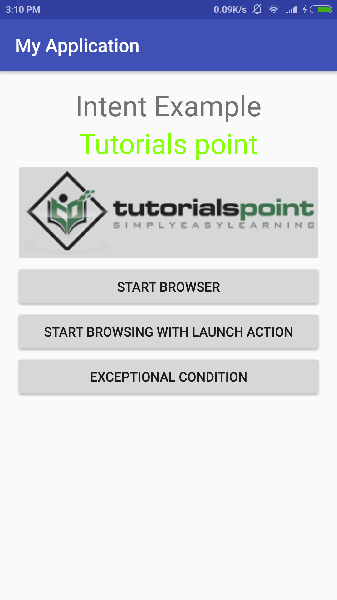
現在讓我們從第一個按鈕“使用 VIEW 動作啟動瀏覽器”開始。在這裡,我們使用過濾器“android.intent.action.VIEW”定義了我們的自定義活動,並且 Android 已為 VIEW 動作定義了一個預設活動,該活動將啟動 Web 瀏覽器,因此 Android 顯示以下兩個選項以選擇您要啟動的活動。
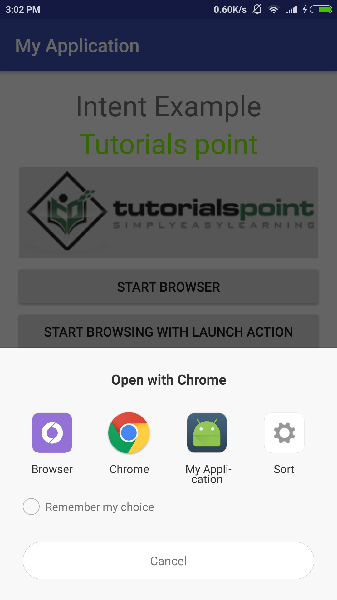
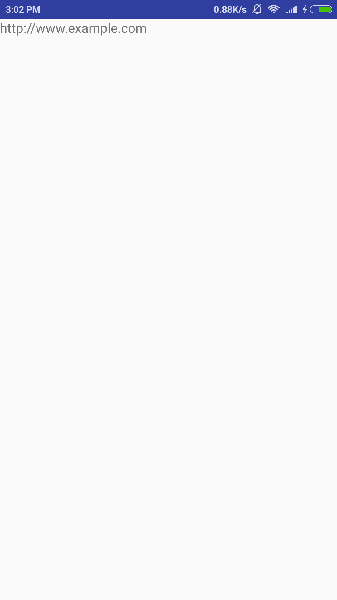
現在,如果您選擇瀏覽器,則 Android 將啟動 Web 瀏覽器並開啟 example.com 網站,但如果您選擇 IndentDemo 選項,則 Android 將啟動 CustomActivity,它什麼也不做,只是捕獲傳遞的資料並在文字檢視中顯示,如下所示:
現在使用後退按鈕返回,然後點選“使用 LAUNCH 動作啟動瀏覽器”按鈕,在這裡 Android 應用過濾器選擇定義的活動,它只是啟動您的自定義活動。
再次使用後退按鈕返回,然後點選“異常情況”按鈕,在這裡 Android 嘗試為給定的 Intent 找出有效的過濾器,但它沒有找到定義的有效活動,因為這次我們使用https而不是http作為資料,儘管我們給出了正確的動作,因此 Android 引發了異常並顯示以下螢幕: