

- Android 基礎
- Android - 首頁
- Android - 概覽
- Android - 環境設定
- Android - 架構
- Android - 應用程式元件
- Android - Hello World 示例
- Android - 資源
- Android - 活動
- Android - 服務
- Android - 廣播接收器
- Android - 內容提供程式
- Android - 碎片
- Android - 意圖/過濾器
- Android - 使用者介面
- Android - UI 佈局
- Android - UI 控制元件
- Android - 事件處理
- Android - 樣式和主題
- Android - 自定義元件
- Android 高階概念
- Android - 拖放
- Android - 通知
- 基於位置的服務
- Android - 傳送電子郵件
- Android - 傳送簡訊
- Android - 電話呼叫
- 釋出 Android 應用程式
- Android 有用示例
- Android - 警報對話方塊
- Android - 動畫
- Android - 音訊捕獲
- Android - 音訊管理器
- Android - 自動完成
- Android - 最佳實踐
- Android - 藍牙
- Android - 相機
- Android - 剪貼簿
- Android - 自定義字型
- Android - 資料備份
- Android - 開發人員工具
- Android - 模擬器
- Android - Facebook 整合
- Android - 手勢
- Android - Google 地圖
- Android - 影像效果
- Android - ImageSwitcher
- Android - 內部儲存
- Android - JetPlayer
- Android - JSON 解析器
- Android - Linkedin 整合
- Android - 載入微調器
- Android - 本地化
- Android - 登入螢幕
- Android - MediaPlayer
- Android - 多點觸控
- Android - 導航
- Android - 網路連線
- Android - NFC 指南
- Android - PHP/MySQL
- Android - 進度圓圈
- Android - 進度條
- Android - 推送通知
- Android - RenderScript
- Android - RSS 閱讀器
- Android - 螢幕錄製
- Android - SDK 管理器
- Android - 感測器
- Android - 會話管理
- Android - 共享首選項
- Android - SIP 協議
- Android - 拼寫檢查器
- Android - SQLite 資料庫
- Android - 支援庫
- Android - 測試
- Android - 文字轉語音
- Android - TextureView
- Android - Twitter 整合
- Android - UI 設計
- Android - UI 模式
- Android - UI 測試
- Android - WebView 佈局
- Android - Wi-Fi
- Android - 小部件
- Android - XML 解析器
- Android 有用資源
- Android - 問答
- Android - 有用資源
- Android - 討論
Android - 內容提供程式
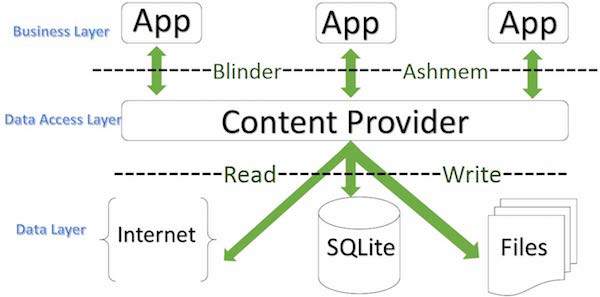
內容提供程式元件根據請求向其他應用程式提供資料。此類請求由 ContentResolver 類的 方法處理。內容提供程式可以使用不同的方式儲存其資料,並且資料可以儲存在資料庫、檔案中,甚至可以透過網路儲存。
ContentProvider
有時需要跨應用程式共享資料。這就是內容提供程式變得非常有用的地方。
內容提供程式允許您在一個地方集中內容,並根據需要讓許多不同的應用程式訪問它。內容提供程式的行為非常類似於資料庫,您可以在其中查詢它、編輯其內容,以及使用 insert()、update()、delete() 和 query() 方法新增或刪除內容。在大多數情況下,這些資料儲存在SQlite資料庫中。
內容提供程式實現為ContentProvider類的子類,並且必須實現一組標準的 API,以使其他應用程式能夠執行事務。
public class My Application extends  ContentProvider {
}
內容 URI
要查詢內容提供程式,您需要以 URI 的形式指定查詢字串,該 URI 具有以下格式:
<prefix>://<authority>/<data_type>/<id>
以下是 URI 各部分的詳細資訊:
| 序號 | 部分及說明 |
|---|---|
| 1 | 字首 始終設定為 content:// |
| 2 | 許可權 指定內容提供程式的名稱,例如聯絡人、瀏覽器等。對於第三方內容提供程式,這可能是完全限定的名稱,例如com.tutorialspoint.statusprovider |
| 3 | 資料型別 指示此特定提供程式提供的資料型別。例如,如果您要從聯絡人內容提供程式獲取所有聯絡人,則資料路徑將為人員,並且 URI 將如下所示:content://contacts/people |
| 4 | ID 指定請求的特定記錄。例如,如果您正在聯絡人內容提供程式中查詢聯絡人號碼 5,則 URI 將如下所示:content://contacts/people/5。 |
建立內容提供程式
這涉及建立您自己的內容提供程式的幾個簡單步驟。
首先,您需要建立一個擴充套件ContentProviderbaseclass的內容提供程式類。
其次,您需要定義內容提供程式 URI 地址,該地址將用於訪問內容。
接下來,您需要建立自己的資料庫來儲存內容。通常,Android 使用 SQLite 資料庫,並且框架需要覆蓋onCreate()方法,該方法將使用 SQLite Open Helper 方法建立或開啟提供程式的資料庫。當您的應用程式啟動時,其每個內容提供程式的onCreate()處理程式都會在主應用程式執行緒上被呼叫。
接下來,您必須實現內容提供程式查詢以執行不同的資料庫特定操作。
最後,使用<provider>標記在您的活動檔案中註冊您的內容提供程式。
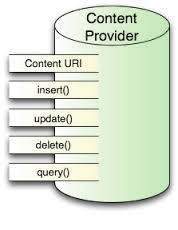
以下是您需要在內容提供程式類中覆蓋的方法列表,以便您的內容提供程式能夠正常工作:
ContentProvider
onCreate()此方法在提供程式啟動時呼叫。
query()此方法接收來自客戶端的請求。結果以 Cursor 物件的形式返回。
insert()此方法將新記錄插入內容提供程式。
delete()此方法從內容提供程式中刪除現有記錄。
update()此方法更新內容提供程式中的現有記錄。
getType()此方法返回給定 URI 處資料的 MIME 型別。
示例
此示例將向您解釋如何建立您自己的ContentProvider。因此,讓我們按照以下步驟操作,類似於我們在建立Hello World 示例時所遵循的步驟:
| 步驟 | 說明 |
|---|---|
| 1 | 您將使用 Android Studio IDE 建立一個 Android 應用程式,並在包com.example.MyApplication下將其命名為我的應用程式,使用空白活動。 |
| 2 | 修改主活動檔案MainActivity.java以新增兩個新方法onClickAddName()和onClickRetrieveStudents()。 |
| 3 | 在包com.example.MyApplication下建立一個名為StudentsProvider.java的新 Java 檔案,以定義您的實際提供程式和關聯的方法。 |
| 4 | 使用<provider.../>標記在您的AndroidManifest.xml檔案中註冊您的內容提供程式 |
| 5 | 修改res/layout/activity_main.xml檔案的預設內容,以包含一個小的 GUI 以新增學生記錄。 |
| 6 | 無需更改 string.xml。Android Studio 會處理 string.xml 檔案。 |
| 7 | 執行應用程式以啟動 Android 模擬器並驗證對應用程式所做的更改的結果。 |
以下是修改後的主活動檔案src/com.example.MyApplication/MainActivity.java的內容。此檔案可以包含每個基本生命週期方法。我們添加了兩個新方法onClickAddName()和onClickRetrieveStudents()來處理使用者與應用程式的互動。
package com.example.MyApplication;

import android.net.Uri;
import android.os.Bundle;
import android.app.Activity;

import android.content.ContentValues;
import android.content.CursorLoader;

import android.database.Cursor;

import android.view.Menu;
import android.view.View;

import android.widget.EditText;
import android.widget.Toast;

public class MainActivity extends Activity {

   @Override
   protected void onCreate(Bundle savedInstanceState) {
      super.onCreate(savedInstanceState);
      setContentView(R.layout.activity_main);
   }
   public void onClickAddName(View view) {
      // Add a new student record
      ContentValues values = new ContentValues();
      values.put(StudentsProvider.NAME,
         ((EditText)findViewById(R.id.editText2)).getText().toString());

      values.put(StudentsProvider.GRADE,
         ((EditText)findViewById(R.id.editText3)).getText().toString());

      Uri uri = getContentResolver().insert(
         StudentsProvider.CONTENT_URI, values);

      Toast.makeText(getBaseContext(),
         uri.toString(), Toast.LENGTH_LONG).show();
   }
   public void onClickRetrieveStudents(View view) {
      // Retrieve student records
      String URL = "content://com.example.MyApplication.StudentsProvider";

      Uri students = Uri.parse(URL);
      Cursor c = managedQuery(students, null, null, null, "name");

      if (c.moveToFirst()) {
         do{
            Toast.makeText(this,
               c.getString(c.getColumnIndex(StudentsProvider._ID)) +
                  ", " +  c.getString(c.getColumnIndex( StudentsProvider.NAME)) +
                     ", " + c.getString(c.getColumnIndex( StudentsProvider.GRADE)),
            Toast.LENGTH_SHORT).show();
         } while (c.moveToNext());
      }
   }
}
在com.example.MyApplication包下建立新的檔案 StudentsProvider.java,以下是src/com.example.MyApplication/StudentsProvider.java的內容:
package com.example.MyApplication;

import java.util.HashMap;

import android.content.ContentProvider;
import android.content.ContentUris;
import android.content.ContentValues;
import android.content.Context;
import android.content.UriMatcher;

import android.database.Cursor;
import android.database.SQLException;

import android.database.sqlite.SQLiteDatabase;
import android.database.sqlite.SQLiteOpenHelper;
import android.database.sqlite.SQLiteQueryBuilder;

import android.net.Uri;
import android.text.TextUtils;

public class StudentsProvider extends ContentProvider {
   static final String PROVIDER_NAME = "com.example.MyApplication.StudentsProvider";
   static final String URL = "content://" + PROVIDER_NAME + "/students";
   static final Uri CONTENT_URI = Uri.parse(URL);

   static final String _ID = "_id";
   static final String NAME = "name";
   static final String GRADE = "grade";

   private static HashMap<String, String> STUDENTS_PROJECTION_MAP;

   static final int STUDENTS = 1;
   static final int STUDENT_ID = 2;

   static final UriMatcher uriMatcher;
   static{
      uriMatcher = new UriMatcher(UriMatcher.NO_MATCH);
      uriMatcher.addURI(PROVIDER_NAME, "students", STUDENTS);
      uriMatcher.addURI(PROVIDER_NAME, "students/#", STUDENT_ID);
   }

   /**
      * Database specific constant declarations
   */

   private SQLiteDatabase db;
   static final String DATABASE_NAME = "College";
   static final String STUDENTS_TABLE_NAME = "students";
   static final int DATABASE_VERSION = 1;
   static final String CREATE_DB_TABLE =
      " CREATE TABLE " + STUDENTS_TABLE_NAME +
         " (_id INTEGER PRIMARY KEY AUTOINCREMENT, " +
         " name TEXT NOT NULL, " +
         " grade TEXT NOT NULL);";

   /**
      * Helper class that actually creates and manages
      * the provider's underlying data repository.
   */

   private static class DatabaseHelper extends SQLiteOpenHelper {
      DatabaseHelper(Context context){
         super(context, DATABASE_NAME, null, DATABASE_VERSION);
      }

      @Override
      public void onCreate(SQLiteDatabase db) {
         db.execSQL(CREATE_DB_TABLE);
      }

      @Override
      public void onUpgrade(SQLiteDatabase db, int oldVersion, int newVersion) {
         db.execSQL("DROP TABLE IF EXISTS " +  STUDENTS_TABLE_NAME);
         onCreate(db);
      }
   }

   @Override
   public boolean onCreate() {
      Context context = getContext();
      DatabaseHelper dbHelper = new DatabaseHelper(context);

      /**
         * Create a write able database which will trigger its
         * creation if it doesn't already exist.
      */

      db = dbHelper.getWritableDatabase();
      return (db == null)? false:true;
   }

   @Override
   public Uri insert(Uri uri, ContentValues values) {
      /**
         * Add a new student record
      */
      long rowID = db.insert(	STUDENTS_TABLE_NAME, "", values);

      /**
         * If record is added successfully
      */
      if (rowID > 0) {
         Uri _uri = ContentUris.withAppendedId(CONTENT_URI, rowID);
         getContext().getContentResolver().notifyChange(_uri, null);
         return _uri;
      }

      throw new SQLException("Failed to add a record into " + uri);
   }

   @Override
   public Cursor query(Uri uri, String[] projection,
      String selection,String[] selectionArgs, String sortOrder) {
      SQLiteQueryBuilder qb = new SQLiteQueryBuilder();
      qb.setTables(STUDENTS_TABLE_NAME);

      switch (uriMatcher.match(uri)) {
         case STUDENTS:
            qb.setProjectionMap(STUDENTS_PROJECTION_MAP);
         break;

         case STUDENT_ID:
            qb.appendWhere( _ID + "=" + uri.getPathSegments().get(1));
         break;

         default:
      }

      if (sortOrder == null || sortOrder == ""){
         /**
            * By default sort on student names
         */
         sortOrder = NAME;
      }

      Cursor c = qb.query(db,	projection,	selection,
         selectionArgs,null, null, sortOrder);
      /**
         * register to watch a content URI for changes
      */
      c.setNotificationUri(getContext().getContentResolver(), uri);
      return c;
   }

   @Override
   public int delete(Uri uri, String selection, String[] selectionArgs) {
      int count = 0;
      switch (uriMatcher.match(uri)){
         case STUDENTS:
            count = db.delete(STUDENTS_TABLE_NAME, selection, selectionArgs);
         break;

         case STUDENT_ID:
            String id = uri.getPathSegments().get(1);
            count = db.delete( STUDENTS_TABLE_NAME, _ID +  " = " + id +
               (!TextUtils.isEmpty(selection) ? "
               AND (" + selection + ')' : ""), selectionArgs);
            break;
         default:
            throw new IllegalArgumentException("Unknown URI " + uri);
      }

      getContext().getContentResolver().notifyChange(uri, null);
      return count;
   }

   @Override
   public int update(Uri uri, ContentValues values,
      String selection, String[] selectionArgs) {
      int count = 0;
      switch (uriMatcher.match(uri)) {
         case STUDENTS:
            count = db.update(STUDENTS_TABLE_NAME, values, selection, selectionArgs);
         break;

         case STUDENT_ID:
            count = db.update(STUDENTS_TABLE_NAME, values,
               _ID + " = " + uri.getPathSegments().get(1) +
               (!TextUtils.isEmpty(selection) ? "
               AND (" +selection + ')' : ""), selectionArgs);
            break;
         default:
            throw new IllegalArgumentException("Unknown URI " + uri );
      }

      getContext().getContentResolver().notifyChange(uri, null);
      return count;
   }

   @Override
   public String getType(Uri uri) {
      switch (uriMatcher.match(uri)){
         /**
            * Get all student records
         */
         case STUDENTS:
            return "vnd.android.cursor.dir/vnd.example.students";
         /**
            * Get a particular student
         */
         case STUDENT_ID:
            return "vnd.android.cursor.item/vnd.example.students";
         default:
            throw new IllegalArgumentException("Unsupported URI: " + uri);
      }
   }
}
以下是修改後的AndroidManifest.xml檔案的內容。在這裡,我們添加了<provider.../>標記以包含我們的內容提供程式
<?xml version="1.0" encoding="utf-8"?>
<manifest xmlns:android="http://schemas.android.com/apk/res/android"
    package="com.example.MyApplication">

   <application
      android:allowBackup="true"
      android:icon="@mipmap/ic_launcher"
      android:label="@string/app_name"
      android:supportsRtl="true"
      android:theme="@style/AppTheme">
         <activity android:name=".MainActivity">
            <intent-filter>
               <action android:name="android.intent.action.MAIN" />
               <category android:name="android.intent.category.LAUNCHER" />
            </intent-filter>
         </activity>

      <provider android:name="StudentsProvider"
         android:authorities="com.example.MyApplication.StudentsProvider"/>
   </application>
</manifest>
以下是res/layout/activity_main.xml檔案的內容:
<?xml version="1.0" encoding="utf-8"?>
<RelativeLayout xmlns:android="http://schemas.android.com/apk/res/android"
   xmlns:tools="http://schemas.android.com/tools"
   android:layout_width="match_parent"
   android:layout_height="match_parent"
   android:paddingBottom="@dimen/activity_vertical_margin"
   android:paddingLeft="@dimen/activity_horizontal_margin"
   android:paddingRight="@dimen/activity_horizontal_margin"
   android:paddingTop="@dimen/activity_vertical_margin"
   tools:context="com.example.MyApplication.MainActivity">

   <TextView
      android:id="@+id/textView1"
      android:layout_width="wrap_content"
      android:layout_height="wrap_content"
      android:text="Content provider"
      android:layout_alignParentTop="true"
      android:layout_centerHorizontal="true"
      android:textSize="30dp" />

   <TextView
      android:id="@+id/textView2"
      android:layout_width="wrap_content"
      android:layout_height="wrap_content"
      android:text="Tutorials point "
      android:textColor="#ff87ff09"
      android:textSize="30dp"
      android:layout_below="@+id/textView1"
      android:layout_centerHorizontal="true" />

   <ImageButton
      android:layout_width="wrap_content"
      android:layout_height="wrap_content"
      android:id="@+id/imageButton"
      android:src="@drawable/abc"
      android:layout_below="@+id/textView2"
      android:layout_centerHorizontal="true" />

   <Button
      android:layout_width="wrap_content"
      android:layout_height="wrap_content"
      android:id="@+id/button2"
      android:text="Add Name"
      android:layout_below="@+id/editText3"
      android:layout_alignRight="@+id/textView2"
      android:layout_alignEnd="@+id/textView2"
      android:layout_alignLeft="@+id/textView2"
      android:layout_alignStart="@+id/textView2"
      android:onClick="onClickAddName"/>

   <EditText
      android:layout_width="wrap_content"
      android:layout_height="wrap_content"
      android:id="@+id/editText"
      android:layout_below="@+id/imageButton"
      android:layout_alignRight="@+id/imageButton"
      android:layout_alignEnd="@+id/imageButton" />

   <EditText
      android:layout_width="wrap_content"
      android:layout_height="wrap_content"
      android:id="@+id/editText2"
      android:layout_alignTop="@+id/editText"
      android:layout_alignLeft="@+id/textView1"
      android:layout_alignStart="@+id/textView1"
      android:layout_alignRight="@+id/textView1"
      android:layout_alignEnd="@+id/textView1"
      android:hint="Name"
      android:textColorHint="@android:color/holo_blue_light" />

   <EditText
      android:layout_width="wrap_content"
      android:layout_height="wrap_content"
      android:id="@+id/editText3"
      android:layout_below="@+id/editText"
      android:layout_alignLeft="@+id/editText2"
      android:layout_alignStart="@+id/editText2"
      android:layout_alignRight="@+id/editText2"
      android:layout_alignEnd="@+id/editText2"
      android:hint="Grade"
      android:textColorHint="@android:color/holo_blue_bright" />

   <Button
      android:layout_width="wrap_content"
      android:layout_height="wrap_content"
      android:text="Retrive student"
      android:id="@+id/button"
      android:layout_below="@+id/button2"
      android:layout_alignRight="@+id/editText3"
      android:layout_alignEnd="@+id/editText3"
      android:layout_alignLeft="@+id/button2"
      android:layout_alignStart="@+id/button2"
      android:onClick="onClickRetrieveStudents"/>
</RelativeLayout>
確保您擁有res/values/strings.xml檔案的以下內容
<?xml version="1.0" encoding="utf-8"?>
<resources>
    <string name="app_name">My Application</string>
</resources>;
讓我們嘗試執行我們剛剛建立的修改後的我的應用程式應用程式。我假設您在進行環境設定時建立了AVD。要從 Android Studio IDE 執行應用程式,請開啟專案的某個活動檔案,然後從工具欄中單擊執行 圖示。Android Studio 將應用程式安裝到您的 AVD 並啟動它,如果您的設定和應用程式一切正常,它將顯示以下模擬器視窗,請耐心等待,因為根據您的計算機速度,這可能需要一些時間:

現在讓我們輸入學生的姓名和年級,最後單擊新增姓名按鈕,這將在資料庫中新增學生記錄,並在底部顯示一條訊息,顯示 ContentProvider URI 以及資料庫中新增的記錄編號。此操作利用了我們的insert()方法。讓我們重複此過程以在內容提供程式的資料庫中新增更多學生。
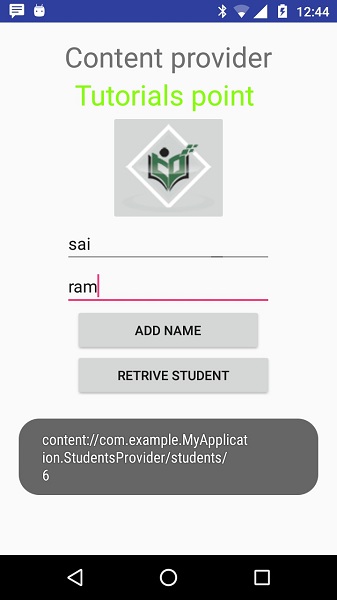
完成在資料庫中新增記錄後,現在是時候要求 ContentProvider 將這些記錄返回給我們了,因此讓我們單擊檢索學生按鈕,該按鈕將逐一獲取並顯示所有記錄,這符合我們query()方法的實現。
您可以透過在MainActivity.java檔案中提供回撥函式來編寫針對更新和刪除操作的活動,然後修改使用者介面以像我們對新增和讀取操作所做的那樣,為更新和刪除操作提供按鈕。
透過這種方式,您可以使用現有的內容提供程式,如通訊錄,或者您可以在開發面向資料庫的精美應用程式時使用內容提供程式概念,您可以在其中執行各種資料庫操作,如讀取、寫入、更新和刪除,如上例所示。