

- Android基礎
- Android - 首頁
- Android - 概述
- Android - 環境搭建
- Android - 架構
- Android - 應用元件
- Android - HelloWorld示例
- Android - 資源
- Android - 活動(Activities)
- Android - 服務(Services)
- Android - 廣播接收器(Broadcast Receivers)
- Android - 內容提供器(Content Providers)
- Android - 碎片(Fragments)
- Android - 意圖/過濾器(Intents/Filters)
- Android - 使用者介面
- Android - UI佈局
- Android - UI控制元件
- Android - 事件處理
- Android - 樣式和主題
- Android - 自定義元件
- Android高階概念
- Android - 拖放
- Android - 通知
- 基於位置的服務
- Android - 傳送郵件
- Android - 傳送簡訊
- Android - 電話呼叫
- 釋出Android應用程式
- Android實用示例
- Android - 警報對話方塊
- Android - 動畫
- Android - 音訊捕獲
- Android - AudioManager
- Android - 自動完成
- Android - 最佳實踐
- Android - 藍牙
- Android - 相機
- Android - 剪貼簿
- Android - 自定義字型
- Android - 資料備份
- Android - 開發者工具
- Android - 模擬器
- Android - Facebook整合
- Android - 手勢
- Android - Google地圖
- Android - 圖片特效
- Android - ImageSwitcher
- Android - 內部儲存
- Android - JetPlayer
- Android - JSON解析器
- Android - LinkedIn整合
- Android - 載入動畫(Loading Spinner)
- Android - 本地化
- Android - 登入介面
- Android - MediaPlayer
- Android - 多點觸控
- Android - 導航
- Android - 網路連線
- Android - NFC指南
- Android - PHP/MySQL
- Android - 進度圓圈
- Android - 進度條
- Android - 推送通知
- Android - RenderScript
- Android - RSS閱讀器
- Android - 螢幕錄製
- Android - SDK管理器
- Android - 感測器
- Android - 會話管理
- Android - Shared Preferences
- Android - SIP協議
- Android - 拼寫檢查器
- Android - SQLite資料庫
- Android - 支援庫
- Android - 測試
- Android - 文字轉語音
- Android - TextureView
- Android - Twitter整合
- Android - UI設計
- Android - UI模式
- Android - UI測試
- Android - WebView佈局
- Android - Wi-Fi
- Android - 小部件
- Android - XML解析器
- Android實用資源
- Android - 問答
- Android - 實用資源
- Android - 討論
Android絕對佈局
絕對佈局允許您指定其子元素的確切位置(x/y座標)。與其他非絕對定位的佈局型別相比,絕對佈局靈活性較差,維護難度較大。
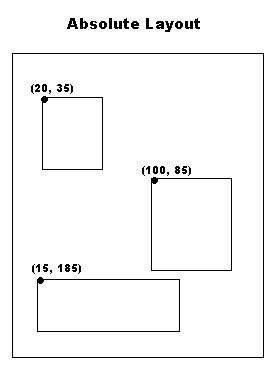
絕對佈局
AbsoluteLayout 屬性
以下是AbsoluteLayout特有的重要屬性:
| 序號 | 屬性及描述 |
|---|---|
| 1 | android:id 這是唯一標識佈局的ID。 |
| 2 | android:layout_x 指定檢視的x座標。 |
| 3 | android:layout_y 指定檢視的y座標。 |
公共建構函式
| AbsoluteLayout(Context context) |
| AbsoluteLayout(Context context, AttributeSet attrs) |
| AbsoluteLayout(Context context, AttributeSet attrs, int defStyleAttr) |
| AbsoluteLayout(Context context, AttributeSet attrs, int defStyleAttr, int defStyleRes) |
示例
本示例將引導您完成簡單的步驟,演示如何使用絕對佈局建立您自己的Android應用程式。請按照以下步驟修改我們在《HelloWorld示例》章節中建立的Android應用程式:
| 步驟 | 描述 |
|---|---|
| 1 | 您將使用Android Studio IDE建立一個Android應用程式,並在`com.example.demo`包下將其命名為`demo`,如《HelloWorld示例》章節中所述。 |
| 2 | 修改`res/layout/activity_main.xml`檔案的預設內容,以在絕對佈局中包含一些小部件。 |
| 3 | 無需修改`strings.xml`,Android Studio會處理預設常量。 |
| 4 | 執行應用程式以啟動Android模擬器並驗證對應用程式所做的更改的結果。 |
以下是修改後的主活動檔案`src/com.example.demo/MainActivity.java`的內容。此檔案可以包含每個基本生命週期方法。
package com.example.demo;

import android.os.Bundle;
import android.app.Activity;

public class MainActivity extends Activity {
   @Override
   protected void onCreate(Bundle savedInstanceState) {
      super.onCreate(savedInstanceState);
      setContentView(R.layout.activity_main);
   }

}
以下是`res/layout/activity_main.xml`檔案的內容:
<AbsoluteLayout xmlns:android="http://schemas.android.com/apk/res/android"
   android:layout_width="fill_parent"
   android:layout_height="fill_parent">

   <Button
      android:layout_width="100dp"
      android:layout_height="wrap_content"
      android:text="OK"
      android:layout_x="50px"
      android:layout_y="361px" />
   <Button
      android:layout_width="100dp"
      android:layout_height="wrap_content"
      android:text="Cancel"
      android:layout_x="225px"
      android:layout_y="361px" />

</AbsoluteLayout>
以下是`res/values/strings.xml`檔案的內容,用於定義兩個新的常量:
<?xml version="1.0" encoding="utf-8"?>
<resources>
   <string name="app_name">demo</string>
   <string name="action_settings">Settings</string>
</resources>
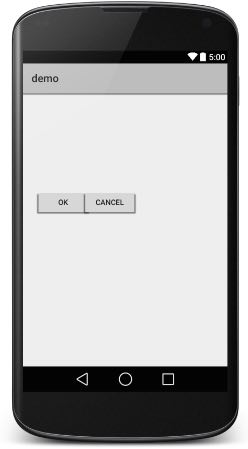
讓我們嘗試執行我們剛剛修改過的`Hello World!`應用程式。我假設您在進行環境設定時已經建立了您的AVD。要在Android Studio中執行應用程式,請開啟專案中的一個活動檔案,然後單擊工具欄中的執行 圖示。Android Studio會將應用程式安裝到您的AVD並啟動它,如果您的設定和應用程式一切正常,它將顯示以下模擬器視窗:
android_user_interface_layouts.htm
廣告