
- Google AMP 教程
- Google AMP - 首頁
- Google AMP - 概述
- Google AMP - 簡介
- Google AMP - 圖片
- Google AMP - 表單
- Google AMP - 內嵌框架
- Google AMP - 影片
- Google AMP - 按鈕
- Google AMP - Timeago
- Google AMP - Mathml
- Google AMP - 自適應文字
- Google AMP - 日期倒計時
- Google AMP - 日期選擇器
- Google AMP - 故事
- Google AMP - 選擇器
- Google AMP - 連結
- Google AMP - 字型
- Google AMP - 列表
- Google AMP - 使用者通知
- Google AMP - 下一頁
- Google AMP - 屬性
- 樣式和自定義 CSS
- Google AMP - 動態 CSS 類
- Google AMP - 操作和事件
- Google AMP - 動畫
- Google AMP - 資料繫結
- Google AMP - 佈局
- Google AMP - 廣告
- Google AMP - 分析
- Google AMP - 社交小部件
- Google AMP - 媒體
- HTML 頁面轉換為 AMP 頁面
- Google AMP - 基本語法
- Google AMP - 驗證
- Google AMP - 快取
- Google AMP - 自定義 JavaScript
- Google AMP - CORS
- Google AMP 有用資源
- Google AMP - 快速指南
- Google AMP - 有用資源
- Google AMP - 討論
Google AMP - 下一頁
Amp next page 是一個 amp 元件,當用戶到達文件末尾時,可以動態載入更多頁面。本章詳細介紹了這個概念。
要使用 amp-next-page 元件,我們需要新增以下指令碼:
<script async custom-element = "amp-next-page"
   src = "https://cdn.ampproject.org/v0/amp-next-page-0.1.js">
</script>
此外,amp-next-page 尚未完全推出,因此要使測試頁面正常工作,請新增以下元標記:
<meta name = "amp-experiments-opt-in" content = "amp-next-page">
要動態載入頁面,我們需要將頁面 URL 提供給型別為“application/json”的指令碼標籤,如下所示:
<amp-next-page>
   <script type = "application/json">
      {

         "pages": [
            {
            "title": "Page 2",
            "image": "images/christmas1.jpg",
            "ampUrl": "ampnextpage1.html"
            },
            {
            "title": "Page 3",
            "image": "images/christmas1.jpg",
            "ampUrl": "ampnextpage2.html"
            }
         ]
      }
   </script>
</amp-next-page>
在上面的標籤中,我們嘗試載入 2 個頁面:ampnextpage1.html 和 ampnextpage2.html。
現在,讓我們看看最終輸出。所有需要載入的頁面都必須新增到 pages 陣列中,其中包含標題、圖片和 ampUrl。
示例
<!doctype html>
<html amp>
   <head>
      <meta charset = "utf-8">
      <title>Google Amp - Next Page</title>
      <link rel = "canonical" href = "ampnextpage.html">
      <meta name = "amp-experiments-opt-in" content = "amp-next-page">
      <meta name = "viewport" content ="width = device-width,
      minimum-scale = 1,initial-scale = 1">

      <style amp-boilerplate>
         body {
            -webkit-animation:
            -amp-start 8s steps(1,end) 0s 1 normal both;-moz-animation:
            -amp-start 8s steps(1,end) 0s 1 normal both;-ms-animation:
            -amp-start 8s steps(1,end) 0s 1 normal both;animation:
            -amp-start 8s steps(1,end) 0s 1 normal both
         }
         @-webkit-keyframes
         -amp-start{from{visibility:hidden}to{visibility:visible}}@-moz-keyframes
         -amp-start{from{visibility:hidden}to{visibility:visible}}@-ms-keyframes
         -amp-start{from{visibility:hidden}to{visibility:visible}}@-o-keyframes
         -amp-start{from{visibility:hidden}to{visibility:visible}}@keyframes
         -amp-start{from{visibility:hidden}to{visibility:visible}}
      </style>

      <noscript>
         <style amp-boilerplate>
            body{
               -webkit-animation:none;
               -moz-animation:none;
               -ms-animation:none;
               animation:none
            }
         </style>
      </noscript>
         <script async src="https://cdn.ampproject.org/v0.js">
      </script>
      <script async custom-element = "amp-next-page"
         src = "https://cdn.ampproject.org/v0/amp-next-page-0.1.js">
      </script>
   </head>
   <body>
      <h1>Google Amp - Next Page</h1>
      <h1>Page 1</h1>
      <p>Start of page 1</p>
      <p>This content is loaded from page 1</p>
      <p>This content is loaded from page 1</p>
      <p>This content is loaded from page 1</p>
      <p>This content is loaded from page 1</p>
      <p>This content is loaded from page 1</p>
      <p>This content is loaded from page 1</p>
      <p>This content is loaded from page 1</p>
      <p>This content is loaded from page 1</p>
      <p>This content is loaded from page 1</p>
      <p>This content is loaded from page 1</p>
      <p>This content is loaded from page 1</p>
      <p>This content is loaded from page 1</p>
      <p>This content is loaded from page 1</p>
      <p>This content is loaded from page 1</p>
      <p>This content is loaded from page 1</p>
      <p>This content is loaded from page 1</p>
      <p>This content is loaded from page 1</p>
      <p>This content is loaded from page 1</p>
      <p>This content is loaded from page 1</p>
      <p>This content is loaded from page 1</p>
      <p>This content is loaded from page 1</p>
      <p>This content is loaded from page 1</p>
      <p>End of page 1</p>

      <amp-next-page>
         <script type = "application/json">
            {
               "pages": [
                  {
                     "title": "Page 2",
                     "image": "images/christmas1.jpg",
                     "ampUrl": "ampnextpage1.html"
                  },
                  {
                     "title": "Page 3",
                     "image": "images/christmas1.jpg",
                     "ampUrl": "ampnextpage2.html"
                  }
               ]
            }
         </script>
      </amp-next-page>
   </body>
</html>
輸出
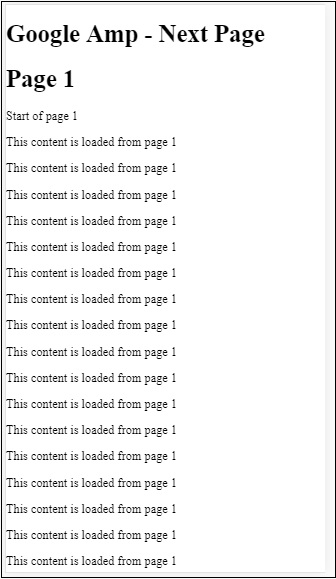
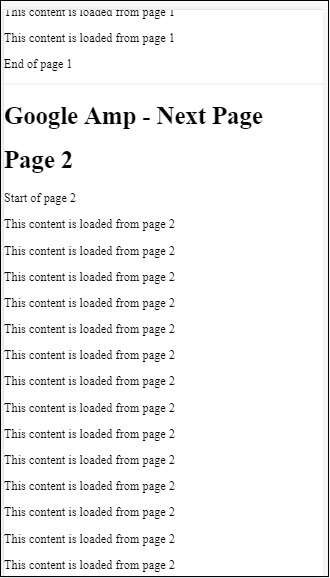
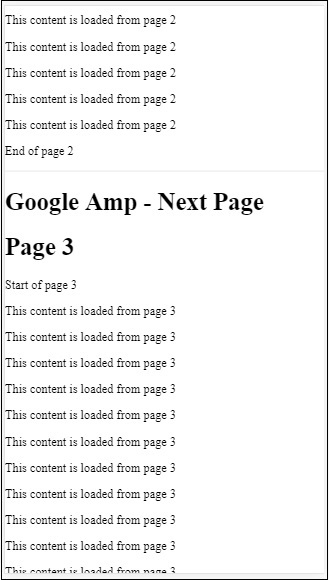
您可以注意到,當您滾動時,將顯示要載入的下一頁,並且位址列中的頁面 URL 也已更改。
廣告