
- Google AMP 教程
- Google AMP - 首頁
- Google AMP - 概述
- Google AMP - 簡介
- Google AMP - 圖片
- Google AMP - 表單
- Google AMP - 內嵌框架
- Google AMP - 影片
- Google AMP - 按鈕
- Google AMP - Timeago
- Google AMP - Mathml
- Google AMP - 適應文字
- Google AMP - 日期倒計時
- Google AMP - 日期選擇器
- Google AMP - 故事
- Google AMP - 選擇器
- Google AMP - 連結
- Google AMP - 字型
- Google AMP - 列表
- Google AMP - 使用者通知
- Google AMP - 下一頁
- Google AMP - 屬性
- 樣式和自定義 CSS
- Google AMP - 動態 CSS 類
- Google AMP - 操作和事件
- Google AMP - 動畫
- Google AMP - 資料繫結
- Google AMP - 佈局
- Google AMP - 廣告
- Google AMP - 分析
- Google AMP - 社交小部件
- Google AMP - 媒體
- HTML 頁面到 AMP 頁面
- Google AMP - 基本語法
- Google AMP - 驗證
- Google AMP - 快取
- Google AMP - 自定義 JavaScript
- Google AMP - CORS
- Google AMP 有用資源
- Google AMP - 快速指南
- Google AMP - 有用資源
- Google AMP - 討論
Google AMP - 廣告
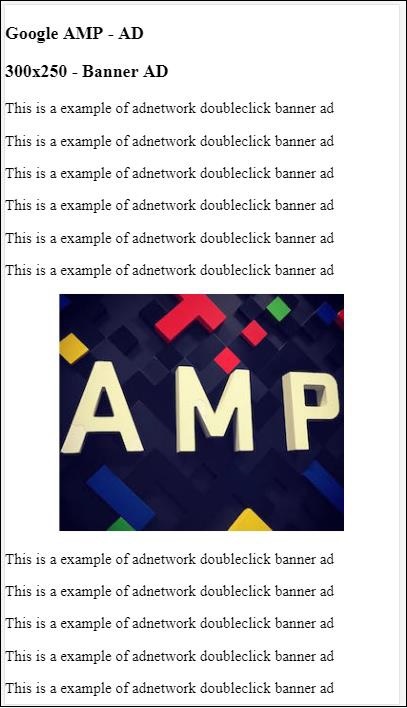
廣告對於釋出者頁面起著重要的作用,因為它們是釋出者收入的來源。對於 AMP 頁面,存在細微差別。它們不允許新增第三方 JavaScript 檔案。為了在頁面上顯示廣告,有一個名為 amp-ad 的 AMP 元件,它有助於在頁面上顯示廣告。大多數提供廣告的廣告網路都與 amp-ad 標籤相容。
廣告工作原理的詳細資訊如下所示:
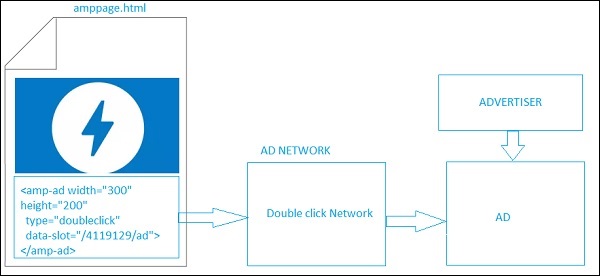
要在釋出者頁面上顯示廣告,我們需要新增 <amp-ad>,它將充當在頁面上投放廣告的佔位符。<amp-ad> 將呼叫為 type 指定的廣告網路。
廣告網路會在內部呼叫要顯示在頁面上的廣告,該廣告由廣告客戶提供,通常是 HTML 或 AMPHTML 廣告。
要使其工作,我們需要首先將指令碼新增到頁面。
<script async custom-element = "amp-ad" src = "
https://cdn.ampproject.org/v0/amp-ad-0.1.js">
</script>
DoubleClick 的 amp-ad 標籤如下所示:
<amp-ad width = "300"
   height = "200"
   type = "doubleclick"
   data-slot = "/4119129/ad">
   <div placeholder>
      <b>Placeholder here!!!</b>
   </div>
</amp-ad>
許多廣告網路支援 amp-ad。請注意,在我們的示例中,我們將重點介紹 **DoubleClick amp-ad 標籤**。廣告網路名稱必須在 **type** 屬性中指定。
示例
<!doctype html>
<html amp lang = "en">
   <head>
      <meta charset = "utf-8">
      <script async src = "https://cdn.ampproject.org/v0.js">
      </script>
      <title>Google AMP - AD</title>
      <link rel = "canonical" href=
      "http://example.ampproject.org/article-metadata.html">
      <meta name = "viewport" content = "width = device-width,
      minimum-scale = 1,initial-scale = 1">

      <style amp-boilerplate>
         body{
            -webkit-animation:
            -amp-start 8s steps(1,end) 0s 1 normal both;-moz-animation:
            -amp-start 8s steps(1,end) 0s 1 normal both;-ms-animation:
            -amp-start 8s steps(1,end) 0s 1 normal both;animation:
            -amp-start 8s steps(1,end) 0s 1 normal both
         }
         @-webkit-keyframes
         -amp-start{from{visibility:hidden}to{visibility:visible}}@-moz-keyframes
         -amp-start{from{visibility:hidden}to{visibility:visible}}@-ms-keyframes
         -amp-start{from{visibility:hidden}to{visibility:visible}}@-o-keyframes
         -amp-start{from{visibility:hidden}to{visibility:visible}}@keyframes
         -amp-start{from{visibility:hidden}to{visibility:visible}}
      </style>
      <noscript>
         <style amp-boilerplate>
            body{
               -webkit-animation:none;
               -moz-animation:none;
               -ms-animation:none;
               animation:none}
         </style>
      </noscript>
      <script async custom-element = "amp-ad" src =
         "https://cdn.ampproject.org/v0/amp-ad-0.1.js">
      </script>
      <style amp-custom>
         div {
            text-align:center;
         }
      </style>
   </head>
   <body>
      <h3>Google AMP - AD</h3>
      <h3>300x250 - Banner AD</h3>
      <p>This is a example of adnetwork doubleclick banner ad</p>
      <p>This is a example of adnetwork doubleclick banner ad</p>
      <p>This is a example of adnetwork doubleclick banner ad</p>
      <p>This is a example of adnetwork doubleclick banner ad</p>
      <p>This is a example of adnetwork doubleclick banner ad</p>
      <p>This is a example of adnetwork doubleclick banner ad</p>
      <div>
         <amp-ad
            data-slot = /30497360/amp_by_example/AMP_Banner_300x250
            height = 250
            layout = fixed
            style = width:300px;height:250px;
            type = doubleclick
            width = 300>
         </amp-ad>
      </div>
      <p>This is a example of adnetwork doubleclick banner ad</p>
      <p>This is a example of adnetwork doubleclick banner ad</p>
      <p>This is a example of adnetwork doubleclick banner ad</p>
      <p>This is a example of adnetwork doubleclick banner ad</p>
      <p>This is a example of adnetwork doubleclick banner ad</p>
      <p>This is a example of adnetwork doubleclick banner ad</p>
      <p>This is a example of adnetwork doubleclick banner ad</p>
      <p>This is a example of adnetwork doubleclick banner ad</p>
      <p>This is a example of adnetwork doubleclick banner ad</p>
   </body>
</html>
輸出
讓我們看一下 amp-ad 上的一些重要屬性,如下表所示:
| 序號 | 屬性和描述 |
|---|---|
| 1 | type
廣告網路的名稱 |
| 2 | width
廣告的寬度 |
| 3 | height
廣告的高度 |
| 4 | placeholder
用作子元素的佔位符,並在廣告仍在載入時顯示給使用者。請注意,此屬性必須由廣告網路端支援。 |
| 5 | data-*
要傳遞給廣告網路的資料屬性。例如,DoubleClick 廣告網路需要 data-slot=/30497360/amp_by_example/AMP_Banner_300x250 以在頁面上渲染廣告。 每個廣告網路都會指定資料引數。 我們還可以使用 data-override-width 和 data-override-height 覆蓋使用的寬度和高度。 |
| 6 | fallback
Fallback 用作 amp-ad 的子元素,並在沒有廣告可投放時顯示。 |
讓我們藉助一個使用 **placeholder** 的工作示例來理解這一點,該示例在沒有廣告可投放時執行。
示例
<!doctype html>
<html amp lang = "en">
   <head>
      <meta charset = "utf-8">
      <script async src = "https://cdn.ampproject.org/v0.js">
      </script>
      <title>Google AMP - AD</title>
      <link rel = "canonical" href =
      "http://example.ampproject.org/article-metadata.html">
      <meta name = "viewport" content="width = device-width,
      minimum-scale = 1,initial-scale = 1">

      <style amp-boilerplate>
         body{
            -webkit-animation:
            -amp-start 8s steps(1,end) 0s 1 normal both;-moz-animation:
            -amp-start 8s steps(1,end) 0s 1 normal both;-ms-animation:
            -amp-start 8s steps(1,end) 0s 1 normal both;animation:
            -amp-start 8s steps(1,end) 0s 1 normal both
         }
         @-webkit-keyframes
         -amp-start{from{visibility:hidden}to{visibility:visible}}@-moz-keyframes
         -amp-start{from{visibility:hidden}to{visibility:visible}}@-ms-keyframes
         -amp-start{from{visibility:hidden}to{visibility:visible}}@-o-keyframes
         -amp-start{from{visibility:hidden}to{visibility:visible}}@keyframes
         -amp-start{from{visibility:hidden}to{visibility:visible}}
      </style>
      <noscript>
         <style amp-boilerplate>
            body{
               -webkit-animation:none;
               -moz-animation:none;
               -ms-animation:none;
               animation:none}
         </style>
      </noscript>
      <script async custom-element = "amp-ad" src =
         "https://cdn.ampproject.org/v0/amp-ad-0.1.js">
      </script>
      <style amp-custom>
      div {
         text-align:center;
      }
      </style>
   </head>
   <body>
      <h3>Google AMP - AD</h3>
      <h3>300x250 - Banner AD</h3>
      <p>This is a example of adnetwork doubleclick banner ad</p>
      <p>This is a example of adnetwork doubleclick banner ad</p>
      <p>This is a example of adnetwork doubleclick banner ad</p>
      <p>This is a example of adnetwork doubleclick banner ad</p>
      <p>This is a example of adnetwork doubleclick banner ad</p>
      <p>This is a example of adnetwork doubleclick banner ad</p>
      <div>
         <amp-ad
            data-slot = /30497360/amp_by_example/AMP_Banner_300x250
            height = 250
            layout = fixed
            style = width:300px;height:250px;
            type = doubleclick
            width = 300>
            <div placeholder>
               <b>Placeholder Example : Ad is loading!!!</b>
            </div>
         </amp-ad>
      </div>
      <p>This is a example of adnetwork doubleclick banner ad</p>
      <p>This is a example of adnetwork doubleclick banner ad</p>
      <p>This is a example of adnetwork doubleclick banner ad</p>
      <p>This is a example of adnetwork doubleclick banner ad<p>
      <p>This is a example of adnetwork doubleclick banner ad</p>
      <p>This is a example of adnetwork doubleclick banner ad</p>
   </body>
</html>
輸出

我們可以使用 fallback 屬性,它是 amp-ad 的子元素,並在沒有廣告可投放時顯示。
示例
<!doctype html>
<html amp lang = "en">
   <head>
      <meta charset = "utf-8">
      <script async src = "https://cdn.ampproject.org/v0.js">
      </script>
      <title>Google AMP - AD</title>
      <link rel = "canonical" href =
      "http://example.ampproject.org/article-metadata.html">
      <meta name = "viewport" content = "width = device-width,
      minimum-scale = 1,initial-scale = 1">

      <style amp-boilerplate>
         body{
            -webkit-animation:
            -amp-start 8s steps(1,end) 0s 1 normal both;-moz-animation:
            -amp-start 8s steps(1,end) 0s 1 normal both;-ms-animation:
            -amp-start 8s steps(1,end) 0s 1 normal both;animation:
            -amp-start 8s steps(1,end) 0s 1 normal both
         }
         @-webkit-keyframes
         -amp-start{from{visibility:hidden}to{visibility:visible}}@-moz-keyframes
         -amp-start{from{visibility:hidden}to{visibility:visible}}@-ms-keyframes
         -amp-start{from{visibility:hidden}to{visibility:visible}}@-o-keyframes
         -amp-start{from{visibility:hidden}to{visibility:visible}}@keyframes
         -amp-start{from{visibility:hidden}to{visibility:visible}}
      </style>
      <noscript>
         <style amp-boilerplate>
            body{
               -webkit-animation:none;
               -moz-animation:none;
               -ms-animation:none;
               animation:none}
         </style>
      </noscript>
      <script async custom-element = "amp-ad" src =
         "https://cdn.ampproject.org/v0/amp-ad-0.1.js">
      </script>
      <style amp-custom>
         div, p{
            text-align:center;
         }
         amp-ad {
            border : solid 1px black;
         }
      </style>
   </head>
   <body>
      <h3>Google AMP - AD</h3>
      <h3>300x250 - Banner AD</h3>
      <p>This is a example of adnetwork doubleclick banner ad</p>
      <p>This is a example of adnetwork doubleclick banner ad</p>
      <p>This is a example of adnetwork doubleclick banner ad</p>
      <p>This is a example of adnetwork doubleclick banner ad</p>
      <p>This is a example of adnetwork doubleclick banner ad</p>
      <p>This is a example of adnetwork doubleclick banner ad</p>
      <div>
         <amp-ad
            width = "300"
            height = "250"
            type = "doubleclick"
            data-slot = "/4119129/no-ad">
            <div fallback>
               <p style = "color:green;font-size:25px;">No ads to Serve!</p>
            </div>
         </amp-ad>
      </div>
      <p>This is a example of adnetwork doubleclick banner ad</p>
      <p>This is a example of adnetwork doubleclick banner ad</p>
      <p>This is a example of adnetwork doubleclick banner ad</p>
      <p>This is a example of adnetwork doubleclick banner ad</p>
      <p>This is a example of adnetwork doubleclick banner ad</p>
      <p>This is a example of adnetwork doubleclick banner ad</p>
   </body>
</html>
輸出

如果廣告在視口中,則 fallback 屬性將顯示 fallback 元素內的訊息。
如果廣告元件位於視口下方且沒有廣告,則 amp-ad 將摺疊空間,並且不會顯示 fallback 訊息。
僅當沒有廣告且廣告位於視口下方時,廣告單元才會摺疊,這樣使用者在閱讀內容時就不會被打擾,因為摺疊會導致內容發生偏移。
支援的廣告網路列表在此處提供:https://www.ampproject.org/docs/ads/ads_vendors
在本章中,我們將討論 AMP 中以下與廣告相關的標籤:
Google AMP - 事件跟蹤畫素
Google AMP - 粘性廣告
Google AMP - AMPHTML 廣告
事件跟蹤畫素
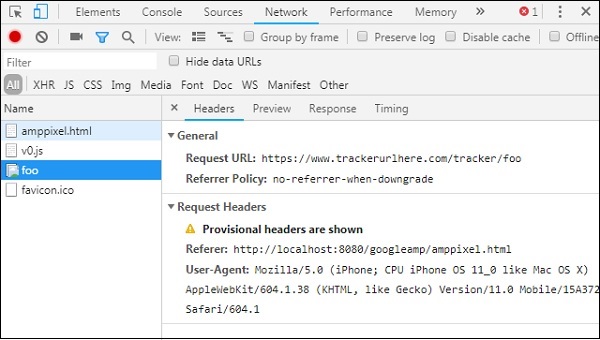
AMP 提供 amp-pixel,它基本上用於觸發畫素以計算頁面瀏覽量。amp-pixel 類似於 img 標籤,我們需要提供要觸發的畫素 URL,並且使用者可以在除錯時在瀏覽器的網路選項卡中看到觸發的 URL。畫素不會顯示在頁面上。
要使用 amp-pixel,我們無需新增任何額外的指令碼,因為其功能在核心 AMP 指令碼中可用。
amp-pixel 標籤如下所示:
<amp-pixel src = "https://urlhere" layout = "nodisplay">
</amp-pixel>
讓我們藉助一個工作示例來了解 amp-pixel 的工作原理:
示例
<!doctype html>
<html amp lang = "en">
   <head>
      <meta charset = "utf-8">
      <script async src = "https://cdn.ampproject.org/v0.js">
      </script>
      <title>Google AMP - Tracking Pixel</title>
      <link rel = "canonical" href =
      "http://example.ampproject.org/article-metadata.html">
      <meta name = "viewport" content = "width = device-width,
      minimum-scale = 1,initial-scale = 1">

      <style amp-boilerplate>
         body{
            -webkit-animation:
            -amp-start 8s steps(1,end) 0s 1 normal both;-moz-animation:
            -amp-start 8s steps(1,end) 0s 1 normal both;-ms-animation:
            -amp-start 8s steps(1,end) 0s 1 normal both;animation:
            -amp-start 8s steps(1,end) 0s 1 normal both
         }
         @-webkit-keyframes
         -amp-start{from{visibility:hidden}to{visibility:visible}}@-moz-keyframes
         -amp-start{from{visibility:hidden}to{visibility:visible}}@-ms-keyframes
         -amp-start{from{visibility:hidden}to{visibility:visible}}@-o-keyframes
         -amp-start{from{visibility:hidden}to{visibility:visible}}@keyframes
         -amp-start{from{visibility:hidden}to{visibility:visible}}
      </style>
      <noscript>
         <style amp-boilerplate>
            body{
               -webkit-animation:none;
               -moz-animation:none;
               -ms-animation:none;
               animation:none}
         </style>
      </noscript>
   </head>
   <body>
      <h3>Google AMP - Tracking Pixel</h3>
      <amp-pixel src = "https://www.trackerurlhere.com/tracker/foo"
      layout = "nodisplay">
      </amp-pixel>
   </body>
</html>
輸出
您將在瀏覽器網路選項卡中看到 URL 觸發。這裡我們使用了虛擬畫素來展示 amp-pixel 的工作原理。在生產環境中,您應該看到針對觸發畫素的資料被跟蹤。因為每次在即時網頁中觸發畫素時,伺服器端都會計算其上的資料。稍後可以從業務角度分析資料。
粘性廣告
粘性廣告是一種顯示廣告的格式。廣告將貼上在頁面底部,該頁面將呼叫 **amp-ad** 元件作為子元件。這基本上就像我們通常在頁面上看到的頁尾廣告。
要使用 amp-sticky-ad,我們需要新增以下指令碼:
<script async custom-element = "amp-sticky-ad" src = "
https://cdn.ampproject.org/v0/amp-sticky-ad-1.0.js">
</script>
與 amp-sticky-ad 相關的條件如下:
您只能在頁面上使用一個 amp-sticky-ad。
amp-ad 必須是 amp-sticky-ad 的直接子元素。例如:
<amp-sticky-ad>
   <amp-ad></amp-ad>
</amp-sticky-ad>
粘性廣告元件將始終位於頁面底部。
粘性廣告將佔用容器的全部寬度,並使用 amp-ad 的寬度和高度填充空間。
粘性廣告的高度為 100px。如果 amp-ad 的高度小於 100px,則粘性廣告將採用 amp-ad 的高度。如果 amp-ad 的高度大於 100px,則高度將保持為 100px,並且內容溢位隱藏。無法將粘性廣告的高度更改為超過 100px。
可以更改粘性廣告的背景顏色。但不允許透明背景。
當用戶滾動併到達頁面底部時,廣告將顯示在頁面末尾,以便不會隱藏底部內容。
在橫向模式下,粘性廣告將居中對齊。
如果沒有廣告可投放,則粘性廣告的容器將摺疊且不可見。
讓我們看看頁面上 amp-sticky-ad 的工作示例,如下所示:
示例
<!doctype html>
<html amp lang = "en">
   <head>
      <meta charset = "utf-8">
      <script async src = "https://cdn.ampproject.org/v0.js">
      </script>
      <title>Google AMP - AD</title>
      <link rel = "canonical" href =
      "http://example.ampproject.org/article-metadata.html">
      <meta name = "viewport" content = "width = device-width,
      minimum-scale = 1,initial-scale = 1">

      <style amp-boilerplate>
         body{
            -webkit-animation:
            -amp-start 8s steps(1,end) 0s 1 normal both;-moz-animation:
            -amp-start 8s steps(1,end) 0s 1 normal both;-ms-animation:
            -amp-start 8s steps(1,end) 0s 1 normal both;animation:
            -amp-start 8s steps(1,end) 0s 1 normal both
         }
         @-webkit-keyframes
         -amp-start{from{visibility:hidden}to{visibility:visible}}@-moz-keyframes
         -amp-start{from{visibility:hidden}to{visibility:visible}}@-ms-keyframes
         -amp-start{from{visibility:hidden}to{visibility:visible}}@-o-keyframes
         -amp-start{from{visibility:hidden}to{visibility:visible}}@keyframes
         -amp-start{from{visibility:hidden}to{visibility:visible}}
      </style>
      <noscript>
         <style amp-boilerplate>
            body{
               -webkit-animation:none;
               -moz-animation:none;
               -ms-animation:none;
               animation:none}
         </style>
      </noscript>
      <script async custom-element = "amp-sticky-ad" src =
         "https://cdn.ampproject.org/v0/amp-sticky-ad-1.0.js">
      </script>
      <style amp-custom>
         div, p{
            text-align:center;
         }
         amp-ad {
            border : solid 1px black;
         }
      </style>
   </head>
   <body>
      <h3>Google AMP - Sticky AD</h3>
      <p>This is a example of adnetwork doubleclick banner ad</p>
      <p>This is a example of adnetwork doubleclick banner ad</p>
      <p>This is a example of adnetwork doubleclick banner ad</p>
      <p>This is a example of adnetwork doubleclick banner ad</p>
      <p>This is a example of adnetwork doubleclick banner ad</p>
      <p>This is a example of adnetwork doubleclick banner ad</p>
      <div>
         <amp-sticky-ad layout = "nodisplay">
            <amp-ad
               width = "320"
               height = "50"
               type = "doubleclick"
               data-slot = "/35096353/amptesting/formats/sticky">
            </amp-ad>
         </amp-sticky-ad>
      </div>
      <p>This is a example of adnetwork doubleclick banner ad</p>
      <p>This is a example of adnetwork doubleclick banner ad</p>
      <p>This is a example of adnetwork doubleclick banner ad</p>

      <p>This is a example of adnetwork doubleclick banner ad</p>
      <p>This is a example of adnetwork doubleclick banner ad</p>
      <p>This is a example of adnetwork doubleclick banner ad</p>
      <p>This is a example of adnetwork doubleclick banner ad</p>
      <p>This is a example of adnetwork doubleclick banner ad</p>
      <p>This is a example of adnetwork doubleclick banner ad</p>

      <p>This is a example of adnetwork doubleclick banner ad</p>
      <p>This is a example of adnetwork doubleclick banner ad</p>
      <p>This is a example of adnetwork doubleclick banner ad</p>
      <p>This is a example of adnetwork doubleclick banner ad</p>
      <p>This is a example of adnetwork doubleclick banner ad</p>
      <p>This is a example of adnetwork doubleclick banner ad</p>

      <p>This is a example of adnetwork doubleclick banner ad</p>
      <p>This is a example of adnetwork doubleclick banner ad</p>
      <p>This is a example of adnetwork doubleclick banner ad</p>
      <p>This is a example of adnetwork doubleclick banner ad</p>
      <p>This is a example of adnetwork doubleclick banner ad</p>
      <p>This is a example of adnetwork doubleclick banner ad</p>

      <p>This is a example of adnetwork doubleclick banner ad</p>
      <p>This is a example of adnetwork doubleclick banner ad</p>
      <p>This is a example of adnetwork doubleclick banner ad</p>
      <p>This is a example of adnetwork doubleclick banner ad</p>
      <p>This is a example of adnetwork doubleclick banner ad</p>
      <p>This is a example of adnetwork doubleclick banner ad</p>

      <p>This is a example of adnetwork doubleclick banner ad</p>
      <p>This is a example of adnetwork doubleclick banner ad</p>
      <p>This is a example of adnetwork doubleclick banner ad</p>
      <p>This is a example of adnetwork doubleclick banner ad</p>
      <p>This is a example of adnetwork doubleclick banner ad</p>
      <p>This is a example of adnetwork doubleclick banner ad</p>

      <p>This is a example of adnetwork doubleclick banner ad</p>
      <p>This is a example of adnetwork doubleclick banner ad</p>
      <p>This is a example of adnetwork doubleclick banner ad</p>
      <p>This is a example of adnetwork doubleclick banner ad</p>
      <p>This is a example of adnetwork doubleclick banner ad</p>
      <p>This is a example of adnetwork doubleclick banner ad</p>

      <p>This is a example of adnetwork doubleclick banner ad</p>
      <p>This is a example of adnetwork doubleclick banner ad</p>
      <p>This is a example of adnetwork doubleclick banner ad</p>
      <p>This is a example of adnetwork doubleclick banner ad</p>
      <p>This is a example of adnetwork doubleclick banner ad</p>
      <p>This is a example of adnetwork doubleclick banner ad</p>

      <p>This is a example of adnetwork doubleclick banner ad</p>
      <p>This is a example of adnetwork doubleclick banner ad</p>
      <p>This is a example of adnetwork doubleclick banner ad</p>
      <p>This is a example of adnetwork doubleclick banner ad</p>

      <p>This is a example of adnetwork doubleclick banner ad</p>
      <p>This is a example of adnetwork doubleclick banner ad</p>
      <p>This is a example of adnetwork doubleclick banner ad</p>
      <p>This is a example of adnetwork doubleclick banner ad</p>

      <h2>END OF PAGE IS VISIBLE AND CONTENT IS NOT COVERED</h2>
   </body>
</html>
輸出

當用戶滾動到頁面末尾時,它看起來是這樣的:
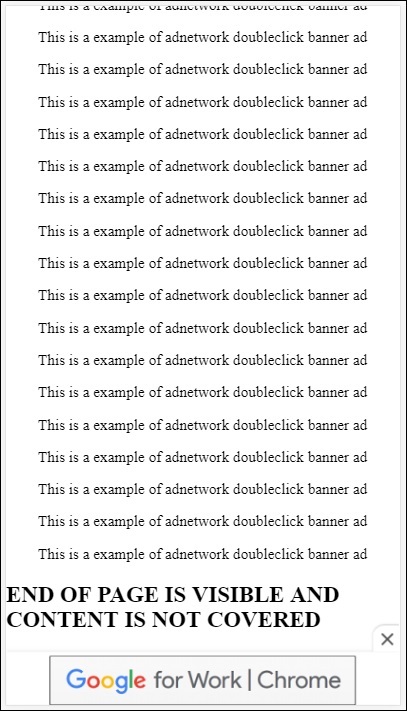
當您到達頁面末尾時,廣告不會與內容重疊。關閉按鈕可用,允許使用者關閉廣告。
如果您想更改與關閉按鈕相關的任何內容,例如影像或寬度等,可以使用樣式元件中的 **.amp-sticky-ad-close-button** 進行更改。
更改關閉按鈕背景顏色的示例
<!doctype html>
<html amp lang = "en">
   <head>
      <meta charset = "utf-8">
      <script async src = "https://cdn.ampproject.org/v0.js">
      </script>
      <title>Google AMP - AD</title>
      <link rel = "canonical" href =
      "http://example.ampproject.org/article-metadata.html">
      <meta name = "viewport" content = "width = device-width,
      minimum-scale = 1,initial-scale = 1">

      <style amp-boilerplate>
         body{
            -webkit-animation:
            -amp-start 8s steps(1,end) 0s 1 normal both;-moz-animation:
            -amp-start 8s steps(1,end) 0s 1 normal both;-ms-animation:
            -amp-start 8s steps(1,end) 0s 1 normal both;animation:
            -amp-start 8s steps(1,end) 0s 1 normal both
         }
         @-webkit-keyframes
         -amp-start{from{visibility:hidden}to{visibility:visible}}@-moz-keyframes
         -amp-start{from{visibility:hidden}to{visibility:visible}}@-ms-keyframes
         -amp-start{from{visibility:hidden}to{visibility:visible}}@-o-keyframes
         -amp-start{from{visibility:hidden}to{visibility:visible}}@keyframes
         -amp-start{from{visibility:hidden}to{visibility:visible}}
      </style>
      <noscript>
         <style amp-boilerplate>
            body{
               -webkit-animation:none;
               -moz-animation:none;
               -ms-animation:none;
               animation:none}
         </style>
      </noscript>
      <script async custom-element = "amp-sticky-ad"
         src = "https://cdn.ampproject.org/v0/amp-sticky-ad-1.0.js">
      </script>
      <style amp-custom>
         div, p{
            text-align:center;
         }
         amp-ad {
            border : solid 1px black;
         }
         .amp-sticky-ad-close-button {
            background-color: red;
         }
      </style>
   </head>
   <body>
      <h3>Google AMP - Sticky AD</h3>
      <p>This is a example of adnetwork doubleclick banner ad</p>
      <p>This is a example of adnetwork doubleclick banner ad</p>
      <p>This is a example of adnetwork doubleclick banner ad</p>
      <p>This is a example of adnetwork doubleclick banner ad</p>
      <p>This is a example of adnetwork doubleclick banner ad</p>
      <p>This is a example of adnetwork doubleclick banner ad</p>
      <div>
         <amp-sticky-ad layout = "nodisplay">
            <amp-ad
               width = "320"
               height = "50"
               type = "doubleclick"
               data-slot = "/35096353/amptesting/formats/sticky">
            </amp-ad>
         </amp-sticky-ad>
      </div>
      <p>This is a example of adnetwork doubleclick banner ad</p>
      <p>This is a example of adnetwork doubleclick banner ad</p>
      <p>This is a example of adnetwork doubleclick banner ad</p>
      <p>This is a example of adnetwork doubleclick banner ad</p>

      <p>This is a example of adnetwork doubleclick banner ad</p>
      <p>This is a example of adnetwork doubleclick banner ad</p>
      <p>This is a example of adnetwork doubleclick banner ad</p>
      <p>This is a example of adnetwork doubleclick banner ad</p>
      <p>This is a example of adnetwork doubleclick banner ad</p>
      <p>This is a example of adnetwork doubleclick banner ad</p>

      <p>This is a example of adnetwork doubleclick banner ad</p>
      <p>This is a example of adnetwork doubleclick banner ad</p>
      <p>This is a example of adnetwork doubleclick banner ad</p>
      <p>This is a example of adnetwork doubleclick banner ad</p>
      <p>This is a example of adnetwork doubleclick banner ad</p>
      <p>This is a example of adnetwork doubleclick banner ad</p>

      <p>This is a example of adnetwork doubleclick banner ad</p>
      <p>This is a example of adnetwork doubleclick banner ad</p>
      <p>This is a example of adnetwork doubleclick banner ad</p>
      <p>This is a example of adnetwork doubleclick banner ad</p>
      <p>This is a example of adnetwork doubleclick banner ad</p>
      <p>This is a example of adnetwork doubleclick banner ad</p>

      <p>This is a example of adnetwork doubleclick banner ad</p>
      <p>This is a example of adnetwork doubleclick banner ad</p>
      <p>This is a example of adnetwork doubleclick banner ad</p>
      <p>This is a example of adnetwork doubleclick banner ad</p>
      <p>This is a example of adnetwork doubleclick banner ad</p>
      <p>This is a example of adnetwork doubleclick banner ad</p>

      <p>This is a example of adnetwork doubleclick banner ad</p>
      <p>This is a example of adnetwork doubleclick banner ad</p>
      <p>This is a example of adnetwork doubleclick banner ad</p>
      <p>This is a example of adnetwork doubleclick banner ad</p>
      <p>This is a example of adnetwork doubleclick banner ad</p>
      <p>This is a example of adnetwork doubleclick banner ad</p>

      <p>This is a example of adnetwork doubleclick banner ad</p>
      <p>This is a example of adnetwork doubleclick banner ad</p>
      <p>This is a example of adnetwork doubleclick banner ad</p>
      <p>This is a example of adnetwork doubleclick banner ad</p>
      <p>This is a example of adnetwork doubleclick banner ad</p>
      <p>This is a example of adnetwork doubleclick banner ad</p>

      <p>This is a example of adnetwork doubleclick banner ad</p>
      <p>This is a example of adnetwork doubleclick banner ad</p>
      <p>This is a example of adnetwork doubleclick banner ad</p>
      <p>This is a example of adnetwork doubleclick banner ad</p>
      <p>This is a example of adnetwork doubleclick banner ad</p>
      <p>This is a example of adnetwork doubleclick banner ad</p>

      <p>This is a example of adnetwork doubleclick banner ad</p>
      <p>This is a example of adnetwork doubleclick banner ad</p>
      <p>This is a example of adnetwork doubleclick banner ad</p>
      <p>This is a example of adnetwork doubleclick banner ad</p>
      <p>This is a example of adnetwork doubleclick banner ad</p>
      <p>This is a example of adnetwork doubleclick banner ad</p>
      <p>This is a example of adnetwork doubleclick banner ad</p>

      <h2>END OF PAGE IS VISIBLE AND CONTENT IS NOT COVERED</h2>
   </body>
</html>
輸出

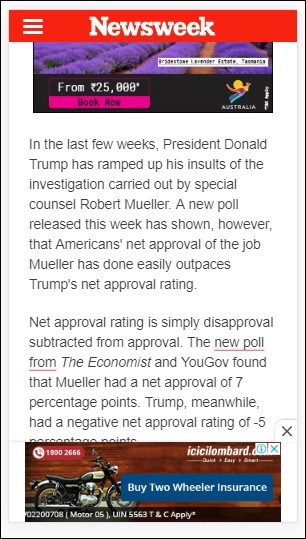
釋出者頁面上 amp 粘性廣告的示例
AMPHTML 廣告
我們已經看到了 <amp-ad>,它用於載入廣告。使用 <amp-ad> 載入的廣告內容可以使用非 AMP 樣式的廣告載入方式。如果 <amp-ad> 載入使用 AMP 規範的廣告,則稱為 AMPHTML 廣告。AMPHTML 廣告比非 AMP 廣告速度更快,因為它們遵循 AMP 規範。
使用可用的 AMP 元件(如燈箱和輪播),我們可以形成多種型別的 AMPHTML 廣告格式,這有助於顯示廣告。
目前,以下廣告伺服器支援 AMPHTML 廣告:
DoubleClick for Publishers
TripleLift
Dianomi
Adzerk
Google AdSense
AMPHTML 廣告將從 <amp-ad> 元件中投放,如下所示:
示例
<!doctype html>
<html amp lang = "en">
   <head>
      <meta charset = "utf-8">
      <script async src = "https://cdn.ampproject.org/v0.js">
      </script>
      <title>Google AMP - Amp HTMLAds</title>
      <link rel = "canonical" href=
      "http://example.ampproject.org/article-metadata.html">
      <meta name = "viewport" content = "width=device-width,
      minimum-scale = 1,initial-scale = 1">

      <style amp-boilerplate>
         body{
            -webkit-animation:
            -amp-start 8s steps(1,end) 0s 1 normal both;-moz-animation:
            -amp-start 8s steps(1,end) 0s 1 normal both;-ms-animation:
            -amp-start 8s steps(1,end) 0s 1 normal both;animation:
            -amp-start 8s steps(1,end) 0s 1 normal both
         }
         @-webkit-keyframes
         -amp-start{from{visibility:hidden}to{visibility:visible}}@-moz-keyframes
         -amp-start{from{visibility:hidden}to{visibility:visible}}@-ms-keyframes
         -amp-start{from{visibility:hidden}to{visibility:visible}}@-o-keyframes
         -amp-start{from{visibility:hidden}to{visibility:visible}}@keyframes
         -amp-start{from{visibility:hidden}to{visibility:visible}}
      </style>
      <noscript>
         <style amp-boilerplate>
            body{
               -webkit-animation:none;
               -moz-animation:none;
               -ms-animation:none;
               animation:none}
         </style>
      </noscript>
      <script async custom-element = "amp-ad" src =
         "https://cdn.ampproject.org/v0/amp-ad-0.1.js">
      </script>
      <style amp-custom>
         .ad-container {
            background: #FFFFFF;
            margin: 0;
            padding: 0px;
            text-align:center;
         }
         .article-body{
            font-family: avenir, Helvetica, arial, serif, sans-serif !important;
            font-weight: 400;
            text-align:center;
         }
         .adv {
            text-align:center;
         }
      </style>
   </head>
   <body>
      <div>
         <p>Amphtml ads are faster in comparison to the non
         amp ones as they follow the amp specification.</p>
         <p>Amphtml ads work fine in amp pages as well as non amp pages</p>
         <div class = "ad-container">
            <div>Advertising</div>
            <amp-ad layout = "fixed"
               width = "300"
               height = "250"
               type = "fake"
               id = "i-amphtml-demo-fake"
               src = "ampimg.html">
            </amp-ad>
         </div>
         <p>Amphtml ads are faster in comparison to the non amp
         ones as they follow the amp specification.</p>
         <p>Amphtml ads work fine in amp pages as well as non amp pages</p>
      </div>
   </body>
</html>
我們呼叫 amp-ad 來顯示廣告。amp-ad 中使用的 src 是另一個 AMP 頁面。我們使用了 type=”fake” 和 id=”i-amphtml-demo-fake”。amp-ad 標籤中使用的 AMP 頁面詳細資訊或 ampimg.html 如下所示:
ampimg.html
<!doctype html>
<html amp lang = "en">
   <head>
      <meta charset = "utf-8">
      <script async src = "https://cdn.ampproject.org/v0.js">
      </script>
      <title>Google AMP - Image</title>
      <link rel = "canonical" href =
      "http://example.ampproject.org/article-metadata.html">
      <meta name = "viewport" content="width = device-width,
      minimum-scale = 1,initial-scale = 1">

      <style amp-boilerplate>
         body{
            -webkit-animation:
            -amp-start 8s steps(1,end) 0s 1 normal both;-moz-animation:
            -amp-start 8s steps(1,end) 0s 1 normal both;-ms-animation:
            -amp-start 8s steps(1,end) 0s 1 normal both;animation:
            -amp-start 8s steps(1,end) 0s 1 normal both
         }
         @-webkit-keyframes
         -amp-start{from{visibility:hidden}to{visibility:visible}}@-moz-keyframes
         -amp-start{from{visibility:hidden}to{visibility:visible}}@-ms-keyframes
         -amp-start{from{visibility:hidden}to{visibility:visible}}@-o-keyframes
         -amp-start{from{visibility:hidden}to{visibility:visible}}@keyframes
         -amp-start{from{visibility:hidden}to{visibility:visible}}
      </style>
      <noscript>
         <style amp-boilerplate>
            body{
               -webkit-animation:none;
               -moz-animation:none;
               -ms-animation:none;
               animation:none}
         </style>
      </noscript>
      <style amp-custom>
         amp-img {
            border: 1px solid black;
            border-radius: 4px;
            padding: 5px;
         }
      </style>
   </head>
   <body>
      <amp-img alt = "Beautiful Flower"
         src = "images/bannerad.png"
         width = "246"
         height = "205">
      </amp-img>
   </body>
</html>
輸出

我們在 amp-ad 中顯示 AMP 頁面。類似地,我們可以使用 amp-video、amp-carousel 在 AMP 頁面中顯示廣告。列出的廣告伺服器支援呼叫正確的 AMP 頁面以在 AMPHTML 廣告下投放廣告。