
- Google AMP 教程
- Google AMP - 首頁
- Google AMP - 概述
- Google AMP - 簡介
- Google AMP - 圖片
- Google AMP - 表單
- Google AMP - 內嵌框架 (Iframes)
- Google AMP - 影片
- Google AMP - 按鈕
- Google AMP - Timeago (時間顯示)
- Google AMP - MathML (數學標記語言)
- Google AMP - 自動調整文字大小 (Fit Text)
- Google AMP - 日期倒計時
- Google AMP - 日期選擇器
- Google AMP - 故事 (Story)
- Google AMP - 選擇器
- Google AMP - 連結
- Google AMP - 字型
- Google AMP - 列表
- Google AMP - 使用者通知
- Google AMP - 下一頁
- Google AMP - 屬性
- 樣式和自定義 CSS
- Google AMP - 動態 CSS 類
- Google AMP - 動作和事件
- Google AMP - 動畫
- Google AMP - 資料繫結
- Google AMP - 佈局
- Google AMP - 廣告
- Google AMP - 分析
- Google AMP - 社交小工具
- Google AMP - 媒體
- HTML頁面轉換為AMP頁面
- Google AMP - 基本語法
- Google AMP - 驗證
- Google AMP - 快取
- Google AMP - 自定義 JavaScript
- Google AMP - CORS (跨域資源共享)
- Google AMP 有用資源
- Google AMP - 快速指南
- Google AMP - 有用資源
- Google AMP - 討論
Google AMP - 字型
AMP 字型是一個AMP元件,它主要用於觸發和監控AMP頁面上的自定義字型。本章將詳細討論amp-font。
要使用amp-font,我們需要新增以下JavaScript檔案:
<script async custom-element = "amp-font"
   src = "https://cdn.ampproject.org/v0/amp-font-0.1.js">
</script>
amp-font元件用於控制字型載入所需的時間。它有一個timeout屬性,以毫秒為單位指定時間。預設值為3000毫秒。該元件允許根據所需字型是否載入或進入錯誤狀態,從document.documentElement或document.body新增/刪除類。
amp-font標籤的格式如下所示:
<amp-font
   layout = "nodisplay"
   font-family = "Roboto Italic"
   timeout = "2000"
   on-error-remove-class = "robotoitalic-loading"
   on-error-add-class = "robotoitalic-missing"
   on-load-remove-class = "robotoitalic-loading"
   on-load-add-class = "robotoitalic-loaded">
</amp-font>
如何在AMP頁面中使用amp-font的示例如下所示:
示例
<!doctype html>
<html amp lang = "en">
   <head>
      <meta charset = "utf-8">
      <script async src = "https://cdn.ampproject.org/v0.js"></script>
      <title>Google AMP - Amp Font</title>
      <link rel = "canonical" href = "http://example.ampproject.org/article-metadata.html">
      <meta name = "viewport" content = "width = device-width,minimum-scale = 1,initial-scale = 1">

      <style amp-boilerplate>
         body{
            -webkit-animation:
            -amp-start 8s steps(1,end) 0s 1 normal both;-moz-animation:
            -amp-start 8s steps(1,end) 0s 1 normal both;-ms-animation:
            -amp-start 8s steps(1,end) 0s 1 normal both;animation:
            -amp-start 8s steps(1,end) 0s 1 normal both
         }
         @-webkit-keyframes
         -amp-start{from{visibility:hidden}to{visibility:visible}}@-moz-keyframes
         -amp-start{from{visibility:hidden}to{visibility:visible}}@-ms-keyframes
         -amp-start{from{visibility:hidden}to{visibility:visible}}@-o-keyframes
         -amp-start{from{visibility:hidden}to{visibility:visible}}@keyframes
         -amp-start{from{visibility:hidden}to{visibility:visible}}
      </style>

      <noscript>
         <style amp-boilerplate>
            body{
               -webkit-animation:none;
               -moz-animation:none;
               -ms-animation:none;
               animation:none}
         </style>
      </noscript>

      <cript async custom-element = "amp-font"
         src = "https://cdn.ampproject.org/v0/amp-font-0.1.js"
      ></script>
      <style amp-custom>
         @font-face {
            font-family: 'This font is not available';
            font-style: normal;
            font-weight: 300;
            src: url(fonts/MissingFont.ttf) format('truetype');
         }
         .font-missing {
            color:red;
            font-size:25px;
         }
      </style>
   </head>
   <body>
      <h1>Google AMP - Amp Font</h1>
         <amp-font
            layout = "nodisplay"
            font-family = "Font Does Not exist"
            timeout = "2000"
            on-error-remove-class = "font-missing"
            on-error-add-class = "font-error"
            on-load-remove-class = "font-missing"
            on-load-add-class = "font-loaded">
         </amp-font>
         <p class = "font-missing">
            Example of amp-font component to show how
            attributes on-error-remove-class,
            on-error-add-class, on-load-remove-class
            and on-load-add-class works when the font
            file to be loaded does not exist.
         </p>
   </body>
</html>
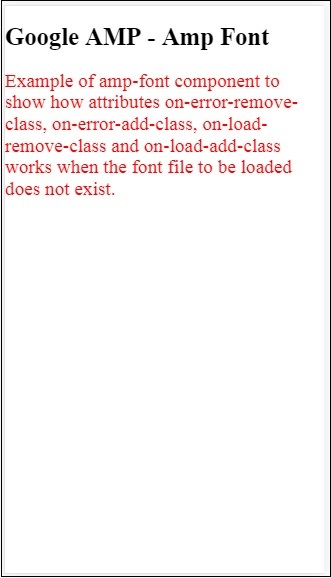
輸出
上面示例程式碼的輸出如下所示:
字型檔案成功載入時amp-font的示例如下所示:
示例
<!doctype html>
<html amp lang = "en">
   <head>
      <meta charset = "utf-8">
      <script async src = "https://cdn.ampproject.org/v0.js"></script>
      <title>Google AMP - Amp Font</title>
      <link rel = "canonical" href = "http://example.ampproject.org/article-metadata.html">
      <meta name = "viewport" content = "width = device-width,minimum-scale = 1,initial-scale = 1">

      <style amp-boilerplate>
         body{
            -webkit-animation:
            -amp-start 8s steps(1,end) 0s 1 normal both;-moz-animation:
            -amp-start 8s steps(1,end) 0s 1 normal both;-ms-animation:
            -amp-start 8s steps(1,end) 0s 1 normal both;animation:
            -amp-start 8s steps(1,end) 0s 1 normal both
         }
         @-webkit-keyframes
         -amp-start{from{visibility:hidden}to{visibility:visible}}@-moz-keyframes
         -amp-start{from{visibility:hidden}to{visibility:visible}}@-ms-keyframes
         -amp-start{from{visibility:hidden}to{visibility:visible}}@-o-keyframes
         -amp-start{from{visibility:hidden}to{visibility:visible}}@keyframes
         -amp-start{from{visibility:hidden}to{visibility:visible}}
      </style>

      <noscript>
         <style amp-boilerplate>
            body{
               -webkit-animation:none;
               -moz-animation:none;
               -ms-animation:none;
               animation:none}
         </style>
      </noscript>

      <script async custom-element = "amp-font"
         src = "https://cdn.ampproject.org/v0/amp-font-0.1.js">
      </script>
      <style amp-custom>
         @font-face {
            font-family: 'This font is not available';
            font-style: normal;
            font-weight: 300;
            src: url(fonts/MissingFont.ttf)
            format('truetype');
         }
         @font-face {
            font-family: 'Roboto Italic';
            font-style: normal;
            font-weight: 300;
            src:url(fonts/Roboto-Italic.ttf) format('truetype');
         }
         .font-missing {
            color:red;
            font-size:25px;
         }
         .robotoitalic-loading {
            color: green;
         }
         .robotoitalic-loaded {
            font-size:25px;
            color: blue;
         }
         .robotoitalic-missing {
            color: red;
         }
         .robotoitalic {
            font-family: 'Roboto Italic';
         }
      </style>
   </head>
   <body>
      <h1>Google AMP - Amp Font</h1>
         <amp-font
            layout = "nodisplay"
            font-family = "Font Does Not exist"
            timeout = "2000"
            on-error-remove-class = "font-missing"
            on-error-add-class = "font-error"
            on-load-remove-class = "font-missing"
            on-load-add-class = "font-loaded">
         </amp-font>
         <p class="font-missing">
            Example of amp-font component to show
            how attributes on-error-remove-class,
            on-error-add-class, on-load-remove-class
            and on-load-add-class works when the
            font file to be loaded does not exist.
         </p>

         <amp-font
            layout = "nodisplay"
            font-family = "Roboto Italic"
            timeout = "2000"
            on-error-remove-class = "robotoitalic-
            loading"
            on-error-add-class = "robotoitalic-missing"
            on-load-remove-class = "robotoitalic-loading"
            on-load-add-class = "robotoitalic-loaded">
         </amp-font>
         <p class = "robotoitalic">
            Example of amp-font component to show how
            attributes on-error-remove-class,
            on-error-add-class, on-load-remove-class
            and on-load-add-class works when the font
            file exists and loads fine.
         </p>
   </body>
</html>
輸出
上面示例程式碼的輸出如下所示:
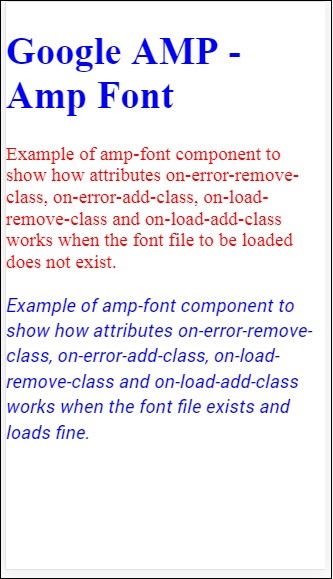
上面的示例展示瞭如何使用字型屬性,例如font-family, timeout, on-error-remove-class, on-error-add-class, on-load-remove-class, on-load-add-class。這些類決定字型載入是否成功。
廣告