- Google AMP 教程
- Google AMP - 首頁
- Google AMP - 概述
- Google AMP - 簡介
- Google AMP - 圖片
- Google AMP - 表單
- Google AMP - 內嵌框架
- Google AMP - 影片
- Google AMP - 按鈕
- Google AMP - Timeago
- Google AMP - MathML
- Google AMP - 適應文字
- Google AMP - 日期倒計時
- Google AMP - 日期選擇器
- Google AMP - 故事
- Google AMP - 選擇器
- Google AMP - 連結
- Google AMP - 字型
- Google AMP - 列表
- Google AMP - 使用者通知
- Google AMP - 下一頁
- Google AMP - 屬性
- 樣式和自定義CSS
- Google AMP - 動態CSS類
- Google AMP - 動作和事件
- Google AMP - 動畫
- Google AMP - 資料繫結
- Google AMP - 佈局
- Google AMP - 廣告
- Google AMP - 分析
- Google AMP - 社交小部件
- Google AMP - 媒體
- HTML頁面轉AMP頁面
- Google AMP - 基本語法
- Google AMP - 驗證
- Google AMP - 快取
- Google AMP - 自定義JavaScript
- Google AMP - CORS
- Google AMP 有用資源
- Google AMP - 快速指南
- Google AMP - 有用資源
- Google AMP - 討論
Google AMP - 表單
本章解釋如何在Google AMP中使用表單。
請注意,表單標籤與標準HTML中的表單標籤相同。由於AMP對錶單的使用添加了特殊的限制,因此我們需要新增amp-form JavaScript檔案才能使用表單。
amp-form指令碼
<script async custom-element = "amp-form"
   src = "https://cdn.ampproject.org/v0/ampform-0.1.js"></script>
要在AMP頁面中使用表單,我們需要在.html檔案中包含上述指令碼。amp-form JavaScript檔案支援**http**和**xmlhttprequest**提交表單。使用HTTP請求會重新載入頁面,而使用**xmlhttprequest**則不會重新載入頁面,類似於ajax請求。
AMP中的表單標籤
For xmlhttprequest :
<form method = "post" class = "p2" action-xhr = "submitform.php" target = "_top">
   //Input fields here
</form>

For http :
<form method = "post" class = "p2" action = "submitform.php" target = "_top">
   //Input fields here
</form>
Amp-form 提供了特殊的屬性,即submit-error和submit-success,用於處理表單提交時的錯誤和成功。
示例
下面顯示了一個amp-form示例:
<!doctype html>
<html amp lang = "en">
   <head>
      <meta charset = "utf-8">
      <script async src = "https://cdn.ampproject.org/v0.js"></script>
      <title>Google AMP - Form</title>
      <link rel = "canonical" href = "ampform.html">
      <meta name = "viewport" conten t = "width = device-width,
         minimum-scale = 1,initialscale = 1">

      <style amp-boilerplate>
         body{
            -webkit-animation:
            -amp-start 8s steps(1,end) 0s1 normal both;-moz-animation:
            -amp-start 8s steps(1,end) 0s 1 normal both;-msanimation:
            -amp-start 8s steps(1,end) 0s 1 normal both;animation:
            -amp-start 8s steps(1,end) 0s 1 normal both
         }
         @-webkit-keyframes
         -ampstart{from{visibility:hidden}to{visibility:visible}}@-moz-keyframes
         -ampstart{from{visibility:hidden}to{visibility:visible}}@-ms-keyframes
         -ampstart{from{visibility:hidden}to{visibility:visible}}@-o-keyframes
         -ampstart{from{visibility:hidden}to{visibility:visible}}@keyframes
         -ampstart{from{visibility:hidden}to{visibility:visible}}
      </style>
         <noscript>
            <style amp-boilerplate>
               body{
                  -webkit-animation:none;
                  -moz-animation:none;
                  -msanimation:none;
                  animation:none
               }
            </style>
         </noscript>
      <script async custom-element = "amp-form"
         src = "https://cdn.ampproject.org/v0/amp-form-0.1.js">
      </script>
      <script async custom-template = "amp-mustache"
         src = "https://cdn.ampproject.org/v0/amp-mustache-0.2.js">
      </script>
      <style amp-custom>
         form.amp-form-submit-success [submit-success],
         form.amp-form-submit-error [submit-error]{
            margin-top: 16px;
         }
         form.amp-form-submit-success [submit-success] {
            color: white;
            background-color:gray;
         }
         form.amp-form-submit-error [submit-error] {
            color: red;
         }
         form.amp-form-submit-success.hide-inputs > input {
            display: none;
         }
      </style>
   </head>
   <body>
      <h3>Google AMP - Form</h3>
      <form method = "post"
         class = "p2"
         action-xhr = "submitform.php"
         target = "_top">
         <p>AMP - Form Example</p>
         <div>
            <input type = "text" name = "name" placeholder = "Enter
               Name" required><br/><br/>
            <input type = "email" name = "email"
            placeholder = "Enter Email" required>
            <br/>
            <br/>
         </div>

         <input type = "submit" value = "Submit">
         <div submit-success>
            <template type = "amp-mustache">
               Form Submitted! Thanks {{name}}.
            </template>
         </div>

         <div submit-error>
            <template type = "amp-mustache">
               Error! {{name}}, please try again.
            </template>
         </div>
      </form>
   </body>
</html>
輸出
執行上面顯示的程式碼後,您將看到如下所示的結果:
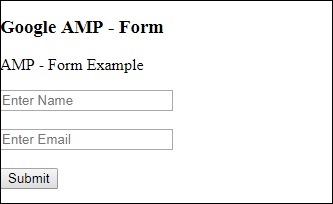
現在,輸入詳細資訊並單擊“提交”按鈕。顯示的輸出螢幕如下所示:
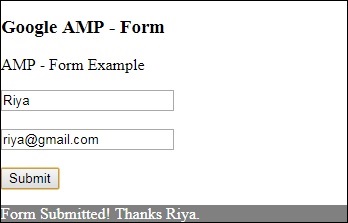
請注意,我們使用了amp-mustache進行資料繫結。該表單使用action-xhr(即xmlhttprequest)提交表單。我們使用了**submitform.php**檔案,該檔案以JSON格式返回資料。
<form method = "post" class = "p2" action-xhr = "submitform.php"
   target = "_top">
</form>
submitform.php
<?php
   if(!empty($_POST)){
      $domain_url = (isset($_SERVER['HTTPS']) ? "https" : "http") .      "://$_SERVER[HTTP_HOST]";
      header("Content-type: application/json");
      header("AMP-Access-Control-Allow-Source-Origin: " . $domain_url);
      header("Access-Control-Expose-Headers: AMP-Access-Control-Allow-Source-Origin");
      $myJSON = json_encode($_POST);
      echo $myJSON;
   }
?>
為了使表單能夠使用xmlhttprequest工作,我們需要根據CORS規範新增標頭。下面顯示了新增到submitform.php的響應標頭的詳細資訊:
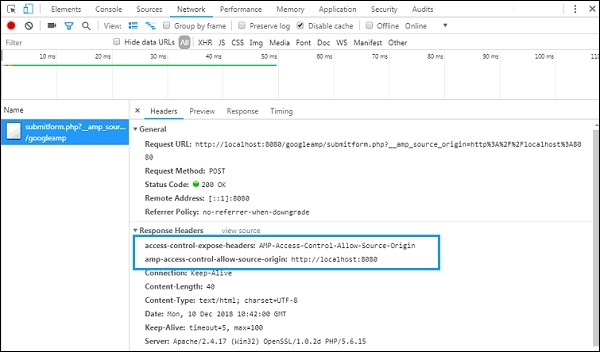
為了使表單正常工作,我們需要新增諸如值為**AMP-Access-Control-Allow-Source-Origin**的**access-control-expose-headers**標頭和**amp-access-control-allow-source-origin** - **https://:8080**。
請注意,我們使用的是php檔案和apache伺服器。在php檔案中,我們添加了如下所示的必需標頭:
<?php

   if(!empty($_POST)){
      $domain_url = (isset($_SERVER['HTTPS']) ? "https" : "http") .  "://$_SERVER[HTTP_HOST]";
      header("Content-type: application/json");
      header("AMP-Access-Control-Allow-Source-Origin: " . $domain_url);
      header("Access-Control-Expose-Headers: AMP-Access-Control-Allow-Source-Origin");
      $myJSON = json_encode($_POST);
      echo $myJSON;
   }
   ?
?>
如果我們使用普通的http請求,頁面將重新載入,如下所示:
對於http請求,我們使用瞭如下所示的表單:
<form method = "GET" class = "p2" action = "submitform.php"
   target = "_top">
</form>
示例
請觀察以下程式碼以更好地理解:
<!doctype html>
<html amp lang = "en">
   <head>
      <meta charset = "utf-8">
      <script async src = "https://cdn.ampproject.org/v0.js"></script>
      <title>Google AMP - Form</title>
      <link rel = "canonical" href = "ampform.html">
      <meta name = "viewport" content = "width = device-width,minimum-scale = 1,initialscale = 1">

      <style amp-boilerplate>
         body{
            -webkit-animation:
            -amp-start 8s steps(1,end) 0s1 normal both;-moz-animation:
            -amp-start 8s steps(1,end) 0s 1 normal both;-msanimation:
            -amp-start 8s steps(1,end) 0s 1 normal both;animation:
            -amp-start 8s steps(1,end) 0s 1 normal both
         }
         @-webkit-keyframes
         -ampstart{from{visibility:hidden}to{visibility:visible}}@-moz-keyframes
         -ampstart{from{visibility:hidden}to{visibility:visible}}@-ms-keyframes
         -ampstart{from{visibility:hidden}to{visibility:visible}}@-o-keyframes
         -ampstart{from{visibility:hidden}to{visibility:visible}}@keyframes
         -ampstart{from{visibility:hidden}to{visibility:visible}}
      </style>
      <noscript>
         <style amp-boilerplate>
            body {
               -webkit-animation:none;
               -moz-animation:none;
               -msanimation:none;
               animation:none}
         >/style>
      </noscript>

      <script async custom-element = "amp-form"
         src = "https://cdn.ampproject.org/v0/amp-form-0.1.js">
      </script>
      <script async custom-template = "amp-mustache"
         src = "https://cdn.ampproject.org/v0/amp-mustache-0.2.js">
      </script>

      <style amp-custom>
         form.amp-form-submit-success [submit-success],
         form.amp-form-submit-error [submit-error]{
            margin-top: 16px;
         }
         form.amp-form-submit-success [submit-success] {
            color: white;
            background-color:gray;
         }
         form.amp-form-submit-error [submit-error] {
            color: red;
         }
         form.amp-form-submit-success.hide-inputs >
            input {
            display: none;
         }
      </style>
   </head>
   <body>
      <h3>Google AMP - Form</h3>
      <form method = "GET" class = "p2" action = "submitform.php" target = "_top">
         <p>AMP - Form Example</p>
         <div>
            <input type = "text" name = "name" placeholder = "Enter Name" required>
            <br/>
            <br/>
            <input type = "email" name = "email" placeholder = "Enter Email" required>
            <br/>
            <br/>
         <div>

         <input type = "submit" value = "Submit">
         <div submit-success>
            <template type = "amp-mustache">
               Form Submitted! Thanks {{name}}.
            </template>
         </div>
         <div submit-error>
            <template type = "amp-mustache">
               Error! {{name}}, please try again.
            </template>
         </div>
      </form>
   </body>
</html>
輸出
執行上面顯示的程式碼後,您將看到如下所示的結果: