- Google AMP 教程
- Google AMP - 首頁
- Google AMP - 概述
- Google AMP - 簡介
- Google AMP - 圖片
- Google AMP - 表單
- Google AMP - iframe
- Google AMP - 影片
- Google AMP - 按鈕
- Google AMP - Timeago
- Google AMP - Mathml
- Google AMP - 適應文字
- Google AMP - 日期倒計時
- Google AMP - 日期選擇器
- Google AMP - 故事
- Google AMP - 選擇器
- Google AMP - 連結
- Google AMP - 字型
- Google AMP - 列表
- Google AMP - 使用者通知
- Google AMP - 下一頁
- Google AMP - 屬性
- 樣式和自定義 CSS
- Google AMP - 動態 CSS 類
- Google AMP - 操作和事件
- Google AMP - 動畫
- Google AMP - 資料繫結
- Google AMP - 佈局
- Google AMP - 廣告
- Google AMP - 分析
- Google AMP - 社交小部件
- Google AMP - 媒體
- HTML 頁面到 AMP 頁面
- Google AMP - 基本語法
- Google AMP - 驗證
- Google AMP - 快取
- Google AMP - 自定義 Javascript
- Google AMP - CORS
- Google AMP 有用資源
- Google AMP - 快速指南
- Google AMP - 有用資源
- Google AMP - 討論
Google AMP - iframe
Google amp-iframe 用於在頁面上顯示 iframe。amp-iframe 需要新增一些條件,因此我們無法在頁面上使用普通的 iframe。本章將進一步討論這一點。
iframe 的使用條件
在 AMP 頁面中使用 iframe 時需要注意以下條件:
iframe 上使用的 URL 必須是 https 請求或 data-URI 或使用 srcdoc 屬性。
amp-iframe 預設會新增 sandbox 屬性。sandbox 屬性將設定為為空。sandbox 的空值表示 iframe 處於最大沙箱化狀態(對 iframe 施加額外的限制)。我們可以向 sandbox 新增值,我們將在下面的示例中進行討論。
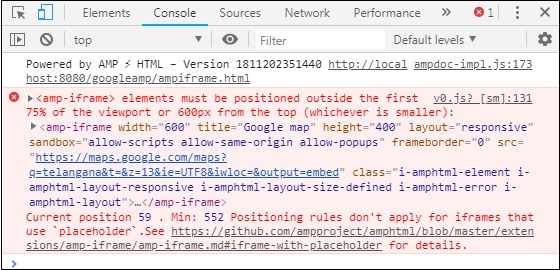
amp-iframe 不能顯示在頁面頂部,它應該距離頂部至少 600px 或在滾動到頂部時位於視口前 75% 的位置。如果您必須在開頭顯示 iframe,則需要向 iframe 新增佔位符,我們將在後面的教程中透過示例進行討論。
amp-iframe 的源站點不能與容器站點相同。例如,如果您的主站點是 www.xyz.com,則不能將 iframe 的 src 設定為 www.xyz.com/urlname。它可以是其他站點,例如 .xyz.com、example.xyz.com 等。
要使用 iframe,我們需要新增以下指令碼:
<script async custom-element = "amp-iframe"
   src = "https://cdn.ampproject.org/v0/amp-iframe-0.1.js"></script>
Amp-iframe 格式如下:
<amp-iframe width = "600" title = "Google map"
   height = "400" layout = "responsive"
   sandbox = "allow-scripts allow-same-origin allow-popups"
   frameborder = "0"
   src = "https://maps.google.com/maps?q=telangana&t=&z=13&ie=UTF8&iwloc=&output=embed">
</amp-iframe>
讓我們透過一個工作示例來理解這一點,在該示例中,我們將使用 iframe 來顯示 Google 地圖,如下所示。
示例
<!doctype html>
<html amp lang = "en">
   <head>
      <meta charset = "utf-8">
      <script async src = "https://cdn.ampproject.org/v0.js"></script>
      <title>Google AMP - Amp Iframe</title>
      <link rel = "canonical" href = "http://example.ampproject.org/article-metadata.html">
      <meta name = "viewport" content = "width = device-width,minimum-scale = 1,initial-scale = 1">

      <style amp-boilerplate>
         body{
            -webkit-animation:-amp-start 8s steps(1,end) 0s
            1 normal both;-moz-animation:
            -amp-start 8s steps(1,end) 0s 1 normal both;-ms-animation:
            -amp-start 8s steps(1,end) 0s 1 normal both;animation:
            -amp-start 8s steps(1,end) 0s 1 normal both}
         @-webkit-keyframes
         -amp-start{from{visibility:hidden}to{visibility:visible}}@-moz-keyframes
         -amp-start{from{visibility:hidden}to{visibility:visible}}@-ms-keyframes
         -amp-start{from{visibility:hidden}to{visibility:visible}}@-o-keyframes
         -amp-start{from{visibility:hidden}to{visibility:visible}}@keyframes
         -amp-start{from{visibility:hidden}to{visibility:visible}}
      </style><noscript>
      <style amp-boilerplate>
         body{-webkit-animation:none;-moz-animation:
         none;-ms-animation:none;animation:none}
      </style></noscript>

      <script async custom-element = "amp-iframe"
         src = "https://cdn.ampproject.org/v0/amp-iframe-0.1.js"
      ></script>

      <style>
         div {
            height:850px;
            text-align:center;
         }
      </style>
   </head>
   <body>
      <h3>Google AMP - Amp Iframe</h3>
      <div>
         Google Maps in Iframe
      </div>
      <h3>Google AMP - Amp Iframe</h3>
      <amp-iframe width = "600"
         title = "Google map"
         height = "400"
         layout = "responsive"
         sandbox = "allow-scripts allow-same-origin allow-popups"
         frameborder = "0" src = "https://maps.google.com/maps?q=telangana&t=&z=13&ie=UTF8&iwloc=&output=embed">
      </amp-iframe>
   </body>
</html>
輸出
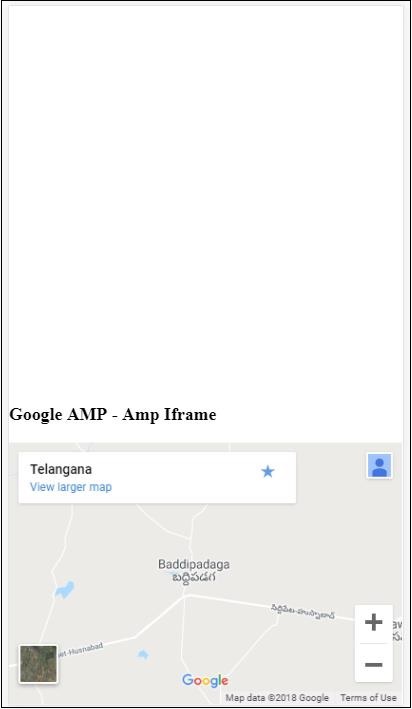
請注意,我們將 iframe 放置在距離頂部超過 600px 的位置。它會顯示如下錯誤:
在上面的示例中,我們使用了帶以下值的 sandbox:
sandbox = "allow-scripts allow-same-origin allow-popups"
Sandbox 屬性就像對 iframe 內部載入的內容的許可權。在這裡,我們允許載入來自 Google 地圖連結的所有指令碼。如果我們不提供 sandbox 屬性,則會顯示阻止內容載入到 iframe 中的錯誤:
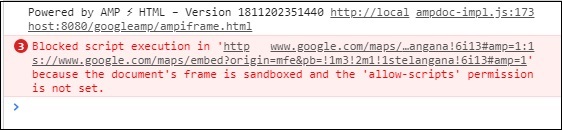
請注意,我們必須向 sandbox 提供正確的許可權。您可以在此處找到需要向 sandbox 提供的所有許可權的詳細資訊:https://mdn.club.tw/en-US/docs/Web/HTML/Element/iframe#attr-sandbox。
我們可以在 amp-iframe 內使用 placeholder 屬性來消除超過 600px 的限制。
下面給出了一個工作示例:
<!doctype html>
<html amp lang = "en">
   <head>
      <meta charset = "utf-8">
      <script async src = "https://cdn.ampproject.org/v0.js"></script>
      <title>Google AMP - Amp Iframe</title>
      <link rel = "canonical" href = "http://example.ampproject.org/article-metadata.html">
      <meta name = "viewport" content = "width = device-width,  minimum-scale=1,initial-scale=1">

      <style amp-boilerplate>
         body{
            -webkit-animation:-amp-start 8s steps(1,end) 0s
            1 normal both;-moz-animation:
            -amp-start 8s steps(1,end) 0s 1 normal both;-ms-animation:
            -amp-start 8s steps(1,end) 0s 1 normal both;animation:
            -amp-start 8s steps(1,end) 0s 1 normal both
         }
         @-webkit-keyframes
         -amp-start{from{visibility:hidden}to{visibility:visible}}@-moz-keyframes
         -amp-start{from{visibility:hidden}to{visibility:visible}}@-ms-keyframes
         -amp-start{from{visibility:hidden}to{visibility:visible}}@-o-keyframes
         -amp-start{from{visibility:hidden}to{visibility:visible}}@keyframes
         -amp-start{from{visibility:hidden}to{visibility:visible}}
      </style>
      <noscript>
         <style amp-boilerplate>
            body{
               -webkit-animation:none;
               -moz-animation:none;
               -ms-animation:none;
               animation:none
            }
         </style>
      </noscript>

      <script async custom-element = "amp-iframe"
         src = "https://cdn.ampproject.org/v0/amp-iframe-0.1.js">
      </script>

      <style>
         div {
            height:850px;
            text-align:center;
         }
      </style>
   </head>
   <body>
      <h3>Google AMP - Amp Iframe</h3>

      <amp-iframe width = "600"
         title = "Google map"
         height = "400"
         layout = "responsive"
         sandbox = "allow-scripts allow-same-origin allow-popups"
         frameborder = "0"
         src = "https://maps.google.com/maps?q=telangana&t=&z=13&ie=UTF8&iwloc=&output=embed">

         <amp-img layout = "fill" src = "images/loading.jpg" placeholder></amp-img>
      </amp-iframe>
   </body>
</html>
我們使用 amp-img 作為佔位符,如下所示:
<amp-iframe width = "600"
   title = "Google map"
   height = "400"
   layout = "responsive"
   sandbox = "allow-scripts allow-same-origin allow-popups"
   frameborder = "0"
   src = "https://maps.google.com/maps?q=telangana&t=&z=13&ie = UTF8&iwloc = &output = embed">

   <amp-img layout = "fill" src = "images/loading.jpg" placeholder></amp-img>
</amp-iframe>
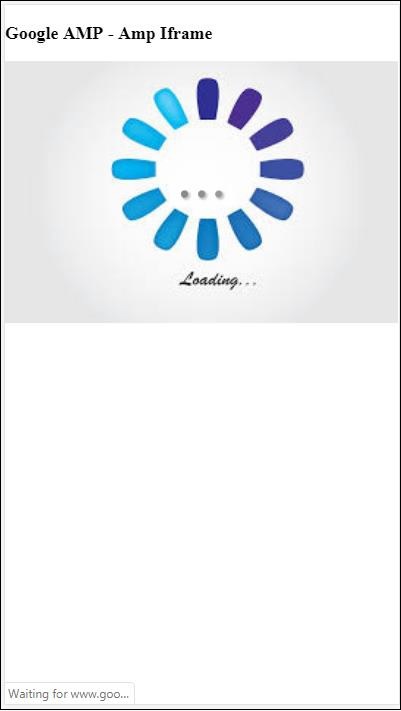
在這種情況下,不考慮 600px 的限制和 amp-iframe 在 75% 視口中的位置。在用作佔位符的影像上顯示載入指示器(三個點),它基本上是為 amp-iframe src 提供的。一旦 iframe 內容載入完畢,就會刪除該影像,並顯示 iframe 內容,如下面的輸出所示:
輸出