
- ReactJS 教程
- ReactJS - 首頁
- ReactJS - 簡介
- ReactJS - 路線圖
- ReactJS - 安裝
- ReactJS - 特性
- ReactJS - 優點與缺點
- ReactJS - 架構
- ReactJS - 建立 React 應用
- ReactJS - JSX
- ReactJS - 元件
- ReactJS - 巢狀元件
- ReactJS - 使用新建立的元件
- ReactJS - 元件集合
- ReactJS - 樣式
- ReactJS - 屬性 (props)
- ReactJS - 使用屬性建立元件
- ReactJS - props 驗證
- ReactJS - 建構函式
- ReactJS - 元件生命週期
- ReactJS - 事件管理
- ReactJS - 建立一個事件感知元件
- ReactJS - 在 Expense Manager 應用中引入事件
- ReactJS - 狀態管理
- ReactJS - 狀態管理 API
- ReactJS - 無狀態元件
- ReactJS - 使用 React Hooks 進行狀態管理
- ReactJS - 使用 React Hooks 進行元件生命週期管理
- ReactJS - 佈局元件
- ReactJS - 分頁
- ReactJS - Material UI
- ReactJS - Http 客戶端程式設計
- ReactJS - 表單程式設計
- ReactJS - 受控元件
- ReactJS - 非受控元件
- ReactJS - Formik
- ReactJS - 條件渲染
- ReactJS - 列表
- ReactJS - Keys
- ReactJS - 路由
- ReactJS - Redux
- ReactJS - 動畫
- ReactJS - Bootstrap
- ReactJS - 地圖
- ReactJS - 表格
- ReactJS - 使用 Flux 管理狀態
- ReactJS - 測試
- ReactJS - CLI 命令
- ReactJS - 構建和部署
- ReactJS - 示例
- Hooks
- ReactJS - Hooks 簡介
- ReactJS - 使用 useState
- ReactJS - 使用 useEffect
- ReactJS - 使用 useContext
- ReactJS - 使用 useRef
- ReactJS - 使用 useReducer
- ReactJS - 使用 useCallback
- ReactJS - 使用 useMemo
- ReactJS - 自定義 Hooks
- ReactJS 高階
- ReactJS - 可訪問性
- ReactJS - 程式碼分割
- ReactJS - 上下文
- ReactJS - 錯誤邊界
- ReactJS - 轉發 Refs
- ReactJS - 碎片
- ReactJS - 高階元件
- ReactJS - 與其他庫整合
- ReactJS - 最佳化效能
- ReactJS - Profiler API
- ReactJS - 埠
- ReactJS - 無 ES6 ECMAScript 的 React
- ReactJS - 無 JSX 的 React
- ReactJS - 調和
- ReactJS - Refs 和 DOM
- ReactJS - 渲染 Props
- ReactJS - 靜態型別檢查
- ReactJS - 嚴格模式
- ReactJS - Web Components
- 其他概念
- ReactJS - 日期選擇器
- ReactJS - Helmet
- ReactJS - 內聯樣式
- ReactJS - PropTypes
- ReactJS - BrowserRouter
- ReactJS - DOM
- ReactJS - 走馬燈
- ReactJS - 圖示
- ReactJS - 表單元件
- ReactJS - 參考 API
- ReactJS 有用資源
- ReactJS - 快速指南
- ReactJS - 有用資源
- ReactJS - 討論
ReactJS - UNSAFE_componentWillReceiveProps() 方法
UNSAFE_componentWillReceiveProps 是一個 React 函式。它用於表示元件即將獲得新的 props 或上下文。請記住,如果元件使用 getDerivedStateFromProps 或 getSnapshotBeforeUpdate,則不會呼叫 UNSAFE_componentWillReceiveProps。此外,它不能保證元件一定會收到新的 props,這在使用 Suspense 等最新的 React 功能時尤其重要。
語法
UNSAFE_componentWillReceiveProps(nextProps, nextContext)
引數
nextProps − 這些是元件從父元件接收到的新 props。我們可以透過比較 nextProps 和 this.props 來檢視發生了哪些變化。
nextContext − 元件將需要從最近的提供者那裡獲取新的上下文。要找出有什麼不同,請將 nextContext 與 this.context 進行比較。這僅在提供 static contextType 或 static contextTypes 時可用。
返回值
該方法不返回任何內容。它只是一個 React 在 props 或上下文即將更改時呼叫的函式。
示例
示例 - 訊息應用
以下是如何在一個小型 React 應用中使用 UNSAFE_componentWillReceiveProps 的示例。在此示例中,我們將建立一個顯示訊息並在接收新 props 時更新訊息的元件。
import React, { Component } from 'react';

class MessageComponent extends Component {
   constructor(props) {
      super(props);
      this.state = {
         message: props.initialMessage,
      };
   }

   // This is the UNSAFE_componentWillReceiveProps function
   UNSAFE_componentWillReceiveProps(nextProps) {
      if (nextProps.newMessage !== this.props.newMessage) {
         // Check if the new message is different
         this.setState({ message: nextProps.newMessage });
      }
   }
   render() {
      return <div>{this.state.message}</div>;
   }
}
class App extends Component {
   constructor() {
      super();
      this.state = {
         message: 'Hello, Tutorialspoint!',
         newMessage: 'Welcome to the React App!',
      };
   }
   updateMessage = () => {
      this.setState({ newMessage: 'Message is Updated!' });
   };

   render() {
      return (
         <div>
            <MessageComponent initialMessage={this.state.message} newMessage={this.state.newMessage} />
            <button onClick={this.updateMessage}>Update Message</button>
         </div>
      );
   }
}

export default App;
輸出
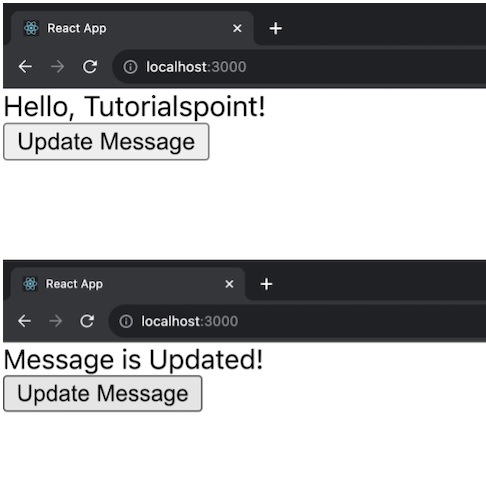
上述示例中有兩個元件:App 和 MessageComponent。當接收到新的 props 時,MessageComponent 使用 UNSAFE_componentWillReceiveProps 更新其訊息。App 元件有一個按鈕可以更改訊息。
示例 - 計數器應用
讓我們再建立一個簡單的 React 應用,併為應用新增 CSS 進行樣式設定。這個應用將是一個基本的待辦事項列表,它展示了 UNSAFE_componentWillReceiveProps() 函式的使用。以下是為此應用編寫的程式碼:
TodoList.js
import React, { Component } from 'react';
import './TodoList.css';

class TodoList extends Component {
   constructor(props) {
      super(props);
      this.state = {
         todos: [],
         newTodo: '',
      };
   }
   UNSAFE_componentWillReceiveProps(nextProps) {
      // Update todos when receiving new props
      if (nextProps.todos !== this.props.todos) {
         this.setState({ todos: nextProps.todos });
      }
   }
   handleInputChange = (event) => {
      this.setState({ newTodo: event.target.value });
   };
   handleAddTodo = () => {
      if (this.state.newTodo) {
         const updatedTodos = [...this.state.todos, this.state.newTodo];
         this.setState({ todos: updatedTodos, newTodo: '' });
      }
   };

   render() {
      return (
         <div className="todo-container App">
            <h2>ToDo List</h2>
            <ul>
               {this.state.todos.map((todo, index) => (
                  <li key={index}>{todo}</li>
               ))}
            </ul>
            <div className="input-container">
               <input
                  type="text"
                  value={this.state.newTodo}
                  onChange={this.handleInputChange}
                  placeholder="Add a new todo"
               />
               <button onClick={this.handleAddTodo}>Add</button>
            </div>
         </div>
      );
   }
}

export default TodoList;
TodoList.css
.todo-container {
   max-width: 400px;
   margin: 20px auto;
   padding: 20px;
   border: 1px solid #ccc;
   border-radius: 8px;
   box-shadow: 0 0 10px rgba(0, 0, 0, 0.1);
}

ul {
   list-style: none;
   padding: 0;
}

li {
   margin-bottom: 8px;
}

.input-container {
   margin-top: 16px;
   display: flex;
}

input {
   flex-grow: 1;
   padding: 8px;
   margin-right: 8px;
}

button {
   padding: 8px 16px;
   background-color: #4caf50;
   color: #fff;
   border: none;
   border-radius: 4px;
   cursor: pointer;
}

button:hover {
   background-color: #45a049;
}
輸出
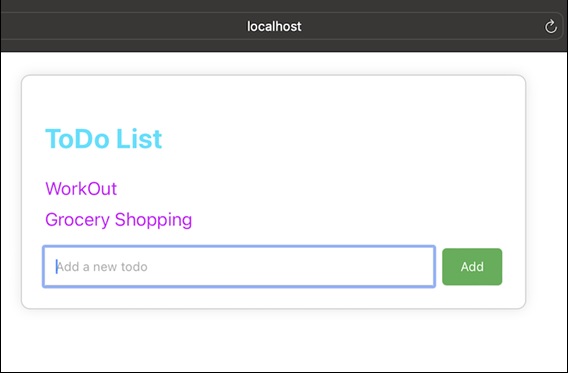
示例 - 個人資料應用
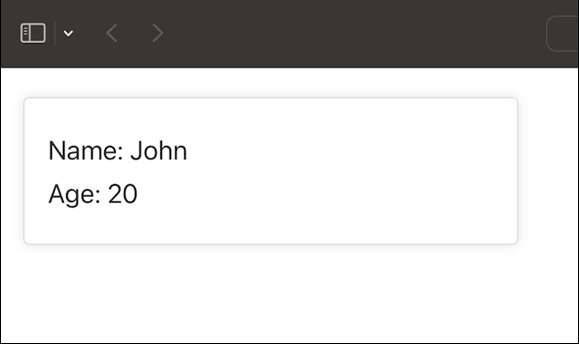
以下是如何使用 UNSAFE_componentWillReceiveProps() 以及 CSS 進行樣式設定的另一個 React 應用示例。這個應用是一個簡單的“使用者個人資料”元件,顯示使用者的姓名和年齡。
UserProfile.js
import React, { Component } from 'react';
import './UserProfile.css';

class UserProfile extends Component {
   constructor(props) {
      super(props);
      this.state = {
         name: 'John',
         age: 20,
      };
   }
   UNSAFE_componentWillReceiveProps(nextProps) {
      // Update state when receiving new props
      if (nextProps.user !== this.props.user) {
         this.setState({
            name: nextProps.user.name,
            age: nextProps.user.age,
         });
      }
   }

   render() {
      return (
         <div className="user-profile-container">
            <p className="user-name">Name: {this.state.name}</p>
            <p className="user-age">Age: {this.state.age}</p>
         </div>
      );
   }
}

export default UserProfile;
UserProfile.css
.user-profile-container {
   max-width: 300px;
   margin: 20px;
   padding: 16px;
   border: 1px solid #ddd;
   border-radius: 4px;
   box-shadow: 0 0 8px rgba(0, 0, 0, 0.1);
}

.user-name, .user-age {
   font-size: 18px;
   color: #333;
   margin: 8px 0;
}
輸出
請記住,在現代 React 中,我們通常使用其他生命週期方法或 Hooks 來實現與 UNSAFE_componentWillReceiveProps 類似的功能。
總結
UNSAFE_componentWillReceiveProps 是一箇舊的 React 生命週期函式,當元件將要從其父元件接收新的 props 時呼叫。它用於透過比較新的 props 和現有的 props 來響應 props 更改。在新的 React 程式碼中處理 props 更改時,最好使用替代方案以獲得更安全和一致的行為。