- ReactJS 教程
- ReactJS - 首頁
- ReactJS - 簡介
- ReactJS - 路線圖
- ReactJS - 安裝
- ReactJS - 特性
- ReactJS - 優點與缺點
- ReactJS - 架構
- ReactJS - 建立 React 應用
- ReactJS - JSX
- ReactJS - 元件
- ReactJS - 巢狀元件
- ReactJS - 使用新建立的元件
- ReactJS - 元件集合
- ReactJS - 樣式
- ReactJS - 屬性 (props)
- ReactJS - 使用屬性建立元件
- ReactJS - props 驗證
- ReactJS - 建構函式
- ReactJS - 元件生命週期
- ReactJS - 事件管理
- ReactJS - 建立一個事件感知元件
- ReactJS - 在 Expense Manager 應用中引入事件
- ReactJS - 狀態管理
- ReactJS - 狀態管理 API
- ReactJS - 無狀態元件
- ReactJS - 使用 React Hooks 進行狀態管理
- ReactJS - 使用 React Hooks 進行元件生命週期管理
- ReactJS - 佈局元件
- ReactJS - 分頁
- ReactJS - Material UI
- ReactJS - Http 客戶端程式設計
- ReactJS - 表單程式設計
- ReactJS - 受控元件
- ReactJS - 非受控元件
- ReactJS - Formik
- ReactJS - 條件渲染
- ReactJS - 列表
- ReactJS - Keys
- ReactJS - 路由
- ReactJS - Redux
- ReactJS - 動畫
- ReactJS - Bootstrap
- ReactJS - Map
- ReactJS - 表格
- ReactJS - 使用 Flux 管理狀態
- ReactJS - 測試
- ReactJS - CLI 命令
- ReactJS - 構建和部署
- ReactJS - 示例
- Hooks
- ReactJS - Hooks 簡介
- ReactJS - 使用 useState
- ReactJS - 使用 useEffect
- ReactJS - 使用 useContext
- ReactJS - 使用 useRef
- ReactJS - 使用 useReducer
- ReactJS - 使用 useCallback
- ReactJS - 使用 useMemo
- ReactJS - 自定義 Hooks
- ReactJS 高階
- ReactJS - 可訪問性
- ReactJS - 程式碼分割
- ReactJS - Context
- ReactJS - 錯誤邊界
- ReactJS - 轉發 Refs
- ReactJS - 片段
- ReactJS - 高階元件
- ReactJS - 整合其他庫
- ReactJS - 效能最佳化
- ReactJS - Profiler API
- ReactJS - Portals
- ReactJS - 無 ES6 ECMAScript 的 React
- ReactJS - 無 JSX 的 React
- ReactJS - 調和
- ReactJS - Refs 和 DOM
- ReactJS - Render Props
- ReactJS - 靜態型別檢查
- ReactJS - Strict Mode
- ReactJS - Web Components
- 附加概念
- ReactJS - 日期選擇器
- ReactJS - Helmet
- ReactJS - 行內樣式
- ReactJS - PropTypes
- ReactJS - BrowserRouter
- ReactJS - DOM
- ReactJS - 輪播圖
- ReactJS - 圖示
- ReactJS - 表單元件
- ReactJS - 參考 API
- ReactJS 有用資源
- ReactJS - 快速指南
- ReactJS - 有用資源
- ReactJS - 討論
ReactJS - Redux
React Redux 是一個用於 React 的高階狀態管理庫。正如我們之前學到的,React 只支援元件級別狀態管理。在一個大型複雜的應用程式中,使用了大量的元件。React 建議將狀態移到頂級元件,並使用屬性將狀態傳遞給巢狀元件。這在某種程度上有所幫助,但當元件數量增加時,它會變得複雜。
React Redux 介入並幫助在應用程式級別維護狀態。React Redux 允許任何元件隨時訪問狀態。此外,它還允許任何元件隨時更改應用程式的狀態。
讓我們學習如何在本章中使用 React Redux 來編寫 React 應用程式。
概念
React Redux 將應用程式的狀態儲存在一個名為 Redux store 的單一位置。React 元件可以從 store 獲取最新狀態,也可以隨時更改狀態。Redux 提供了一個簡單的流程來獲取和設定應用程式的當前狀態,並涉及以下概念。
Store - 儲存應用程式狀態的中心位置。
Actions - Action 是一個簡單的物件,包含要執行的動作型別和執行動作所需的輸入(稱為 payload)。例如,在 store 中新增專案的 action 包含型別為 ADD_ITEM 和一個包含專案詳細資訊的物件作為 payload。Action 可以表示為:
{
   type: 'ADD_ITEM',
   payload: { name: '..', ... }
}
Reducers - Reducers 是純函式,用於根據現有狀態和當前 action 建立新狀態。它返回新建立的狀態。例如,在新增專案的情況下,它建立一個新的專案列表,並將狀態中的專案和新專案合併,然後返回新建立的列表。
Action creators - Action creator 建立具有適當動作型別和動作所需資料的 action 並返回該 action。例如,addItem action creator 返回以下物件:
{
   type: 'ADD_ITEM',
   payload: { name: '..', ... }
}
Component - 元件可以連線到 store 以獲取當前狀態,並向 store 分派 action,以便 store 執行 action 並更新其當前狀態。
典型 Redux store 的工作流程如下圖所示。

- React 元件訂閱 store,並在應用程式初始化期間獲取最新狀態。
- 要更改狀態,React 元件建立必要的 action 並分派該 action。
- Reducer 根據 action 建立新狀態並返回它。Store 使用新狀態更新自身。
- 狀態更改後,store 將更新後的狀態傳送到所有已訂閱的元件。
Redux API
Redux 提供單個 API,connect,它將元件連線到 store,並允許元件獲取和設定 store 的狀態。
connect API 的簽名是:
function connect(mapStateToProps?, mapDispatchToProps?, mergeProps?, options?)
所有引數都是可選的,它返回一個 HOC(高階元件)。高階元件是一個包裝元件並返回新元件的函式。
let hoc = connect(mapStateToProps, mapDispatchToProps)
let connectedComponent = hoc(component)
讓我們看看前兩個引數,對於大多數情況來說,它們就足夠了。
mapStateToProps - 接受具有以下簽名的函式。
(state, ownProps?) => Object
這裡,state 指的是 store 的當前狀態,Object 指的是元件的新 props。每當 store 的狀態更新時,它都會被呼叫。
(state) => { prop1: this.state.anyvalue }
mapDispatchToProps - 接受具有以下簽名的函式。
Object | (dispatch, ownProps?) => Object
這裡,dispatch 指的是用於在 redux store 中分派 action 的 dispatch 物件,Object 指的是元件的一個或多個 dispatch 函式作為 props。
(dispatch) => {
   addDispatcher: (dispatch) => dispatch({ type: 'ADD_ITEM', payload: { } }),
   removeispatcher: (dispatch) => dispatch({ type: 'REMOVE_ITEM', payload: { } }),
}
Provider 元件
React Redux 提供了一個 Provider 元件,其唯一目的是使 Redux store 可用於所有使用 connect API 連線到 store 的巢狀元件。示例程式碼如下:
import React from 'react'
import ReactDOM from 'react-dom'
import { Provider } from 'react-redux'
import { App } from './App'
import createStore from './createReduxStore'

const store = createStore()

ReactDOM.render(
   <Provider store={store}>
      <App />
   </Provider>,
   document.getElementById('root')
)
現在,App 元件內的所有元件都可以使用 connect API 訪問 Redux store。
工作示例
讓我們重新建立我們的 expense manager 應用程式,並使用 React Redux 概念來維護應用程式的狀態。
首先,使用 Create React App 或 Rollup bundler 建立一個新的 React 應用程式,react-message-app,方法是按照“建立 React 應用程式”一章中的說明進行操作。
接下來,安裝 Redux 和 React Redux 庫。
npm install redux react-redux --save
接下來,安裝 uuid 庫以生成新費用的唯一識別符號。
npm install uuid --save
接下來,在您最喜歡的編輯器中開啟應用程式。
接下來,在應用程式的根目錄下建立 src 資料夾。
接下來,在 src 資料夾下建立 actions 資料夾。
接下來,在 src/actions 資料夾下建立一個檔案,types.js,並開始編輯。
接下來,新增兩種 action 型別,一種用於新增支出,另一種用於刪除支出。
export const ADD_EXPENSE = 'ADD_EXPENSE';
export const DELETE_EXPENSE = 'DELETE_EXPENSE';
接下來,在 src/actions 資料夾下建立一個檔案,index.js,以新增 action 並開始編輯。
接下來,匯入 uuid 來建立唯一識別符號。
import { v4 as uuidv4 } from 'uuid';
接下來,匯入 action 型別。
import { ADD_EXPENSE, DELETE_EXPENSE } from './types';
接下來,新增一個新函式以返回用於新增支出的 action 型別並將其匯出。
export const addExpense = ({ name, amount, spendDate, category }) => ({
   type: ADD_EXPENSE,
   payload: {
      id: uuidv4(),
      name,
      amount,
      spendDate,
      category
   }
});
這裡,該函式期望 expense 物件並返回型別為 ADD_EXPENSE 的 action 型別以及 expense 資訊的 payload。
接下來,新增一個新函式以返回用於刪除支出的 action 型別並將其匯出。
export const deleteExpense = id => ({
   type: DELETE_EXPENSE,
   payload: {
      id
   }
});
這裡,該函式期望要刪除的支出專案的 id,並返回型別為 'DELETE_EXPENSE' 的 action 型別以及支出 id 的 payload。
action 的完整原始碼如下:
import { v4 as uuidv4 } from 'uuid';
import { ADD_EXPENSE, DELETE_EXPENSE } from './types';

export const addExpense = ({ name, amount, spendDate, category }) => ({
   type: ADD_EXPENSE,
   payload: {
      id: uuidv4(),
      name,
      amount,
      spendDate,
      category
   }
});
export const deleteExpense = id => ({
   type: DELETE_EXPENSE,
   payload: {
      id
   }
});
接下來,在 src 資料夾下建立一個名為 reducers 的新資料夾。
接下來,在 src/reducers 資料夾下建立一個檔案,index.js,以編寫 reducer 函式並開始編輯。
接下來,匯入 action 型別。
import { ADD_EXPENSE, DELETE_EXPENSE } from '../actions/types';
接下來,新增一個函式,expensesReducer,以執行在 redux store 中新增和更新支出的實際功能。
export default function expensesReducer(state = [], action) {
   switch (action.type) {
      case ADD_EXPENSE:
         return [...state, action.payload];
      case DELETE_EXPENSE:
         return state.filter(expense => expense.id !== action.payload.id);
      default:
         return state;
   }
}
reducer 的完整原始碼如下:
import { ADD_EXPENSE, DELETE_EXPENSE } from '../actions/types';

export default function expensesReducer(state = [], action) {
   switch (action.type) {
      case ADD_EXPENSE:
         return [...state, action.payload];
      case DELETE_EXPENSE:
         return state.filter(expense => expense.id !== action.payload.id);
      default:
         return state;
   }
}
這裡,reducer 檢查 action 型別並執行相關程式碼。
接下來,在 src 資料夾下建立 components 資料夾。
接下來,在 src/components 資料夾下建立一個檔案,ExpenseEntryItemList.css,併為 html 表格新增通用樣式。
html {
   font-family: sans-serif;
}
table {
   border-collapse: collapse;
   border: 2px solid rgb(200,200,200);
   letter-spacing: 1px;
   font-size: 0.8rem;
}
td, th {
   border: 1px solid rgb(190,190,190);
   padding: 10px 20px;
}
th {
   background-color: rgb(235,235,235);
}
td, th {
   text-align: left;
}
tr:nth-child(even) td {
   background-color: rgb(250,250,250);
}
tr:nth-child(odd) td {
   background-color: rgb(245,245,245);
}
caption {
   padding: 10px;
}
tr.highlight td {
   background-color: #a6a8bd;
}
接下來,在 src/components 資料夾下建立一個檔案,ExpenseEntryItemList.js,並開始編輯。
接下來,匯入 React 和 React Redux 庫。
import React from 'react';
import { connect } from 'react-redux';
接下來,匯入 ExpenseEntryItemList.css 檔案。
import './ExpenseEntryItemList.css';
接下來,匯入 action creators。
import { deleteExpense } from '../actions';
import { addExpense } from '../actions';
接下來,建立一個類,ExpenseEntryItemList,並使用 props 呼叫建構函式。
class ExpenseEntryItemList extends React.Component {
   constructor(props) {
      super(props);
   }
}
接下來,建立 mapStateToProps 函式。
const mapStateToProps = state => {
   return {
      expenses: state
   };
};
在這裡,我們將輸入狀態複製到元件的 expenses props 中。
接下來,建立 mapDispatchToProps 函式。
const mapDispatchToProps = dispatch => {
   return {
      onAddExpense: expense => {
         dispatch(addExpense(expense));
      },
      onDelete: id => {
         dispatch(deleteExpense(id));
      }
   };
};
在這裡,我們建立了兩個函式,一個用於分派 add expense (addExpense) 函式,另一個用於分派 delete expense (deleteExpense) 函式,並將這些函式對映到元件的 props 中。
接下來,使用 connect api 匯出元件。
export default connect(
   mapStateToProps,
   mapDispatchToProps
)(ExpenseEntryItemList);
現在,元件獲得三個新的屬性,如下所示:
expenses - 支出列表
onAddExpense - 用於分派 addExpense 函式的函式
onDelete - 用於分派 deleteExpense 函式的函式
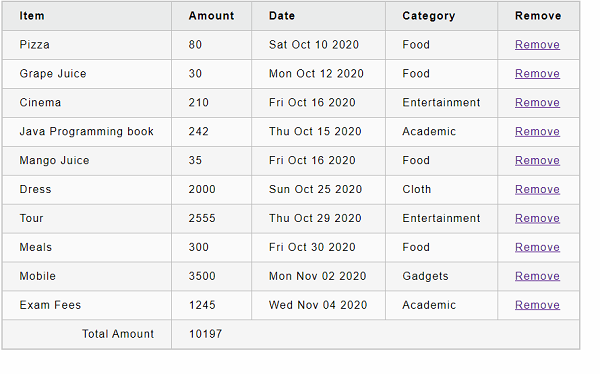
接下來,使用 onAddExpense 屬性在建構函式中向 redux store 新增一些支出。
if (this.props.expenses.length == 0)
{
   const items = [
      { id: 1, name: "Pizza", amount: 80, spendDate: "2020-10-10", category: "Food" },
      { id: 2, name: "Grape Juice", amount: 30, spendDate: "2020-10-12", category: "Food" },
      { id: 3, name: "Cinema", amount: 210, spendDate: "2020-10-16", category: "Entertainment" },
      { id: 4, name: "Java Programming book", amount: 242, spendDate: "2020-10-15", category: "Academic" },
      { id: 5, name: "Mango Juice", amount: 35, spendDate: "2020-10-16", category: "Food" },
      { id: 6, name: "Dress", amount: 2000, spendDate: "2020-10-25", category: "Cloth" },
      { id: 7, name: "Tour", amount: 2555, spendDate: "2020-10-29", category: "Entertainment" },
      { id: 8, name: "Meals", amount: 300, spendDate: "2020-10-30", category: "Food" },
      { id: 9, name: "Mobile", amount: 3500, spendDate: "2020-11-02", category: "Gadgets" },
      { id: 10, name: "Exam Fees", amount: 1245, spendDate: "2020-11-04", category: "Academic" }
   ]
   items.forEach((item) => {
      this.props.onAddExpense(
         {
            name: item.name,
            amount: item.amount,
            spendDate: item.spendDate,
            category: item.category
         }
      );
   })
}
接下來,新增一個事件處理程式以使用支出 id 刪除支出專案。
handleDelete = (id,e) => {
   e.preventDefault();
   this.props.onDelete(id);
}
在這裡,事件處理程式呼叫 onDelete 分派器,它與支出 id 一起呼叫 deleteExpense。
接下來,新增一個方法來計算所有支出的總金額。
getTotal() {
   let total = 0;
   for (var i = 0; i < this.props.expenses.length; i++) {
      total += this.props.expenses[i].amount
   }
   return total;
}
接下來,新增 render() 方法,並以表格格式列出支出專案。
render() {
   const lists = this.props.expenses.map(
      (item) =>
      <tr key={item.id}>
         <td>{item.name}</td>
         <td>{item.amount}</td>
         <td>{new Date(item.spendDate).toDateString()}</td>
         <td>{item.category}</td>
         <td><a href="#"
            onClick={(e) => this.handleDelete(item.id, e)}>Remove</a></td>
      </tr>
   );
   return (
      <div>
         <table>
            <thead>
               <tr>
                  <th>Item</th>
                  <th>Amount</th>
                  <th>Date</th>
                  <th>Category</th>
                  <th>Remove</th>
               </tr>
            </thead>
            <tbody>
               {lists}
               <tr>
                  <td colSpan="1" style={{ textAlign: "right" }}>Total Amount</td>
                  <td colSpan="4" style={{ textAlign: "left" }}>
                     {this.getTotal()}
                  </td>
               </tr>
            </tbody>
         </table>
      </div>
   );
}
這裡,我們將事件處理程式handleDelete設定為從儲存中移除費用。
下面給出了ExpenseEntryItemList元件的完整原始碼:
import React from 'react';
import { connect } from 'react-redux';
import './ExpenseEntryItemList.css';
import { deleteExpense } from '../actions';
import { addExpense } from '../actions';

class ExpenseEntryItemList extends React.Component {
   constructor(props) {
      super(props);

      if (this.props.expenses.length == 0){
         const items = [
            { id: 1, name: "Pizza", amount: 80, spendDate: "2020-10-10", category: "Food" },
            { id: 2, name: "Grape Juice", amount: 30, spendDate: "2020-10-12", category: "Food" },
            { id: 3, name: "Cinema", amount: 210, spendDate: "2020-10-16", category: "Entertainment" },
            { id: 4, name: "Java Programming book", amount: 242, spendDate: "2020-10-15", category: "Academic" },
            { id: 5, name: "Mango Juice", amount: 35, spendDate: "2020-10-16", category: "Food" },
            { id: 6, name: "Dress", amount: 2000, spendDate: "2020-10-25", category: "Cloth" },
            { id: 7, name: "Tour", amount: 2555, spendDate: "2020-10-29", category: "Entertainment" },
            { id: 8, name: "Meals", amount: 300, spendDate: "2020-10-30", category: "Food" },
            { id: 9, name: "Mobile", amount: 3500, spendDate: "2020-11-02", category: "Gadgets" },
            { id: 10, name: "Exam Fees", amount: 1245, spendDate: "2020-11-04", category: "Academic" }
         ]
         items.forEach((item) => {
            this.props.onAddExpense(
               {
                  name: item.name,
                  amount: item.amount,
                  spendDate: item.spendDate,
                  category: item.category
               }
            );
         })
      }
   }
   handleDelete = (id,e) => {
      e.preventDefault();
      this.props.onDelete(id);
   }
   getTotal() {
      let total = 0;
      for (var i = 0; i < this.props.expenses.length; i++) {
         total += this.props.expenses[i].amount
      }
      return total;
   }
   render() {
      const lists = this.props.expenses.map((item) =>
         <tr key={item.id}>
            <td>{item.name}</td>
            <td>{item.amount}</td>
            <td>{new Date(item.spendDate).toDateString()}</td>
            <td>{item.category}</td>
            <td><a href="#"
               onClick={(e) => this.handleDelete(item.id, e)}>Remove</a></td>
         </tr>
      );
      return (
         <div>
            <table>
               <thead>
                  <tr>
                     <th>Item</th>
                     <th>Amount</th>
                     <th>Date</th>
                     <th>Category</th>
                     <th>Remove</th>
                  </tr>
               </thead>
               <tbody>
                  {lists}
                  <tr>
                     <td colSpan="1" style={{ textAlign: "right" }}>Total Amount</td>
                     <td colSpan="4" style={{ textAlign: "left" }}>
                        {this.getTotal()}
                     </td>
                  </tr>
               </tbody>
            </table>
         </div>
      );
   }
}
const mapStateToProps = state => {
   return {
      expenses: state
   };
};
const mapDispatchToProps = dispatch => {
   return {
      onAddExpense: expense => {
         dispatch(addExpense(expense));
      },
      onDelete: id => {
         dispatch(deleteExpense(id));
      }
   };
};
export default connect(
   mapStateToProps,
   mapDispatchToProps
)(ExpenseEntryItemList);
接下來,在src/components資料夾下建立一個檔案App.js,並使用ExpenseEntryItemList元件。
import React, { Component } from 'react';
import ExpenseEntryItemList from './ExpenseEntryItemList';

class App extends Component {
   render() {
      return (
         <div>
            <ExpenseEntryItemList />
         </div>
      );
   }
}
export default App;
接下來,在src資料夾下建立一個檔案index.js。
import React from 'react';
import ReactDOM from 'react-dom';
import { createStore } from 'redux';
import { Provider } from 'react-redux';
import rootReducer from './reducers';
import App from './components/App';

const store = createStore(rootReducer);

ReactDOM.render(
   <Provider store={store}>
      <App />
   </Provider>,
   document.getElementById('root')
);
這裡,
使用createStore建立一個儲存,並附加我們的reducer。
使用React redux庫中的Provider元件並將store設定為props,這使得所有巢狀元件都可以使用connect api連線到store。
最後,在根資料夾下建立一個public資料夾,並在其中建立一個index.html檔案。
<!DOCTYPE html>
<html lang="en">
   <head>
      <meta charset="utf-8">
      <title>React Containment App</title>
   </head>
   <body>
      <div id="root"></div>
      <script type="text/JavaScript" src="./index.js"></script>
   </body>
</html>
接下來,使用npm命令啟動應用程式。
npm start
接下來,開啟瀏覽器並在位址列中輸入https://:3000,然後按回車鍵。
點選移除連結將從redux儲存中移除該專案。