
- ReactJS 教程
- ReactJS - 首頁
- ReactJS - 簡介
- ReactJS - 路線圖
- ReactJS - 安裝
- ReactJS - 特性
- ReactJS - 優點與缺點
- ReactJS - 架構
- ReactJS - 建立 React 應用
- ReactJS - JSX
- ReactJS - 元件
- ReactJS - 巢狀元件
- ReactJS - 使用新建立的元件
- ReactJS - 元件集合
- ReactJS - 樣式
- ReactJS - 屬性 (props)
- ReactJS - 使用屬性建立元件
- ReactJS - props 驗證
- ReactJS - 建構函式
- ReactJS - 元件生命週期
- ReactJS - 事件管理
- ReactJS - 建立一個事件感知元件
- ReactJS - 在 Expense Manager 應用中引入事件
- ReactJS - 狀態管理
- ReactJS - 狀態管理 API
- ReactJS - 無狀態元件
- ReactJS - 使用 React Hooks 進行狀態管理
- ReactJS - 使用 React Hooks 進行元件生命週期管理
- ReactJS - 佈局元件
- ReactJS - 分頁
- ReactJS - Material UI
- ReactJS - Http 客戶端程式設計
- ReactJS - 表單程式設計
- ReactJS - 受控元件
- ReactJS - 非受控元件
- ReactJS - Formik
- ReactJS - 條件渲染
- ReactJS - 列表
- ReactJS - Keys
- ReactJS - 路由
- ReactJS - Redux
- ReactJS - 動畫
- ReactJS - Bootstrap
- ReactJS - Map
- ReactJS - 表格
- ReactJS - 使用 Flux 管理狀態
- ReactJS - 測試
- ReactJS - CLI 命令
- ReactJS - 構建和部署
- ReactJS - 示例
- Hooks
- ReactJS - Hooks 簡介
- ReactJS - 使用 useState
- ReactJS - 使用 useEffect
- ReactJS - 使用 useContext
- ReactJS - 使用 useRef
- ReactJS - 使用 useReducer
- ReactJS - 使用 useCallback
- ReactJS - 使用 useMemo
- ReactJS - 自定義 Hooks
- ReactJS 高階
- ReactJS - 可訪問性
- ReactJS - 程式碼分割
- ReactJS - Context
- ReactJS - 錯誤邊界
- ReactJS - 轉發 Refs
- ReactJS - 片段
- ReactJS - 高階元件
- ReactJS - 與其他庫整合
- ReactJS - 效能最佳化
- ReactJS - Profiler API
- ReactJS - Portals
- ReactJS - 無 ES6 ECMAScript 的 React
- ReactJS - 無 JSX 的 React
- ReactJS - 調和
- ReactJS - Refs 和 DOM
- ReactJS - 渲染屬性
- ReactJS - 靜態型別檢查
- ReactJS - Strict Mode
- ReactJS - Web Components
- 其他概念
- ReactJS - 日期選擇器
- ReactJS - Helmet
- ReactJS - 內聯樣式
- ReactJS - PropTypes
- ReactJS - BrowserRouter
- ReactJS - DOM
- ReactJS - 輪播圖
- ReactJS - 圖示
- ReactJS - 表單元件
- ReactJS - 參考 API
- ReactJS 有用資源
- ReactJS - 快速指南
- ReactJS - 有用資源
- ReactJS - 討論
ReactJS - 渲染屬性
由於 React 元件透過組合(一個元件巢狀在另一個元件內部)而不是繼承來連線,因此一個 React 元件中使用的邏輯不會直接共享到另一個元件。React 提供了多種在元件之間共享邏輯的選項,其中一個選項就是渲染屬性。渲染屬性基本上是透過其 props 將包含必要渲染邏輯的函式傳遞給具有核心功能的元件。因此,它被稱為渲染屬性。
讓我們學習如何在本章中使用渲染屬性。
如何使用渲染屬性
讓我們看看如何逐步使用渲染屬性並在兩個元件之間共享邏輯。讓我們考慮從外部 URL 獲取和渲染資料的場景。
建立一個元件,FetcherComponent 用於從外部 url 獲取資料,FetcherConsumerComponent 用於使用資料並渲染它。
為給定的 url (props.url) 建立一個帶有資料獲取邏輯的元件 FetcherComponent。
componentDidMount() {
   fetch(this.props.url)
   .then((response) => response.json())
   .then((data) => {
      this.setState({
         data: data
      });
   });
}
現在,更新FetcherComponent,以便核心渲染邏輯將委託給 props (this.props.render)。
render() {
   return (
      <div>
         <h2>Fetch react component</h2>
         {this.state.data && this.props.render(this.state.data)}
      </div>
   )
}
這裡:
this.props.render 是具有渲染邏輯的函式,將透過其他任何元件的 props 傳遞到 FetcherComponent。
建立一個元件 FetcherConsumerComponent 並透過傳遞獲取資料的渲染邏輯來渲染 FetcherComponent。
render() {
   return (<FetcherComponent url="users.json" render={(items) => (
      <ul>
         {items && items.length && items.map((item) =>
            <li key={item.id}>{item.name}</li>
         )}
      </ul>
   )} />)
}
這裡:
items 是由FetcherComponent 元件獲取的資料。
它們被迴圈遍歷併發出 HTML 無序列表。
我們可以按照章節中定義的步驟,在下一節中建立一個可工作的示例。
應用渲染屬性
首先,建立一個新的 React 應用,並使用以下命令啟動它。
create-react-app myapp
cd myapp
npm start
接下來,開啟App.css (src/App.css) 並刪除所有 CSS 類。然後,建立一個元件 FetchRenderProps (src/Components/FetchRenderProps.js),其中包含如下所示的資料獲取邏輯:
import React from "react";
class FetchRenderProps extends React.Component {
   constructor(props) {
      super(props);
      this.state = {
         data: []
      }
   }
   componentDidMount() {
      fetch(this.props.url)
      .then((response) => response.json())
      .then((data) => {
         console.log(data)
         this.setState({
            data: data
         });
      });
   }
   render() {
      return (
         <div>
            <h2>Fetch react component</h2>
            {this.state.data && this.props.render(this.state.data)}
         </div>
      )
   }
}
export default FetchRenderProps;
在這裡我們:
使用fetch javascript 方法在componentDidMount 事件中從外部 url 獲取資料。
使用透過 props 傳遞的render 方法渲染獲取的資料。
接下來,在 public 資料夾中建立一個檔案 users.json (public/users.json) 來儲存使用者資訊。我們將嘗試使用FetchRenderProps 元件獲取它並在我們的應用程式中顯示它。
[{"id":1,"name":"Fowler","age":18},
{"id":2,"name":"Donnell","age":24},
{"id":3,"name":"Pall","age":26}]
接下來,在 public 資料夾中建立一個檔案 todo_list.json (public/todo_list.json) 來儲存待辦事項列表資訊。我們將嘗試使用FetchRenderProps 元件獲取它並在我們的應用程式中顯示它。
[{"id":1,"title":"Learn JavaScript","is_done":true},
{"id":2,"title":"Learn React","is_done":true},
{"id":3,"title":"Learn Typescript","is_done":false
接下來,建立一個元件 SimpleRenderProps (src/Components/SimpleRenderProps.js) 來使用 FetchRenderProps 元件,如下所示:
import React from "react";
import FetchRenderProps from "./FetchRenderProps";
class SimpleRenderProps extends React.Component {
   render() {
      return (
         <>
            <FetchRenderProps url="users.json" render={(items) => (
               <ul>
                  {items && items.length && items.map((item) =>
                     <li key={item.id}>{item.name}</li>
                  )}
               </ul>
            )} />
            <FetchRenderProps url="todo_list.json" render={(items) => (
               <ul>
                  {items && items.length && items.map((item) =>
                     <li key={item.id}>{item.title} {item.is_done && <strong>Done</strong>}</li>
                  )}
               </ul>
            )} />
         </>
      )
   }
}
export default SimpleRenderProps;
在這裡我們:
使用FetchRenderProps 和 users.json 來獲取和渲染使用者列表
使用FetchRenderProps 和todo_list.json 來獲取和渲染待辦事項列表
獲取使用者和待辦事項列表都使用相同的FetchRenderProps 元件。
接下來,開啟App.js 檔案並渲染一個SimpleRenderProps 元件,如下所示:
import './App.css'
import React from 'react';
import SimpleRenderProps from './Components/SimpleRenderProps'
function App() {
   return (
      <div className="container">
         <div style={{ padding: "10px" }}>
            <div>
               <SimpleRenderProps />
            </div>
         </div>
      </div>
   );
}
export default App;
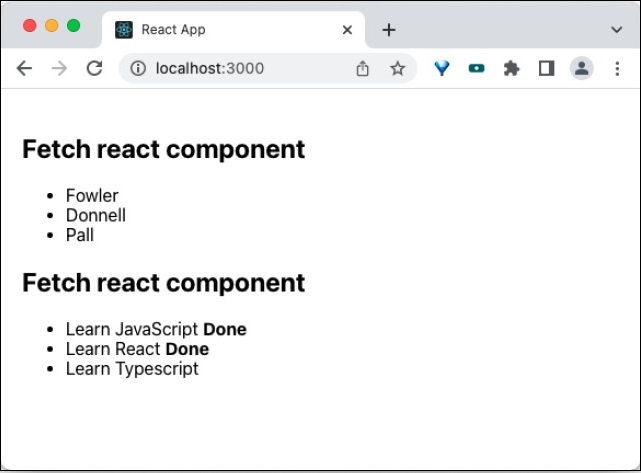
最後,在瀏覽器中開啟應用程式並檢查最終結果。應用程式將按如下所示渲染:
總結
渲染屬性是在元件之間共享邏輯的有效方法。它在許多第三方元件中被廣泛使用,並取得了良好的成功率,並且它是 React 領域中經時間考驗的共享邏輯方法。