
- ReactJS 教程
- ReactJS - 首頁
- ReactJS - 簡介
- ReactJS - 路線圖
- ReactJS - 安裝
- ReactJS - 特性
- ReactJS - 優點與缺點
- ReactJS - 架構
- ReactJS - 建立 React 應用
- ReactJS - JSX
- ReactJS - 元件
- ReactJS - 巢狀元件
- ReactJS - 使用新建立的元件
- ReactJS - 元件集合
- ReactJS - 樣式
- ReactJS - 屬性 (props)
- ReactJS - 使用屬性建立元件
- ReactJS - props 驗證
- ReactJS - 建構函式
- ReactJS - 元件生命週期
- ReactJS - 事件管理
- ReactJS - 建立事件感知元件
- ReactJS - 在 Expense Manager 應用中引入事件
- ReactJS - 狀態管理
- ReactJS - 狀態管理 API
- ReactJS - 無狀態元件
- ReactJS - 使用 React Hooks 進行狀態管理
- ReactJS - 使用 React Hooks 進行元件生命週期管理
- ReactJS - 佈局元件
- ReactJS - 分頁
- ReactJS - Material UI
- ReactJS - Http 客戶端程式設計
- ReactJS - 表單程式設計
- ReactJS - 受控元件
- ReactJS - 非受控元件
- ReactJS - Formik
- ReactJS - 條件渲染
- ReactJS - 列表
- ReactJS - Keys
- ReactJS - 路由
- ReactJS - Redux
- ReactJS - 動畫
- ReactJS - Bootstrap
- ReactJS - 地圖
- ReactJS - 表格
- ReactJS - 使用 Flux 管理狀態
- ReactJS - 測試
- ReactJS - CLI 命令
- ReactJS - 構建和部署
- ReactJS - 示例
- Hooks
- ReactJS - Hooks 簡介
- ReactJS - 使用 useState
- ReactJS - 使用 useEffect
- ReactJS - 使用 useContext
- ReactJS - 使用 useRef
- ReactJS - 使用 useReducer
- ReactJS - 使用 useCallback
- ReactJS - 使用 useMemo
- ReactJS - 自定義 Hooks
- ReactJS 高階
- ReactJS - 可訪問性
- ReactJS - 程式碼分割
- ReactJS - 上下文
- ReactJS - 錯誤邊界
- ReactJS - 轉發 Refs
- ReactJS - 片段
- ReactJS - 高階元件
- ReactJS - 與其他庫整合
- ReactJS - 最佳化效能
- ReactJS - Profiler API
- ReactJS - 門戶
- ReactJS - 無 ES6 ECMAScript 的 React
- ReactJS - 無 JSX 的 React
- ReactJS - 調和
- ReactJS - Refs 和 DOM
- ReactJS - 渲染 Props
- ReactJS - 靜態型別檢查
- ReactJS - 嚴格模式
- ReactJS - Web Components
- 其他概念
- ReactJS - 日期選擇器
- ReactJS - Helmet
- ReactJS - 內聯樣式
- ReactJS - PropTypes
- ReactJS - BrowserRouter
- ReactJS - DOM
- ReactJS - 走馬燈
- ReactJS - 圖示
- ReactJS - 表單元件
- ReactJS - 參考 API
- ReactJS 有用資源
- ReactJS - 快速指南
- ReactJS - 有用資源
- ReactJS - 討論
ReactJS - DOM
要執行 React 應用程式,它需要將自身附加到 Web 應用程式的主文件。React 提供了一個模組來訪問和將應用程式附加到文件的 DOM,該模組是 ReactDOM (react-dom)。
讓我們在本節中學習如何建立一個簡單的 React 元件,並使用 reactDOM 模組將該元件附加到文件中。
ReactDOM 用法
react-dom 是用於操作文件 DOM 的核心包。react-dom 允許將一個或多個 React 應用程式附加到文件。應將 react-dom 匯入到應用程式中,如下所示:
import * as ReactDOM from 'react-dom';
react-dom 提供了兩種操作 DOM 的方法,它們如下:
createPortal() - 在 React 應用程式中建立一個門戶。門戶是一個特殊的 React 節點,它使主 React 應用程式能夠將其子節點渲染到 DOM 中,該 DOM 位於其自身 DOM 元件層次結構之外。
return ReactDOM.createPortal(
   this.props.children, // child node
   domNode // DOM node outside the root element
);
我們將在以後的章節中詳細瞭解門戶。
flushSync() - 立即重新整理狀態更改並更新 DOM。通常,React 會建立一個虛擬 DOM,然後透過分析虛擬 DOM 和真實 DOM 之間的差異來更新真實 DOM。更新頻率由 React 內部確定。flushSync() 會中斷並立即更新更改。
react-dom 提供了兩個子模組,一個用於伺服器端應用程式,另一個用於客戶端應用程式。這些模組如下:
react-dom/server
react-dom/client
ReactDOMServer
伺服器模組將用於在伺服器上渲染 React 元件,並且可以按如下所示匯入該模組:
import * as ReactDOMServer from 'react-dom/server';
ReactDOMServer 提供的一些方法如下:
renderToPipeableStream() - 將 React 元件渲染到其初始 HTML 並返回一個管道流。
renderToReadableStream() - 將 React 元件渲染到其初始 HTML 並透過 Promise 返回一個可讀的 Web 流。
renderToStaticNodeStream() - 將 React 元件渲染到其初始 HTML 並返回一個可讀的 Node.js 流,該流輸出 HTML 字串。它跳過額外的標記,例如 data-reactroot,並且輸出將與 renderToStaticMarkup() 相同。
renderToString() - 將 React 元件渲染到其初始 HTML 並返回一個 HTML 字串。
renderToStaticMarkup() - 與 renderToString() 相同,除了它跳過額外的標記,例如 data-reactroot。
ReactDOMClient
客戶端模組將在前端開發中廣泛使用,並且可以按如下所示匯入到應用程式中:
import * as ReactDOM from 'react-dom/client';
ReactDOMClient 提供的一些方法如下:
createRoot() - 建立一個根元素以稍後附加和渲染 React 元件。它接受一個 HTML 元素並返回一個 React 節點。該 React 節點稱為應用程式的根。返回的 React 節點將具有兩種方法,render 用於渲染 React 元件,unmount 用於解除安裝 React 元件。
const root = createRoot(container);
root.render(element); // where element = document.getElementById('root-id')
root.umount();
hydrateRoot() - 與 createRoot() 相同,但它與 react-dom/server 模組結合使用以水化在伺服器上渲染的 React 元件。
應用 ReactDOMClient
首先,建立一個新的 React 應用程式並使用以下命令啟動它。
create-react-app myapp
cd myapp
npm start
接下來,在元件資料夾下(src/components/Hello.js)建立一個 React 元件 Hello。
import React from "react";
class Hello extends React.Component {
   constructor(props) {
      super(props)
   }
   render() {
      return (
         <div>Hello, {this.props.name}</div>
      );
   }
}
export default Hello;
接下來,開啟 index.html (public/index.html) 並新增一個新的容器 (root2),如下所示:
<!DOCTYPE html>
<html lang="en">
   <head>
      <meta charset="utf-8" />
      <link rel="icon" href="%PUBLIC_URL%/favicon.ico" />
      <meta name="viewport" content="width=device-width, initial-scale=1" />
      <meta name="theme-color" content="#000000" />
      <meta name="description" content="Web site created using create-react-app" />
      <link rel="apple-touch-icon" href="%PUBLIC_URL%/logo192.png" />
      <link rel="manifest" href="%PUBLIC_URL%/manifest.json" />
      <title>React App</title>
   </head>
   <body>
      <noscript>You need to enable JavaScript to run this app.</noscript>
      <div style="padding: 10px;">
         <div id="root"></div>
         <div id="root2"></div>
      </div>
   </body>
</html>
接下來,開啟 index.js (src/index.js) 並將我們的 hello 元件附加到 root 和 root2 容器中,如下所示:
import React from 'react';
import ReactDOM from 'react-dom/client';
import './index.css';
import Hello from './Components/Hello';
import reportWebVitals from './reportWebVitals';
const root = ReactDOM.createRoot(document.getElementById('root'));
root.render(
   <React.StrictMode>
      <Hello name="Main root container" />
   </React.StrictMode>
);
const root2 = ReactDOM.createRoot(document.getElementById('root2'));
root2.render(
   <React.StrictMode>
      <Hello name="Another root container" />
   </React.StrictMode>
);
reportWebVitals();`
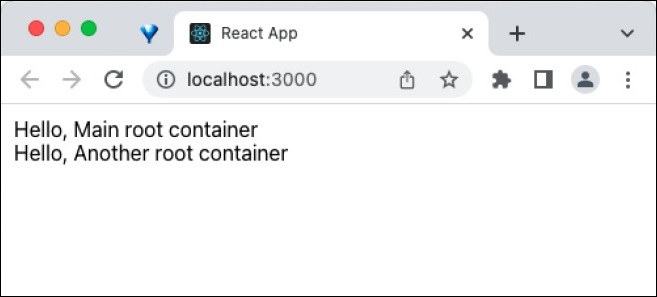
最後,在瀏覽器中開啟應用程式並檢查結果。React 元件將附加到兩個根元素,如下所示:
總結
ReactDOM 提供了在客戶端和伺服器環境中透過將 React 元件附加到 HTML 文件中來建立 React 應用程式入口點的方法。