
- ReactJS 教程
- ReactJS - 首頁
- ReactJS - 簡介
- ReactJS - 路線圖
- ReactJS - 安裝
- ReactJS - 特性
- ReactJS - 優點與缺點
- ReactJS - 架構
- ReactJS - 建立 React 應用
- ReactJS - JSX
- ReactJS - 元件
- ReactJS - 巢狀元件
- ReactJS - 使用新建立的元件
- ReactJS - 元件集合
- ReactJS - 樣式
- ReactJS - 屬性 (props)
- ReactJS - 使用屬性建立元件
- ReactJS - props 驗證
- ReactJS - 建構函式
- ReactJS - 元件生命週期
- ReactJS - 事件管理
- ReactJS - 建立一個事件感知元件
- ReactJS - 在 Expense Manager 應用中引入事件
- ReactJS - 狀態管理
- ReactJS - 狀態管理 API
- ReactJS - 無狀態元件
- ReactJS - 使用 React Hooks 進行狀態管理
- ReactJS - 使用 React Hooks 進行元件生命週期管理
- ReactJS - 佈局元件
- ReactJS - 分頁
- ReactJS - Material UI
- ReactJS - Http 客戶端程式設計
- ReactJS - 表單程式設計
- ReactJS - 受控元件
- ReactJS - 非受控元件
- ReactJS - Formik
- ReactJS - 條件渲染
- ReactJS - 列表
- ReactJS - Keys
- ReactJS - 路由
- ReactJS - Redux
- ReactJS - 動畫
- ReactJS - Bootstrap
- ReactJS - Map
- ReactJS - 表格
- ReactJS - 使用 Flux 管理狀態
- ReactJS - 測試
- ReactJS - CLI 命令
- ReactJS - 構建和部署
- ReactJS - 示例
- Hooks
- ReactJS - Hooks 簡介
- ReactJS - 使用 useState
- ReactJS - 使用 useEffect
- ReactJS - 使用 useContext
- ReactJS - 使用 useRef
- ReactJS - 使用 useReducer
- ReactJS - 使用 useCallback
- ReactJS - 使用 useMemo
- ReactJS - 自定義 Hooks
- ReactJS 高階
- ReactJS - 可訪問性
- ReactJS - 程式碼分割
- ReactJS - Context
- ReactJS - 錯誤邊界
- ReactJS - 轉發 Refs
- ReactJS - Fragments
- ReactJS - 高階元件
- ReactJS - 與其他庫整合
- ReactJS - 效能最佳化
- ReactJS - Profiler API
- ReactJS - Portals
- ReactJS - 無 ES6 ECMAScript 的 React
- ReactJS - 無 JSX 的 React
- ReactJS - Reconciliation (協調)
- ReactJS - Refs 和 DOM
- ReactJS - Render Props
- ReactJS - 靜態型別檢查
- ReactJS - Strict Mode (嚴格模式)
- ReactJS - Web Components
- 其他概念
- ReactJS - 日期選擇器
- ReactJS - Helmet
- ReactJS - 內聯樣式
- ReactJS - PropTypes
- ReactJS - BrowserRouter
- ReactJS - DOM
- ReactJS - 走馬燈
- ReactJS - 圖示
- ReactJS - 表單元件
- ReactJS - 參考 API
- ReactJS 有用資源
- ReactJS - 快速指南
- ReactJS - 有用資源
- ReactJS - 討論
ReactJS - UNSAFE_componentWillMount() 方法
React 中的 componentWillMount() 函式就像元件出現在網頁上之前的準備步驟。它發生在元件顯示之前。此函式獲取資料,但需要注意的是,在元件第一次顯示之前,它不會提供任何結果。由於獲取資料可能需要一些時間,因此元件不會等待此階段完成才顯示自身。
在最新的 React 版本中,不再推薦使用 componentWillMount()。他們建議改用 componentDidMount()。如果我們確實想要使用 componentWillMount(),我們可以使用,但是我們必須將其稱為 UNSAFE_componentWillMount()。這就像一個警告標誌,提醒 React 開發者應該避免使用它。
語法
UNSAFE_componentWillMount() {
   //the action will come here that we want to execute
}
引數
此方法不接受任何引數。
返回值
此方法不應該返回任何值。
示例
示例 - 顯示警告訊息
藉助 UNSAFE_componentWillMount() 函式,這是一個在元件載入之前顯示警告的 React 應用示例。
import React, { Component } from 'react';

class App extends Component {
   UNSAFE_componentWillMount() {
      alert("This message will appear before the component loads.");
   }
   render() {
      return (
         <div>
            <h1>Welcome to My React App</h1>
            <p>This is a simple application using UNSAFE_componentWillMount().</p>
         </div>
      );
   }
}

export default App;
輸出

這是一個簡單的 UNSAFE_componentWillMount() 應用示例,用於在網頁上載入 React 元件之前顯示訊息。請記住,在最新的 React 版本中,對於類似的功能,建議使用 componentDidMount() 而不是 UNSAFE_componentWillMount()。
示例 - 資料獲取應用
在這個示例中,我們將建立一個元件,在即將掛載時從 JSONPlaceholder API 獲取資料。然後將獲取到的資料儲存在元件的狀態中,元件在資料可用後呈現資料。因此,此應用的程式碼如下:
import React, { Component } from 'react';
import './App.css'

class DataFetchingApp extends Component {
   constructor() {
      super();
      this.state = {
         data: null,
      };
   }
   UNSAFE_componentWillMount() {
      // fetching data from an API
      fetch('https://jsonplaceholder.typicode.com/todos/1')
      .then((response) => response.json())
      .then((data) => {
         this.setState({ data });
      })
      .catch((error) => console.error('Error fetching data:', error));
   }
   render() {
      const { data } = this.state;

      return (
         <div className='App'>
            <h1>Data Fetching App</h1>
            {data ? (
               <div>
                  <h2>Data from API:</h2>
                  <p>Title: {data.title}</p>
                  <p>User ID: {data.userId}</p>
                  <p>Completed: {data.completed ? 'Yes' : 'No'}</p>
               </div>
               ) : (
               <p>Loading data...</p>
               )}
         </div>
      );
   }
}

export default DataFetchingApp;
App.css
.App {
   align-items: center;
   justify-content: center;
   margin-left: 500px;
   margin-top: 50px;
}
h1 {
   color: red;
}
p {
   margin: 8px 0;
   color: green;
}
輸出
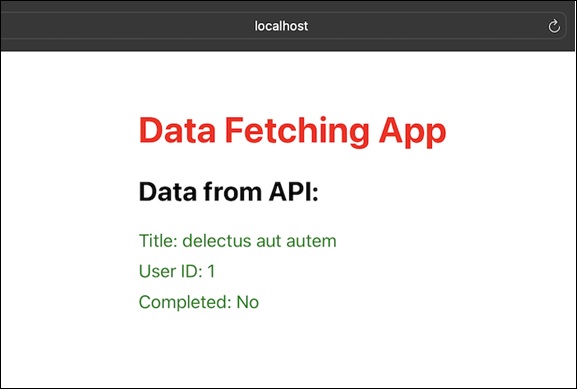
在這個 React 應用中,我們使用了 UNSAFE_componentWillMount() 來在元件掛載之前從 API 獲取資料。因此,我們使用了 API 來獲取資料。
示例 - 倒計時器應用
現在我們還有一個簡單的 React 應用,它使用 UNSAFE_componentWillMount() 來設定倒計時器。在這個應用程式中,我們將有一個計時器,它將倒計時 10 秒,10 秒後,它將在螢幕上顯示一條警告訊息,表明時間已達到零。因此,此應用的程式碼如下:
import React, { Component } from 'react';
import './App.css';

class CountdownTimerApp extends Component {
   constructor() {
      super();
      this.state = {
         seconds: 10,
      };
   }
   UNSAFE_componentWillMount() {
      this.startTimer();
   }
   startTimer() {
      this.timerInterval = setInterval(() => {
         this.setState((prevState) => ({
            seconds: prevState.seconds - 1,
         }), () => {
         if (this.state.seconds === 0) {
            clearInterval(this.timerInterval);
            alert('Countdown timer reached zero!');
         }
         });
      }, 1000);
   }

   render() {
      return (
         <div className='App'>
            <h1>Countdown Timer App</h1>
            <p>Seconds remaining: {this.state.seconds}</p>
         </div>
      );
   }
}

export default CountdownTimerApp;
輸出
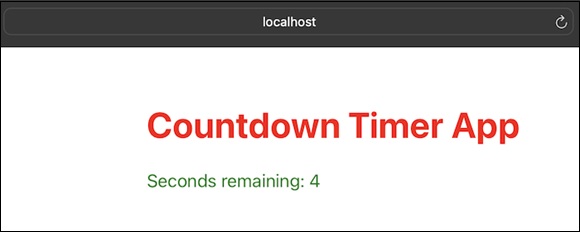
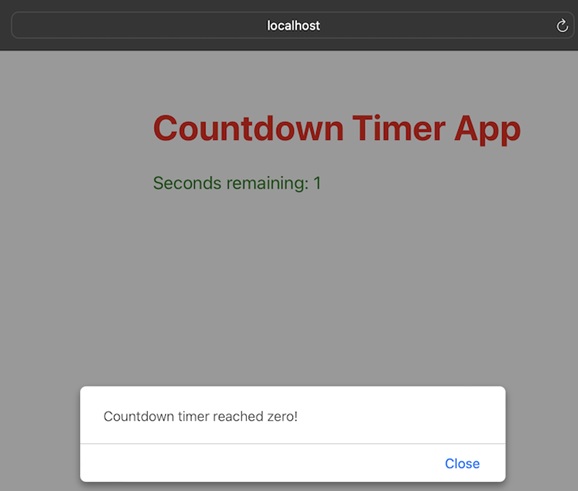
在這個示例中,元件在 UNSAFE_componentWillMount() 生命週期方法中開始倒計時器。每秒,計時器都會遞減 seconds 狀態。當倒計時達到零時,間隔被清除並顯示警報。
限制
如果元件使用 getDerivedStateFromProps 或 getSnapshotBeforeUpdate,則不會呼叫此方法。
UNSAFE_componentWillMount 不能保證元件在某些當前 React 場景(如 Suspense)中會被掛載。
它被稱為“不安全”是因為在某些情況下,React 可以丟棄正在進行的元件樹並重建它,這使得 UNSAFE_componentWillMount 變得不可靠。
如果我們需要執行依賴於元件掛載的活動,請改用 componentDidMount。
UNSAFE_componentWillMount 是伺服器端渲染時唯一執行的生命週期方法。
對於大多數實際用途,它與建構函式類似,因此最好使用建構函式來實現等效邏輯。
總結
UNSAFE_componentWillMount() 是一個較舊的 React 生命週期函式,用於元件載入前的任務,但在現代 React 程式設計中,建議遵循當前的最佳實踐,併為此類任務使用 componentDidMount()。