
- ReactJS 教程
- ReactJS - 首頁
- ReactJS - 簡介
- ReactJS - 路線圖
- ReactJS - 安裝
- ReactJS - 特性
- ReactJS - 優點與缺點
- ReactJS - 架構
- ReactJS - 建立 React 應用
- ReactJS - JSX
- ReactJS - 元件
- ReactJS - 巢狀元件
- ReactJS - 使用新建立的元件
- ReactJS - 元件集合
- ReactJS - 樣式
- ReactJS - 屬性 (props)
- ReactJS - 使用屬性建立元件
- ReactJS - props 校驗
- ReactJS - 建構函式
- ReactJS - 元件生命週期
- ReactJS - 事件管理
- ReactJS - 建立一個事件感知元件
- ReactJS - 在 Expense Manager 應用中引入事件
- ReactJS - 狀態管理
- ReactJS - 狀態管理 API
- ReactJS - 無狀態元件
- ReactJS - 使用 React Hooks 進行狀態管理
- ReactJS - 使用 React Hooks 進行元件生命週期管理
- ReactJS - 佈局元件
- ReactJS - 分頁
- ReactJS - Material UI
- ReactJS - Http 客戶端程式設計
- ReactJS - 表單程式設計
- ReactJS - 受控元件
- ReactJS - 非受控元件
- ReactJS - Formik
- ReactJS - 條件渲染
- ReactJS - 列表
- ReactJS - Keys
- ReactJS - 路由
- ReactJS - Redux
- ReactJS - 動畫
- ReactJS - Bootstrap
- ReactJS - Map
- ReactJS - 表格
- ReactJS - 使用 Flux 管理狀態
- ReactJS - 測試
- ReactJS - CLI 命令
- ReactJS - 構建和部署
- ReactJS - 示例
- Hooks
- ReactJS - Hooks 簡介
- ReactJS - 使用 useState
- ReactJS - 使用 useEffect
- ReactJS - 使用 useContext
- ReactJS - 使用 useRef
- ReactJS - 使用 useReducer
- ReactJS - 使用 useCallback
- ReactJS - 使用 useMemo
- ReactJS - 自定義 Hooks
- ReactJS 高階
- ReactJS - 可訪問性
- ReactJS - 程式碼分割
- ReactJS - Context
- ReactJS - 錯誤邊界
- ReactJS - 轉發 Refs
- ReactJS - Fragments
- ReactJS - 高階元件
- ReactJS - 整合其他庫
- ReactJS - 效能最佳化
- ReactJS - Profiler API
- ReactJS - Portals
- ReactJS - 無 ES6 ECMAScript 的 React
- ReactJS - 無 JSX 的 React
- ReactJS - 調和
- ReactJS - Refs 和 DOM
- ReactJS - Render Props
- ReactJS - 靜態型別檢查
- ReactJS - Strict Mode
- ReactJS - Web Components
- 其他概念
- ReactJS - 日期選擇器
- ReactJS - Helmet
- ReactJS - 內聯樣式
- ReactJS - PropTypes
- ReactJS - BrowserRouter
- ReactJS - DOM
- ReactJS - 輪播圖
- ReactJS - 圖示
- ReactJS - 表單元件
- ReactJS - 參考 API
- ReactJS 有用資源
- ReactJS - 快速指南
- ReactJS - 有用資源
- ReactJS - 討論
ReactJS - renderToString() 方法
將 React 元件渲染到 HTML 是一個常見的操作,尤其是在處理伺服器端渲染 (SSR) 時。這可以透過使用 renderToString 方法來實現。
什麼是 renderToString?
React 的 renderToString 函式將 React 元件渲染成 HTML 字串。在伺服器上,它主要用於在將我們的 React 應用提供給客戶端作為初始伺服器響應的一部分之前預渲染我們的 React 應用。這意味著我們的網站載入速度更快,並且更易於搜尋引擎最佳化。
語法
renderToString(reactNode)
引數
reactNode − 要渲染到 HTML 的 React 節點。例如 <App />。
返回值
它返回一個 HTML 字串。
示例
示例 - 問候應用
在這個程式碼中,我們將建立一個名為 Greetings 的 React 元件來顯示簡單的問候訊息。它將使用伺服器端渲染將元件轉換為 HTML 字串並將該字串記錄到控制檯。執行時,我們將看到 Greetings 元件的初始 HTML 表示,其中包含歡迎標題和鼓勵使用 React 進行構建的訊息。
// Import necessary modules
const React = require('react');
const ReactDOMServer = require('react-dom/server');

// Define a component with greetings
const Greetings = () => (
   <div>
      <h1>Welcome to React!</h1>
      <p>Hope you enjoy building with it.</p>
   </div>
);
export default Greetings;

// Render the component to a string
const htmlString2 = ReactDOMServer.renderToString(<Greetings />);

// Log the result
console.log(htmlString2);
輸出
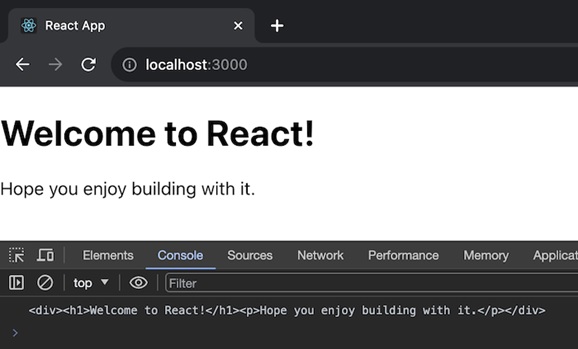
示例 - 計數器應用
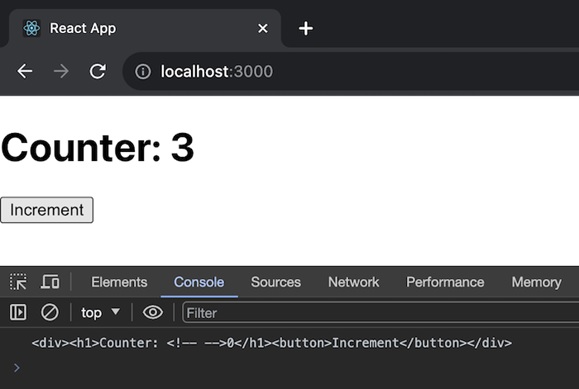
在這個應用中,我們將建立一個 React 元件 (Counter),它表示一個帶有遞增按鈕的簡單計數器。它將使用伺服器端渲染將元件轉換為 HTML 字串並將該字串記錄到控制檯。執行時,我們將看到 Counter 元件的初始 HTML 表示,計數為 0。
// Import necessary modules
const React = require('react');
const ReactDOMServer = require('react-dom/server');

// Define a component with a simple counter
class Counter extends React.Component {
   constructor() {
      super();
      this.state = { count: 0 };
   }
   render() {
      return (
         <div>
            <h1>Counter: {this.state.count}</h1>
            <button onClick={() => this.setState({ count: this.state.count + 1 })}>
               Increment
            </button>
         </div>
      );
   }
}
export default Counter;

// Render the component to a string
const htmlString3 = ReactDOMServer.renderToString(<Counter />);

// Log the result
console.log(htmlString3);
輸出
示例 - 伺服器和客戶端
我們可以透過兩種不同的方式使用 renderToString:第一種是在伺服器上,第二種是在客戶端。因此,我們將逐一討論這兩種方式。
在伺服器上
首先,我們將從 'react-dom/server' 中匯入 renderToString 方法。並使用它將我們的 React 應用渲染到 HTML。
import { renderToString } from 'react-dom/server';
const html = renderToString(<App />);
在客戶端
我們需要一個單獨的函式,例如 hydrateRoot,才能使伺服器生成的 HTML 具有互動性。
首先,驗證我們的響應是否包含伺服器渲染的 HTML,並且我們是否包含了在客戶端載入我們的 React 元件和 hydrateRoot 所需的指令碼。
伺服器端渲染 (Node.js/Express)
import express from 'express';
import React from 'react';
import { renderToString } from 'react-dom/server';
import App from './App'; // Import the main React component

const app = express();
app.get('/', (req, res) => {

   // Server-side rendering
   const html = renderToString(<App />);
   res.send(`
      <!DOCTYPE html>
      <html>
      <head>
         <title>Server-Side Rendering</title>
      </head>
      <body>
         <div id="root">${html}</div>
         <script src="/client.js"></script>
      </body>
      </html>
   `);
});

app.listen(3000, () => {
   console.log('Server is running on https://:3000');
});
客戶端 (client.js)
import React from 'react';
import { hydrateRoot } from 'react-dom'; // Import hydrateRoot
import App from './App'; // Import the main React component

// Find the root element
const rootElement = document.getElementById('root');

// Hydrate the server-rendered HTML
hydrateRoot(rootElement, <App />);
使用此方法,我們可以實現伺服器端渲染,同時使內容在客戶端具有互動性,結合兩種方式的優點。
侷限性
React Suspense 僅部分支援 renderToString。如果元件等待資料,renderToString 會立即傳送其回退內容作為 HTML。
雖然它可以在瀏覽器中使用,但不建議將其用於客戶端應用程式。客戶端渲染有更好的選擇。
總結
renderToString 是一個有用的 React 方法,用於在伺服器端將我們的元件更改為 HTML,從而提高網站效能和搜尋引擎最佳化。請記住,它可能不是客戶端程式碼的最佳選擇。