
- ReactJS 教程
- ReactJS - 首頁
- ReactJS - 簡介
- ReactJS - 路線圖
- ReactJS - 安裝
- ReactJS - 特性
- ReactJS - 優點與缺點
- ReactJS - 架構
- ReactJS - 建立 React 應用
- ReactJS - JSX
- ReactJS - 元件
- ReactJS - 巢狀元件
- ReactJS - 使用新建立的元件
- ReactJS - 元件集合
- ReactJS - 樣式
- ReactJS - 屬性 (props)
- ReactJS - 使用屬性建立元件
- ReactJS - props 驗證
- ReactJS - 建構函式
- ReactJS - 元件生命週期
- ReactJS - 事件管理
- ReactJS - 建立一個事件感知元件
- ReactJS - 在 Expense Manager APP 中引入事件
- ReactJS - 狀態管理
- ReactJS - 狀態管理 API
- ReactJS - 無狀態元件
- ReactJS - 使用 React Hooks 進行狀態管理
- ReactJS - 使用 React Hooks 進行元件生命週期管理
- ReactJS - 佈局元件
- ReactJS - 分頁
- ReactJS - Material UI
- ReactJS - Http 客戶端程式設計
- ReactJS - 表單程式設計
- ReactJS - 受控元件
- ReactJS - 非受控元件
- ReactJS - Formik
- ReactJS - 條件渲染
- ReactJS - 列表
- ReactJS - Keys
- ReactJS - 路由
- ReactJS - Redux
- ReactJS - 動畫
- ReactJS - Bootstrap
- ReactJS - 地圖
- ReactJS - 表格
- ReactJS - 使用 Flux 管理狀態
- ReactJS - 測試
- ReactJS - CLI 命令
- ReactJS - 構建和部署
- ReactJS - 示例
- Hooks
- ReactJS - Hooks 簡介
- ReactJS - 使用 useState
- ReactJS - 使用 useEffect
- ReactJS - 使用 useContext
- ReactJS - 使用 useRef
- ReactJS - 使用 useReducer
- ReactJS - 使用 useCallback
- ReactJS - 使用 useMemo
- ReactJS - 自定義 Hooks
- ReactJS 高階
- ReactJS - 可訪問性
- ReactJS - 程式碼分割
- ReactJS - 上下文
- ReactJS - 錯誤邊界
- ReactJS - 轉發 Refs
- ReactJS - 片段
- ReactJS - 高階元件
- ReactJS - 與其他庫整合
- ReactJS - 最佳化效能
- ReactJS - Profiler API
- ReactJS - 埠
- ReactJS - 無 ES6 ECMAScript 的 React
- ReactJS - 無 JSX 的 React
- ReactJS - 調和
- ReactJS - Refs 和 DOM
- ReactJS - 渲染 Props
- ReactJS - 靜態型別檢查
- ReactJS - 嚴格模式
- ReactJS - Web Components
- 其他概念
- ReactJS - 日期選擇器
- ReactJS - Helmet
- ReactJS - 內聯樣式
- ReactJS - PropTypes
- ReactJS - BrowserRouter
- ReactJS - DOM
- ReactJS - 走馬燈
- ReactJS - 圖示
- ReactJS - 表單元件
- ReactJS - 參考 API
- ReactJS 有用資源
- ReactJS - 快速指南
- ReactJS - 有用資源
- ReactJS - 討論
ReactJS - renderToReadableStream() 方法
渲染元件是 React Web 開發領域中一項非常基礎的任務。一種方法是使用 renderToReadableStream 函式將 React 元件渲染為流。
什麼是 renderToReadableStream?
React 提供了 renderToReadableStream 方法用於 React 元件的伺服器端渲染。我們可以使用此方法將我們的 React 樹作為 HTML 渲染到可讀 Web 流中。它允許我們以流式格式傳輸線上內容,而不是一次建立和分發整個網頁。
它是如何工作的?
當我們呼叫 renderToReadableStream 時,我們會傳入一個我們想要渲染為 Web 流的 React 元件。此元件應表示完整文件,包括 HTML 結構。該函式還接受可選引數,這些引數可用於自定義流的行為。
語法
const stream = await renderToReadableStream(reactNode, optional)
引數
reactNode − 它是要渲染為 HTML 的 React 節點。例如,像 <App /> 這樣的 JSX 元素。App 元件應該渲染 <html> 標籤,因為它被建立為表示完整內容。
optional − 它是一個包含流選項的物件。
返回值
renderToReadableStream 方法返回一個 Promise。如果 shell 成功渲染,則此 Promise 解析為包含生成的 HTML 內容的可讀 Web 流。如果渲染失敗,則 Promise 被拒絕,讓使用者有機會提供備用 shell。
示例
示例 - 載入內容
我們可以在 React 中以不同的方式使用 renderToReadableStream 方法 -
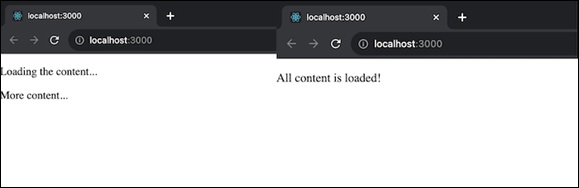
流內容 − 為了使我們的網站更友好,我們可以根據載入情況顯示它的各個部分。
import React, { useState, useEffect } from 'react';
import { renderToReadableStream } from 'react-dom/server';

const App = () => {
   const [content, setContent] = useState([]);
   useEffect(() => {

      // loading content progressively
      const loadDataProgressively = async () => {
         await new Promise(resolve => setTimeout(resolve, 1000));
         setContent(['Loading the content...']);
         await new Promise(resolve => setTimeout(resolve, 2000));
         setContent(['Loading the content...', 'More content...']);
         await new Promise(resolve => setTimeout(resolve, 2000));
         setContent(['All content is loaded!']);
      };

      loadDataProgressively();
   }, []);

   return (
      <div>
         {content.map((item, index) => (
            <p key={index}>{item}</p>
         ))}
      </div>
   );
};

const stream = renderToReadableStream(<App />);
輸出
新增自定義指令碼 − 我們可以引入自定義指令碼來自定義網頁顯示時的行為。
// Inside our component
useEffect(() => {

   // Create a new element
   const script = document.createElement('script');
   script.text = 'console.log("Custom Script has been Executed");';
   document.body.appendChild(script);
}, []);
處理錯誤 − 在顯示內容之前,我們可以處理伺服器錯誤,甚至更改錯誤狀態程式碼。
// Inside the component
const [error, setError] = useState(null);

useEffect(() => {
   try {
      // Code that can throw an error
   } catch (err) {
      setError(err);
   }
}, []);

return (
   <div>
      {error ? <p>Error is: {error.message}</p> : null}
   </div>
);
中止渲染 − 在必要時,我們可以停止伺服器渲染並讓客戶端處理其餘的渲染。要中止渲染,我們可以根據條件簡單地停止渲染內容。這是一個簡單的示例 -
const [abortRendering, setAbortRendering] = useState(false);

useEffect(() => {
      if (abortRendering) {
         // Stop rendering
      }
   }, []);

return (
   <div>
      {abortRendering ? <p>Rendering aborted</p> : <p>Content goes here</p>}
   </div>
);
示例 - 帶有帖子的部落格應用
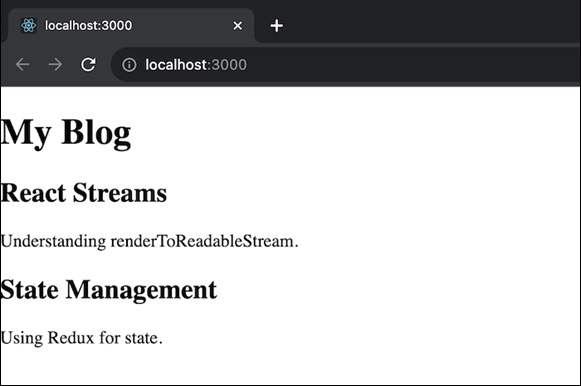
此應用程式是一個簡單的部落格應用程式,顯示部落格文章列表。每個帖子都將有一個標題和內容。BlogApp 元件將帖子陣列作為 prop 並使用 Post 元件渲染它們。因此,我們將有兩個元件 Post 和 BlogApp。Post 元件將顯示具有標題和內容的單個部落格帖子。BlogApp 將是主元件,它獲取帖子陣列並渲染具有標題和內容的部落格。該應用程式將生成一個包含帖子列表的部落格。
import { renderToReadableStream } from 'react-render-stream';

// Define the Post and BlogApp components
const Post = ({ title, content }) => (
   <div>
      <h2>{title}</h2>
      <p>{content}</p>
   </div>
);
const BlogApp = ({ posts }) => (
   <div>
      <h1>My Blog</h1>
      {posts.map((post, index) => (
         <Post key={index} {...post} />
      ))}
   </div>
);

// Create some sample blog posts
const posts = [
   { title: 'React Streams', content: 'Understanding renderToReadableStream.' },
   { title: 'State Management', content: 'Using Redux for state.' },
   // Add more posts as needed
];

// Render the BlogApp component
const App = () => (
   <div>
      <BlogApp posts={posts} />
   </div>
);

const stream = await renderToReadableStream(<App />);
輸出
示例 - 電子商務產品目錄
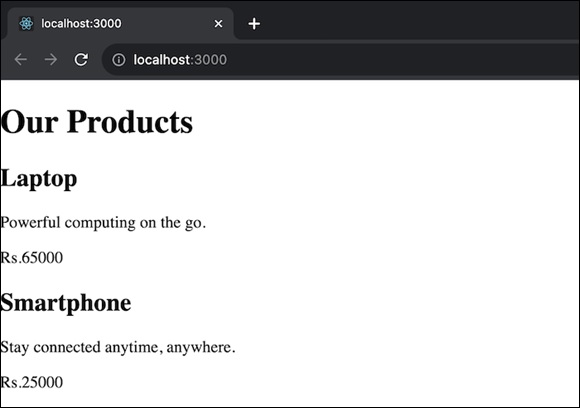
在此應用程式中,我們將擁有一個顯示產品列表的電子商務產品目錄。每個產品都有名稱、價格和描述。ECommerceApp 元件將產品陣列作為 prop 並使用 Product 元件渲染它們。我們將有兩個元件:Product 和 ECommerceApp。Product 元件顯示具有名稱、價格和描述的單個產品。ECommerceApp 元件將是主元件,它獲取產品陣列並渲染產品目錄。該應用程式將生成一個包含產品列表的電子商務目錄。
import { renderToReadableStream } from 'react-render-stream';

// Define the components
const Product = ({ name, price, description }) => (
   <div>
      <h2>{name}</h2>
      <p>{description}</p>
      <p>${price}</p>
   </div>
);
const ECommerceApp = ({ products }) => (
   <div>
   <h1>Our Products</h1>
   {products.map((product, index) => (
      <Product key={index} {...product} />
   ))}
   </div>
);

// Sample products
const products = [
   { name: 'Laptop', price: 999, description: 'Powerful computing on the go.' },
   { name: 'Smartphone', price: 599, description: 'Stay connected anytime, anywhere.' },
];

// Render the ECommerceApp component
const App = () => (
   <div>
      <ECommerceApp products={products} />
   </div>
);

const stream = await renderToReadableStream(<App />);
輸出
總結
renderToReadableStream 是一種將 React 元件渲染為流的強大方法。它允許我們建立更具響應性的應用程式並改善使用者體驗。