
- Windows 10 開發教程
- Windows 10 - 首頁
- Windows 10 - 簡介
- Windows 10 – UWP
- Windows 10 – 第一個應用
- Windows 10 - 應用商店
- Windows 10 - XAML 控制元件
- Windows 10 - 資料繫結
- Windows 10 - XAML 效能
- Windows 10 - 自適應設計
- Windows 10 - 自適應 UI
- Windows 10 - 自適應程式碼
- Windows 10 - 檔案管理
- Windows 10 - SQLite 資料庫
- Windows 10 – 通訊
- Windows 10 - 應用本地化
- Windows 10 - 應用生命週期
- Windows 10 - 後臺執行
- Windows 10 - 應用服務
- Windows 10 - Web 平臺
- Windows 10 - 連線體驗
- Windows 10 - 導航
- Windows 10 - 網路
- Windows 10 - 雲服務
- Windows 10 - 即時磁貼
- Windows 10 - 共享契約
- Windows 10 - 移植到 Windows
- Windows 10 有用資源
- Windows 10 - 快速指南
- Windows 10 - 有用資源
- Windows 10 - 討論
Windows 10 開發 - 網路
如今,您會看到許多應用程式都以某種方式與網路上的 Web 服務或其他裝置整合。獲取線上天氣內容、最新新聞、聊天或對等遊戲是一些使用網路服務的示例。這些應用程式使用各種各樣的網路 API 構建。在 Windows 10 中,網路 API 在速度和記憶體效能以及它們為開發人員提供的功能和靈活性方面得到了改進。
功能
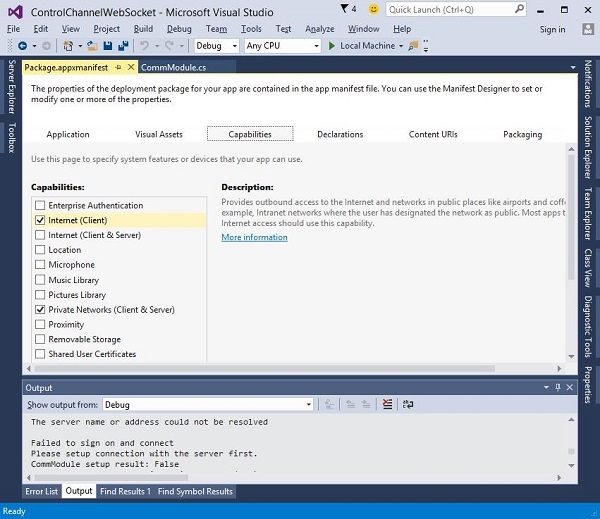
為了聯網,您必須將適當的功能元素新增到您的應用程式清單中。如果您的應用程式清單中未指定任何網路功能,則您的應用程式將沒有任何網路功能,並且任何嘗試連線到網路的嘗試都將失敗。
以下是最常用的網路功能。
| 序號 | 功能和描述 |
|---|---|
| 1 | internetClient 提供對網際網路和公共場所(如機場和咖啡店)網路的出站訪問。大多數需要網際網路訪問的應用程式都應該使用此功能。 |
| 2 | internetClientServer 允許應用程式從網際網路和公共場所(如機場和咖啡店)網路進行入站和出站網路訪問。 |
| 3 | privateNetworkClientServer 允許應用程式在使用者信任的場所(如家庭和工作場所)進行入站和出站網路訪問。 |
要在您的應用程式清單檔案中定義一個或多個功能,請檢視下面的圖片。
通用 Windows 平臺 (UWP) 透過定位以下內容包含大量網路 API:
- 查詢裝置的連線狀態並連線到對等裝置。
- 與 REST Web 服務通訊,以及
- 在後臺下載大型媒體檔案
網路技術
在通用 Windows 平臺 (UWP) 中,開發人員可以使用以下網路技術,這些技術可用於許多不同的情況。
套接字
當您想使用自己的協議與其他裝置通訊時,可以使用套接字。
作為通用 Windows 平臺 (UWP) 應用程式開發人員,您可以同時使用Windows.Networking.Sockets 和 Winsock 與其他裝置通訊。
Windows.Networking.Sockets 的優勢在於它是一個現代 API,專為 UWP 開發人員使用而設計。
如果您使用跨平臺網路庫或其他現有的 Winsock 程式碼,則使用Winsock API。
以下程式碼顯示如何建立套接字偵聽器。
try {

//Create a StreamSocketListener to start listening for TCP connections.
   Windows.Networking.Sockets.StreamSocketListener socketListener = new
      Windows.Networking.Sockets.StreamSocketListener();

//Hook up an event handler to call when connections are received.
   socketListener.ConnectionReceived += SocketListener_ConnectionReceived;

//Start listening for incoming TCP connections on the specified port.
   You can specify any port that's not currently in use.

   await socketListener.BindServiceNameAsync("1337");
} catch (Exception e) {
   //Handle exception.
}
以下程式碼顯示SocketListener_ConnectionReceived 事件處理程式的實現。
private async void SocketListener_ConnectionReceived(
   Windows.Networking.Sockets.StreamSocketListen er sender,
   Windows.Networking.Sockets.StreamSocketListenerConnectionReceivedEventArgs args){

   //Read line from the remote client.
   Stream inStream = args.Socket.InputStream.AsStreamForRead();
   StreamReader reader = new StreamReader(inStream);
   string request = await reader.ReadLineAsync();

   //Send the line back to the remote client.
   Stream outStream = args.Socket.OutputStream.AsStreamForWrite();
   StreamWriter writer = new StreamWriter(outStream);

   await writer.WriteLineAsync(request);
   await writer.FlushAsync();
}
WebSocket
WebSockets 協議提供了一種在 Web 上客戶端和伺服器之間進行快速安全的雙向通訊的方法。通用 Windows 平臺 (UWP) 開發人員可以使用MessageWebSocket 和StreamWebSocket 類連線到支援 Websocket 協議的伺服器。
重要功能包括:
在 WebSocket 協議下,資料透過全雙工單套接字連線立即傳輸。
它允許即時從兩個端點發送和接收訊息。
WebSockets 非常適合用於即時遊戲,在即時遊戲中需要安全地使用快速資料傳輸來即時進行社交網路通知和資訊的最新顯示(遊戲統計資料)。
以下程式碼顯示如何在安全連線上傳送和接收訊息。
MessageWebSocket webSock = new MessageWebSocket();

//In this case we will be sending/receiving a string so we need to
   set the MessageType to Utf8.
webSock.Control.MessageType = SocketMessageType.Utf8;

//Add the MessageReceived event handler.
webSock.MessageReceived += WebSock_MessageReceived;

//Add the Closed event handler.
webSock.Closed += WebSock_Closed;

Uri serverUri = new Uri("wss://echo.websocket.org");

try {
   //Connect to the server.
   await webSock.ConnectAsync(serverUri);

   //Send a message to the server.
   await WebSock_SendMessage(webSock, "Hello, world!");
} catch (Exception ex) {
   //Add code here to handle any exceptions
}
以下程式碼顯示事件實現,它將從已連線的WebSocket接收字串。
//The MessageReceived event handler.
private void WebSock_MessageReceived(MessageWebSocket sender,
   MessageWebSocketMessageReceivedEventArgs args){

   DataReader messageReader = args.GetDataReader();
   messageReader.UnicodeEncoding = UnicodeEncoding.Utf8;
   string messageString = messageReader.ReadString(
      messageReader.UnconsumedBufferLength);
   //Add code here to do something with the string that is received.
}
HttpClient
HttpClient 和Windows.Web.Http 名稱空間 API 為開發人員提供了使用 HTTP 2.0 和 HTTP 1.1 協議傳送和接收資訊的能力。
它可以用於:
- 與 Web 服務或 Web 伺服器通訊。
- 上傳或下載多個小檔案。
- 透過網路流式傳輸內容。
以下程式碼顯示如何使用Windows.Web.Http.HttpClient 和Windows.Web.Http.HttpResponseMessage傳送 GET 請求。
//Create an HTTP client object
Windows.Web.Http.HttpClient httpClient = new Windows.Web.Http.HttpClient();

//Add a user-agent header to the GET request.
var headers = httpClient.DefaultRequestHeaders;

//The safe way to add a header value is to use the TryParseAdd method
   and verify the return value is true,

//especially if the header value is coming from user input.
string header = "ie";

if (!headers.UserAgent.TryParseAdd(header)) {
   throw new Exception("Invalid header value: " + header);
}

header = "Mozilla/5.0 (compatible; MSIE 10.0; Windows NT 6.2; WOW64; Trident/6.0)";

if (!headers.UserAgent.TryParseAdd(header)) {
   throw new Exception("Invalid header value: " + header);
}

Uri requestUri = new Uri("http://www.contoso.com");

//Send the GET request asynchronously and retrieve the response as a string.
Windows.Web.Http.HttpResponseMessage httpResponse = new
   Windows.Web.Http.HttpResponseMessage();
string httpResponseBody = "";

try {
   //Send the GET request
   httpResponse = await httpClient.GetAsync(requestUri);
   httpResponse.EnsureSuccessStatusCode();
   httpResponseBody = await httpResponse.Content.ReadAsStringAsync();
} catch (Exception ex) {
   httpResponseBody = "Error: " + ex.HResult.ToString("X") + " Message: " + ex.Message;
}