- Java 數字影像處理
- DIP - 首頁
- DIP - 簡介
- DIP - Java BufferedImage 類
- DIP - 影像下載和上傳
- DIP - 影像畫素
- DIP - 灰度轉換
- DIP - 增強影像對比度
- DIP - 增強影像亮度
- DIP - 增強影像銳度
- DIP - 影像壓縮技術
- DIP - 新增影像邊框
- DIP - 影像金字塔
- DIP - 基本閾值化
- DIP - 影像形狀轉換
- DIP - 高斯濾波器
- DIP - 均值濾波器
- DIP - 腐蝕和膨脹
- DIP - 水印
- DIP - 卷積理解
- DIP - Prewitt運算元
- DIP - Sobel運算元
- DIP - Kirsch運算元
- DIP - Robinson運算元
- DIP - Laplacian運算元
- DIP - 加權平均濾波器
- DIP - 建立縮放效果
- DIP - 開源庫
- DIP - OpenCV簡介
- DIP - OpenCV灰度轉換
- DIP - 顏色空間轉換
- DIP 有用資源
- DIP - 快速指南
- DIP - 有用資源
- DIP - 討論
Java BufferedImage 類
Java BufferedImage 類是 Image 類的子類。它用於處理和操作影像資料。BufferedImage 由影像資料的 ColorModel 組成。所有 BufferedImage 物件的左上角座標為 (0, 0)。
建構函式
此類支援三種類型的建構函式。
第一個建構函式使用指定的 ColorModel 和 Raster 構造一個新的 BufferedImage。
BufferedImage(ColorModel cm, WritableRaster raster,
boolean isRasterPremultiplied, Hashtable<?,?> properties)
第二個建構函式構造一個預定義影像型別之一的 BufferedImage。
BufferedImage(int width, int height, int imageType)
第三個建構函式構造一個預定義影像型別之一的 BufferedImage:TYPE_BYTE_BINARY 或 TYPE_BYTE_INDEXED。
BufferedImage(int width, int height, int imageType, IndexColorModel cm)
| 序號 | 方法和描述 |
|---|---|
| 1 |
copyData(WritableRaster outRaster) 它計算 |
| 2 |
getColorModel() 它返回影像的 ColorModel 類的物件。 |
| 3 |
getData() 它將影像作為單個大圖塊返回。 |
| 4 |
getData(Rectangle rect) 它計算並返回 |
| 5 |
getGraphics() 此方法返回 Graphics2D,保持向後相容性。 |
| 6 |
getHeight() 它返回 |
| 7 |
getMinX() 它返回此 |
| 8 |
getMinY() 它返回此 |
| 9 |
getRGB(int x, int y) 它返回預設 RGB 顏色模型 (TYPE_INT_ARGB) 和預設 sRGB 色彩空間中的整數畫素。 |
| 10 |
getType() 它返回影像型別。 |
示例
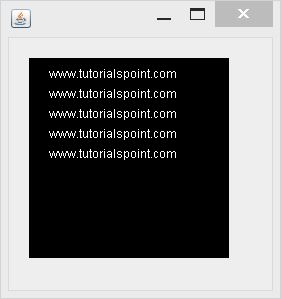
以下示例演示了 java BufferedImage 類的用法,該類使用 Graphics 物件在螢幕上繪製一些文字 -
import java.awt.Graphics;
import java.awt.Image;
import java.awt.image.BufferedImage;

import javax.swing.JFrame;
import javax.swing.JPanel;

public class Test extends JPanel {

   public void paint(Graphics g) {
      Image img = createImageWithText();
      g.drawImage(img, 20,20,this);
   }

   private Image createImageWithText() {
      BufferedImage bufferedImage = new BufferedImage(200,200,BufferedImage.TYPE_INT_RGB);
      Graphics g = bufferedImage.getGraphics();

      g.drawString("www.tutorialspoint.com", 20,20);
      g.drawString("www.tutorialspoint.com", 20,40);
      g.drawString("www.tutorialspoint.com", 20,60);
      g.drawString("www.tutorialspoint.com", 20,80);
      g.drawString("www.tutorialspoint.com", 20,100);

      return bufferedImage;
   }

   public static void main(String[] args) {
      JFrame frame = new JFrame();
      frame.getContentPane().add(new Test());

      frame.setDefaultCloseOperation(JFrame.EXIT_ON_CLOSE);
      frame.setSize(200, 200);
      frame.setVisible(true);
   }
}
輸出
執行給定程式碼時,將看到以下輸出 -