
- Java 數字影像處理
- 數字影像處理 - 首頁
- 數字影像處理 - 簡介
- 數字影像處理 - Java BufferedImage 類
- 數字影像處理 - 圖片下載與上傳
- 數字影像處理 - 圖片畫素
- 數字影像處理 - 灰度轉換
- 數字影像處理 - 增強影像對比度
- 數字影像處理 - 增強影像亮度
- 數字影像處理 - 增強影像銳度
- 數字影像處理 - 影像壓縮技術
- 數字影像處理 - 新增影像邊框
- 數字影像處理 - 影像金字塔
- 數字影像處理 - 基本閾值分割
- 數字影像處理 - 影像形狀轉換
- 數字影像處理 - 高斯濾波器
- 數字影像處理 - 方框濾波器
- 數字影像處理 - 腐蝕與膨脹
- 數字影像處理 - 水印
- 數字影像處理 - 卷積理解
- 數字影像處理 - Prewitt 運算元
- 數字影像處理 - Sobel 運算元
- 數字影像處理 - Kirsch 運算元
- 數字影像處理 - Robinson 運算元
- 數字影像處理 - Laplacian 運算元
- 數字影像處理 - 加權平均濾波器
- 數字影像處理 - 建立縮放效果
- 數字影像處理 - 開源庫
- 數字影像處理 - OpenCV 簡介
- 數字影像處理 - OpenCV 灰度轉換
- 數字影像處理 - 顏色空間轉換
- 數字影像處理有用資源
- 數字影像處理 - 快速指南
- 數字影像處理 - 有用資源
- 數字影像處理 - 討論
Java 數字影像處理 - 灰度轉換
為了將彩色影像轉換為灰度影像,您需要使用File和ImageIO物件讀取影像的畫素或資料,並將影像儲存在BufferedImage物件中。其語法如下:
File input = new File("digital_image_processing.jpg");
BufferedImage image = ImageIO.read(input);
此外,使用getRGB()方法獲取畫素值,並對其執行GrayScale()方法。getRGB()方法以行和列索引作為引數。
Color c = new Color(image.getRGB(j, i));
int red = (c.getRed() * 0.299);
int green =(c.getGreen() * 0.587);
int blue = (c.getBlue() *0.114);
除了這三種方法外,Color類中還有其他一些方法,簡要描述如下:
| 序號 | 方法及描述 |
|---|---|
| 1 |
brighter() 它建立一個比此顏色更亮的新顏色。 |
| 2 |
darker() 它建立一個比此顏色更暗的新顏色。 |
| 3 |
getAlpha() 它返回0-255範圍內的alpha分量。 |
| 4 |
getHSBColor(float h, float s, float b) 它基於HSB顏色模型的指定值建立一個Color物件。 |
| 5 |
HSBtoRGB(float hue, float saturation, float brightness) 它將由HSB模型指定的顏色的分量轉換為預設RGB模型的等效值集。 |
| 6 |
toString() 它返回此顏色的字串表示形式。 |
最後一步是將這三個值相加,並將其重新設定為相應的畫素值。其語法如下:
int sum = red+green+blue;
Color newColor = new Color(sum,sum,sum);
image.setRGB(j,i,newColor.getRGB());
示例
以下示例演示了將影像轉換為灰度影像的Java BufferedImage類的用法:
import java.awt.*;
import java.awt.image.BufferedImage;

import java.io.*;

import javax.imageio.ImageIO;
import javax.swing.JFrame;

public class GrayScale {

   BufferedImage  image;
   int width;
   int height;

   public GrayScale() {

      try {
         File input = new File("digital_image_processing.jpg");
         image = ImageIO.read(input);
         width = image.getWidth();
         height = image.getHeight();

         for(int i=0; i<height; i++) {

            for(int j=0; j<width; j++) {

               Color c = new Color(image.getRGB(j, i));
               int red = (int)(c.getRed() * 0.299);
               int green = (int)(c.getGreen() * 0.587);
               int blue = (int)(c.getBlue() *0.114);
               Color newColor = new Color(red+green+blue,

               red+green+blue,red+green+blue);

               image.setRGB(j,i,newColor.getRGB());
            }
         }

         File ouptut = new File("grayscale.jpg");
         ImageIO.write(image, "jpg", ouptut);

      } catch (Exception e) {}
   }

   static public void main(String args[]) throws Exception {
      GrayScale obj = new GrayScale();
   }
}
輸出
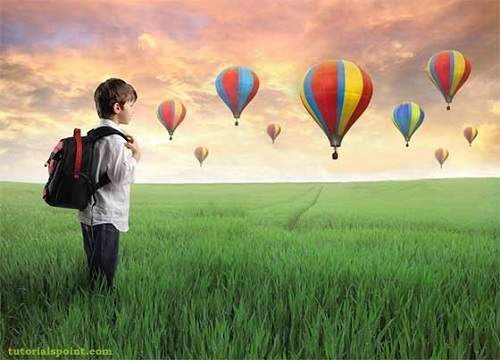
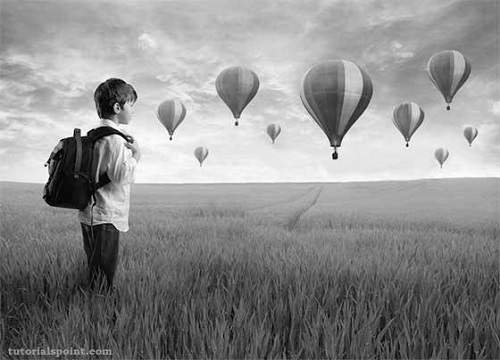
執行給定的示例時,它會將影像digital_image_processing.jpg轉換為其等效的灰度影像,並將其以grayscale.jpg的名義寫入硬碟。
原始影像
灰度影像
廣告