- Java 數字影像處理
- 數字影像處理 - 首頁
- 數字影像處理 - 簡介
- 數字影像處理 - Java BufferedImage 類
- 數字影像處理 - 圖片下載與上傳
- 數字影像處理 - 圖片畫素
- 數字影像處理 - 灰度轉換
- 數字影像處理 - 增強影像對比度
- 數字影像處理 - 增強影像亮度
- 數字影像處理 - 增強影像銳度
- 數字影像處理 - 影像壓縮技術
- 數字影像處理 - 新增影像邊框
- 數字影像處理 - 影像金字塔
- 數字影像處理 - 基本閾值化
- 數字影像處理 - 影像形狀轉換
- 數字影像處理 - 高斯濾波器
- 數字影像處理 - 均值濾波器
- 數字影像處理 - 腐蝕與膨脹
- 數字影像處理 - 水印
- 數字影像處理 - 卷積理解
- 數字影像處理 - Prewitt 運算元
- 數字影像處理 - Sobel 運算元
- 數字影像處理 - Kirsch 運算元
- 數字影像處理 - Robinson 運算元
- 數字影像處理 - 拉普拉斯運算元
- 數字影像處理 - 加權平均濾波器
- 數字影像處理 - 建立縮放效果
- 數字影像處理 - 開源庫
- 數字影像處理 - OpenCV 簡介
- 數字影像處理 - OpenCV 灰度轉換
- 數字影像處理 - 顏色空間轉換
- 數字影像處理 有用資源
- 數字影像處理 - 快速指南
- 數字影像處理 - 有用資源
- 數字影像處理 - 討論
Java 數字影像處理 - 拉普拉斯運算元
拉普拉斯運算元也是一種微分運算元,用於查詢影像中的邊緣。拉普拉斯運算元和 Prewitt、Sobel、Robinson 和 Kirsch 等其他運算元的主要區別在於,這些都是一階導數掩碼,而拉普拉斯運算元是二階導數掩碼。
我們使用OpenCV 函式filter2D 將拉普拉斯運算元應用於影像。它可以在Imgproc 包下找到。其語法如下:
filter2D(src, dst, depth , kernel, anchor, delta, BORDER_DEFAULT );
函式引數描述如下:
| 序號 | 引數 |
|---|---|
| 1 |
src 源影像。 |
| 2 |
dst 目標影像。 |
| 3 |
depth dst 的深度。負值(例如 -1)表示深度與源相同。 |
| 4 |
kernel 要掃描影像的核心。 |
| 5 |
anchor 錨點相對於其核心的位置。預設情況下,位置 Point(-1, -1) 表示中心。 |
| 6 |
delta 在卷積過程中新增到每個畫素的值。預設為 0。 |
| 7 |
BORDER_DEFAULT 我們使用預設值。 |
除了 filter2D() 方法外,Imgproc 類還提供了其他方法。簡要說明如下:
| 序號 | 方法和描述 |
|---|---|
| 1 |
cvtColor(Mat src, Mat dst, int code, int dstCn) 它將影像從一種顏色空間轉換為另一種顏色空間。 |
| 2 |
dilate(Mat src, Mat dst, Mat kernel) 它使用特定的結構元素膨脹影像。 |
| 3 |
equalizeHist(Mat src, Mat dst) 它均衡灰度影像的直方圖。 |
| 4 |
filter2D(Mat src, Mat dst, int depth, Mat kernel, Point anchor, double delta) 它使用核心對影像進行卷積。 |
| 5 |
GaussianBlur(Mat src, Mat dst, Size ksize, double sigmaX) 它使用高斯濾波器模糊影像。 |
| 6 |
integral(Mat src, Mat sum) 它計算影像的積分。 |
示例
以下示例演示瞭如何使用 Imgproc 類將拉普拉斯運算元應用於灰度影像。
import org.opencv.core.Core;
import org.opencv.core.CvType;
import org.opencv.core.Mat;

import org.opencv.highgui.Highgui;
import org.opencv.imgproc.Imgproc;

public class convolution {
   public static void main( String[] args ) {

      try {
         int kernelSize = 9;
         System.loadLibrary( Core.NATIVE_LIBRARY_NAME );

         Mat source = Highgui.imread("grayscale.jpg",  Highgui.CV_LOAD_IMAGE_GRAYSCALE);
         Mat destination = new Mat(source.rows(),source.cols(),source.type());

         Mat kernel = new Mat(kernelSize,kernelSize, CvType.CV_32F) {
            {
               put(0,0,0);
               put(0,1,-1)
               put(0,2,0);

               put(1,0-1);
               put(1,1,4);
               put(1,2,-1);

               put(2,0,0);
               put(2,1,-1);
               put(2,2,0);
            }
         };

         Imgproc.filter2D(source, destination, -1, kernel);
         Highgui.imwrite("output.jpg", destination);

      } catch (Exception e) {
         System.out.println("Error: " + e.getMessage());
      }
   }
}
輸出
執行給定程式碼後,將看到以下輸出:
原始影像
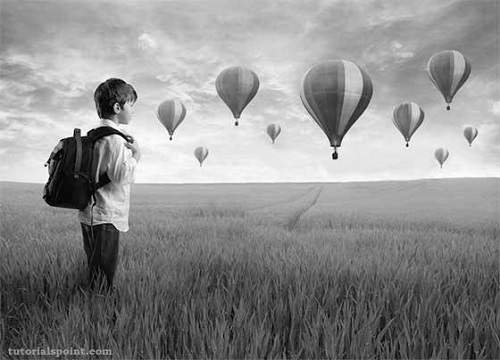
此原始影像與如下所示的拉普拉斯負運算元進行卷積:
拉普拉斯負運算元
| 0 | -1 | 0 |
| -1 | 4 | -1 |
| 0 | -1 | 0 |
卷積影像(拉普拉斯負運算元)
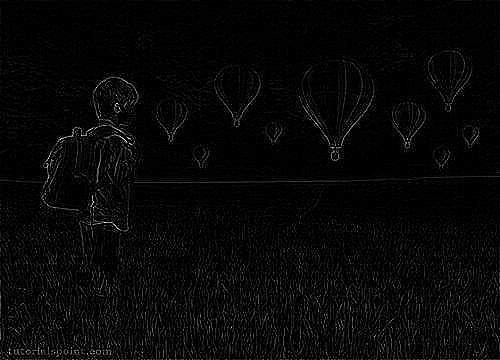
此原始影像與如下所示的拉普拉斯正運算元進行卷積:
拉普拉斯正運算元
| 0 | 1 | 0 |
| 1 | -4 | 1 |
| 0 | 1 | 0 |
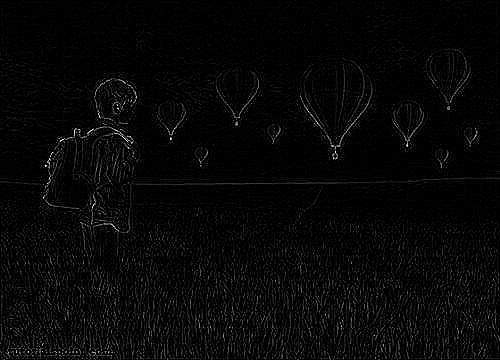
卷積影像(拉普拉斯正運算元)