
- WPF 教程
- WPF - 主頁
- WPF - 概覽
- WPF - 環境設定
- WPF - Hello World
- WPF - XAML 概述
- WPF - 元素樹
- WPF - 依賴屬性
- WPF - 路由事件
- WPF - 控制元件
- WPF - 佈局
- WPF - 佈局的巢狀
- WPF - 輸入
- WPF - 命令列
- WPF - 資料繫結
- WPF - 資源
- WPF - 模板
- WPF - 樣式
- WPF - 觸發器
- WPF - 除錯
- WPF - 自定義控制元件
- WPF - 異常處理
- WPF - 本地化
- WPF - 互動
- WPF - 二維圖形
- WPF - 三維圖形
- WPF - 多媒體
- WPF 有用資源
- WPF - 快速指南
- WPF - 有用資源
- WPF - 討論
WPF - 路由命令
路由命令以更語義化的級別啟用輸入處理。這些實際上是簡單的指令,如新建、開啟、複製、剪下和儲存。這些命令非常有用,可以從選單或鍵盤快捷鍵中訪問它們。如果命令變為不可用,它將停用控制元件。以下示例定義選單項的命令。
讓我們建立一個名為WPFCommandsInput的新 WPF 專案。
將選單控制元件拖動到堆疊面板,然後設定以下屬性和命令,如在以下 XAML 檔案中所示。
<Window x:Class = "WPFContextMenu.MainWindow"
   xmlns = "http://schemas.microsoft.com/winfx/2006/xaml/presentation"
   xmlns:x = "http://schemas.microsoft.com/winfx/2006/xaml"
   xmlns:d = "http://schemas.microsoft.com/expression/blend/2008"
   xmlns:mc = "http://schemas.openxmlformats.org/markup-compatibility/2006"
   xmlns:local = "clr-namespace:WPFContextMenu"
   mc:Ignorable = "d" Title = "MainWindow" Height = "350" Width = "525">

   <Grid>
      <StackPanel x:Name = "stack" Background = "Transparent">

         <StackPanel.ContextMenu>
            <ContextMenu>
               <MenuItem Header = "New" Command = "New" />
               <MenuItem Header = "Open" Command = "Open" />
               <MenuItem Header = "Save" Command = "Save" />
            </ContextMenu>
         </StackPanel.ContextMenu>

         <Menu>
            <MenuItem Header = "File" >
               <MenuItem Header = "New" Command = "New" />
               <MenuItem Header = "Open" Command = "Open" />
               <MenuItem Header = "Save" Command = "Save" />
            </MenuItem>
         </Menu>

      </StackPanel>
   </Grid>

</Window>
以下是處理不同命令的 C# 程式碼。
using System.Windows;
using System.Windows.Input;

namespace WPFContextMenu {
   /// <summary>
      /// Interaction logic for MainWindow.xaml
   /// </summary>

   public partial class MainWindow : Window {

      public MainWindow() {
         InitializeComponent();
         CommandBindings.Add(new CommandBinding(ApplicationCommands.New, NewExecuted, CanNew));
         CommandBindings.Add(new CommandBinding(ApplicationCommands.Open, OpenExecuted, CanOpen));
         CommandBindings.Add(new CommandBinding(ApplicationCommands.Save, SaveExecuted, CanSave));
      }

      private void NewExecuted(object sender, ExecutedRoutedEventArgs e) {
         MessageBox.Show("You want to create new file.");
      }

      private void CanNew(object sender, CanExecuteRoutedEventArgs e) {
         e.CanExecute = true;
      }

      private void OpenExecuted(object sender, ExecutedRoutedEventArgs e) {
         MessageBox.Show("You want to open existing file.");
      }

      private void CanOpen(object sender, CanExecuteRoutedEventArgs e) {
         e.CanExecute = true;
      }

      private void SaveExecuted(object sender, ExecutedRoutedEventArgs e) {
         MessageBox.Show("You want to save a file.");
      }
      private void CanSave(object sender, CanExecuteRoutedEventArgs e) {
         e.CanExecute = true;
      }
   }

}
編譯並執行以上程式碼後,將生成以下視窗 −
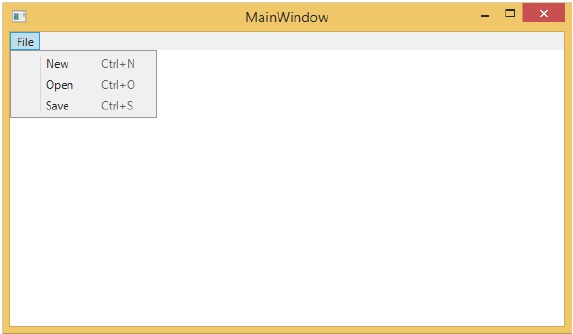
現在,你可以從選單或快捷鍵命令訪問這些選單項。從任一選項中,它將執行命令。
wpf_input.htm
廣告