
- WPF 教程
- WPF - 首頁
- WPF - 概述
- WPF - 環境設定
- WPF - Hello World
- WPF - XAML 概述
- WPF - 元素樹
- WPF - 依賴屬性
- WPF - 路由事件
- WPF - 控制元件
- WPF - 佈局
- WPF - 佈局巢狀
- WPF - 輸入
- WPF - 命令列
- WPF - 資料繫結
- WPF - 資源
- WPF - 模板
- WPF - 樣式
- WPF - 觸發器
- WPF - 除錯
- WPF - 自定義控制元件
- WPF - 異常處理
- WPF - 本地化
- WPF - 互動
- WPF - 2D 圖形
- WPF - 3D 圖形
- WPF - 多媒體
- WPF 有用資源
- WPF - 快速指南
- WPF - 有用資源
- WPF - 討論
WPF - 異常處理
異常是程式執行過程中遇到的任何錯誤條件或意外行為。異常可能由多種原因引起,其中一些如下:
程式碼或您呼叫的程式碼(例如共享庫)中的故障;
不可用的作業系統資源;
公共語言執行時遇到的意外情況(例如無法驗證的程式碼)
語法
異常能夠將程式的流程從一個部分轉移到另一個部分。在 .NET 框架中,異常處理包含以下四個關鍵字:
try − 在此塊中,程式識別導致某些異常的特定條件。
catch − catch 關鍵字表示捕獲異常。try 塊之後是一個或多個catch 塊,用於使用異常處理程式在程式中捕獲異常,從而處理問題。
finally − finally 塊用於執行給定的語句集,無論是否丟擲異常。例如,如果您打開了一個檔案,則無論是否引發異常,都必須關閉它。
throw − 當出現問題時,程式會丟擲異常。這是使用 throw 關鍵字完成的。
使用這四個關鍵字的語法如下:
try {
   ///This will still trigger the exception
}
catch (ExceptionClassName e) {
   // error handling code
}
catch (ExceptionClassName e) {
   // error handling code
}
catch (ExceptionClassName e) {
   // error handling code
}
finally {
   // statements to be executed
}
在 try 塊根據程式流程的情況可能引發多個異常的情況下,使用多個 catch 語句。
層次結構
.NET 框架中幾乎所有異常類都直接或間接地派生自 Exception 類。從 Exception 類派生的最重要的異常類是:
ApplicationException 類 − 它支援程式生成的異常。當開發者想要定義異常時,類應該從此類派生。
SystemException 類 − 它是所有預定義執行時系統異常的基類。以下層次結構顯示了執行時提供的標準異常。

下表列出了執行時提供的標準異常以及您應該在何種情況下建立派生類。
| 異常型別 | 基型別 | 描述 |
|---|---|---|
| Exception | Object | 所有異常的基類。 |
| SystemException | Exception | 所有執行時生成的錯誤的基類。 |
| IndexOutOfRangeException | SystemException | 僅當陣列索引不正確時,才由執行時丟擲。 |
| NullReferenceException | SystemException | 僅當引用空物件時,才由執行時丟擲。 |
| AccessViolationException | SystemException | 僅當訪問無效記憶體時,才由執行時丟擲。 |
| InvalidOperationException | SystemException | 當方法處於無效狀態時丟擲。 |
| ArgumentException | SystemException | 所有引數異常的基類。 |
| ArgumentNullException | ArgumentException | 由不允許引數為 null 的方法丟擲。 |
| ArgumentOutOfRangeException | ArgumentException | 由驗證引數在給定範圍內的那些方法丟擲。 |
| ExternalException | SystemException | 發生在執行時外部環境或以執行時外部環境為目標的異常的基類。 |
| SEHException | ExternalException | 封裝 Win32 結構化異常處理資訊的異常。 |
示例
讓我們來看一個簡單的例子來更好地理解這個概念。首先建立一個名為WPFExceptionHandling的新 WPF 專案。
從工具箱將一個文字框拖到設計視窗。以下 XAML 程式碼建立一個文字框並用一些屬性對其進行初始化。
<Window x:Class = "WPFExceptionHandling.MainWindow"
   xmlns = "http://schemas.microsoft.com/winfx/2006/xaml/presentation"
   xmlns:x = "http://schemas.microsoft.com/winfx/2006/xaml"
   xmlns:d = "http://schemas.microsoft.com/expression/blend/2008"
   xmlns:mc = "http://schemas.openxmlformats.org/markup-compatibility/2006"
   xmlns:local = "clr-namespace:WPFExceptionHandling"
   mc:Ignorable = "d"
   Title = "MainWindow" Height = "350" Width = "604">

   <Grid>
      <TextBox x:Name = "textBox" HorizontalAlignment = "Left"
         Height = "241" Margin = "70,39,0,0" TextWrapping = "Wrap"
         VerticalAlignment = "Top" Width = "453"/>
   </Grid>

</Window>
以下是使用 C# 進行異常處理的檔案讀取。
using System;
using System.IO;
using System.Windows;

namespace WPFExceptionHandling {

   public partial class MainWindow : Window {

      public MainWindow() {
         InitializeComponent();
         ReadFile(0);
      }

      void ReadFile(int index) {
         string path = @"D:\Test.txt";
         StreamReader file = new StreamReader(path);
         char[] buffer = new char[80];

         try {
            file.ReadBlock(buffer, index, buffer.Length);
            string str = new string(buffer);
            str.Trim();
            textBox.Text = str;
         }
         catch (Exception e) {
            MessageBox.Show("Error reading from "+ path + "\nMessage = "+ e.Message);
         }
         finally {
            if (file != null) {
               file.Close();
            }
         }
      }
   }
}
編譯並執行上述程式碼後,它將生成一個視窗,其中文字框內顯示文字。
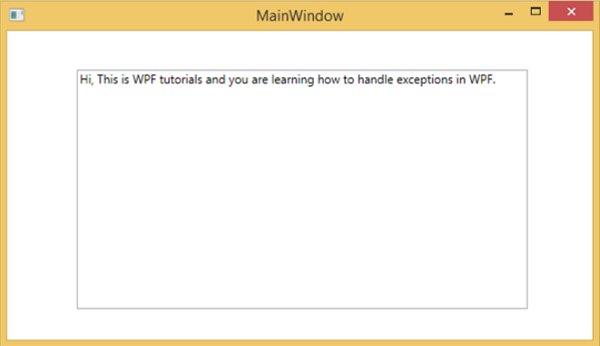
當引發異常或手動丟擲異常(如下面的程式碼所示)時,它將顯示一個帶有錯誤的訊息框。
using System;
using System.IO;
using System.Windows;

namespace WPFExceptionHandling {

   public partial class MainWindow : Window {

      public MainWindow() {
         InitializeComponent();
         ReadFile(0);
      }

      void ReadFile(int index) {
         string path = @"D:\Test.txt";
         StreamReader file = new StreamReader(path);
         char[] buffer = new char[80];

         try {
            file.ReadBlock(buffer, index, buffer.Length);
            string str = new string(buffer);
            throw new Exception();
            str.Trim();
            textBox.Text = str;
         }
         catch (Exception e) {
            MessageBox.Show("Error reading from "+ path + "\nMessage = "+ e.Message);
         }
         finally {
            if (file != null) {
               file.Close();
            }
         }
      }
   }
}
當執行上述程式碼時引發異常時,它將顯示以下訊息。

我們建議您執行上述程式碼並試驗其功能。