
- WPF 教程
- WPF - 首頁
- WPF - 概述
- WPF - 環境設定
- WPF - Hello World
- WPF - XAML 概述
- WPF - 元素樹
- WPF - 依賴屬性
- WPF - 路由事件
- WPF - 控制元件
- WPF - 佈局
- WPF - 佈局巢狀
- WPF - 輸入
- WPF - 命令列
- WPF - 資料繫結
- WPF - 資源
- WPF - 模板
- WPF - 樣式
- WPF - 觸發器
- WPF - 除錯
- WPF - 自定義控制元件
- WPF - 異常處理
- WPF - 本地化
- WPF - 互動
- WPF - 2D 圖形
- WPF - 3D 圖形
- WPF - 多媒體
- WPF 有用資源
- WPF - 快速指南
- WPF - 有用資源
- WPF - 討論
WPF - 命令列
命令列引數是一種機制,使用者可以在執行 WPF 應用程式時向其傳遞一組引數或值。這些引數對於從外部控制應用程式非常重要,例如,如果要從命令提示符開啟 Word 文件,可以使用此命令“C:\> start winword word1.docx”,它將開啟word1.docx文件。
命令列引數在 Startup 函式中處理。以下是一個簡單的示例,演示如何將命令列引數傳遞給 WPF 應用程式。讓我們建立一個名為WPFCommandLine的新 WPF 應用程式。
將一個文字框從工具箱拖到設計視窗。
在這個例子中,我們將一個 txt 檔案路徑作為命令列引數傳遞給我們的應用程式。
程式將讀取 txt 檔案,然後將所有文字寫入文字框。
以下 XAML 程式碼建立一個文字框並用一些屬性初始化它。
<Window x:Class = "WPFCommandLine.MainWindow"
   xmlns = "http://schemas.microsoft.com/winfx/2006/xaml/presentation"
   xmlns:x = "http://schemas.microsoft.com/winfx/2006/xaml"
   xmlns:d = "http://schemas.microsoft.com/expression/blend/2008"
   xmlns:mc = "http://schemas.openxmlformats.org/markup-compatibility/2006"
   xmlns:local = "clr-namespace:WPFCommandLine"
   mc:Ignorable = "d" Title = "MainWindow" Height = "350" Width = "525">

   <Grid>
      <TextBox x:Name = "textBox" HorizontalAlignment = "Left"
         Height = "180" Margin = "100" TextWrapping = "Wrap"
         VerticalAlignment = "Top" Width = "300"/>
   </Grid>

</Window>
- 現在,像下面這樣在 App.xaml 檔案中訂閱 Startup 事件。
<Application x:Class = "WPFCommandLine.App"
   xmlns = "http://schemas.microsoft.com/winfx/2006/xaml/presentation"
   xmlns:x = "http://schemas.microsoft.com/winfx/2006/xaml"
   xmlns:local = "clr-namespace:WPFCommandLine"
   StartupUri = "MainWindow.xaml" Startup = "app_Startup">

   <Application.Resources>

   </Application.Resources>

</Application>
下面是在 App.xaml.cs 中 app_Startup 事件的實現,它將獲取命令列引數。
using System.Windows;

namespace WPFCommandLine {
   /// <summary>
      /// Interaction logic for App.xaml
   /// </summary>

   public partial class App : Application {
      public static string[] Args;

      void app_Startup(object sender, StartupEventArgs e) {
         // If no command line arguments were provided, don't process them
         if (e.Args.Length == 0) return;

         if (e.Args.Length > 0) {
            Args = e.Args;
         }
      }
   }
}
現在,在 MainWindow 類中,程式將開啟 txt 檔案並將所有文字寫入文字框。
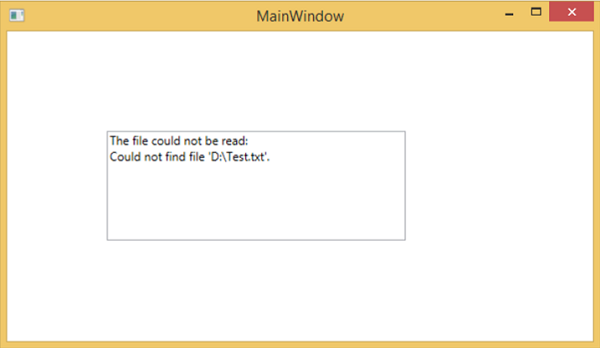
如果發現某些錯誤,程式將在文字框中顯示錯誤訊息。
using System;
using System.IO;
using System.Windows;

namespace WPFCommandLine {

   public partial class MainWindow : Window {

      public MainWindow() {
         InitializeComponent();
         String[] args = App.Args;

         try {
            // Open the text file using a stream reader.
            using (StreamReader sr = new StreamReader(args[0])) {
               // Read the stream to a string, and write
               // the string to the text box
               String line = sr.ReadToEnd();
               textBox.AppendText(line.ToString());
               textBox.AppendText("\n");
            }
         }
         catch (Exception e) {
            textBox.AppendText("The file could not be read:");
            textBox.AppendText("\n");
            textBox.AppendText(e.Message);
         }
      }
   }
}
編譯並執行上述程式碼時,它將生成一個帶有文字框的空白視窗,因為此程式需要命令列引數。因此,Visual Studio 提供了一種簡單的方法來使用命令列引數執行應用程式。
右鍵單擊解決方案資源管理器中的 WPF 專案,然後選擇屬性,將顯示以下視窗。

選擇“除錯”選項,並在“命令列引數”中寫入檔案路徑。
建立一個名為 Test.txt 的 txt 檔案,並在其中寫入一些文字並將其儲存到任何位置。在本例中,txt 檔案儲存在“D:\”硬碟驅動器中。
儲存專案中的更改,然後編譯並執行應用程式。您將在文字框中看到程式從 Test.txt 檔案讀取的文字。

現在讓我們嘗試將計算機上的檔名從Test.txt更改為Test1.txt,然後再次執行程式,您將在文字框中看到錯誤訊息。
我們建議您執行上述程式碼並按照所有步驟成功執行應用程式。