
- WPF 教程
- WPF - 首頁
- WPF - 概述
- WPF - 環境設定
- WPF - Hello World
- WPF - XAML 概述
- WPF - 元素樹
- WPF - 依賴屬性
- WPF - 路由事件
- WPF - 控制元件
- WPF - 佈局
- WPF - 佈局巢狀
- WPF - 輸入
- WPF - 命令列
- WPF - 資料繫結
- WPF - 資源
- WPF - 模板
- WPF - 樣式
- WPF - 觸發器
- WPF - 除錯
- WPF - 自定義控制元件
- WPF - 異常處理
- WPF - 本地化
- WPF - 互動
- WPF - 2D 圖形
- WPF - 3D 圖形
- WPF - 多媒體
- WPF 有用資源
- WPF - 快速指南
- WPF - 有用資源
- WPF - 討論
WPF - 進度條
進度條是一種指示操作進度的控制元件,其典型的視覺外觀是一個條形,隨著進度的繼續,填充區域會進行動畫顯示。它可以以下列兩種樣式之一顯示進度:
- 顯示重複模式的條形,或
- 根據值填充的條形。
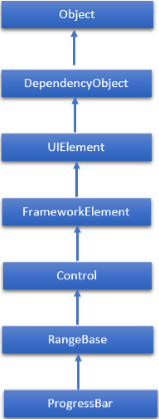
ProgressBar 類的繼承層次結構如下:
ProgressBar 常用屬性
| 序號 | 屬性及說明 |
|---|---|
| 1 | IsIndeterminate 獲取或設定一個值,該值指示進度條是使用重複模式報告通用進度,還是根據 Value 屬性報告進度。 |
| 2 | IsIndeterminateProperty 標識 IsIndeterminate 依賴屬性。 |
| 3 | ShowError 獲取或設定一個值,該值指示進度條是否應使用向用戶傳達錯誤狀態的可視狀態。 |
| 4 | ShowErrorProperty 標識 ShowError 依賴屬性。 |
| 5 | ShowPaused 獲取或設定一個值,該值指示進度條是否應使用向用戶傳達暫停狀態的可視狀態。 |
| 6 | ShowPausedProperty 標識 ShowPaused 依賴屬性。 |
| 7 | TemplateSettings 獲取一個物件,該物件提供可作為定義 ProgressBar 控制元件模板時的 TemplateBinding 源引用的計算值。 |
ProgressBar 類中常用的事件
| 序號 | 事件及說明 |
|---|---|
| 1 | ManipulationCompleted 當對 UIElement 的操作完成時發生。(從 UIElement 繼承) |
| 2 | ManipulationDelta 當輸入裝置在操作期間更改位置時發生。(從 UIElement 繼承) |
| 3 | ManipulationInertiaStarting 當輸入裝置在操作期間與 UIElement 物件失去接觸並開始慣性時發生。(從 UIElement 繼承) |
| 4 | ManipulationStarted 當輸入裝置開始對 UIElement 進行操作時發生。(從 UIElement 繼承) |
| 5 | ManipulationStarting 當首次建立操作處理器時發生。(從 UIElement 繼承) |
| 6 | ValueChanged 當範圍值更改時發生。(從 RangeBase 繼承) |
ProgressBar 類中常用的方法
| 序號 | 方法及說明 |
|---|---|
| 1 | OnManipulationCompleted 在 ManipulationCompleted 事件發生之前呼叫。(從 Control 繼承) |
| 2 | OnManipulationDelta 在 ManipulationDelta 事件發生之前呼叫。(從 Control 繼承) |
| 3 | OnManipulationInertiaStarting 在 ManipulationInertiaStarting 事件發生之前呼叫。(從 Control 繼承) |
| 4 | OnManipulationStarted 在 ManipulationStarted 事件發生之前呼叫。(從 Control 繼承) |
| 5 | OnManipulationStarting 在 ManipulationStarting 事件發生之前呼叫。(從 Control 繼承) |
| 6 | OnMaximumChanged 當 Maximum 屬性更改時呼叫。(從 RangeBase 繼承) |
| 7 | OnMinimumChanged 當 Minimum 屬性更改時呼叫。(從 RangeBase 繼承) |
| 8 | OnValueChanged 觸發 ValueChanged 路由事件。(從 RangeBase 繼承) |
| 9 | SetBinding 使用提供的繫結物件將繫結附加到 FrameworkElement。(從 FrameworkElement 繼承) |
| 10 | SetValue 設定 DependencyObject 上依賴屬性的區域性值。(從 DependencyObject 繼承) |
示例
讓我們建立一個名為WPFProgressBarControl的新 WPF 專案。
以下示例演示如何使用 ProgressBar 控制元件。以下是建立並初始化兩個 ProgressBar 控制元件的 XAML 程式碼。
<Window x:Class = "WPFProgressBarControl.MainWindow"
   xmlns = "http://schemas.microsoft.com/winfx/2006/xaml/presentation"
   xmlns:x = "http://schemas.microsoft.com/winfx/2006/xaml"
   xmlns:d = "http://schemas.microsoft.com/expression/blend/2008"
   xmlns:mc = "http://schemas.openxmlformats.org/markup-compatibility/2006"
   xmlns:local = "clr-namespace:WPFProgressBarControl"
   mc:Ignorable = "d" Title = "MainWindow" Height = "350" Width = "604">

   <Grid>
      <StackPanel x:Name = "LayoutRoot" Margin = "20">

         <Border BorderThickness = "5" BorderBrush = "Green">
            <StackPanel Background = "White">
               <TextBlock HorizontalAlignment = "Center" Margin = "10"
                  Text = "Value-Based Progress Bar" />
               <ProgressBar x:Name = "pg1" Value = "100"  Margin = "10" Maximum = "200"
                  Height = "15" IsIndeterminate = "False" />
            </StackPanel>
         </Border>

         <Border BorderThickness = "5" BorderBrush = "Green">
            <StackPanel Background = "White">
               <TextBlock HorizontalAlignment = "Center"
                  Margin = "10" Text = "Indeterminate Progress Bar" />
               <ProgressBar x:Name = "pg2" Margin = "10" Height = "15"
                  IsIndeterminate = "True" />
            </StackPanel>
         </Border>

      </StackPanel>
   </Grid>

</Window>
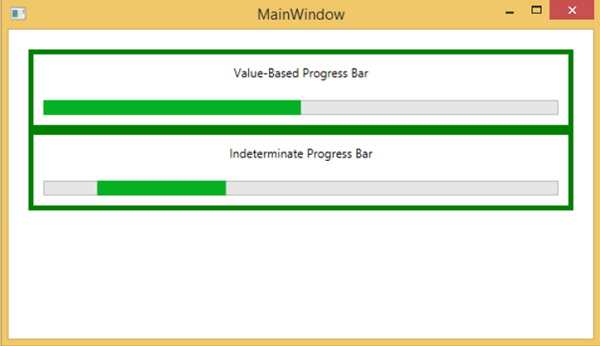
編譯並執行上述程式碼後,將生成以下視窗。
我們建議您執行上述示例程式碼,並嘗試 ProgressBar 類的其他屬性和事件。