
- WPF 教程
- WPF - 首頁
- WPF - 概述
- WPF - 環境搭建
- WPF - Hello World
- WPF - XAML 概述
- WPF - 元素樹
- WPF - 依賴屬性
- WPF - 路由事件
- WPF - 控制元件
- WPF - 佈局
- WPF - 佈局巢狀
- WPF - 輸入
- WPF - 命令列
- WPF - 資料繫結
- WPF - 資源
- WPF - 模板
- WPF - 樣式
- WPF - 觸發器
- WPF - 除錯
- WPF - 自定義控制元件
- WPF - 異常處理
- WPF - 本地化
- WPF - 互動
- WPF - 2D 圖形
- WPF - 3D 圖形
- WPF - 多媒體
- WPF 有用資源
- WPF - 快速指南
- WPF - 有用資源
- WPF - 討論
WPF - 密碼框
PasswordBox 是一種允許使用者輸入掩碼密碼的控制元件。當用戶輸入密碼時,它將顯示為密碼字元。您可以透過設定 PasswordChar 屬性來更改密碼字元。PasswordBox 類的層次繼承如下:
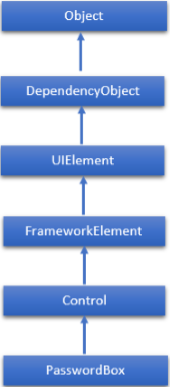
PasswordBox 類常用屬性
| 序號 | 屬性及描述 |
|---|---|
| 1 | InputScope 獲取或設定此 PasswordBox 使用的輸入上下文。 |
| 2 | InputScopeProperty 標識 InputScope 依賴屬性。 |
| 3 | IsPasswordRevealButtonEnabled 獲取或設定一個值,該值指定 PasswordBox 的視覺化 UI 是否包含一個按鈕元素,用於切換顯示或隱藏鍵入的字元。在 Windows 10 及更高版本中,請改用 PasswordRevealMode。 |
| 4 | IsPasswordRevealButtonEnabledProperty 標識 IsPasswordRevealButtonEnabled 依賴屬性。 |
| 5 | MaxLength 獲取或設定此 PasswordBox 要處理的密碼的最大長度。 |
| 6 | MaxLengthProperty 標識 MaxLength 依賴屬性。 |
| 7 | Password 獲取或設定 PasswordBox 當前持有的密碼。 |
| 8 | PasswordChar 獲取或設定 PasswordBox 的掩碼字元。 |
| 9 | PasswordCharProperty 標識 PasswordChar 依賴屬性。 |
| 10 | PasswordProperty 標識 Password 依賴屬性。 |
| 11 | PasswordRevealMode 獲取或設定一個值,該值指定密碼始終、從不還是可選地被隱藏。 |
| 12 | PasswordRevealModeProperty 標識 PasswordRevealMode 依賴屬性。 |
| 13 | Resources 獲取本地定義的資源字典。在 XAML 中,您可以透過 XAML 隱式集合語法,將資源項設定為 frameworkElement.Resources 屬性元素的子物件元素。(繼承自 FrameworkElement) |
PasswordBox 類常用事件
| 序號 | 事件及描述 |
|---|---|
| 1 | ContextMenuOpening 當系統處理顯示上下文選單的互動時發生。 |
| 2 | GotFocus 當 UIElement 獲取焦點時發生。(繼承自 UIElement) |
| 3 | PasswordChanged 當 Password 屬性的值更改時發生。 |
| 4 | Paste 當文字貼上到控制元件中時發生。 |
以下是 PasswordBox 類常用的方法。
| 序號 | 方法及描述 |
|---|---|
| 1 | OnLostFocus 在 LostFocus 事件發生之前呼叫。(繼承自 Control) |
| 2 | SelectAll 選擇 PasswordBox 中的所有字元。 |
| 3 | SetBinding 使用提供的繫結物件將繫結附加到 FrameworkElement。(繼承自 FrameworkElement) |
| 4 | SetValue 設定 DependencyObject 上依賴屬性的區域性值。(繼承自 DependencyObject) |
以下示例顯示了 PasswordBox、標籤和按鈕。以下是建立和初始化所有這些控制元件的 XAML 程式碼。
<Window x:Class = "PasswordBox.MainWindow"
   xmlns = "http://schemas.microsoft.com/winfx/2006/xaml/presentation"
   xmlns:x = "http://schemas.microsoft.com/winfx/2006/xaml"
   Title = "MainWindow" Height = "350" Width = "604">

   <Grid >
      <PasswordBox x:Name = "pwBox" Height = "35" Width = "200"
         MaxLength = "8" Margin = "159,55,158,229" />
      <Label Content = "Password" HorizontalAlignment = "Left" Margin = "108,61,0,0"
         VerticalAlignment = "Top" Width = "70" />
      <Button Content = "Ok" HorizontalAlignment = "Left" Margin = "406,64,0,0"
         VerticalAlignment = "Top" Width = "75" Click = "Button_Click"/>
      <Label Name = "statusText" HorizontalAlignment = "Left" Margin = "159,128,0,0"
         VerticalAlignment = "Top" Width = "200" Height = "38"/>
   </Grid>

</Window>
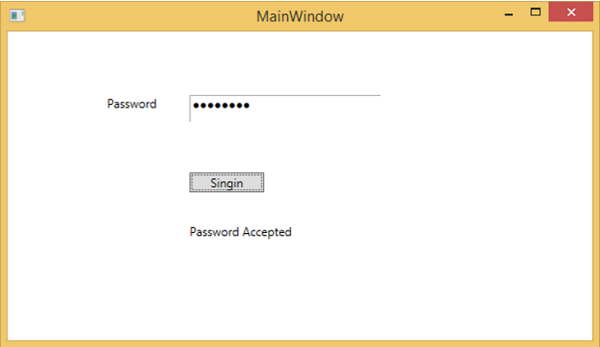
以下是C# 中的按鈕點選事件實現,程式比較輸入的密碼是否為“wpf12345”,如果是則在文字塊上顯示正確的密碼訊息。
using System.Windows;

namespace WPFPasswordBoxControl {
   /// <summary>
      /// Interaction logic for MainWindow.xaml
   /// </summary>

   public partial class MainWindow : Window {

      public MainWindow() {
         InitializeComponent();
      }

      private void Button_Click(object sender, RoutedEventArgs e) {

         if (pwBox.Password.ToString() == "wpf12345")
            statusText.Text = "Password Accepted";
         else
            statusText.Text = "Wrong Password";
      }

   }
}
編譯並執行上述程式碼後,將生成以下視窗:
我們建議您執行上述示例程式碼,並嘗試 PasswordBox 類的其他屬性和事件。