
- WPF 教程
- WPF - 首頁
- WPF - 概述
- WPF - 環境設定
- WPF - Hello World
- WPF - XAML 概述
- WPF - 元素樹
- WPF - 依賴屬性
- WPF - 路由事件
- WPF - 控制元件
- WPF - 佈局
- WPF - 佈局巢狀
- WPF - 輸入
- WPF - 命令列
- WPF - 資料繫結
- WPF - 資源
- WPF - 模板
- WPF - 樣式
- WPF - 觸發器
- WPF - 除錯
- WPF - 自定義控制元件
- WPF - 異常處理
- WPF - 本地化
- WPF - 互動
- WPF - 2D 圖形
- WPF - 3D 圖形
- WPF - 多媒體
- WPF 有用資源
- WPF - 快速指南
- WPF - 有用資源
- WPF - 討論
WPF - 複選框
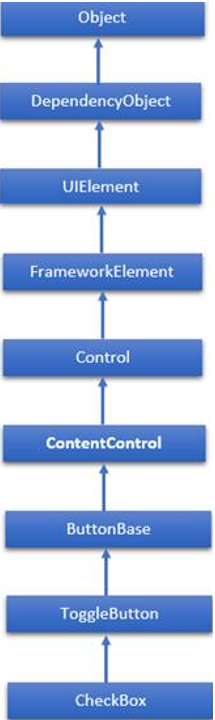
複選框是一個使用者可以選擇(選中)或取消選擇(取消選中)的控制元件。它提供使用者可以選擇的一系列選項,例如應用於應用程式的一系列設定。複選框類的層次繼承如下:
CheckBox 常用屬性
| 序號 | 屬性及描述 |
|---|---|
| 1 | Background 獲取或設定提供控制元件背景的畫刷。(繼承自 Control) |
| 2 | BorderBrush 獲取或設定描述控制元件邊框填充的畫刷。(繼承自 Control) |
| 3 | BorderThickness 獲取或設定控制元件的邊框粗細。(繼承自 Control) |
| 4 | Content 獲取或設定 ContentControl 的內容。(繼承自 ContentControl) |
| 5 | ClickMode 獲取或設定一個值,該值指示 Click 事件何時發生,以裝置行為表示。(繼承自 ButtonBase) |
| 6 | ContentTemplate 獲取或設定用於顯示 ContentControl 內容的資料模板。(繼承自 ContentControl) |
| 7 | FontFamily 獲取或設定用於在控制元件中顯示文字的字型。(繼承自 Control) |
| 8 | FontSize 獲取或設定此控制元件中文字的大小。(繼承自 Control) |
| 9 | FontStyle 獲取或設定渲染文字的樣式。(繼承自 Control) |
| 10 | FontWeight 獲取或設定指定字型的粗細。(繼承自 Control) |
| 11 | Foreground 獲取或設定描述前景色顏色的畫刷。(繼承自 Control) |
| 12 | Height 獲取或設定 FrameworkElement 的建議高度。(繼承自 FrameworkElement) |
| 13 | HorizontalAlignment 獲取或設定當 FrameworkElement 在佈局父級(例如面板或項控制元件)中組合時應用的水平對齊特性。(繼承自 FrameworkElement) |
| 14 | IsChecked 獲取或設定 ToggleButton 是否處於選中狀態。(繼承自 ToggleButton) |
| 15 | IsEnabled 獲取或設定一個值,該值指示使用者是否可以與控制元件互動。(繼承自 Control) |
| 16 | IsPressed 獲取一個值,該值指示 ButtonBase 當前是否處於按下狀態。(繼承自 ButtonBase) |
17 |
IsThreeState 獲取或設定一個值,該值指示控制元件是否支援三種狀態。(繼承自 ToggleButton) |
| 18 | Margin 獲取或設定 FrameworkElement 的外邊距。(繼承自 FrameworkElement) |
| 19 | Name 獲取或設定物件的標識名稱。當 XAML 處理器從 XAML 標記建立物件樹時,執行時程式碼可以透過此名稱引用 XAML 宣告的物件。(繼承自 FrameworkElement) |
| 20 | Opacity 獲取或設定物件的透明度。(繼承自 UIElement) |
| 21 | Resources 獲取本地定義的資源字典。在 XAML 中,您可以將資源項作為 frameworkElement 的子物件元素建立。Resources 屬性元素,透過 XAML 隱式集合語法。(繼承自 FrameworkElement) |
| 22 | Style 獲取或設定在佈局和渲染期間應用於此物件的例項 Style。(繼承自 FrameworkElement) |
| 23 | Template 獲取或設定控制元件模板。控制元件模板定義 UI 中控制元件的可視外觀,並在 XAML 標記中定義。(繼承自 Control) |
| 24 | VerticalAlignment 獲取或設定當 FrameworkElement 在父物件(例如面板或項控制元件)中組合時應用的垂直對齊特性。(繼承自 FrameworkElement) |
| 25 | Visibility 獲取或設定 UIElement 的可見性。不可見的 UIElement 不會呈現,也不會將其所需的大小傳達給佈局。(繼承自 UIElement) |
| 26 | Width 獲取或設定 FrameworkElement 的寬度。(繼承自 FrameworkElement) |
CheckBox 常用方法
| 序號 | 方法及描述 |
|---|---|
| 1 | ClearValue 清除依賴屬性的區域性值。(繼承自 DependencyObject) |
| 2 | FindName 檢索具有指定標識名稱的物件。(繼承自 FrameworkElement) |
| 3 | OnApplyTemplate 每當應用程式程式碼或內部程序(例如重建佈局傳遞)呼叫 ApplyTemplate 時都會呼叫。簡單來說,這意味著該方法在 UI 元素在應用程式中顯示之前立即被呼叫。重寫此方法以影響類的預設後模板邏輯。(繼承自 FrameworkElement) |
| 4 | OnContentChanged 當 Content 屬性的值更改時呼叫。(繼承自 ContentControl) |
| 5 | OnDragEnter 在 DragEnter 事件發生之前呼叫。(繼承自 Control) |
| 6 | OnDragLeave 在 DragLeave 事件發生之前呼叫。(繼承自 Control) |
| 7 | OnDragOver 在 DragOver 事件發生之前呼叫。(繼承自 Control) |
| 8 | OnDrop 在 Drop 事件發生之前呼叫。(繼承自 Control) |
| 9 | OnGotFocus 在 GotFocus 事件發生之前呼叫。(繼承自 Control) |
| 10 | OnKeyDown 在 KeyDown 事件發生之前呼叫。(繼承自 Control) |
| 11 | OnKeyUp 在 KeyUp 事件發生之前呼叫。(繼承自 Control) |
| 12 | OnLostFocus 在 LostFocus 事件發生之前呼叫。(繼承自 Control) |
| 13 | OnToggle 當 ToggleButton 接收到切換刺激時呼叫。(繼承自 ToggleButton) |
| 14 | SetBinding 使用提供的繫結物件將繫結附加到 FrameworkElement。(繼承自 FrameworkElement) |
CheckBox 常用事件
| 序號 | 事件及描述 |
|---|---|
| 1 | Checked 當 ToggleButton 被選中時觸發。(繼承自 ToggleButton) |
| 2 | Click 當按鈕控制元件被單擊時發生。(繼承自 ButtonBase) |
| 3 | DataContextChanged 當 FrameworkElement.DataContext 屬性的值發生更改時發生。(繼承自 FrameworkElement) |
| 4 | DragEnter 當輸入系統報告以該元素為目標的基礎拖動事件時發生。(繼承自 UIElement) |
| 5 | DragLeave 當輸入系統報告以該元素為原點的基礎拖動事件時發生。(繼承自 UIElement) |
| 6 | DragOver 當輸入系統報告以該元素為潛在放置目標的基礎拖動事件時發生。(繼承自 UIElement) |
| 7 | DragStarting 當拖動操作開始時發生。(繼承自 UIElement) |
| 8 | GotFocus 當 UIElement 獲取焦點時發生。(繼承自 UIElement) |
| 9 | Holding 當在此元素的命中測試區域上發生其他未處理的 Hold 互動時發生。(繼承自 UIElement) |
| 10 | Intermediate 當 ToggleButton 的狀態切換到不確定狀態時觸發。(繼承自 ToggleButton) |
| 11 | IsEnabledChanged 當 IsEnabled 屬性更改時發生。(繼承自 Control) |
| 12 | KeyDown 當 UIElement 具有焦點時按下鍵盤鍵時發生。(繼承自 UIElement) |
| 13 | KeyUp 當 UIElement 具有焦點時釋放鍵盤鍵時發生。(繼承自 UIElement) |
| 14 | LostFocus 當 UIElement 失去焦點時發生。(繼承自 UIElement) |
| 15 | SizeChanged 當 FrameworkElement 上的 ActualHeight 或 ActualWidth 屬性的值發生更改時發生。(繼承自 FrameworkElement) |
| 16 | Unchecked 當 ToggleButton 被取消選中時發生。(繼承自 ToggleButton) |
示例
讓我們建立一個名為 WPFCheckBoxControl 的新 WPF 專案。
從工具箱中拖動兩個複選框和兩個文字框,並在屬性視窗中設定以下屬性。
| 控制元件 | 屬性 | 值 |
|---|---|---|
| Checkbox1 | Content | 兩種狀態 |
| Name | checkBox1 | |
| Width | 90 | |
| Checkbox2 | Content | 三種狀態 |
| Name | checkBox2 | |
| Width | 90 | |
| textbox1 | Name | textBox1 |
| Width | 300 | |
| Textbox2 | Name | textBox2 |
| Width | 300 |
現在切換到 XAML 視窗,您將在其中看到複選框和文字框的 XAML 標記。
新增更多屬性和選擇事件,如下面的 XAML 程式碼所示。
<Window x:Class = "WPFCheckBoxControl.MainWindow"
   xmlns = "http://schemas.microsoft.com/winfx/2006/xaml/presentation"
   xmlns:x = "http://schemas.microsoft.com/winfx/2006/xaml"
   xmlns:d = "http://schemas.microsoft.com/expression/blend/2008"
   xmlns:mc = "http://schemas.openxmlformats.org/markup-compatibility/2006"
   xmlns:local = "clr-namespace:WPFCheckBoxControl"
   mc:Ignorable = "d" Title = "MainWindow" Height = "350" Width = "604">

   <Grid>
      <CheckBox x:Name = "checkBox1" Content = "Two States" HorizontalAlignment = "Left"
         Margin = "80,70,0,0" VerticalAlignment = "Top" Checked = "HandleCheck"
         Unchecked = "HandleUnchecked" Width = "90"/>

      <CheckBox x:Name = "checkBox2" Content = "Three States"
         HorizontalAlignment = "Left" Margin = "80,134,0,0" VerticalAlignment = "Top"
         Width = "90" IsThreeState = "True" Indeterminate = "HandleThirdState"
         Checked = "HandleCheck" Unchecked = "HandleUnchecked"/>

      <TextBox x:Name = "textBox1" HorizontalAlignment = "Left"
         Height = "23" Margin = "236,68,0,0" TextWrapping = "Wrap"
         VerticalAlignment = "Top" Width = "300"/>

      <TextBox x:Name = "textBox2" HorizontalAlignment = "Left"
         Height = "23" Margin = "236,135,0,0" TextWrapping = "Wrap"
         VerticalAlignment = "Top" Width = "300"/>
   </Grid>

</Window>
以下是針對不同事件的 C# 實現:
using System.Windows;
using System.Windows.Controls;

namespace WPFCheckBoxControl {
   /// <summary>
      /// Interaction logic for MainWindow.xaml
   /// </summary>

   public partial class MainWindow : Window {

      public MainWindow() {
         InitializeComponent();
      }

      private void HandleCheck(object sender, RoutedEventArgs e) {
         CheckBox cb = sender as CheckBox;

         if (cb.Name == "checkBox1") textBox1.Text = "2 state CheckBox is checked.";
         else textBox2.Text = "3 state CheckBox is checked.";
      }

      private void HandleUnchecked(object sender, RoutedEventArgs e) {
         CheckBox cb = sender as CheckBox;

         if (cb.Name == "checkBox1") textBox1.Text = "2 state CheckBox is unchecked.";
         else textBox2.Text = "3 state CheckBox is unchecked.";
      }

      private void HandleThirdState(object sender, RoutedEventArgs e) {
         CheckBox cb = sender as CheckBox;
         textBox2.Text = "3 state CheckBox is in indeterminate state.";
      }

   }
}
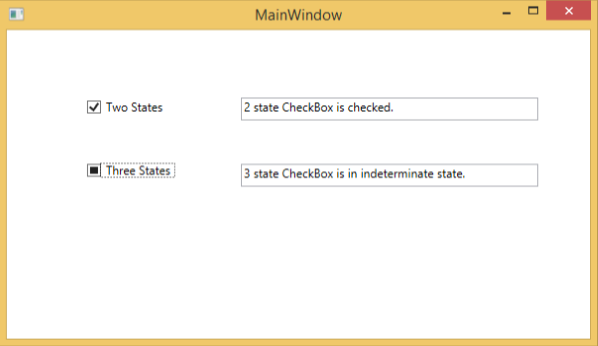
編譯並執行上述程式碼後,將生成以下視窗。選中/取消選中複選框時,它將相應地更新文字塊。
建議您執行上述示例程式碼,並嘗試複選框控制元件的其他屬性和事件。