

- Selenium教程
- Selenium - 首頁
- Selenium - 概述
- Selenium - 元件
- Selenium - 自動化測試
- Selenium - 環境搭建
- Selenium - 遠端控制
- Selenium IDE 教程
- Selenium - IDE 簡介
- Selenium - 特性
- Selenium - 限制
- Selenium - 安裝
- Selenium - 建立測試
- Selenium - 建立指令碼
- Selenium - 控制流
- Selenium - 儲存變數
- Selenium - 警報和彈出視窗
- Selenium - Selenese 命令
- Selenium - Actions 命令
- Selenium - Accessors 命令
- Selenium - Assertions 命令
- Selenium - Assert/Verify 方法
- Selenium - 定位策略
- Selenium - 指令碼除錯
- Selenium - 驗證點
- Selenium - 模式匹配
- Selenium - JSON 資料檔案
- Selenium - 瀏覽器執行
- Selenium - 使用者擴充套件
- Selenium - 程式碼匯出
- Selenium - 程式碼輸出
- Selenium - JavaScript 函式
- Selenium - 外掛
- Selenium WebDriver 教程
- Selenium - 簡介
- Selenium WebDriver vs RC
- Selenium - 安裝
- Selenium - 第一個測試指令碼
- Selenium - 驅動程式會話
- Selenium - 瀏覽器選項
- Selenium - Chrome 選項
- Selenium - Edge 選項
- Selenium - Firefox 選項
- Selenium - Safari 選項
- Selenium - 雙擊
- Selenium - 右擊
- Python 中的 HTML 報告
- 處理編輯框
- Selenium - 單個元素
- Selenium - 多個元素
- Selenium Web 元素
- Selenium - 檔案上傳
- Selenium - 定位策略
- Selenium - 相對定位器
- Selenium - 查詢器
- Selenium - 查詢所有連結
- Selenium - 使用者互動
- Selenium - WebElement 命令
- Selenium - 瀏覽器互動
- Selenium - 瀏覽器命令
- Selenium - 瀏覽器導航
- Selenium - 警報和彈出視窗
- Selenium - 處理表單
- Selenium - 視窗和標籤頁
- Selenium - 處理連結
- Selenium - 輸入框
- Selenium - 單選按鈕
- Selenium - 複選框
- Selenium - 下拉框
- Selenium - 處理IFrames
- Selenium - 處理Cookie
- Selenium - 日期時間選擇器
- Selenium - 動態Web表格
- Selenium - Actions 類
- Selenium - Action 類
- Selenium - 鍵盤事件
- Selenium - 鍵上/下
- Selenium - 複製和貼上
- Selenium - 處理特殊鍵
- Selenium - 滑鼠事件
- Selenium - 拖放
- Selenium - 筆事件
- Selenium - 滾動操作
- Selenium - 等待策略
- Selenium - 顯式/隱式等待
- Selenium - 支援特性
- Selenium - 多選
- Selenium - 等待支援
- Selenium - 選擇支援
- Selenium - 顏色支援
- Selenium - ThreadGuard
- Selenium - 錯誤和日誌記錄
- Selenium - 異常處理
- Selenium - 其他
- Selenium - 處理Ajax呼叫
- Selenium - JSON 資料檔案
- Selenium - CSV 資料檔案
- Selenium - Excel 資料檔案
- Selenium - 跨瀏覽器測試
- Selenium - 多瀏覽器測試
- Selenium - 多視窗測試
- Selenium - JavaScript 執行器
- Selenium - 無頭執行
- Selenium - 捕獲螢幕截圖
- Selenium - 捕獲影片
- Selenium - 頁面物件模型
- Selenium - 頁面工廠
- Selenium - 錄製和回放
- Selenium - 框架
- Selenium - 瀏覽上下文
- Selenium - DevTools
- Selenium Grid 教程
- Selenium - 概述
- Selenium - 架構
- Selenium - 元件
- Selenium - 配置
- Selenium - 建立測試指令碼
- Selenium - 測試執行
- Selenium - 端點
- Selenium - 自定義節點
- Selenium 報告工具
- Selenium - 報告工具
- Selenium - TestNG
- Selenium - JUnit
- Selenium - Allure
- Selenium & 其他技術
- Selenium - Java 教程
- Selenium - Python 教程
- Selenium - C# 教程
- Selenium - Javascript 教程
- Selenium - Kotlin 教程
- Selenium - Ruby 教程
- Selenium - Maven & Jenkins
- Selenium - 資料庫測試
- Selenium - LogExpert 日誌記錄
- Selenium - Log4j 日誌記錄
- Selenium - Robot Framework
- Selenium - AutoIT
- Selenium - Flash 測試
- Selenium - Apache Ant
- Selenium - Github 教程
- Selenium - SoapUI
- Selenium - Cucumber
- Selenium - IntelliJ
- Selenium - XPath
- Selenium 其他概念
- Selenium - IE 驅動程式
- Selenium - 自動化框架
- Selenium - 關鍵字驅動框架
- Selenium - 資料驅動框架
- Selenium - 混合驅動框架
- Selenium - SSL 證書錯誤
- Selenium - 替代方案
- Selenium 有用資源
- Selenium - 問答
- Selenium - 快速指南
- Selenium - 有用資源
- Selenium - 自動化實踐
- Selenium - 討論
110+ Selenium面試問答(2024)
Selenium是一個用於自動化測試的開源工具。它主要用於測試Web應用程式和自動化瀏覽器互動。類似於人類使用者如何與瀏覽器互動,Selenium允許透過建立指令碼與網頁進行互動,例如網頁導航、輸入文字、單擊按鈕以及驗證預期結果。開發人員可以使用強大的Selenium框架跨各種瀏覽器和平臺測試Web應用程式。
希望在Selenium方面取得成功的求職者可以使用這110多個Selenium面試問答。無論您是應屆畢業生還是經驗豐富的專業人士,您都可以透過這些問答來測試您對Selenium的瞭解,以及您批判性思維和解決問題的能力。
Selenium面試問答
以下是Selenium中最常被問到的面試問題和答案:
1. 什麼是Selenium?
Selenium是一個免費的開源Web自動化測試工具。它可以用來執行諸如點選、輸入、滑鼠和鍵盤操作等操作,這些操作作用於網頁上的元素,並驗證執行這些操作後產生的結果。
Selenium支援多種語言,例如Java、C#、Python、JavaScript等,並且可以在Windows、Mac、iPhone等各種平臺上使用。它包含以下工具:
2. Selenium的元件是什麼?
Selenium是一套包含多個工具的工具套件,每個工具都用於執行基於Web的測試中的各種專案。Selenium元件包括:
- Selenium 整合開發環境 (IDE) - 此工具主要用於基於Web的測試,並因其錄製和回放功能而廣受歡迎。
- Selenium 遠端控制 (RC) - 此工具就像一個伺服器,能夠生成多種語言的指令碼。它接收來自測試的命令,並將它們以Selenium核心JavaScript命令的形式定向到瀏覽器。
- Selenium WebDriver - 此工具可用於透過直接與Web瀏覽器互動來設計多種語言的測試指令碼。
- Selenium Grid - 此工具用於在多個裝置、瀏覽器、作業系統等上啟用測試指令碼的並行執行。
3. 使用Selenium有哪些優勢?
使用Selenium的優勢如下:
- 它是開源的,不需要任何許可費用。
- 它可以與多個瀏覽器一起使用,例如Chrome、Firefox、Safari、Edge等。
- 它用於在各種平臺和裝置上執行測試,例如Mac、Windows、iPhone、Android。
- 它可以與其他框架整合,例如TestNG、Junit等。此外,它可以與其他構建工具一起使用,例如Maven、Ant。
- 它可以用於執行無頭和並行執行。
- 它定期更新,並且配置非常容易。Selenium擁有龐大的社群支援,如果遇到問題,可以提供幫助。
- 它可以與多種程式語言一起使用,例如Java、JavaScript、C#、Ruby、Python、Kotlin等。
- 它採用使用者友好的介面,幫助使用者建立和維護測試指令碼。
- 它不是單個工具,而是一組工具,每個工具都可用於不同的測試目的。
4. 使用Selenium有哪些缺點?
使用Selenium的缺點如下:
- 它僅支援測試基於Web的應用程式。
- 它需要技術知識和編碼技能。
- 不建議將其用於測試條形碼、QR碼掃描、驗證碼等場景。
- 它必須與其他工具整合才能生成報告。
- 在舒適地使用瀏覽器和平臺的新版本之前,它需要一些時間。
- 它沒有任何預設的物件儲存庫。
5. 自動化測試是什麼意思?它的優勢是什麼?
自動化測試是使用測試工具將手動測試用例轉換為自動化的過程。具有大量重複和冗餘步驟的手動測試通常被選擇作為自動化的合適候選者。但是,必須注意的是,不可能將100%的手動測試用例自動化。此外,自動化只能在穩定的軟體上採用。
自動化測試的優勢如下:
- 它可用於驗證軟體的功能和非功能需求。
- 它具有巨大的投資回報率,因為它節省了大量的時間、金錢和人力。
- 可以透過自動化實現並行執行。
- 它透過避免在執行測試用例中的人工干預來減少人為錯誤的範圍。
- 透過自動化節省的時間可用於手動測試無法自動化的非常複雜的場景。
- 它允許測試人員在一個測試周期中多次執行迴歸和重複的測試用例。
- 它提供關於軟體構建方式的更快反饋。
6. 為什麼Selenium被廣泛用於自動化?
Selenium被廣泛用於自動化,因為它與多個瀏覽器、平臺和語言相容。它不需要任何許可費用。
7. 什麼是Selenese命令?
Selenese是一組用於執行基於Web測試的命令。這些命令廣泛用於Selenium IDE。Selenese命令分為三種類型:Actions、Accessors和Assertions。
8. Selenium 3.x和Selenium 4.x有什麼區別?
Selenium 最新版本為 4.x 版本。此版本的架構和通訊符合 W3C 標準。Selenium 3.x 版本的架構和通訊基於 JSON Wire 協議。Selenium 4.x 添加了相對定位器,例如 above()、below()、toRightOf()、toLeftOf()、near() 以及相對定位器的鏈式呼叫。它還提供了對 ChromeDevTools 的訪問,ChromeDevTools 用於除錯、網路流量分析以及其他有助於自動化的功能。
Selenium 3.x 擴充套件了 Remote WebDriver,而 Selenium 4.x 擴充套件了 Chrome Driver。此外,3.x 版本需要觸發 Hub 和 Node jar 來執行 Selenium Grid 測試,而 4.x 版本不再需要。Selenium 4.x 版本為 Chrome 和 Firefox 提供了 Selenium IDE 外掛。最新版本的 Selenium 還包含了 side runner。
9. Selenium 2 和 Selenium 3 之間有什麼區別?
Selenium 2 和 Selenium 3 之間有什麼區別?答案:Selenium 3.0 是 Selenium 2.0 的改進版本,它修復了 Selenium 2.0 版本中的錯誤。Selenium 2.0 是 Selenium RC 和 Selenium WebDriver 的組合。但是,從 Selenium 3.0 版本開始,Selenium RC 已被淘汰。
Selenium 2.0 對移動測試的範圍不大,而從 Selenium 3.0 開始,可以使用 Appium 進行移動測試,並且它擁有比 Selenium 2.0 更新和改進的 API。Selenium 2.0 現在已不再使用。
10. 列舉一些用於自動化測試的工具
下面列出了一些用於自動化測試的工具:
- Selenium − 主要用於基於 Web 的自動化測試。
- Cypress − 主要用於基於 Web 的自動化測試和 API 自動化測試。
- Playwright − 主要用於基於 Web 的自動化測試。
- Appium − 主要用於移動自動化測試。
- UFT − 是一款商業授權的 Web 自動化測試工具。
- JMETER − 主要用於負載測試。
11. Selenium 中有哪些不同型別的定位器?
Selenium 透過其定位策略來識別網頁上的元素。Selenium 中提供的一些定位器如下所示:
- Css
- Xpath
- Link Text
- Partial Link Text
- Id
- Name
- Class Name
- Tagname
從 Selenium 的最新版本開始,還提供了其他型別的定位器,稱為相對定位器,它們根據另一個元素的位置來識別元素。Selenium 中的一些 相對定位器 如下所示:
- above()
- below()
- toRightOf()
- toLeftOf()
- near()
- 定位器鏈式呼叫
12. 使用 Selenium 可以進行哪些不同型別的測試?
可以使用 Selenium 執行的不同型別的測試如下所示:
13. 什麼是 XPath?
XPath 是一種查詢語言,用於根據其 XML 路徑來檢測元素。它用於遍歷 XML 文件的 Web 元素及其屬性。有關 XPath 的更多資訊,請訪問以下連結:
XML 是一種可擴充套件標記語言,用於儲存、管理和傳送資料。資料以類似於 HTML 的鍵值對格式儲存。XPath 分為兩種型別:相對 XPath 和絕對 XPath。
14. 什麼是絕對 XPath 和相對 XPath?
絕對 XPath 用雙斜槓 // 表示。它從文件的起始節點開始識別所需的元素。但是,如果從根到當前節點的任何元素的路徑發生更改,則現有的絕對 XPath 將無法再識別該特定元素。
示例
Absolute Xpath Used: /html/body/main/div/div//div/ul/li[2]/input
相對 XPath 用單斜槓 / 表示。它從 DOM 中的任何位置開始識別所需的元素。
示例
Relative Xpath Used: //*[@id='gg_bf_1']//parent::ul
15. driver.close() 和 driver.quit() 之間有什麼區別?
driver.close() 用於關閉當前處於焦點的瀏覽器視窗。如果打開了多個選項卡和視窗,driver.close() 不會關閉所有選項卡和視窗。它只會關閉當前活動的選項卡或視窗。如果在 driver.close() 之後再次呼叫 driver 例項,則會丟擲無效會話 ID 異常。
driver.quit() 用於關閉所有開啟的視窗和選項卡並終止驅動程式會話。如果在 driver.quit() 之後再次呼叫 driver 例項,則會丟擲會話 ID 為 null 的異常。
16. 如何使用 Selenium 等待頁面完全載入?
我們可以使用以下方法使用 Selenium 等待頁面完全載入:
使用隱式等待 − 在這種方法中,在每個頁面載入時,它都會等待頁面完全載入。
例如 −
driver.manage().timeouts().implicitlyWait(10, TimeUnit.SECONDS);
使用 JavaScript 函式 − 在這種方法中,呼叫 JavaScript return document.readyState 直到頁面載入後返回 complete。
例如 −
if (document.readyState == "complete"){
   alert("Page is loaded completely");
}
17. Selenium 中的異常測試是什麼意思?
異常測試是指預期從測試類接收異常作為輸出的測試。它查詢 @Test 註解,然後查詢括號內的預期異常名稱。
例如 −
@Test
public void test1(expectedException = NoSuchElementException.class){

   // description of test method

}
上述異常測試用於無法識別的元素。
18. 為什麼 Selenium 是測試基於 Web 的應用程式的流行選擇?
Selenium 是測試基於 Web 的應用程式的流行選擇,因為它是一個相對簡單的工具,可以使用 JavaScript 實現。它與多種瀏覽器、平臺和語言相容。它可以輕鬆地與其他第三方工具(如 TestNG、Junit、Maven 等)整合。
19. 列舉與 Selenium 一起使用的各種註解
與 Selenium 一起使用的各種註解通常是 TestNG 測試自動化框架的一部分。與 Selenium 一起使用的一些註解如下所示:
- @BeforeSuite
- @AfterSuite
- @BeforeClass
- @AfterClass
- @BeforeSuite
- @AfterSuite
- @BeforeTest
- @AfterTest
20. Selenium 中的 TestNG 是什麼?
TestNG 是一個單元測試自動化框架,可以與 Selenium 整合。它允許對測試進行分組、設定優先順序、並行測試等。
21. 什麼是同源策略?
同源策略是應用於瀏覽器的安全特性,它不允許屬於一個源的文件或指令碼被另一個源的文件或指令碼訪問。它包括協議、來源和埠。
因此,如果兩個網頁都來自相同的源,則 Web 瀏覽器允許來自特定網頁的指令碼訪問另一個網頁。同源策略保護網頁的安全資料免受來自不同源的另一個網頁的惡意攻擊。
為了避免同源策略,採用了代理注入技術。在這種方法中,Selenium 伺服器充當配置為 HTTP 代理的客戶端,並誘使瀏覽器接受 Selenium Core 和被測應用程式屬於相同的源。
22. 為什麼選擇 Selenium 而不是 UFT?
主要由於以下原因,Selenium 比 UFT 更受歡迎:
- UFT 是一款商業授權工具,需要付費,而 Selenium 是免費的開源工具。
- UFT 僅用於測試 Windows 應用程式,而 Selenium 可以在多個平臺上進行測試,例如 Windows、Linux、Mac、iPhone、Blueberry 等。
- UFT 是一個桌面應用程式,而 Selenium 是一組 API。
- UFT 僅支援 Visual Basic 指令碼,而 Selenium 支援多種程式語言,例如 Java、C#、Python、JavaScript、Ruby、Kotlin 等。
- 如果測試團隊正在尋找免費的開源工具,並且精通程式語言,那麼 Selenium 始終比 UFT 更好。但是,如果測試團隊只瞭解 VB 指令碼,並且需要在 Windows 平臺上進行驗證,則可以選擇 UFT。
23. 什麼是 POM 或頁面物件模型,以及它的好處是什麼?
POM,也稱為 頁面物件模型,是一種設計模式,可用於透過將元素和測試用例流程分離到各個類檔案中來建立 Selenium 測試指令碼。POM 的好處是,透過分離 Web 元素和測試用例,它可以提高程式碼的可讀性、可重用性和易維護性。
24. Selenium 中有哪些不同型別的等待?
Selenium 中可用的不同型別的等待如下所示:
隱式等待
它是一種預設型別,Selenium 在丟擲異常之前會等待特定時間。
例如 −
driver.manage().timeouts().implicitlyWait(10, TimeUnit.SECONDS);
顯式等待
此等待用於通知 Webdriver 在丟擲異常之前等待特定條件特定時間。
例如 −
WebDriverWait w = new WebDriverWait(driver, 15);
wt.until(ExpectedConditions.invisibilityOfElementLocated
   (By.xpath("//*[@class='btn']")));
流暢等待
此等待用於通知 Webdriver 在丟擲異常之前,以給定的間隔等待特定條件,在此期間檢查該條件特定時間。
例如 −
Wait w = new FluentWait(driver).withTimeout(25, TimeUnit.SECONDS)
   .pollingEvery(15, TimeUnit.SECONDS)
   .ignoring(ElementNotInteractableException.class);

wt.until(ExpectedConditions.titleIs("Online Tutorialspoint"));
25. Selenium 中 findElement() 和 finElements() 方法之間有什麼區別?
Selenium 中 findElement() 和 findElements() 方法之間的區別如下所示:
- findElement() 返回一個 WebElement,而 findElements() 返回 WebElement 列表。
- 如果沒有匹配的元素,findElement() 將丟擲 NoSuchElementException,而 findElements() 將返回大小為 0 的陣列列表。
26. 什麼是 Selenium WebDriver?
Selenium WebDriver 是 Selenium 工具套件的一部分,從 Selenium 2 版本開始提供。它可用於使用多種語言、平臺和瀏覽器來自動化 Web 應用程式的測試。
27. Selenium WebDriver 是庫的一部分嗎?
Selenium WebDriver 是一個免費的開源庫,用於建立基於 Web 的應用程式的自動化測試指令碼。
28. Selenium 中使用了哪些不同型別的導航命令?
Selenium 中使用的不同型別的導航命令如下所示:
driver.navigate().to("應用程式的 URL") − 它將導航到應用程式的 URL。
driver.navigate()
   .to("https://tutorialspoint.tw/selenium/practice/login.php");
driver.get("應用程式的 URL") − 它將啟動瀏覽器以開啟應用程式的 URL。
driver.get("https://tutorialspoint.tw/selenium/practice/login.php");
driver.navigate().back() − 它將根據瀏覽器歷史記錄上下文跳轉到上一頁。
driver.navigate().back();
driver.navigate().forward() − 根據瀏覽器歷史上下文,跳轉到下一頁。
driver.navigate().forward();
driver.navigate().refresh() − 重新載入網頁。
driver.navigate().refresh();
29. 什麼是資料驅動框架?
資料驅動框架是一種測試資料與測試指令碼分離的框架。它允許你使用多個數據集執行測試用例。此外,如果需要對測試用例進行更改,可以在不接觸測試資料的情況下完成。
30. Selenium支援哪些程式語言?
Selenium可以與多種程式語言一起使用,例如Java、C#、Python、JavaScript、Ruby、Kotlin、Perl等。
31. driver.get()和driver.navigate.to()有什麼區別?
driver.get()和driver.navigate.to()的區別如下:
- driver.get()方法啟動URL並等待頁面完全載入,而driver.navigate.to()方法啟動URL而無需等待頁面完全載入。
- driver.get()方法是WebDriver介面的一部分,而driver.navigate.to()方法是Navigation介面的一部分。
- driver.get()方法不允許瀏覽器在瀏覽器歷史記錄中向前或向後移動以及重新整理,而driver.navigate.to()方法允許所有這些操作。
32. Selenium無法自動化哪些場景?
Selenium無法自動化的場景如下:
- 它無法自動化包含點陣圖比較的場景。
- 它無法自動化驗證碼場景。
- 它無法自動化條形碼場景。
- Selenium可以自動化效能測試,但這並不是推薦的做法。
- 它無法自動化影片流場景。
33. 列舉一些可以與Selenium整合的開源框架
一些可以與Selenium整合的開源框架如下:
34. 在Selenium中使用driver.get()方法會發生什麼?
driver.get()方法啟動瀏覽器,開啟應用程式URL,並等待頁面完全載入。
語法
driver.get("https://tutorialspoint.tw/selenium/index.htm");
要了解更多關於driver.get()的資訊,請訪問連結 Selenium WebDriver瀏覽器導航
35. 開啟應用程式URL的driver.get()方法的替代方法是什麼?
開啟應用程式URL的driver.get()方法的替代方法是driver.navigate.to()方法。它啟動URL而無需等待頁面完全載入。
語法
driver.navigate()
   .to("https://tutorialspoint.tw/selenium/index.htm");
36. 什麼是關鍵字驅動框架?
關鍵字驅動框架是一種實現邏輯和程式碼被隱藏的框架。它是資料驅動框架的一種擴充套件。在關鍵字驅動框架中,透過按特定順序排列一組關鍵字來建立測試用例。
37. 如何使用Selenium上傳檔案?
我們可以使用Selenium上傳檔案。如果檔案在同一臺機器上或放置在對映驅動器中,我們需要將檔案位置傳遞給sendKeys()方法。
語法
WebDriver driver = new ChromeDriver();

// identify element
WebElement m = driver.findElement(By.xpath("value of xpath locator"));

// obtain file path to be uploaded
File file = new File("./Pictures.png");
System.out.println("File path to be uploaded: " + file.getAbsolutePath());

// uploading file with path
m.sendKeys(file.getAbsolutePath());
38. getWindowHandle()方法和getWindowHandles()方法有什麼區別?
getWindowHandle()方法和getWindowHandles()方法的區別如下:
- getWindowHandles()方法返回當前開啟的所有視窗和標籤頁的控制代碼ID,而getWindowHandle()方法返回當前處於焦點的視窗或標籤頁的控制代碼ID。
- getWindowHandles()方法使用集合Set返回當前開啟的所有視窗和標籤頁的控制代碼ID,而getWindowHandle()方法返回當前處於焦點的視窗或標籤頁的控制代碼ID(字串)。
39. WebDriver driver = new FireFoxDriver()是什麼意思?
在程式碼語句WebDriver driver = new FireFoxDriver()中,WebDriver是一個介面,FirefoxDriver是一個類。在這裡,我們使用Java中的new關鍵字建立了FirefoxDriver類的物件。然後將該物件賦值給WebDriver介面的引用變數driver。
此語句主要用於替代FireFoxDriver driver = new FireFoxDriver(),因為在自動化框架中,我們提供了在多個瀏覽器中執行測試的功能。為了實現此功能,只需要將瀏覽器名稱傳遞給可重用的方法,該方法將建立正確類的物件,最後將其賦值給WebDriver介面。
也可以使用語句FireFoxDriver driver = new FireFoxDriver(),但是為了最佳化程式碼,我們通常使用WebDriver driver = new FireFoxDriver()。此外,此語句只能使用並呼叫適用於Firefox瀏覽器的FireFoxDriver的方法。
我們不能建立特定驅動程式(例如FirefoxDriver)的物件並將其賦值給另一個瀏覽器驅動程式(例如ChromeDriver)。因此,語句ChromeDriver driver = new FireFoxDriver()是錯誤的。但是我們可以將FirefoxDriver、ChromeDriver等的物件賦值給WebDriver介面。語句WebDriver driver = new WebDriver()不被使用,因為WebDriver是一個介面,我們不能建立介面的物件。
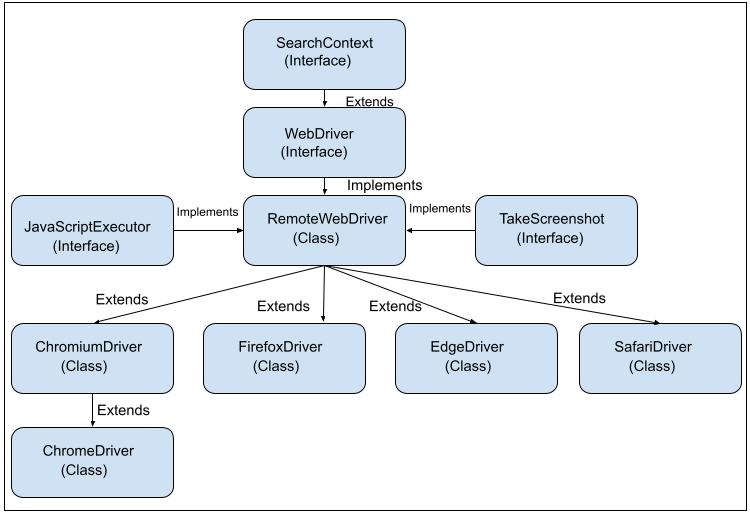
40. WebDriver的超介面是什麼?
根據類和介面的層次結構,SearchContext是WebDriver的超介面。Selenium中類和介面的層次結構如下圖所示:
41. 如何在Selenium中向文字框輸入文字?
我們可以使用以下方法在Selenium中向文字框輸入文字:
使用sendKeys()方法
Webdriver driver = new ChromeDriver();
driver.findElement(By.id("value of id")).sendKeys("value to be entered");
使用JavaScript執行器
Webdriver driver = new ChromeDriver();
WebElement elm = driver.findElement(By.id("value of id"));
JavascriptExecutor j = (JavascriptExecutor) driver;
j.executeScript("arguments[0].setAttribute('value', 'Selenium')", elm);
使用Actions
Webdriver driver = new ChromeDriver();
Actions a = new Actions(driver);
a.sendKeys(e, "value entered").perform();
42. 我們能否使用Selenium測試API和Web服務?
Selenium主要用於測試Web應用程式,不用於API測試。只有Selenium庫本身無法支援API或Web服務測試,為此需要額外的庫,例如Rest Assured。
43. 我們是否需要使用Selenium Server來執行Selenium Webdriver指令碼?
Selenium Server用於執行Selenium Webdriver指令碼,藉助Selenium Grid在多個平臺、瀏覽器和機器之間觸發並行執行。如果要在遠端機器上執行測試,則需要遠端伺服器來執行測試指令碼。
44. Selenium中的WebElement是什麼意思?
一個WebElement是Selenium中的一個介面,它指的是網頁上的一個元素。它用於對頁面上的這些元素執行操作。
45. 如何使用xpath定位元素的第n個子元素?
我們可以使用以下方法使用xpath定位元素的第n個子元素:
使用xpath表示式 - //parent/childElement[n]
//div/a[5]
上面的xpath標識父div的第五個錨點子元素。
在xpath表示式中使用子軸 - //parent/child::tagname[n]
Webdriver driver = new ChromeDriver();
WebElement parnt = driver.findElement(By.xpath("//ul[@name='toc']"));

//identify all children nodes with ./child::* expression in xpath
List<WebElement> c = parnt.findElements(By.xpath("./child::*"));
46. Selenium中有物件庫嗎?
Selenium中沒有預設的物件庫。但是,所有元素定位器都可以在單獨的類檔案、屬性檔案等中定義,以便於維護和從測試用例中訪問。
47. 如何在Selenium IDE中插入斷點?
我們在Selenium IDE中插入斷點來除錯測試步驟。可以透過以下方法應用斷點:
- 單擊測試中的行號以新增斷點。
- 按“停用斷點”停用所有斷點。再次按下相同的按鈕即可啟用斷點。
- 右鍵單擊任何步驟,然後按“切換斷點”。
48. 如何在Selenium中單擊連結?
我們可以使用以下方法在Selenium中單擊連結:
使用click()方法
Webdriver driver = new ChromeDriver();
driver.findElement(By.linkText("Home")).click();
使用JavaScript執行器
Webdriver driver = new ChromeDriver();
WebElement elm = driver.findElement(By.xpath("//div/ul/li[2]/a"));
JavascriptExecutor j = (JavascriptExecutor) driver;
j.executeScript("arguments[0].click();", elm);
49. 如何在Selenium中處理警告框和彈出視窗?
我們可以使用Alerts介面在Selenium中處理警告框和彈出視窗。最初,驅動程式焦點位於主網頁上,要訪問警告框,我們需要使用switchTo().alert()方法將驅動程式焦點從主頁面切換到警告框。
Alert介面的方法如下:
- driver.switchTo().alert().accept() − 接受警告框並單擊“確定”。
- driver.switchTo().alert().dismiss() − 關閉警告框並單擊“取消”。
- driver.switchTo().alert().getText() − 獲取警告框中的文字。
- driver.switchTo().alert().sendKeys("value") − 在警告框中的文字欄位中輸入文字。
50. Selenium IDE中assert和verify命令有什麼區別?
assert和verify命令用於在測試用例中新增驗證點。如果assert命令中檢查的條件不滿足,則執行在不匹配點停止。否則繼續執行。如果verify命令中檢查的條件不滿足,則執行仍在不匹配點之後繼續。
51. 如何在Selenium中向下滾動網頁?
我們可以使用JavaScript執行器在Selenium中向下滾動網頁。要向下滾動到特定高度,可以使用scrollBy方法。
語法
JavascriptExecutor j = (JavascriptExecutor) driver;
j.executeScript("window.scrollBy(0,700)", "");
要向下滾動到頁面底部,同樣可以使用scrollBy方法。
語法
JavascriptExecutor j = (JavascriptExecutor) driver;
j.executeScript
   ("window.scrollBy(0,document.body.scrollHeight)");
要向下滾動到網頁上元素可見。
語法
WebElement t = driver.findElement
   (By.xpath("<value of xpath>"));

// scrolling to view of an element

JavascriptExecutor j = (JavascriptExecutor) driver;
j.executeScript("arguments[0].scrollIntoView();", t);
52. Selenium中getText()和getAttribute()方法有什麼區別?
getText()方法用於獲取網頁上元素的文字。getAttribute()方法用於獲取DOM中元素的執行時值,要獲取的值作為引數傳遞。兩者都被稱為Selenium中的WebElement命令。
語法
WebDriver driver = new ChromeDriver();

// Identify the element
WebElement elm = driver.findElement
   (By.xpath("<value of xpath>"));

// text of the element
String text =  elm.getText());

// Identify another element
WebElement elm1 = driver.findElement
   (By.xpath("<value of id>"));

// enter text in input box
elm1.sendKeys("Selenium Interview");

// Obtain the value entered
String text = elm1.getAttribute("value");
53. 如何獲取元素的css屬性?
我們可以使用getCSSValue()方法獲取元素的css屬性。要獲取像color或border-color這樣的css屬性,我們需要將它們作為引數傳遞給此方法。
語法
WebDriver driver = new ChromeDriver();

// Identify the element
WebElement element = driver.findElement
   (By.xpath("<value of xpath>"));

// Get background color
String color = element.getCssValue("background-color"));
54. Page Factory中@FindBy註解有什麼作用?
在Page Factory中,@FindBy註解用於使用xpath、css、tagname、link text、partial link text、name、class name等定位器標識、宣告和對網頁上的web元素執行操作。
語法
FindBy(id = "name")
WebElement elm;
55. 混合框架是什麼意思?
混合框架結合了資料驅動和關鍵字驅動框架的功能。使用混合框架構建的測試指令碼更健壯,並且更容易維護。
56. 如何在Selenium中處理框架?
我們可以處理Selenium中的框架。最初,驅動程式焦點位於主網頁上,要訪問框架,我們需要使用switchTo().frame()方法將驅動程式焦點從主頁面切換到框架。
框架上一些基本的過載方法如下:
switchTo.frame(args) − 將框架索引號作為引數傳遞。框架的起始索引為零。
driver.switchTo.frame(0), switching to the first frame.
switchTo.frame(args) − 將框架ID或名稱作為引數傳遞。
driver.switchTo.frame(“id-value”), switching to the frame
   having id or name value as id-value.
switchTo.frame(args) − 將框架webelement作為引數傳遞。
driver.switchTo.frame(“id-name”), switching to the frame
   having webelement value as id-name.
driver.switchTo.defaultContent() − 將驅動程式上下文從框架切換到主頁面。
57. 如何清除 Selenium 中輸入框的文字?
我們可以使用 clear() 方法清除 Selenium 輸入框 中的文字。首先,使用 sendKeys() 方法在輸入框中輸入文字,然後藉助 clear() 方法清除。
58. 如何獲取 Selenium 中元素屬性的值?
我們可以使用 getAttribute() 方法獲取 Selenium 中元素屬性的值。例如,我們可以使用 getAttribute() 方法獲取文字框中輸入的值,然後將值作為引數傳遞給該方法。
語法
// Identify element
WebElement textBox = driver.findElement
   (By.className("<value of class name>"));

// Enter text in text box
textBox.sendKeys("Interview Questions");

// Obtain the value entered
String text1 = textBox.getAttribute("value");
59. 如何在 Selenium 中提交表單?
我們可以使用 Selenium 提交表單。表單元素的標籤名為 form,其 type 屬性的值等於 submit。要提交表單,我們可以採用以下方法:
使用 submit() 方法
WebDriver driver = new ChromeDriver();

// Identify element within form
WebElement inputBox = driver.findElement
   (By.xpath("<value of xpath>"));
inputBox.sendKeys("Name");

// Submitting form with submit()
WebElement button = driver.findElement
   (By.xpath("<value of xpath>"));
button.submit();
使用 click() 方法
WebDriver driver = new ChromeDriver();

// Identify element within form
WebElement inputBox = driver.findElement
   (By.xpath("<value of xpath>"));
inputBox.sendKeys("Name");

// Submitting form with click()
WebElement button = driver.findElement
   (By.xpath("<value of xpath>"));
button.click();
60. Selenium WebDriver 的架構是什麼?
Selenium WebDriver 4.x 及更高版本完全基於 W3C WebDriver 協議。早期,客戶端與伺服器之間的 HTTP 請求和響應是透過 JSON Wire 協議進行的。但是,從 4.x 版本開始,Selenium 客戶端庫與瀏覽器驅動程式的通訊透過 W3C WebDriver 協議進行。
Web 瀏覽器及其驅動程式已經相容 W3C,因此 Selenium WebDriver 採用了相同的協議,以便在整個架構中遵循標準的通用協議。這也為測試帶來了穩定性,並且可以將通用程式碼用於多個瀏覽器。此外,Selenium 中使用的 Actions API 現在提供了額外的功能,例如雙擊按鍵、放大/縮小等。
61. 列舉一些 Selenium WebDriver 中遇到的異常。
在使用 Selenium 時,我們會遇到許多異常。當找不到元素,或者預期結果與實際結果不符,或者由於其他原因時,就會發生異常。程式碼會生成異常以邏輯的方式結束測試。
62. 列舉一些常用的用於非功能測試的自動化測試工具。
常用的用於非功能測試的自動化測試工具如下:
- LoadRunner
- JMeter
- Silk Performer
- Gatling
- Apache (此處應指具體的工具,例如 Apache JMeter,原文略顯模糊)
- Neoload
63. XPath 定位器中 / 和 // 的區別是什麼?
單個斜槓 / 指的是絕對 XPath,雙斜槓 // 指的是相對 XPath。絕對路徑從根節點開始定位元素,而相對路徑可以從 DOM 中的任何位置開始查詢元素。
示例
Absolute Xpath Used: /html/body/main/div/div/ul/li[3]/a
Relative Xpath Used: //ul[@id='bn_jn_w']//child::li[3]/a
64. 列舉 Selenium 中使用的各種型別的 WebDriver API。
Selenium 中使用的各種型別的 WebDriver API 如下:
- ChromeDriver
- FirefoxDriver
- InternetExplorerDriver
- HTMLUnitDriver
- SafariDriver
- iPhoneDriver
- RemoteWebDriver
- AndroidDriver
- iPhoneSimulatorDriver
- EventFiringWebDriver
65. 如何處理 Selenium 中的同步問題?
我們可以透過對測試應用隱式等待、顯式等待和流暢等待來處理 Selenium 中不同的同步問題。這些是包含在測試中的等待,以便 Selenium 工具及其與 Web 元素的互動並行進行,並且這兩個實體之間沒有延遲。
66. 編寫在 Chrome 瀏覽器中啟動應用程式的程式碼。
在 Chrome 瀏覽器中啟動應用程式的程式碼如下:
程式碼實現
package org.example;

import org.openqa.selenium.By;
import org.openqa.selenium.WebDriver;
import org.openqa.selenium.WebElement;
import org.openqa.selenium.chrome.ChromeDriver;
import java.util.concurrent.TimeUnit;

public class LaunchChromeBrowser {
   public static void main(String[] args) throws InterruptedException {

      // Initiate the Webdriver
      WebDriver driver = new ChromeDriver();

      // adding implicit wait of 15 secs
      driver.manage().timeouts().implicitlyWait(15, TimeUnit.SECONDS);

      // Opening the webpage
      driver.get("https://tutorialspoint.tw/selenium/practice/radio-button.php");

      System.out.println("Get the page URL: " + driver.getTitle());

      // Closing browser
      driver.quit();
   }
}
67. 編寫在 Firefox 瀏覽器中啟動應用程式的程式碼。
在 Firefox 瀏覽器中啟動應用程式的程式碼如下:
程式碼實現
package org.example;

import org.openqa.selenium.By;
import org.openqa.selenium.WebDriver;
import org.openqa.selenium.WebElement;
import org.openqa.selenium.firefox.FirefoxDriver;
import java.util.concurrent.TimeUnit;

public class LaunchFirefoxBrowser {
   public static void main(String[] args) throws InterruptedException {

      // Initiate the Webdriver
      WebDriver driver = new FirefoxDriver();

      // adding implicit wait of 15 secs
      driver.manage().timeouts().implicitlyWait(15, TimeUnit.SECONDS);

      // Opening the webpage
      driver.get("https://tutorialspoint.tw/selenium/practice/radio-button.php");

      System.out.println("Get the page URL: " + driver.getTitle());

      // Closing browser
      driver.close();
   }
}
68. 如何獲取 Selenium 中元素的文字?
我們可以使用 getText() 方法獲取 Selenium 中元素的文字。
語法
// Identify element
WebElement textBox = driver.findElement
   (By.className("<value of class name>"));

// Obtain the text
String text1 = textBox.getText();
69. 我們能否使用 Selenium WebDriver 測試移動應用程式?
不能,我們不能使用 Selenium WebDriver 測試移動應用程式。通常我們使用 Appium(它建立在 Selenium 之上)來測試移動應用程式。
70. 如何在 Selenium 中執行拖放操作?
我們可以藉助 Actions 類中的 dragAndDrop() 和 dragAndDropBy() 方法在 Selenium 中執行拖放操作。dragAndDrop 方法有兩個引數:源和目標定位器。dragAndDropBy 方法有三個引數:源定位器、水平方向的 x 偏移值和垂直方向的 y 偏移值。
71. 如何在 Selenium 中處理 Cookie?
我們可以處理 Selenium 中的Cookie。我們可以獲取、新增和刪除 Cookie。Cookie 的基本方法如下:
- addCookie() - 將 Cookie 新增到當前會話。
- getCookieNamed() - 獲取所有已建立 Cookie 中具有特定名稱的 Cookie。
- getCookies() - 獲取當前會話的所有 Cookie。
- deleteCookieNamed() - 刪除具有特定名稱(作為引數傳遞)的 Cookie。
- deleteCookie() - 刪除具有 Cookie 物件(作為引數傳遞)的 Cookie。
- deleteAllCookies() - 刪除當前瀏覽器會話中的所有 Cookie。
72. 如何在 Selenium 中處理多個視窗?
我們可以處理 Selenium 中的多個視窗。最初,驅動程式的焦點在主視窗上,要訪問另一個視窗,我們需要使用 switchTo().window("子視窗控制代碼 ID") 方法將驅動程式焦點從主視窗切換到另一個視窗。
與視窗互動的方法如下:
- getWindowHandles():它使用集合 Set 返回當前開啟的所有視窗的控制代碼 ID。
- getWindowHandle() 方法返回作為字串的當前焦點視窗的控制代碼 ID。
73. 如何在 Selenium 中不使用 sendKeys() 方法向文字框輸入文字?
我們可以不使用 sendKeys() 方法向文字框輸入文字。這也可以使用 JavaScript Executor 完成。
語法
Webdriver driver = new ChromeDriver();
WebElement element = driver.findElement(By.name("value of name"));
JavascriptExecutor j = (JavascriptExecutor) driver;
j.executeScript("arguments[0].setAttribute('value', 'Interview')", element);
74. 如何在 Selenium 中執行滑鼠懸停操作?
我們可以使用Actions 類的 moveToElement() 方法在 Selenium 中執行滑鼠懸停操作。
語法
WebDriver driver = new ChromeDriver();

// identify element
WebElement m1 = driver.findElement
   (By.xpath("//div/div[3]/nav/div/a"));
Actions actions = new Actions(driver);
   actions.moveToElement(m1).click().build().perform();
75. 什麼是 Page Factory?
Page Factory 是一個輔助實現頁面物件模型的類。它是頁面物件模型的擴充套件,可從 WebDriver 類獲得。
76. 如何在 Selenium 中選擇下拉列表中的選項?
我們可以使用 Select 類的各種方法來選擇下拉列表中的選項。網頁中的下拉列表由 select 標籤名錶示,其選項由 options 標籤名錶示。Selenium WebDriver 中有多種 Select 類方法。它們列在下面:
getOptions() - 返回所有選項的列表。
WebDriver driver = new ChromeDriver();
WebElement elm = driver.findElement(By.id("value of id”))

Select sel = new Select(elm);

List<WebElement> elm1 = sel.getOptions();
getFirstSelectedOption() - 返回下拉列表中選定的選項。
WebDriver driver = new ChromeDriver();
WebElement elm = driver.findElement(By.id("value of id”))

Select sel = new Select(elm);

options = sel.getFirstSelectedOption();
isMultiple() - 如果下拉列表允許多選,則返回 true 值。
WebDriver driver = new ChromeDriver();
WebElement elm = driver.findElement(By.id("value of id”))

Select sel = new Select(elm);

boolean result = sel.isMultiple();
selectByIndex() - 將要選擇的下拉列表選項的索引作為引數傳遞。索引從 0 開始。
WebDriver driver = new ChromeDriver();
WebElement elm = driver.findElement(By.id("value of id”))

Select sel = new Select(elm);

sel.selectByIndex(0);
selectByValue() - 將要選擇的下拉列表選項的 value 屬性作為引數傳遞。
WebDriver driver = new ChromeDriver();
WebElement elm = driver.findElement(By.id("value of id”))

Select sel = new Select(elm);

sel.selectByValue("option 5");
selectByVisibleText() - 將要選擇的下拉列表選項的可視文字作為引數傳遞。
WebDriver driver = new ChromeDriver();
WebElement elm = driver.findElement(By.id("value of id”))

Select sel = new Select(elm);

sel.selectByVisibleText("Interview");
deselectByVisibleText() - 將要取消選擇的下拉列表選項的可視文字作為引數傳遞。
WebDriver driver = new ChromeDriver();
WebElement elm = driver.findElement(By.id("value of id”))

Select sel = new Select(elm);

sel.deselectByVisibleText("Interview");
deselectByValue() - 將要取消選擇的下拉列表選項的 value 屬性作為引數傳遞。
WebDriver driver = new ChromeDriver();
WebElement elm = driver.findElement(By.id("value of id”))

Select sel = new Select(elm);

sel.deselectByValue("option 5");
deselectByIndex() - 將要取消選擇的下拉列表選項的索引作為引數傳遞。
WebDriver driver = new ChromeDriver();
WebElement elm = driver.findElement(By.id("value of id”))

Select sel = new Select(elm);

sel.deselectByIndex(0);
deselectAll() - 取消選擇所有選定的選項。
WebDriver driver = new ChromeDriver();
WebElement elm = driver.findElement(By.id("value of id”))

Select sel = new Select(elm);

sel.deselectAll();
getAllSelectedOptions() - 返回所有選定的選項。
77. 如何處理 Selenium 中的隱藏元素?
我們可以使用 JavaScript Executor 來處理 Selenium 中的隱藏元素。
語法
WebDriver driver = new ChromeDriver();

   // Javascript executor class
   JavascriptExecutor j = (JavascriptExecutor) driver;

   // identify hidden element and set value
   j.executeScript
      ("document.getElementById('hidden-field').value='Interview';");
   String st = (String) j.executeScript("return
   document.getElementById('hidden-field').value");
78. 在 Selenium 中同時使用 Thread.sleep() 和 WebDriver 等待會發生什麼?
Thread.sleep() 會停止測試執行一段時間,WebDriver 等待也會在滿足條件之前暫停執行一段時間。如果我們同時使用兩種等待,則會增加總的執行時間。
79. 在 Selenium 中同時使用隱式等待和顯式等待會發生什麼?
不建議在同一個 Selenium 測試中同時新增隱式等待和顯式等待。在一個驅動程式會話中同時新增兩者會導致不確定的等待時間,例如,將 15 秒的顯式等待和 10 秒的隱式等待組合在一起,可能會在 20 秒後導致超時錯誤。
隱式等待在一個測試指令碼中只使用一次,並適用於每個測試步驟。但是,顯式等待用於等待特定條件。當同時應用兩種等待時,顯式等待會覆蓋隱式等待。
80. 什麼是 StaleElementReferenceException 以及如何避免它?
當 Selenium WebDriver 嘗試查詢以前可用的但當前已不可用或已從 DOM 中刪除的 Web 元素時,會丟擲 StaleElementReferenceException。這可能是由於頁面重新整理,或者元素或其父元素已被刪除。因此,當 WebDriver 無法與該元素互動時,就會丟擲此異常。
可以透過以下措施避免 StaleElementReferenceException:
- 重新重新整理頁面
- 等待該元素
- 再次嘗試訪問相同的元素
81. 如何使用 Selenium 啟動不同的瀏覽器?
Selenium 用於啟動不同的瀏覽器,例如 Chrome、Firefox、Edge、Safari 等。
語法
// For Chrome
WebDriver driver = new ChromeDriver();

// For Firefox
WebDriver driver = new FirefoxDriver();

// For Edge
WebDriver driver = new EdgeDriver();

// For Safari
WebDriver driver = new SafariDriver();
82. Selenium 中的 Actions 類是什麼?
Selenium 中的Actions 類用於執行鍵盤和滑鼠操作。這些操作包括雙擊、右擊、單擊、按鍵、拖放等。Actions 類包含高階使用者互動 API。
83. Selenium 在測試方面還能做出哪些貢獻?
Selenium 在測試方面還能做出更多貢獻的領域如下:
- 移動測試
- 效能測試
- API 測試
- 預設報告生成
- 視覺測試
- 跨瀏覽器測試
84. 什麼是 testng.xml 檔案?
testng.xml 檔案是 TestNG 單元測試框架的一部分。它用作配置檔案來執行TestNG 測試。藉助 testng.xml 檔案,可以對測試進行分組、包含或排除、並行執行等。
85. Selenium 中的斷言是什麼?
斷言是新增到測試用例中的驗證點,用於驗證軟體是否按預期正確工作。斷言新增到自動化測試用例中,以確認測試用例是否透過或失敗。斷言方法可從 TestNG 和 JUnit 庫中獲得。
86. 如何在 Selenium Webdriver 中捕獲螢幕截圖?
Selenium Webdriver 用於在測試用例失敗時捕獲螢幕截圖。它有助於除錯失敗的測試步驟。getScreenShotAs 方法(TakeScreenshot 介面的一部分)用於捕獲螢幕截圖。
語法
Webdriver driver = new ChromeDriver();
WebElement l = driver.findElement(By.id("id"));
l.click();

// take screenshot of link and store in a location
File s = l.getScreenshotAs(OutputType.FILE);
FileUtils.copyFile(s, new File("location of screenshot"));
87. 如何使用 Selenium 在文字框中按下 ENTER 鍵?
我們可以使用 sendKeys() 方法和 Key 類在文字框中按下 ENTER 鍵。Keys.ENTER 將作為引數傳遞給 sendKeys() 方法以執行此操作。
語法
WebDriver driver = new ChromeDriver();

// Identify element
WebElement m = driver.findElement(By.name("huj"));
m.sendKeys("Interview");

// Type enter with sendKeys()
m.sendKeys(Keys.ENTER);
88. 如何在 Selenium 中重新整理網頁?
我們可以在 Selenium 中透過以下幾種方式重新整理網頁:
使用重新整理方法
driver.get("https://tutorialspoint.tw/selenium/index.htm");
driver.navigate().refresh();
使用 sendKeys 方法
driver.get("https://tutorialspoint.tw/selenium/practice/text-box.php");
WebElement t = driver.findElement(By.id("fullname"));
t.sendKeys(Keys.F5);
使用 get 方法
driver.get("https://tutorialspoint.tw/selenium/practice/text-box.php");
driver.get(driver.getCurrentUrl());
使用 navigate.to() 方法
driver.get("https://tutorialspoint.tw/selenium/practice/text-box.php");
driver.navigate().to(driver.getCurrentUrl());
使用帶 ASCII 的 sendKeys 方法
driver.get("https://tutorialspoint.tw/selenium/practice/text-box.php");
WebElement t = driver.findElement(By.id("fullname"));
t.sendKeys("\uE035");
89. 如何在 Selenium 中斷言頁面的標題?
我們可以藉助 TestNG 斷言在 Selenium 中斷言頁面的標題。
程式碼實現
package org.example;

import org.openqa.selenium.By;
import org.openqa.selenium.WebDriver;
import org.openqa.selenium.WebElement;
import org.openqa.selenium.firefox.FirefoxDriver;
import java.util.concurrent.TimeUnit;
import org.testng.Assert;

public class AssertBrowserTitle {
   public static void main(String[] args) throws InterruptedException {

      // Initiate the Webdriver
      WebDriver driver = new FirefoxDriver();

      // adding implicit wait of 15 secs
      driver.manage().timeouts().implicitlyWait(15, TimeUnit.SECONDS);

      // Opening the webpage
      driver.get("https://tutorialspoint.tw/selenium/practice/alerts.php");

      System.out.println("Get the page URL: " + driver.getTitle());

      // obtain page title and compare
      String actTitle = driver.getTitle();
      String title = “Selenium Practice - Alerts";

      Assert.assertEquals
      (actualTitle, expectedTitle);

      // Closing browser
      driver.close();
   }
}
90. 是否應該使用 Selenium 驗證驗證碼?
不,不應該使用 Selenium 驗證驗證碼。
91. 什麼是 Selenium Maven 專案?
Selenium Maven 專案是指使用 Maven 作為構建工具並獲取執行 Selenium 專案所需正確依賴項的專案。它還有助於為原始碼、可重用檔案、測試程式碼等建立正確的專案結構。因此,Maven 有助於實現更輕鬆的程式碼維護、可讀性和可靠性。
92. 為什麼在 Selenium 中使用 switchTo() 方法?
switchTo() 方法用於將驅動程式焦點從主頁面切換到另一個視窗、選項卡、警報、框架等。
93. 如何在 Selenium 中設定瀏覽器視窗大小?
我們可以透過以下方法在 Selenium 中設定瀏覽器視窗大小:
使用最大化方法
driver.manage().window().maximize();
使用 setSize 方法
Dimension dimension = new Dimension(500, 500);
driver.manage().window().setSize(dimension);
使用 JavaScript 執行器方法
((JavascriptExecutor)driver).executeScript("window.resizeTo(500, 400)");
94. 列出可以與 Selenium 整合以進行持續整合的自動化測試工具
一些可以與 Selenium 整合以進行持續整合的自動化測試工具如下:
- Jenkins
- CircleCI
- AWS CodePipeline
- Azure DevOps
- Bitbucket
95. 隱式等待的缺點是什麼?
隱式等待是應用於測試用例中每個測試步驟的全域性等待。它的預設等待時間為零,會減慢測試的執行速度。此外,如果在隱式等待指定的給定時間後檢測到元素,則可能導致錯誤的失敗。
96. 編寫在 Internet Explorer 瀏覽器中啟動應用程式的程式碼
在 Internet Explorer 瀏覽器中啟動應用程式的程式碼如下:
程式碼實現
package org.example;

import org.openqa.selenium.By;
import org.openqa.selenium.WebDriver;
import org.openqa.selenium.WebElement;
import org.openqa.selenium.ie.InternetExplorerDriver;
import java.util.concurrent.TimeUnit;

public class LaunchIEBrowser {
   public static void main(String[] args) throws InterruptedException {

      // Initiate the Webdriver
      WebDriver driver = new InternetExplorerDriver();

      // adding implicit wait of 15 secs
      driver.manage().timeouts().implicitlyWait(15, TimeUnit.SECONDS);

      // Opening the webpage
      driver.get("https://tutorialspoint.tw/selenium/practice/modal-dialogs.php");

      System.out.println("Get URL: " + driver.getTitle());

      // Closing browser
      driver.quit();
   }
}
97. 如何在 Selenium 中返回瀏覽器?
我們可以使用 navigate().back() 方法在 Selenium 中返回瀏覽器。它可以幫助瀏覽器返回到瀏覽器歷史記錄。
98. 解釋 Selenium Grid 的工作原理
Selenium Grid 用於支援跨多個瀏覽器、平臺、裝置和機器的並行執行。它有助於減少執行時間,並透過在多臺機器上分配執行來允許有效利用資源。它基於中心-節點架構。
99. 如何在 Selenium 中識別動態元素?
我們可以透過以下方法在 Selenium 中識別動態元素:
在定位器中使用正則表示式
WebDriver driver = new ChromeDriver();

// identify element with partial class match with * in css
WebElement element  =
   driver.findElement(By.cssSelector("input[name*='inputTxt']"));
在 xpath 定位器中使用正則表示式
WebDriver driver = new ChromeDriver();

// Identify element with contains in xpath
WebElement element  =
   = driver.findElement(By.xpath("//input[contains(@name,'inputTxt')]"))
100. 如何在 TestNG 中為測試用例設定優先順序?
我們可以透過為具有 @Test 註解的測試方法設定優先順序引數來在 TestNG 中為測試用例設定優先順序。設定的數字越小,其優先順序越高。每個測試方法的預設優先順序為 0。
101. 如何從 Excel 讀取資料?
我們可以使用名為Apache POI 的第三方庫從 Excel 讀取資料。它有助於在遍歷工作簿內工作表中的行和列後訪問各個單元格。
102. 如何在 Selenium 中執行右鍵單擊?
我們可以藉助 Actions 類的 contextClick() 方法對元素執行右鍵單擊。
WebDriver driver = new ChromeDriver();

// Identify element
WebElement element = driver.findElement
   (By.xpath("//div/div/a"));
Actions actions = new Actions(driver);
   actions.moveToElement(element ).contextClick().build().perform();
103. 命名不同型別的框架
可用的不同型別的框架如下:
104. 命名 TestNG 中不同型別的監聽器。
TestNG 中使用的不同型別的監聽器如下:
- ITestListener
- IReporter
- IHookable
- IExecutionListener
- IConfigurationListener
- IAnnotationTransformer
- IConfigurationListener
- IInvokedMethodListener
105. 如何在 Selenium 中處理基於 Windows 的彈出視窗?
Selenium 僅用於測試基於 Web 的應用程式。要在 Selenium 中處理基於 Windows 的彈出視窗,我們必須將 Selenium 與 AutoIt 或 Robot 類整合。
106. Selenium 中的 ExpectedConditions 類是什麼?
ExpectedConditions 類是 Selenium 中的一個實用程式類,它提供在移動到下一步之前應滿足的特定條件。這些與顯式等待一起使用,有助於在測試中實現同步。ExpectedConditions 類與 WebdriverWait 類一起使用,以等待特定時間內滿足給定條件,之後再次開始與頁面上的 Web 元素進行通訊。
語法
WebDriverWait wt = new WebDriverWait(driver, 15);
wt.until(ExpectedConditions.invisibilityOfElementLocated
   (By.id("id value")));
107. 如何在 Selenium 中執行跨瀏覽器測試?
使用 Selenium 執行跨瀏覽器測試 以驗證軟體是否與多個瀏覽器相容。為此,針對各種瀏覽器執行相同的測試,以檢查是否存在任何問題。在 Selenium 中,跨瀏覽器測試主要藉助 TestNG 單元測試自動化框架實現。
108. 如何使用 Selenium Webdriver 測試應用程式的登入功能?
我們可以使用 Selenium Webdriver 識別應用程式的登入功能。首先,我們必須在瀏覽器中啟動應用程式 URL。然後,我們必須使用 Selenium 中提供的任何定位器(例如 id、class、name、css、xpath 等)來識別使用者名稱、密碼和登入按鈕。最後,我們必須使用 sendKeys() 方法輸入使用者名稱和密碼,並使用 click() 方法單擊登入按鈕。
程式碼實現
package org.example;

import org.openqa.selenium.By;
import org.openqa.selenium.WebDriver;
import org.openqa.selenium.WebElement;
import org.openqa.selenium.edge.EdgeDriver;
import java.util.concurrent.TimeUnit;

public class Login {
   public static void main(String[] args) throws InterruptedException {

      // Initiate the Webdriver
      WebDriver driver = new EdgeDriver();

      // adding implicit wait of 10 secs
      driver.manage().timeouts().implicitlyWait(10, TimeUnit.SECONDS);

      // Opening the webpage
      driver.get("https://tutorialspoint.tw/selenium/practice/login.php");

      // identify element
      WebElement username = driver.findElement(By.id("email"));
      username.sendKeys("Selenium Java");
      WebElement password = driver.findElement(By.id("password"));
      password.sendKeys("Automation");

      // identify element
      WebElement loginBtn = driver.findElement
         (By.id("//*[@id='signInForm']/div[3]/input"));
      loginBtn.click();

      // Closing browser
      driver.quit();
   }
}
109. Selenium 中 type 和 typeAndWait 命令有什麼區別?
type 命令用於在文字框中輸入鍵盤鍵值。它還有助於在組合框中選擇選項。typeAndWait 命令用於在完成輸入且網頁開始載入時。它會等到頁面載入完畢後再繼續執行下一步。
110. 透過測試描述 Selenium 的用法
在開始 Selenium 測試之前,應滿足以下先決條件:
- 下載並安裝 Java 和 Maven
- 下載並安裝任何 IDE,例如 IntelliJ
- 新增 Selenium 依賴項
程式碼實現
package org.example;

import org.openqa.selenium.By;
import org.openqa.selenium.WebDriver;
import org.openqa.selenium.WebElement;
import org.openqa.selenium.chrome.ChromeDriver;
import java.util.concurrent.TimeUnit;

public class FirstTest {
   public static void main(String[] args) throws InterruptedException {

      // Initiate the Webdriver
      WebDriver driver = new ChromeDriver();

      // adding implicit wait of 15 secs
      driver.manage().timeouts().implicitlyWait(15, TimeUnit.SECONDS);

      // Opening the webpage
      driver.get("https://tutorialspoint.tw/selenium/practice/login.php");

      // identify element to enter email address and password
      WebElement email = driver.findElement(By.id("email"));
      email.sendKeys("Interview");
      WebElement p = driver.findElement(By.id("password"));
      p.sendKeys("Automation");

      // identify login element
      WebElement submitBtn = driver.findElement
         (By.id("//*[@id='signInForm']/div[3]/input"));
      submitBtn.click();

      // Closing browser
      driver.close();
   }
}
111. 如何實現 Selenium Webdriver 監聽器?
可以透過以下方法實現 Selenium Webdriver 監聽器:
- WebDriverEventListener
- AbstractWebDriverEventListener
112. 如何在 Selenium Webdriver 中新增恢復方案?
我們可以透過合併 try-catch 塊在 Selenium Webdriver 中新增恢復方案。這是處理程式碼中異常的一種方法。
語法
try {

   // Perform some tasks
} catch(Exception e1) {

   // Code for the catch block
}
113. 是否可以僅使用 build() 而不用 perform()?
是的,可以僅使用 build() 而不用 perform()。build() 方法構造並返回 Actions 類的物件,它是操作序列的集合。如果不使用 build() 方法,則在呼叫 perform() 時會立即執行操作。