

- Selenium 教程
- Selenium - 首頁
- Selenium - 概述
- Selenium - 元件
- Selenium - 自動化測試
- Selenium - 環境搭建
- Selenium - 遠端控制
- Selenium IDE 教程
- Selenium - IDE 簡介
- Selenium - 特性
- Selenium - 限制
- Selenium - 安裝
- Selenium - 建立測試
- Selenium - 建立指令碼
- Selenium - 控制流
- Selenium - 儲存變數
- Selenium - 警報和彈出視窗
- Selenium - Selenese 命令
- Selenium - Actions 命令
- Selenium - Accessors 命令
- Selenium - Assertions 命令
- Selenium - Assert/Verify 方法
- Selenium - 定位策略
- Selenium - 指令碼除錯
- Selenium - 驗證點
- Selenium - 模式匹配
- Selenium - JSON 資料檔案
- Selenium - 瀏覽器執行
- Selenium - 使用者擴充套件
- Selenium - 程式碼匯出
- Selenium - 程式碼生成
- Selenium - JavaScript 函式
- Selenium - 外掛
- Selenium WebDriver 教程
- Selenium - 簡介
- Selenium WebDriver vs RC
- Selenium - 安裝
- Selenium - 第一個測試指令碼
- Selenium - 驅動程式會話
- Selenium - 瀏覽器選項
- Selenium - Chrome 選項
- Selenium - Edge 選項
- Selenium - Firefox 選項
- Selenium - Safari 選項
- Selenium - 雙擊
- Selenium - 右鍵單擊
- Python 中的 HTML 報告
- 處理編輯框
- Selenium - 單個元素
- Selenium - 多個元素
- Selenium Web 元素
- Selenium - 檔案上傳
- Selenium - 定位器策略
- Selenium - 相對定位器
- Selenium - 查詢器
- Selenium - 查詢所有連結
- Selenium - 使用者互動
- Selenium - WebElement 命令
- Selenium - 瀏覽器互動
- Selenium - 瀏覽器命令
- Selenium - 瀏覽器導航
- Selenium - 警報和彈出視窗
- Selenium - 處理表單
- Selenium - 視窗和標籤頁
- Selenium - 處理連結
- Selenium - 輸入框
- Selenium - 單選按鈕
- Selenium - 複選框
- Selenium - 下拉框
- Selenium - 處理 IFrame
- Selenium - 處理 Cookie
- Selenium - 日期時間選擇器
- Selenium - 動態網頁表格
- Selenium - Actions 類
- Selenium - Action 類
- Selenium - 鍵盤事件
- Selenium - 鍵上/下
- Selenium - 複製和貼上
- Selenium - 處理特殊鍵
- Selenium - 滑鼠事件
- Selenium - 拖放
- Selenium - 筆事件
- Selenium - 滾動操作
- Selenium - 等待策略
- Selenium - 顯式/隱式等待
- Selenium - 支援特性
- Selenium - 多選
- Selenium - 等待支援
- Selenium - 選擇支援
- Selenium - 顏色支援
- Selenium - ThreadGuard
- Selenium - 錯誤和日誌記錄
- Selenium - 異常處理
- Selenium - 其他
- Selenium - 處理 Ajax 呼叫
- Selenium - JSON 資料檔案
- Selenium - CSV 資料檔案
- Selenium - Excel 資料檔案
- Selenium - 跨瀏覽器測試
- Selenium - 多瀏覽器測試
- Selenium - 多視窗測試
- Selenium - JavaScript 執行器
- Selenium - 無頭執行
- Selenium - 捕獲螢幕截圖
- Selenium - 捕獲影片
- Selenium - 頁面物件模型
- Selenium - 頁面工廠
- Selenium - 錄製和回放
- Selenium - 框架
- Selenium - 瀏覽器上下文
- Selenium - DevTools
- Selenium Grid 教程
- Selenium - 概述
- Selenium - 架構
- Selenium - 元件
- Selenium - 配置
- Selenium - 建立測試指令碼
- Selenium - 測試執行
- Selenium - 端點
- Selenium - 自定義節點
- Selenium 報告工具
- Selenium - 報告工具
- Selenium - TestNG
- Selenium - JUnit
- Selenium - Allure
- Selenium & 其他技術
- Selenium - Java 教程
- Selenium - Python 教程
- Selenium - C# 教程
- Selenium - Javascript 教程
- Selenium - Kotlin 教程
- Selenium - Ruby 教程
- Selenium - Maven & Jenkins
- Selenium - 資料庫測試
- Selenium - LogExpert 日誌記錄
- Selenium - Log4j 日誌記錄
- Selenium - Robot Framework
- Selenium - AutoIT
- Selenium - Flash 測試
- Selenium - Apache Ant
- Selenium - Github 教程
- Selenium - SoapUI
- Selenium - Cucumber
- Selenium - IntelliJ
- Selenium - XPath
- Selenium 其他概念
- Selenium - IE 驅動程式
- Selenium - 自動化框架
- Selenium - 關鍵字驅動框架
- Selenium - 資料驅動框架
- Selenium - 混合驅動框架
- Selenium - SSL 證書錯誤
- Selenium - 替代方案
- Selenium 有用資源
- Selenium - 問答
- Selenium - 快速指南
- Selenium - 有用資源
- Selenium - 自動化實踐
- Selenium - 討論
Selenium WebDriver - 動態網頁表格
Selenium WebDriver 可用於處理動態網頁表格(行數和列數不相等的表格)。每個表格在 HTML 中都由標籤名 table 標識。此外,表格中的每一行都具有標籤名為 tr,列的標籤名為 td。列標題由 th 標籤名標識。
在網頁上識別動態網頁表格
右鍵單擊在瀏覽器(例如 Chrome)中開啟的網頁,然後單擊“檢查”按鈕。這將顯示整個頁面的完整 HTML 程式碼。要檢查下面頁面上的網頁表格,請單擊下面突出顯示的左上方箭頭。
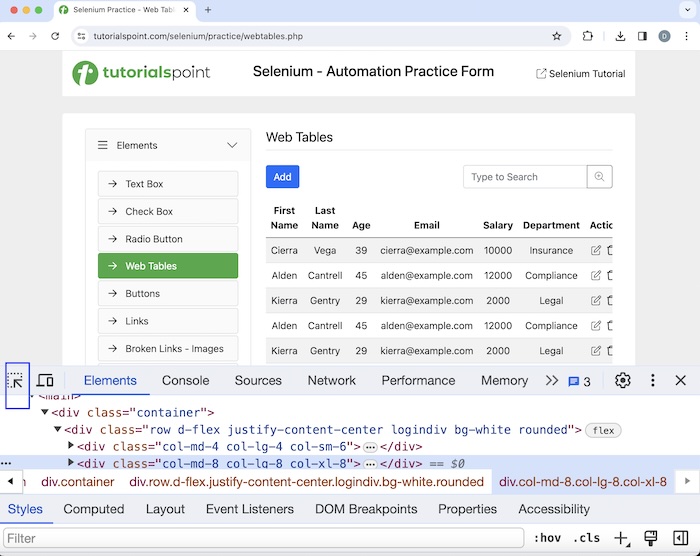
單擊箭頭並將其指向表格(如下圖所示)後,其 HTML 程式碼將可用,反映表格標籤名以及表格行、列和標題的 tr、td 和 th 標籤名。
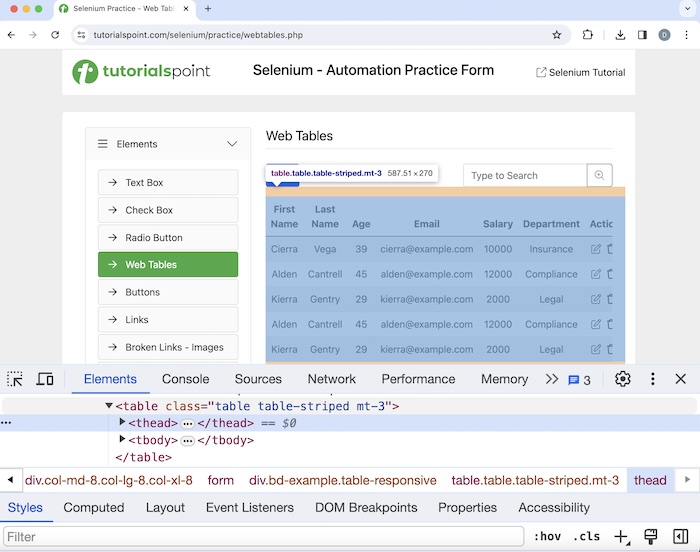
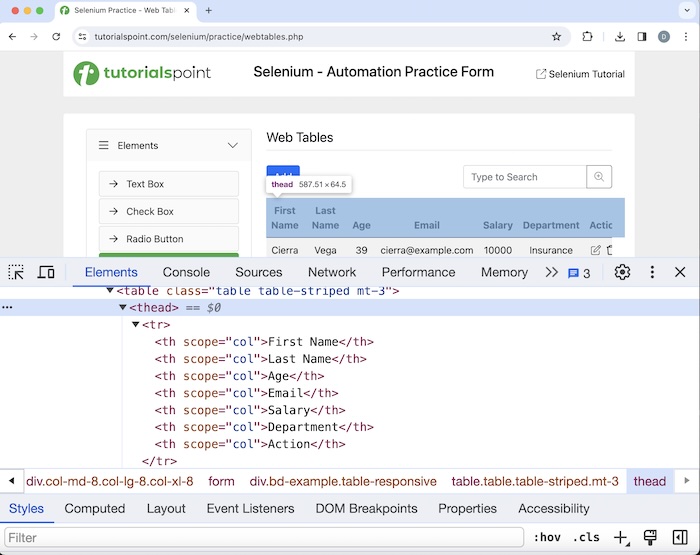
thead 標籤下的 th 標籤名用於表格中的列標題。
<thead>
   <tr>
      <th scope="col">First Name</th>
      <th scope="col">Last Name</th>
      <th scope="col">Age</th>
      <th scope="col">Email</th>
      <th scope="col">Salary</th>
      <th scope="col">Department</th>
      <th scope="col">Action</th>
   </tr>
</thead>
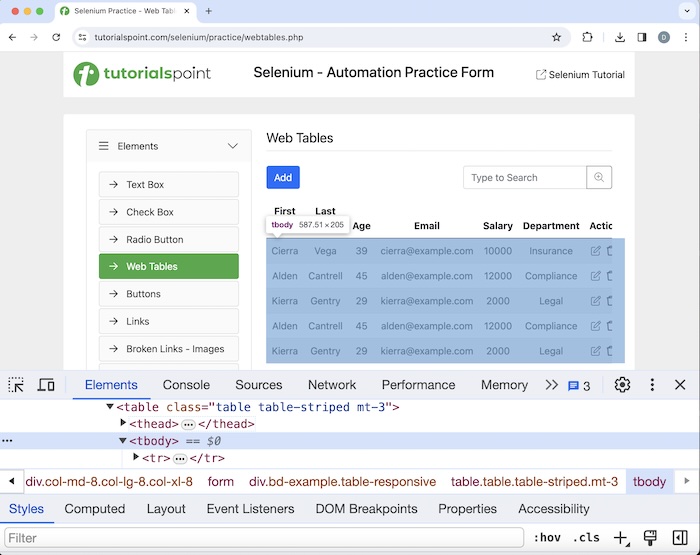
tbody 標籤下的 td 標籤名用於表格中的單元格值。
示例 1
讓我們以上面表格為例,我們將使用該表格的定位器 xpath 獲取具有 td 標籤名的表格的所有單元格值。
語法
Webdriver driver = new ChromeDriver();

// Locate the table element
WebElement table1 = driver.findElement(By.xpath("value of xpath"));

// Find all rows in the table then store in list
List<WebElement> r = table1.findElements(By.xpath(".//tr"));

// Looping through rows and get cell values
for (WebElement rw : r) {
   List<WebElement> cell = rw.findElements(By.xpath(".//td"));
   for (WebElement c : cell) {
      String value = c.getText();
   }
}
程式碼實現
package org.example;

import org.openqa.selenium.By;
import org.openqa.selenium.WebDriver;
import org.openqa.selenium.WebElement;
import org.openqa.selenium.chrome.ChromeDriver;
import java.util.List;
import java.util.concurrent.TimeUnit;

public class HandlingWebTable {
   public static void main(String[] args) throws InterruptedException {

      // Initiate the Webdriver
      WebDriver driver = new ChromeDriver();

      // adding implicit wait of 15 secs
      driver.manage().timeouts().implicitlyWait(15, TimeUnit.SECONDS);

      // Open the webpage to identify table
      driver.get("https://tutorialspoint.tw/selenium/practice/webtables.php");

      // Locate the table element
      WebElement table1 = driver.findElement
         (By.xpath("/html/body/main/div/div/div[2]/form/div[2]/table"));

      // Find all rows in the table
      List<WebElement> r = table1.findElements(By.xpath(".//tr"));

      // Looping through rows and get cell values
      for (WebElement rw : r) {
         List<WebElement> cell = rw.findElements(By.xpath(".//td"));
         for (WebElement c : cell) {
            String value = c.getText();
            System.out.println("Cells values: " + value);
         }
      }

      // Closing browser
      driver.quit();
   }
}
輸出
Cells values: Cierra
Cells values: Vega
Cells values: 39
Cells values: cierra@example.com
Cells values: 10000
Cells values: Insurance
Cells values:
Cells values: Alden
Cells values: Cantrell
Cells values: 45
Cells values: alden@example.com
Cells values: 12000
Cells values: Compliance
Cells values:
Cells values: Kierra
Cells values: Gentry
Cells values: 29
Cells values: kierra@example.com
Cells values: 2000
Cells values: Legal
Cells values:
Cells values: Alden
Cells values: Cantrell
Cells values: 45
Cells values: alden@example.com
Cells values: 12000
Cells values: Compliance
Cells values:
Cells values: Kierra
Cells values: Gentry
Cells values: 29
Cells values: kierra@example.com
Cells values: 2000
Cells values: Legal
Cells values:

Process finished with exit code 0
在上面的示例中,我們捕獲了表格中的所有單元格值。
最後,收到訊息Process finished with exit code 0,表示程式碼成功執行。
示例 2
讓我們以同一個表格為例,我們將使用該表格的定位器 xpath 獲取具有 th 標籤名的表格的所有單元格標題。
語法
獲取表格中所有單元格標題的語法。
Webdriver driver = new ChromeDriver();
WebElement table1 = driver.findElement(By.xpath("value of xpath"));
List<WebElement> r = table1.findElements(By.xpath(".//tr"));

// Looping through rows and get cell values
for (WebElement rw : r) {
   List<WebElement> cell = rw.findElements(By.xpath(".//th"));
   for (WebElement c : cell) {
      String value = c.getText();
   }
}
程式碼實現
package org.example;

import org.openqa.selenium.By;
import org.openqa.selenium.WebDriver;
import org.openqa.selenium.WebElement;
import org.openqa.selenium.chrome.ChromeDriver;
import java.util.List;
import java.util.concurrent.TimeUnit;

public class HandlingWebTable {
   public static void main(String[] args) throws InterruptedException {

      // Initiate the Webdriver
      WebDriver driver = new ChromeDriver();

      // adding implicit wait of 15 secs
      driver.manage().timeouts().implicitlyWait(15, TimeUnit.SECONDS);

      // Open the webpage
      driver.get("https://tutorialspoint.tw/selenium/practice/webtables.php");

      // Locate the table element
      WebElement table1 = driver..findElement
         (By.xpath ("/html/body/main/div/div/div[2]/form/div[2]/table"));

      // Find all rows in the table
      List<WebElement> r = table1.findElements(By.xpath(".//tr"));

      // Looping through rows and get headers
      for (WebElement rw : r) {
         List<WebElement> cell = rw.findElements(By.xpath(".//th"));
         for (WebElement c : cell) {
            String value = c.getText();
            System.out.println("Table headers: " + value);
         }
      }

      // Closing browser
      driver.quit();
   }
}
輸出
Table headers: First Name
Table headers: Last Name
Table headers: Age
Table headers: Email
Table headers: Salary
Table headers: Department
Table headers: Action

Process finished with exit code 0
在上面的示例中,我們捕獲了表格中的所有表頭。
結論
本教程總結了 Selenium WebDriver 動態網頁表格的全面介紹。我們從描述如何在 HTML 中識別動態網頁表格開始,並透過示例說明如何在 Selenium WebDriver 中處理動態網頁表格。這使您能夠深入瞭解 Selenium WebDriver 動態網頁表格。最好繼續練習您所學的內容,並探索與 Selenium 相關的其他內容,以加深您的理解並拓寬視野。
廣告