

- Selenium 教程
- Selenium - 首頁
- Selenium - 概述
- Selenium - 元件
- Selenium - 自動化測試
- Selenium - 環境設定
- Selenium - 遠端控制
- Selenium IDE 教程
- Selenium - IDE 簡介
- Selenium - 特性
- Selenium - 限制
- Selenium - 安裝
- Selenium - 建立測試
- Selenium - 建立指令碼
- Selenium - 控制流
- Selenium - 儲存變數
- Selenium - 警報和彈出視窗
- Selenium - Selenese 命令
- Selenium - Actions 命令
- Selenium - Accessors 命令
- Selenium - Assertions 命令
- Selenium - Assert/Verify 方法
- Selenium - 定位策略
- Selenium - 指令碼除錯
- Selenium - 驗證點
- Selenium - 模式匹配
- Selenium - JSON 資料檔案
- Selenium - 瀏覽器執行
- Selenium - 使用者擴充套件
- Selenium - 程式碼匯出
- Selenium - 程式碼輸出
- Selenium - JavaScript 函式
- Selenium - 外掛
- Selenium WebDriver 教程
- Selenium - 簡介
- Selenium WebDriver vs RC
- Selenium - 安裝
- Selenium - 第一個測試指令碼
- Selenium - 驅動程式會話
- Selenium - 瀏覽器選項
- Selenium - Chrome 選項
- Selenium - Edge 選項
- Selenium - Firefox 選項
- Selenium - Safari 選項
- Selenium - 雙擊
- Selenium - 右擊
- Python 中的 HTML 報告
- 處理編輯框
- Selenium - 單個元素
- Selenium - 多個元素
- Selenium Web 元素
- Selenium - 檔案上傳
- Selenium - 定位器策略
- Selenium - 相對定位器
- Selenium - 查詢器
- Selenium - 查詢所有連結
- Selenium - 使用者互動
- Selenium - WebElement 命令
- Selenium - 瀏覽器互動
- Selenium - 瀏覽器命令
- Selenium - 瀏覽器導航
- Selenium - 警報和彈出視窗
- Selenium - 處理表單
- Selenium - 視窗和標籤頁
- Selenium - 處理連結
- Selenium - 輸入框
- Selenium - 單選按鈕
- Selenium - 複選框
- Selenium - 下拉框
- Selenium - 處理 IFrame
- Selenium - 處理 Cookie
- Selenium - 日期時間選擇器
- Selenium - 動態 Web 表格
- Selenium - Actions 類
- Selenium - Action 類
- Selenium - 鍵盤事件
- Selenium - 鍵上/下
- Selenium - 複製和貼上
- Selenium - 處理特殊鍵
- Selenium - 滑鼠事件
- Selenium - 拖放
- Selenium - 筆事件
- Selenium - 滾動操作
- Selenium - 等待策略
- Selenium - 顯式/隱式等待
- Selenium - 支援特性
- Selenium - 多選
- Selenium - 等待支援
- Selenium - 選擇支援
- Selenium - 顏色支援
- Selenium - ThreadGuard
- Selenium - 錯誤和日誌記錄
- Selenium - 異常處理
- Selenium - 其他
- Selenium - 處理 Ajax 呼叫
- Selenium - JSON 資料檔案
- Selenium - CSV 資料檔案
- Selenium - Excel 資料檔案
- Selenium - 跨瀏覽器測試
- Selenium - 多瀏覽器測試
- Selenium - 多視窗測試
- Selenium - JavaScript 執行器
- Selenium - 無頭執行
- Selenium - 擷取螢幕截圖
- Selenium - 錄製影片
- Selenium - 頁面物件模型
- Selenium - 頁面工廠
- Selenium - 錄製和回放
- Selenium - 框架
- Selenium - 瀏覽上下文
- Selenium - DevTools
- Selenium Grid 教程
- Selenium - 概述
- Selenium - 架構
- Selenium - 元件
- Selenium - 配置
- Selenium - 建立測試指令碼
- Selenium - 測試執行
- Selenium - 端點
- Selenium - 自定義節點
- Selenium 報告工具
- Selenium - 報告工具
- Selenium - TestNG
- Selenium - JUnit
- Selenium - Allure
- Selenium 和其他技術
- Selenium - Java 教程
- Selenium - Python 教程
- Selenium - C# 教程
- Selenium - Javascript 教程
- Selenium - Kotlin 教程
- Selenium - Ruby 教程
- Selenium - Maven 和 Jenkins
- Selenium - 資料庫測試
- Selenium - LogExpert 日誌記錄
- Selenium - Log4j 日誌記錄
- Selenium - Robot Framework
- Selenium - AutoIT
- Selenium - Flash 測試
- Selenium - Apache Ant
- Selenium - Github 教程
- Selenium - SoapUI
- Selenium - Cucumber
- Selenium - IntelliJ
- Selenium - XPath
- Selenium 其他概念
- Selenium - IE 驅動程式
- Selenium - 自動化框架
- Selenium - 基於關鍵字的框架
- Selenium - 資料驅動的框架
- Selenium - 混合驅動的框架
- Selenium - SSL 證書錯誤
- Selenium - 替代方案
- Selenium 有用資源
- Selenium - 問答
- Selenium - 快速指南
- Selenium - 有用資源
- Selenium - 自動化實踐
- Selenium - 討論
Selenium - Log4j 日誌記錄
Selenium Webdriver 可用於在測試執行期間記錄資訊。日誌記錄主要用於提取有關執行方式的資訊。
日誌記錄透過提供有關應用程式功能(正在執行或未執行)的資料來幫助增強任何應用程式。因此,日誌記錄對於提高應用程式質量和故障排除非常重要。
什麼是 Log4j?
Log4j 是一個基於 Java 的開源框架,主要用於記錄資訊。它是一個簡單、可靠且快速的框架。Log4j 必須使用配置檔案(如 Log4j.xml 檔案、Log4j.properties 檔案、yaml 或 JSON 檔案等)以鍵值對的形式進行配置。Log4j 是 Apache Logging Services 的一部分。
Log4j 的元件
Log4j 的元件如下所示:
記錄器 (Loggers)
追加器 (Appenders)
佈局 (Layouts)
記錄器 (Loggers)
記錄器包含使用 Log4j 框架生成的全部重要日誌資訊。記錄器的基本元件包括:
Logger 類的物件。
日誌級別 - 日誌級別有助於獲取日誌訊息。日誌級別包括:ALL(記錄所有資訊)、ERROR(僅記錄可能暫停執行的錯誤資訊)、WARN(僅記錄可能暫停執行但並非致命的錯誤資訊)、DEBUG(記錄除錯所需的資訊)、INFO(記錄應用程式的響應方式)、TRACE(記錄最詳細的日誌資訊)和 FATAL(記錄應用程式中可能導致應用程式崩潰的挑剔資訊)。
追加器 (Appenders)
追加器從記錄器獲取資訊並將其輸出到另一個檔案或儲存區。追加器包括:FileAppender(將日誌資訊寫入另一個檔案)、RollingFileAppender(類似於 FileAppender,但限制了檔案大小,一旦檔案大小超過限制,剩餘的日誌資訊將被捕獲到追加器建立的另一個新檔案中)、DailyRollingFileAppender(用於提供捕獲日誌資訊的間隔)、以及 ConsoleAppender(將日誌資訊寫入控制檯)。
佈局
佈局用於設定日誌檔案的格式。佈局包括:模式佈局、HTML 佈局、XML 佈局等。
Log4j 日誌記錄的先決條件
在系統中安裝 Java(8 以上版本),並使用命令 java -version 檢查它是否存在。如果安裝成功,將顯示安裝的 Java 版本。
在系統中安裝 Maven,並使用命令 mvn -version 檢查它是否存在。如果安裝成功,將顯示安裝的 Maven 版本。
安裝任何 IDE,例如 Eclipse、IntelliJ 等。
儲存包含所有依賴項的 pom.xml 檔案並更新 Maven 專案
Log4j 日誌記錄步驟
步驟 1 - 建立一個 Maven 專案,並將正確的依賴項新增到 pom.xml 檔案中,用於以下專案:
從以下連結新增 Log4j 依賴項:https://logging.apache.org/log4j/。
從以下連結新增 Selenium Java 依賴項:https://mvnrepository.com/artifact/。
儲存包含所有依賴項的 pom.xml 檔案並更新 Maven 專案。
步驟 2 - 建立一個配置檔案 - log4j.xml 或 loj4j.properties 檔案。在這裡,我們將提供設定。在我們的專案中,我們在 resources 資料夾下建立了一個名為 log4j2.properties 的檔案。
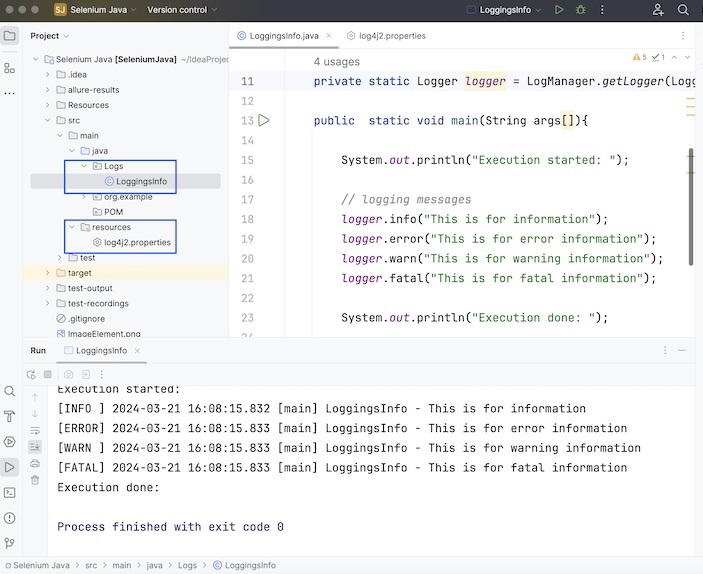
步驟 3 - 建立一個測試類,在其中我們將建立 Logger 類的物件幷包含日誌語句。執行專案並驗證結果。
示例
package Logs;

import org.apache.logging.log4j.LogManager;
import org.apache.logging.log4j.Logger;
import org.openqa.selenium.WebDriver;
import org.openqa.selenium.chrome.ChromeDriver;
import java.util.concurrent.TimeUnit;

public class LoggingsInfo {

   // object of Logger class
   private static Logger logger = LogManager.getLogger(LoggingsInfo.class);

   public  static void main(String args[]){

      System.out.println("Execution started: ");

      // logging messages
      logger.info("This is for information");
      logger.error("This is for error information");
      logger.warn("This is for warning information");
      logger.fatal("This is for fatal information");

      System.out.println("Execution done: ");
   }
}
log4j2.properties 檔案中的配置。
name=PropertiesConfig
property.filename = logs
appenders = console, file

appender.console.type = Console
appender.console.name = STDOUT
appender.console.layout.type = PatternLayout
appender.console.layout.pattern = [%-5level] %d{yyyy-MM-dd HH:mm:ss.SSS} [%t] %c{1} - %msg%n

appender.file.type = File
appender.file.name = LOGFILE
appender.file.fileName=${filename}/LogsGenerated.log
appender.file.layout.type=PatternLayout
appender.file.layout.pattern=[%-5level] %d{yyyy-MM-dd HH:mm:ss.SSS} [%t] %c{1} - %msg%n

loggers=file
logger.file.name=Logs
logger.file.level = debug
logger.file.appenderRefs = file
logger.file.appenderRef.file.ref = LOGFILE

rootLogger.level = debug
rootLogger.appenderRefs = stdout
rootLogger.appenderRef.stdout.ref = STDOUT
pom.xml 中的依賴項。
<?xml version="1.0" encoding="UTF-8"?>
<project xmlns="http://maven.apache.org/POM/4.0.0"
   xmlns:xsi="http://www.w3.org/2001/XMLSchema-instance"
   xsi:schemaLocation="http://maven.apache.org/POM/4.0.0
   http://maven.apache.org/xsd/maven-4.0.0.xsd">

   <modelVersion>4.0.0</modelVersion>
   <groupId>org.example</groupId>
   <artifactId>SeleniumJava</artifactId>
   <version>1.0-SNAPSHOT</version>

   <properties>
      <maven.compiler.source>16</maven.compiler.source>
      <maven.compiler.target>16</maven.compiler.target>
      <project.build.sourceEncoding>UTF-8</project.build.sourceEncoding>
   </properties>

   <!-- https://mvnrepository.com/artifact/org.seleniumhq.selenium/selenium-java -->
   <dependencies>

      <dependency>
         <groupId>org.seleniumhq.selenium</groupId>
         <artifactId>selenium-java</artifactId>
         <version>4.11.0</version>
      </dependency>

      <dependency>
         <groupId>org.apache.logging.log4j</groupId>
         <artifactId>log4j-api</artifactId>
         <version>2.23.1</version>
      </dependency>

      <dependency>
         <groupId>org.apache.logging.log4j</groupId>
         <artifactId>log4j-core</artifactId>
         <version>2.23.1</version>
      </dependency>

   </dependencies>
</project>
輸出
Execution started:
[INFO ] 2024-03-21 16:15:08.431 [main] LoggingsInfo - This is for information
[ERROR] 2024-03-21 16:15:08.432 [main] LoggingsInfo - This is for error information
[WARN ] 2024-03-21 16:15:08.432 [main] LoggingsInfo - This is for warning information
[FATAL] 2024-03-21 16:15:08.432 [main] LoggingsInfo - This is for fatal information
Execution done:

Process finished with exit code 0
除此之外,專案中的 log 資料夾中還會生成一個名為 LogsGenerated.log 的檔案,其中包含與控制檯輸出相同的日誌資訊。
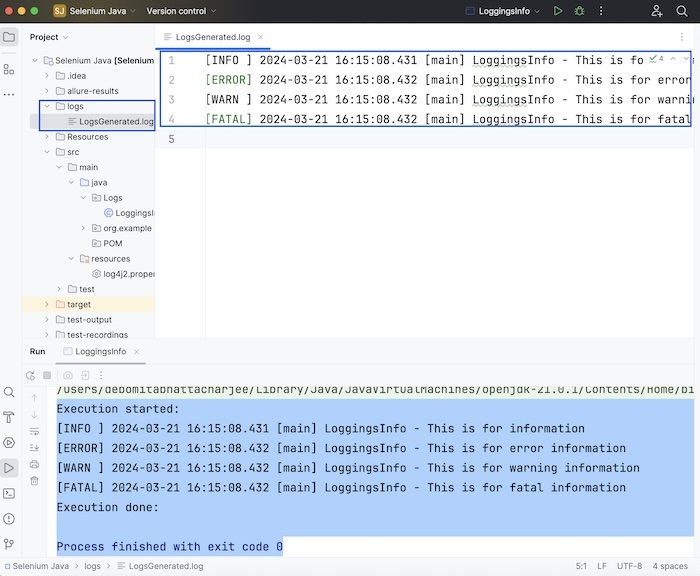
我們還可以透過更新 log4j2.properties 檔案中的 rootLogger.level = trace 和 logger.file.level = trace 來更改日誌級別配置為 trace。
更新後的 log4j2.properties 配置
name=PropertiesConfig
property.filename = logs
appenders = console, file

appender.console.type = Console
appender.console.name = STDOUT
appender.console.layout.type = PatternLayout
appender.console.layout.pattern = [%-5level] %d{yyyy-MM-dd HH:mm:ss.SSS} [%t] %c{1} - %msg%n

appender.file.type = File
appender.file.name = LOGFILE
appender.file.fileName=${filename}/LogsGenerated.log
appender.file.layout.type=PatternLayout
appender.file.layout.pattern=[%-5level] %d{yyyy-MM-dd HH:mm:ss.SSS} [%t] %c{1} - %msg%n

loggers=file
logger.file.name=Logs
logger.file.level = trace
logger.file.appenderRefs = file
logger.file.appenderRef.file.ref = LOGFILE

rootLogger.level = trace
rootLogger.appenderRefs = stdout
rootLogger.appenderRef.stdout.ref = STDOUT
示例
package Logs;

import org.apache.logging.log4j.LogManager;
import org.apache.logging.log4j.Logger;
import org.openqa.selenium.WebDriver;
import org.openqa.selenium.chrome.ChromeDriver;
import java.util.concurrent.TimeUnit;

public class LoggingsInfo {

   // object of Logger class
   private static Logger logger =
   LogManager.getLogger(LoggingsInfo.class);

   public  static void main(String args[]){
      System.out.println("Execution started: ");

      // logging messages
      logger.trace("This is for trace information");
      logger.info("This is for information");
      logger.error("This is for error information");
      logger.warn("This is for warning information");
      logger.fatal("This is for fatal information");

      System.out.println("Execution done: ");
   }
}
輸出
[TRACE] 2024-03-21 16:25:08.354 [main] LoggingsInfo - This is for trace information
[INFO ] 2024-03-21 16:25:08.356 [main] LoggingsInfo - This is for information
[ERROR] 2024-03-21 16:25:08.356 [main] LoggingsInfo - This is for error information
[WARN ] 2024-03-21 16:25:08.356 [main] LoggingsInfo - This is for warning information
[FATAL] 2024-03-21 16:25:08.356 [main] LoggingsInfo - This is for fatal information
Execution done:

Process finished with exit code 0
除此之外,專案中的 log 資料夾中生成的 LogsGenerated.log 檔案已更新為包含 trace 資訊。
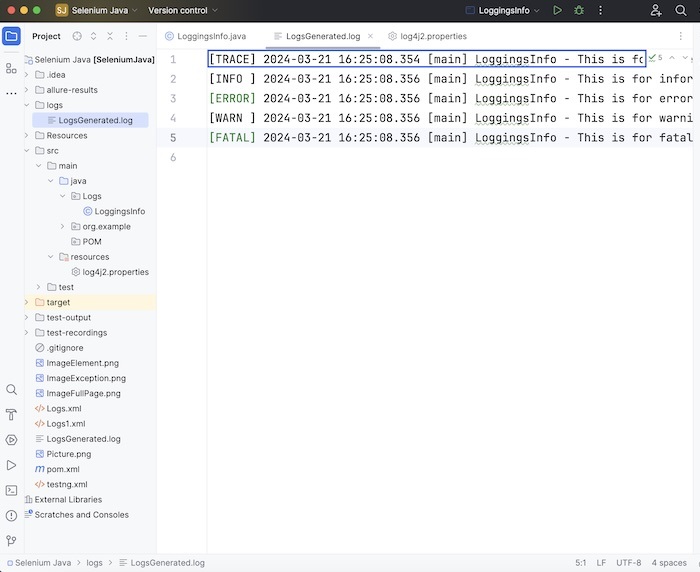
在上述兩種情況下,我們都覆蓋了日誌檔案,但是,我們可以透過將配置 appender.file.append=true 新增到 log4j2.properties 檔案中來將日誌追加到日誌檔案中。
此外,要停用控制檯和日誌檔案的日誌資訊,我們必須使用 logger.file.level = off 和 rootLogger.level = off 更新 log4j2.properties 檔案。
本教程總結了Selenium - Log4j日誌記錄的全面內容。我們首先介紹了Log4j及其元件、設定Log4j的先決條件,並逐步演示瞭如何建立一個Log4j,並透過示例說明了如何將其與Selenium一起使用。這將使您深入瞭解Log4j。建議您多練習所學內容,並探索與Selenium相關的其他知識,以加深理解並拓寬視野。