
- Python 基礎
- Python - 首頁
- Python - 概述
- Python - 歷史
- Python - 特性
- Python vs C++
- Python - Hello World 程式
- Python - 應用領域
- Python - 直譯器
- Python - 環境搭建
- Python - 虛擬環境
- Python - 基本語法
- Python - 變數
- Python - 資料型別
- Python - 型別轉換
- Python - Unicode 系統
- Python - 字面量
- Python - 運算子
- Python - 算術運算子
- Python - 比較運算子
- Python - 賦值運算子
- Python - 邏輯運算子
- Python - 位運算子
- Python - 成員運算子
- Python - 身份運算子
- Python - 運算子優先順序
- Python - 註釋
- Python - 使用者輸入
- Python - 數字
- Python - 布林值
- Python 控制語句
- Python - 控制流
- Python - 決策
- Python - if 語句
- Python - if else
- Python - 巢狀 if
- Python - match-case 語句
- Python - 迴圈
- Python - for 迴圈
- Python - for-else 迴圈
- Python - while 迴圈
- Python - break 語句
- Python - continue 語句
- Python - pass 語句
- Python - 巢狀迴圈
- Python 函式與模組
- Python - 函式
- Python - 預設引數
- Python - 關鍵字引數
- Python - 僅限關鍵字引數
- Python - 位置引數
- Python - 僅限位置引數
- Python - 可變引數
- Python - 變數作用域
- Python - 函式註解
- Python - 模組
- Python - 內建函式
- Python 字串
- Python - 字串
- Python - 字串切片
- Python - 修改字串
- Python - 字串連線
- Python - 字串格式化
- Python - 跳脫字元
- Python - 字串方法
- Python - 字串練習
- Python 列表
- Python - 列表
- Python - 訪問列表元素
- Python - 修改列表元素
- Python - 新增列表元素
- Python - 刪除列表元素
- Python - 遍歷列表
- Python - 列表推導式
- Python - 排序列表
- Python - 複製列表
- Python - 合併列表
- Python - 列表方法
- Python - 列表練習
- Python 元組
- Python - 元組
- Python - 訪問元組元素
- Python - 更新元組
- Python - 解包元組
- Python - 遍歷元組
- Python - 合併元組
- Python - 元組方法
- Python - 元組練習
- Python 集合
- Python - 集合
- Python - 訪問集合元素
- Python - 新增集合元素
- Python - 刪除集合元素
- Python - 遍歷集合
- Python - 合併集合
- Python - 複製集合
- Python - 集合運算子
- Python - 集合方法
- Python - 集合練習
- Python 字典
- Python - 字典
- Python - 訪問字典元素
- Python - 修改字典元素
- Python - 新增字典元素
- Python - 刪除字典元素
- Python - 字典檢視物件
- Python - 遍歷字典
- Python - 複製字典
- Python - 巢狀字典
- Python - 字典方法
- Python - 字典練習
- Python 陣列
- Python - 陣列
- Python - 訪問陣列元素
- Python - 新增陣列元素
- Python - 刪除陣列元素
- Python - 遍歷陣列
- Python - 複製陣列
- Python - 反轉陣列
- Python - 排序陣列
- Python - 合併陣列
- Python - 陣列方法
- Python - 陣列練習
- Python 檔案處理
- Python - 檔案處理
- Python - 寫入檔案
- Python - 讀取檔案
- Python - 重新命名和刪除檔案
- Python - 目錄
- Python - 檔案方法
- Python - OS 檔案/目錄方法
- Python - OS 路徑方法
- 面向物件程式設計
- Python - OOPs 概念
- Python - 類與物件
- Python - 類屬性
- Python - 類方法
- Python - 靜態方法
- Python - 建構函式
- Python - 訪問修飾符
- Python - 繼承
- Python - 多型
- Python - 方法重寫
- Python - 方法過載
- Python - 動態繫結
- Python - 動態型別
- Python - 抽象
- Python - 封裝
- Python - 介面
- Python - 包
- Python - 內部類
- Python - 匿名類和物件
- Python - 單例類
- Python - 包裝器類
- Python - 列舉
- Python - 反射
- Python 錯誤與異常
- Python - 語法錯誤
- Python - 異常
- Python - try-except 塊
- Python - try-finally 塊
- Python - 丟擲異常
- Python - 異常鏈
- Python - 巢狀 try 塊
- Python - 使用者自定義異常
- Python - 日誌記錄
- Python - 斷言
- Python - 內建異常
- Python 多執行緒
- Python - 多執行緒
- Python - 執行緒生命週期
- Python - 建立執行緒
- Python - 啟動執行緒
- Python - 執行緒連線
- Python - 執行緒命名
- Python - 執行緒排程
- Python - 執行緒池
- Python - 主執行緒
- Python - 執行緒優先順序
- Python - 守護執行緒
- Python - 執行緒同步
- Python 同步
- Python - 執行緒間通訊
- Python - 執行緒死鎖
- Python - 中斷執行緒
- Python 網路程式設計
- Python - 網路程式設計
- Python - 套接字程式設計
- Python - URL 處理
- Python - 泛型
- Python 庫
- NumPy 教程
- Pandas 教程
- SciPy 教程
- Matplotlib 教程
- Django 教程
- OpenCV 教程
- Python 雜項
- Python - 日期與時間
- Python - 數學
- Python - 迭代器
- Python - 生成器
- Python - 閉包
- Python - 裝飾器
- Python - 遞迴
- Python - 正則表示式
- Python - PIP
- Python - 資料庫訪問
- Python - 弱引用
- Python - 序列化
- Python - 模板
- Python - 輸出格式化
- Python - 效能測量
- Python - 資料壓縮
- Python - CGI 程式設計
- Python - XML 處理
- Python - GUI 程式設計
- Python - 命令列引數
- Python - 文件字串
- Python - JSON
- Python - 傳送郵件
- Python - 擴充套件
- Python - 工具/實用程式
- Python - GUI
- Python 高階概念
- Python - 抽象基類
- Python - 自定義異常
- Python - 高階函式
- Python - 物件內部
- Python - 記憶體管理
- Python - 元類
- Python - 使用元類進行超程式設計
- Python - 模擬和存根
- Python - 猴子補丁
- Python - 訊號處理
- Python - 型別提示
- Python - 自動化教程
- Python - Humanize 包
- Python - 上下文管理器
- Python - 協程
- Python - 描述符
- Python - 診斷和修復記憶體洩漏
- Python - 不可變資料結構
- Python 有用資源
- Python - 問答
- Python - 線上測驗
- Python - 快速指南
- Python - 參考
- Python - 速查表
- Python - 專案
- Python - 有用資源
- Python - 討論
- Python 編譯器
- NumPy 編譯器
- Matplotlib 編譯器
- SciPy 編譯器
Python - 使用 Flask 構建問答應用專案
在這裡,我們將使用 Python Flask 建立一個問答應用程式。 Flask 是一個輕量級的 Python Web 應用框架。選項包括選擇測驗、回答問題以及在應用程式上檢視結果。它具有用於處理測驗會話的動態路由,並可以使用 HTML 模板和 CSS 來實現使用者介面,使其更加精緻。
安裝
使用 pip 安裝 Flask −
pip install flask
問答應用專案程式碼檔案
以下是建立問答應用專案的程式碼檔案 −
1. 檔案:app.py
from flask import Flask, render_template, request, redirect, url_for, session
app = Flask(__name__)
app.secret_key = 'your_secret_key'
# Example quiz data
quiz_data = {
   "quizzes": {
      "General Knowledge": [
         {
            "question": "What is the capital of France?",
            "options": ["Paris", "London", "Berlin", "Madrid"],
            "answer": "Paris"
         },
         {
            "question": "Which planet is known as the Red Planet?",
            "options": ["Earth", "Mars", "Jupiter", "Venus"],
            "answer": "Mars"
         },
         {
            "question": "Who wrote 'To Kill a Mockingbird'?",
            "options": ["Harper Lee", "Mark Twain", "J.K. Rowling", "Jane Austen"],
            "answer": "Harper Lee"
         },
         {
            "question": "What is the largest ocean on Earth?",
            "options": ["Atlantic Ocean", "Indian Ocean", "Arctic Ocean", "Pacific Ocean"],
            "answer": "Pacific Ocean"
         },
         {
            "question": "What is the smallest country in the world?",
            "options": ["Monaco", "San Marino", "Vatican City", "Liechtenstein"],
            "answer": "Vatican City"
         },
         {
            "question": "In which year did the Titanic sink?",
            "options": ["1912", "1905", "1898", "1923"],
            "answer": "1912"
         },
         {
            "question": "What is the hardest natural substance on Earth?",
            "options": ["Gold", "Iron", "Diamond", "Platinum"],
            "answer": "Diamond"
         },
         {
            "question": "Which element has the chemical symbol 'O'?",
            "options": ["Oxygen", "Gold", "Silver", "Osmium"],
            "answer": "Oxygen"
         },
         {
            "question": "Who painted the Mona Lisa?",
            "options": ["Leonardo da Vinci", "Vincent van Gogh", "Claude Monet", "Pablo Picasso"],
            "answer": "Leonardo da Vinci"
         },
         {
            "question": "What is the longest river in the world?",
            "options": ["Nile", "Amazon", "Yangtze", "Mississippi"],
            "answer": "Nile"
         }
      ],
      "Science": [
         {
            "question": "What is the chemical symbol for water?",
            "options": ["H2O", "O2", "CO2", "HO2"],
            "answer": "H2O"
         },
         {
            "question": "Who developed the theory of relativity?",
            "options": ["Isaac Newton", "Albert Einstein", "Galileo Galilei", "Nikola Tesla"],
            "answer": "Albert Einstein"
         },
         {
            "question": "What is the powerhouse of the cell?",
            "options": ["Nucleus", "Mitochondria", "Ribosome", "Endoplasmic Reticulum"],
            "answer": "Mitochondria"
         },
         {
            "question": "What planet is known for its rings?",
            "options": ["Saturn", "Jupiter", "Uranus", "Neptune"],
            "answer": "Saturn"
         },
         {
            "question": "What is the main gas found in the air we breathe?",
            "options": ["Oxygen", "Nitrogen", "Carbon Dioxide", "Hydrogen"],
            "answer": "Nitrogen"
         },
         {
            "question": "What is the chemical symbol for gold?",
            "options": ["Au", "Ag", "Pb", "Fe"],
            "answer": "Au"
         },
         {
            "question": "What is the speed of light?",
            "options": ["300,000 km/s", "150,000 km/s", "100,000 km/s", "200,000 km/s"],
            "answer": "300,000 km/s"
         },
         {
            "question": "Who is known as the father of modern physics?",
            "options": ["Isaac Newton", "Albert Einstein", "Niels Bohr", "Richard Feynman"],
            "answer": "Albert Einstein"
         },
         {
            "question": "What is the chemical formula for methane?",
            "options": ["CH4", "C2H6", "C3H8", "C4H10"],
            "answer": "CH4"
         },
         {
            "question": "What force keeps us grounded on Earth?",
            "options": ["Gravity", "Magnetism", "Friction", "Electromagnetism"],
            "answer": "Gravity"
         }
      ]
   }
}

@app.route('/')
def index():
   return render_template('index.html', quizzes=quiz_data["quizzes"])

@app.route('/start_quiz/<quiz_name>')
def start_quiz(quiz_name):
   session['quiz_name'] = quiz_name
   session['current_question'] = 0
   session['score'] = 0
   return redirect(url_for('quiz_question'))

@app.route('/quiz_question', methods=['GET', 'POST'])
def quiz_question():
   quiz_name = session.get('quiz_name')
   current_question = session.get('current_question', 0)  # Default to 0 if not set
   quiz_questions = quiz_data["quizzes"].get(quiz_name, [])

   if request.method == 'POST':
      selected_option = request.form.get('option')
      correct_answer = quiz_questions[current_question]['answer']

      # Check if the selected answer is correct
      if selected_option == correct_answer:
         session['score'] = session.get('score', 0) + 1  # Increment score if the answer is correct
         feedback = "Correct! Well done."
      else:
         feedback = f"Wrong! The correct answer is {correct_answer}."

      # Move to the next question
      session['current_question'] = current_question + 1
      session['feedback'] = feedback

      if session['current_question'] >= len(quiz_questions):
         return redirect(url_for('quiz_result'))

   return redirect(url_for('quiz_question'))

   # Handle GET request: get current question data
   if current_question < len(quiz_questions):
      current_question_data = quiz_questions[current_question]
      feedback = session.pop('feedback', '')  # Remove feedback from session
      return render_template('quiz_question.html', question_data=current_question_data, current_question=current_question + 1, total_questions=len(quiz_questions), feedback=feedback)
   else:
      return redirect(url_for('quiz_result'))

@app.route('/quiz_result')
def quiz_result():
   score = session.get('score', 0)  # Default to 0 if score is not found
   quiz_name = session.get('quiz_name')
   total_questions = len(quiz_data["quizzes"].get(quiz_name, []))  # Handle case where quiz_name might not be found

   return render_template('quiz_result.html', score=score, total_questions=total_questions)

if __name__ == '__main__':
   app.run(debug=True)
2. 檔案:index.html
<!DOCTYPE html>
<html lang="en">
<head>
<meta charset="UTF-8">
<title>Quiz Platform</title>
<link rel="stylesheet" href="{{ url_for('static', filename='styles.css') }}">
</head>
<body>
<header>
   <h1>Welcome to the Quiz Platform</h1>
</header>
<div class="container">
<h1>Select a Quiz</h1>
<ul>
   {% for quiz in quizzes %}
   <li><a href="{{ url_for('start_quiz', quiz_name=quiz) }}">{{ quiz }}</a></li>
   {% endfor %}
</ul>
</div>
</body>
</html>
3. 檔案 (quiz_question.html)
<!DOCTYPE html>
<html lang="en">
<head>
<meta charset="UTF-8">
<meta name="viewport" content="width=device-width, initial-scale=1.0">
<title>Quiz Question</title>
<link rel="stylesheet" href="{{ url_for('static', filename='styles.css') }}">
</head>
<body>
<header>
   <h1>Quiz Question</h1>
</header>
<div class="container">
   <h2>Question {{ current_question }} of {{ total_questions }}</h2>
   <form method="post">
      <p>{{ question_data['question'] }}</p>
      {% for option in question_data['options'] %}
      <div>
         <input type="radio" id="{{ option }}" name="option" value="{{ option }}">
         <label for="{{ option }}">{{ option }}</label>
      </div>
      {% endfor %}
      <button type="submit">Submit</button>
   </form>
   <p>{{ feedback }}</p>
</div>
</body>
</html>
4. 檔案:(quiz_result.html)
<!DOCTYPE html>
<html lang="en">
<head>
<meta charset="UTF-8">
<meta name="viewport" content="width=device-width, initial-scale=1.0">
<title>Quiz Result</title>
<link rel="stylesheet" href="{{ url_for('static', filename='styles.css') }}">
</head>
<body>
<header>
   <h1>Quiz Result</h1>
</header>
<div class="container">
   <h2>Your Score</h2>
   <p>You scored {{ score }} out of {{ total_questions }}.</p>
   <a href="{{ url_for('index') }}">Return to Home</a>
</div>
</body>
</html>
5. 檔案 (styles.css)
body {
   font-family: Arial, sans-serif;
   background-color: #f4f4f4;
   margin: 0;
   padding: 0;
}

header {
   background-color: #333;
   color: #fff;
   padding: 10px 0;
   text-align: center;
}

.container {
   max-width: 800px;
   margin: 20px auto;
   padding: 20px;
   background: #fff;
   box-shadow: 0 0 10px rgba(0, 0, 0, 0.1);
}

h1, h2 {
   color: #333;
}

ul {
   list-style-type: none;
   padding: 0;
}

li {
   margin: 10px 0;
}

a {
   text-decoration: none;
   color: #007bff;
}

a:hover {
   text-decoration: underline;
}

form div {
   margin: 10px 0;
}

input[type="radio"] {
   margin-right: 10px;
}

button {
   background-color: #007bff;
   color: #fff;
   border: none;
   padding: 10px 20px;
   cursor: pointer;
}

button:hover {
   background-color: #0056b3;
}
背景圖片檔案

檔案結構
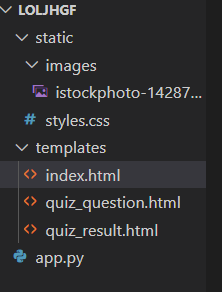
使用應用程式的步驟
- **設定虛擬環境** − 建立並激活一個虛擬空間。
- **安裝依賴項** − 您可以使用安裝 Python 時使用的 pip 來安裝 Flask,使用命令 pip install Flask,如下面的圖片所示。
- **執行應用程式** − 透過執行程式碼啟動 Flask,並在 Web 瀏覽器中開啟應用程式。
- **與應用程式互動** − 完成問卷,回答問題並檢視您的分數。
輸出
可以透過 http://127.0.0.1:5000/ 訪問該應用程式。轉到您的隱身標籤。
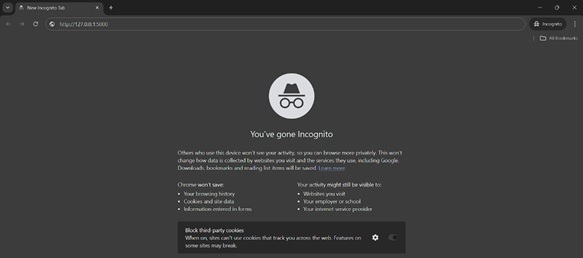
搜尋後,您將看到此介面 −
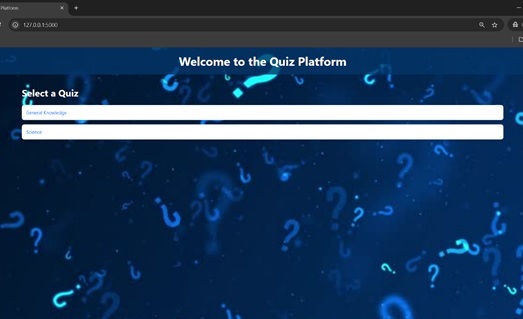
您可以選擇任何一個,我選擇常識 −
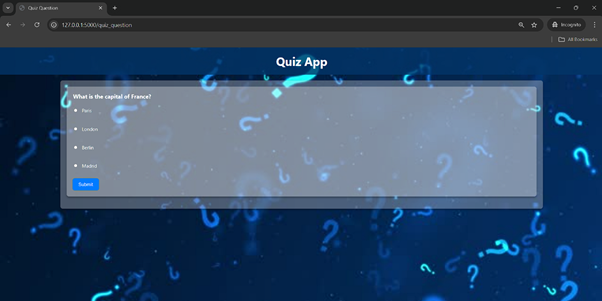
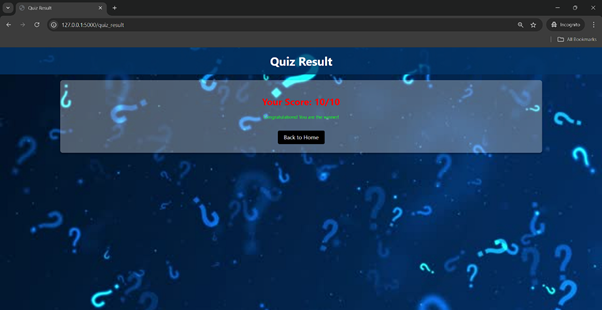
成功完成測驗後,您將看到 −
python_projects_from_basic_to_advanced.htm
廣告