- FastAPI 教程
- FastAPI - 首頁
- FastAPI - 簡介
- FastAPI - Hello World
- FastAPI - OpenAPI
- FastAPI - Uvicorn
- FastAPI - 型別提示
- FastAPI - IDE 支援
- FastAPI - REST 架構
- FastAPI - 路徑引數
- FastAPI - 查詢引數
- FastAPI - 引數驗證
- FastAPI - Pydantic
- FastAPI - 請求體
- FastAPI - 模板
- FastAPI - 靜態檔案
- FastAPI - HTML 表單模板
- FastAPI - 訪問表單資料
- FastAPI - 上傳檔案
- FastAPI - Cookie 引數
- FastAPI - 頭部引數
- FastAPI - 響應模型
- FastAPI - 巢狀模型
- FastAPI - 依賴項
- FastAPI - CORS
- FastAPI - CRUD 操作
- FastAPI - SQL 資料庫
- FastAPI - 使用 MongoDB
- FastAPI - 使用 GraphQL
- FastAPI - WebSockets
- FastAPI - FastAPI 事件處理器
- FastAPI - 掛載子應用
- FastAPI - 中介軟體
- FastAPI - 掛載 Flask 應用
- FastAPI - 部署
- FastAPI 有用資源
- FastAPI - 快速指南
- FastAPI - 有用資源
- FastAPI - 討論
FastAPI - 模板
預設情況下,FastAPI 向客戶端呈現 JSON 響應。但是,它可以轉換為 HTML 響應。為此,FastAPI 在fastapi.responses 模組中定義了HTMLResponse 類。我們需要將response_class作為附加引數新增到操作裝飾器中,並將HTMLResponse物件作為其值。
在以下示例中,@app.get() 裝飾器具有“/hello/”端點和 HTMLResponse 作為 response_class。在 hello() 函式內部,我們有一個 Hello World 訊息的 HTML 程式碼的字串表示形式。該字串以 HTML 響應的形式返回。
from fastapi.responses import HTMLResponse
from fastapi import FastAPI
app = FastAPI()
@app.get("/hello/")
async def hello():
   ret='''
<html>
<body>
<h2>Hello World!</h2>
</body>
</html>
'''
   return HTMLResponse(content=ret)
檢查 API 文件後,可以看出伺服器的響應正文為 HTML。
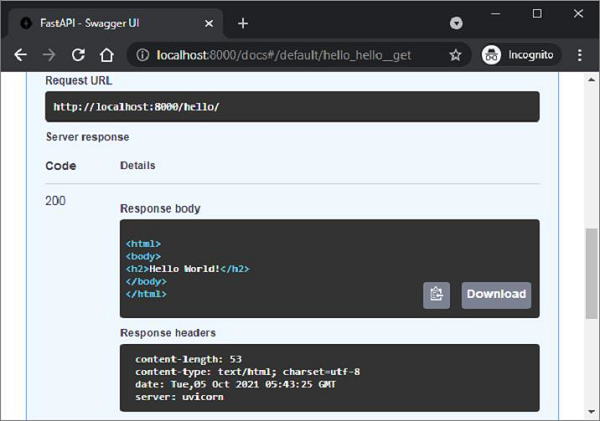
請求 URL (https://:8000/hello/) 也應該在瀏覽器中呈現訊息。但是,呈現原始 HTML 響應非常繁瑣。或者,可以呈現預構建的 HTML 頁面作為模板。為此,我們需要使用 Web 模板庫。
Web 模板庫有一個模板引擎,它合併具有佔位符變數的靜態網頁。來自任何來源(例如資料庫)的資料都被合併以動態生成和呈現網頁。FastAPI 沒有任何預打包的模板庫。因此,您可以自由使用任何適合您需求的庫。在本教程中,我們將使用jinja2,一個非常流行的 Web 模板庫。讓我們首先使用 pip 安裝程式安裝它。
pip3 install jinja2
FastAPI 對 Jinja 模板的支援以fastapi.templates 模組中定義的jinja2Templates 類形式提供。
from fastapi.templating import Jinja2Templates
要宣告模板物件,應將儲存 html 模板的資料夾作為引數提供。在當前工作目錄中,我們將建立一個“templates”目錄。
templates = Jinja2Templates(directory="templates")
一個簡單的網頁“hello.html”用於呈現 Hello World 訊息,也放在“templates”資料夾中。
<html>
<body>
<h2>Hello World!</h2>
</body>
</html>
我們現在將從該頁面呈現 html 程式碼作為 HTMLResponse。讓我們修改 hello() 函式如下:
from fastapi.responses import HTMLResponse
from fastapi.templating import Jinja2Templates
from fastapi import FastAPI, Request
app = FastAPI()
templates = Jinja2Templates(directory="templates")
@app.get("/hello/", response_class=HTMLResponse)
async def hello(request: Request):
   return templates.TemplateResponse("hello.html", {"request": request})
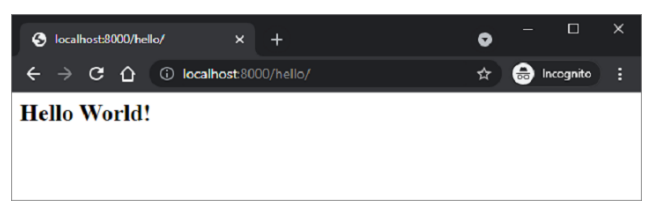
這裡,模板物件的templateResponse()方法收集模板程式碼和請求上下文以呈現 http 響應。當我們啟動伺服器並訪問 https://:8000/hello/ URL 時,我們可以在瀏覽器中看到Hello World 訊息,這實際上是hello.html 的輸出。
如前所述,jinja2 模板允許在 HTML 程式碼中嵌入某些佔位符。jinja2 程式碼元素放在花括號內。一旦瀏覽器的 HTML 解析器遇到此程式碼,模板引擎就會接管並使用 HTTP 響應提供的變數資料填充這些程式碼元素。Jinja2 提供以下程式碼元素:
{% %} – 語句
{{ }} – 列印到模板輸出的表示式
{# #} − 註釋,不包含在模板輸出中
# # # − 行語句
hello.html 修改如下,透過替換 name 引數來顯示動態訊息。
<html>
<body>
<h2>Hello {{name}} Welcome to FastAPI</h2>
</body>
</html>
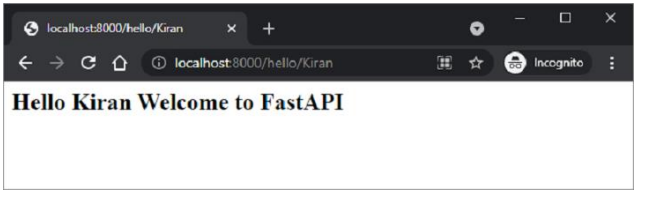
操作函式hello()也修改為接受 name 作為路徑引數。TemplateResponse還應包含“name”:name 的 JSON 表示以及請求上下文。
from fastapi.responses import HTMLResponse
from fastapi.templating import Jinja2Templates
from fastapi import FastAPI, Request
app = FastAPI()
templates = Jinja2Templates(directory="templates")
@app.get("/hello/{name}", response_class=HTMLResponse)
async def hello(request: Request, name:str):
   return templates.TemplateResponse("hello.html", {"request": request, "name":name})
重新啟動伺服器並訪問 https://:8000/hello/Kiran。瀏覽器現在使用此 URL 中的路徑引數填充 jinja2 佔位符。