
- FastAPI 教程
- FastAPI - 首頁
- FastAPI - 簡介
- FastAPI - Hello World
- FastAPI - OpenAPI
- FastAPI - Uvicorn
- FastAPI - 型別提示
- FastAPI - IDE 支援
- FastAPI - REST 架構
- FastAPI - 路徑引數
- FastAPI - 查詢引數
- FastAPI - 引數驗證
- FastAPI - Pydantic
- FastAPI - 請求體
- FastAPI - 模板
- FastAPI - 靜態檔案
- FastAPI - HTML 表單模板
- FastAPI - 訪問表單資料
- FastAPI - 上傳檔案
- FastAPI - Cookie 引數
- FastAPI - Header 引數
- FastAPI - 響應模型
- FastAPI - 巢狀模型
- FastAPI - 依賴項
- FastAPI - CORS
- FastAPI - CRUD 操作
- FastAPI - SQL 資料庫
- FastAPI - 使用 MongoDB
- FastAPI - 使用 GraphQL
- FastAPI - Websockets
- FastAPI - FastAPI 事件處理器
- FastAPI - 掛載子應用
- FastAPI - 中介軟體
- FastAPI - 掛載 Flask 應用
- FastAPI - 部署
- FastAPI 有用資源
- FastAPI - 快速指南
- FastAPI - 有用資源
- FastAPI - 討論
FastAPI - Hello World
入門
建立 FastAPI 應用的第一步是宣告 FastAPI 類的應用程式物件。
from fastapi import FastAPI
app = FastAPI()
這個 app 物件是應用程式與客戶端瀏覽器互動的主要點。uvicorn 伺服器使用此物件來監聽客戶端的請求。
下一步是建立路徑操作。路徑是客戶端訪問時會呼叫對映 URL 的 URL,與 HTTP 方法之一相關聯的函式將被執行。我們需要將檢視函式繫結到 URL 和相應的 HTTP 方法。例如,index() 函式對應於‘/’ 路徑和‘get’ 操作。
@app.get("/")
async def root():
   return {"message": "Hello World"}
該函式返回 JSON 響應,但是,它也可以返回dict、list、str、int 等。它還可以返回 Pydantic 模型。
將以下程式碼儲存為 main.py
from fastapi import FastAPI
app = FastAPI()
@app.get("/")
async def index():
   return {"message": "Hello World"}
透過提及例項化 FastAPI 應用程式物件的檔案來啟動 uvicorn 伺服器。
uvicorn main:app --reload
INFO: Uvicorn running on http://127.0.0.1:8000 (Press CTRL+C to quit)
INFO: Started reloader process [28720]
INFO: Started server process [28722]
INFO: Waiting for application startup.
INFO: Application startup complete.
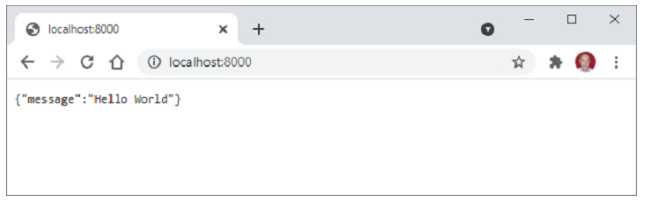
開啟瀏覽器並訪問 https://:/8000。您將在瀏覽器視窗中看到 JSON 響應。
廣告