
- FastAPI 教程
- FastAPI - 首頁
- FastAPI - 簡介
- FastAPI - Hello World
- FastAPI - OpenAPI
- FastAPI - Uvicorn
- FastAPI - 型別提示
- FastAPI - IDE 支援
- FastAPI - REST 架構
- FastAPI - 路徑引數
- FastAPI - 查詢引數
- FastAPI - 引數驗證
- FastAPI - Pydantic
- FastAPI - 請求體
- FastAPI - 模板
- FastAPI - 靜態檔案
- FastAPI - HTML 表單模板
- FastAPI - 訪問表單資料
- FastAPI - 上傳檔案
- FastAPI - Cookie 引數
- FastAPI - 頭部引數
- FastAPI - 響應模型
- FastAPI - 巢狀模型
- FastAPI - 依賴項
- FastAPI - CORS
- FastAPI - CRUD 操作
- FastAPI - SQL 資料庫
- FastAPI - 使用 MongoDB
- FastAPI - 使用 GraphQL
- FastAPI - Websockets
- FastAPI - FastAPI 事件處理器
- FastAPI - 掛載子應用
- FastAPI - 中介軟體
- FastAPI - 掛載 Flask 應用
- FastAPI - 部署
- FastAPI 有用資源
- FastAPI - 快速指南
- FastAPI - 有用資源
- FastAPI - 討論
FastAPI - 訪問表單資料
現在我們將瞭解如何在 FastAPI 操作函式中訪問 HTML 表單資料。在上面的示例中,/login 路由呈現了一個登入表單。使用者輸入的資料以 POST 作為請求方法提交到/submit URL。現在我們必須提供一個檢視函式來處理使用者提交的資料。
FastAPI 有一個 Form 類來處理透過提交 HTML 表單作為請求接收到的資料。但是,您需要安裝python-multipart 模組。它是 Python 的流式多部分表單解析器。
pip3 install python-multipart
將Form 類新增到從 FastAPI 匯入的資源中
from fastapi import Form
讓我們定義一個submit() 函式,由 @app.post() 裝飾。為了接收表單資料,宣告兩個 Form 型別的引數,其名稱與表單屬性相同。
@app.post("/submit/")
async def submit(nm: str = Form(...), pwd: str = Form(...)):
   return {"username": nm}
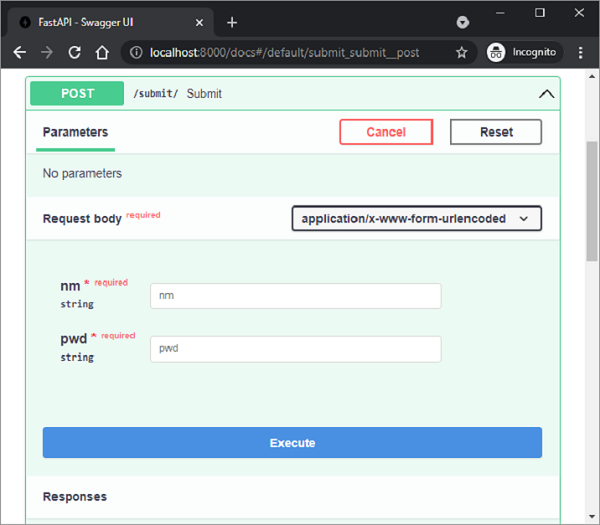
填寫文字欄位後,按下提交。瀏覽器重定向到 /submit URL 並呈現 JSON 響應。檢查/submit 路由的 Swagger API 文件。它正確地將nm 和pwd 識別為請求體引數,並將表單的“媒體型別”識別為application/x-www-form-urlencoded。
甚至可以使用 HTML 表單資料填充並返回 Pydantic 模型。在以下程式碼中,我們將 User 類宣告為 Pydantic 模型,並將其物件作為伺服器的響應傳送。
from pydantic import BaseModel
class User(BaseModel):
   username:str
   password:str
@app.post("/submit/", response_model=User)
async def submit(nm: str = Form(...), pwd: str = Form(...)):
   return User(username=nm, password=pwd)
廣告