
- FastAPI 教程
- FastAPI - 首頁
- FastAPI - 簡介
- FastAPI - Hello World
- FastAPI - OpenAPI
- FastAPI - Uvicorn
- FastAPI - 型別提示
- FastAPI - IDE 支援
- FastAPI - REST 架構
- FastAPI - 路徑引數
- FastAPI - 查詢引數
- FastAPI - 引數驗證
- FastAPI - Pydantic
- FastAPI - 請求體
- FastAPI - 模板
- FastAPI - 靜態檔案
- FastAPI - HTML 表單模板
- FastAPI - 訪問表單資料
- FastAPI - 上傳檔案
- FastAPI - Cookie 引數
- FastAPI - 頭部引數
- FastAPI - 響應模型
- FastAPI - 巢狀模型
- FastAPI - 依賴項
- FastAPI - CORS
- FastAPI - CRUD 操作
- FastAPI - SQL 資料庫
- FastAPI - 使用 MongoDB
- FastAPI - 使用 GraphQL
- FastAPI - Websockets
- FastAPI - FastAPI 事件處理器
- FastAPI - 掛載子應用
- FastAPI - 中介軟體
- FastAPI - 掛載 Flask 應用
- FastAPI - 部署
- FastAPI 有用資源
- FastAPI - 快速指南
- FastAPI - 有用資源
- FastAPI - 討論
FastAPI - 頭部引數
為了讀取作為客戶端請求一部分的HTTP 頭部的值,請從 FastAPI 庫匯入 Header 物件,並在操作函式定義中宣告一個 Header 型別的引數。引數名稱應與轉換為駝峰命名法的 HTTP 頭部匹配。
在下面的示例中,將檢索 "accept-language" 頭部。由於 Python 不允許在識別符號名稱中使用 "-"(短橫線),因此將其替換為 "_"(下劃線)
from typing import Optional
from fastapi import FastAPI, Header
app = FastAPI()
@app.get("/headers/")
async def read_header(accept_language: Optional[str] = Header(None)):
   return {"Accept-Language": accept_language}
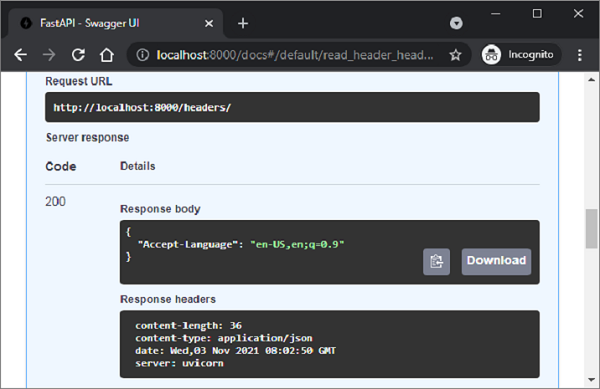
如下 Swagger 文件所示,檢索到的頭部顯示為響應體。
您可以將自定義和預定義的頭部推送到響應物件中。操作函式應具有Response型別的引數。為了設定自定義頭部,其名稱應以“X”為字首。在以下情況下,將新增名為“X-Web-Framework”的自定義頭部和預定義頭部“Content-Language”,以及操作函式的響應。
from fastapi import FastAPI
from fastapi.responses import JSONResponse
app = FastAPI()
@app.get("/rspheader/")
def set_rsp_headers():
   content = {"message": "Hello World"}
   headers = {"X-Web-Framework": "FastAPI", "Content-Language": "en-US"}
   return JSONResponse(content=content, headers=headers)
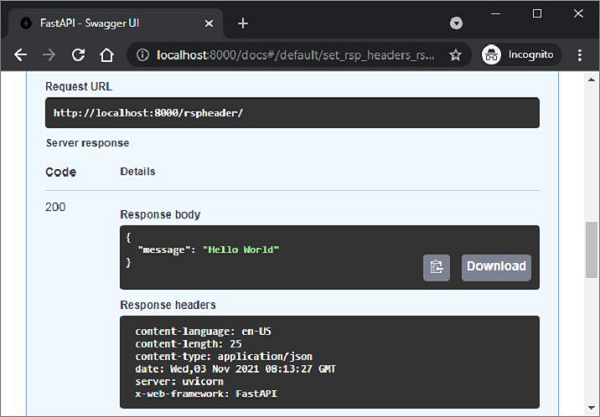
新新增的頭部將出現在文件的響應頭部部分。
廣告