
- FastAPI 教程
- FastAPI - 主頁
- FastAPI - 簡介
- FastAPI - Hello World
- FastAPI - OpenAPI
- FastAPI - Uvicorn
- FastAPI - 型別提示
- FastAPI - IDE 支援
- FastAPI - Rest 架構
- FastAPI - 路徑引數
- FastAPI - 查詢引數
- FastAPI - 引數驗證
- FastAPI - Pydantic
- FastAPI - 請求正文
- FastAPI - 模板
- FastAPI - 靜態檔案
- FastAPI - HTML 表單模板
- FastAPI - 訪問表單資料
- FastAPI - 上傳檔案
- FastAPI - Cookie 引數
- FastAPI - 頭引數
- FastAPI - 響應模型
- FastAPI - 巢狀模型
- FastAPI - 依賴項
- FastAPI - CORS
- FastAPI - Crud 操作
- FastAPI - SQL 資料庫
- FastAPI - 使用 MongoDB
- FastAPI - 使用 GraphQL
- FastAPI - Websocket
- FastAPI - FastAPI 事件處理程式
- FastAPI - 子應用程式掛載
- FastAPI - 中介軟體
- FastAPI - 掛載 Flast 應用程式
- FastAPI - 部署
- FastAPI 實用資源
- FastAPI - 快速指南
- FastAPI - 實用資源
- FastAPI - 討論
FastAPI - 子應用程式掛載
如果你有兩個獨立的 FastAPI 應用程式,其中一個可以掛載到另一個上。掛載的應用程式被稱為子應用程式。app.mount() 方法在主應用程式的特定路徑中新增另一個完全“獨立”的應用程式。然後它負責處理該路徑下的所有內容,以及在該子應用程式中宣告的路徑操作。
我們首先宣告一個簡單的 FastAPI 應用程式物件,用作頂層應用程式。
from fastapi import FastAPI
app = FastAPI()
@app.get("/app")
def mainindex():
   return {"message": "Hello World from Top level app"}
然後建立另一個應用程式物件 subapp 並新增它自己的路徑操作。
subapp = FastAPI()
@subapp.get("/sub")
def subindex():
   return {"message": "Hello World from sub app"}
使用 mount() 方法將此 subapp 物件掛載到主應用程式上。需要的兩個引數是 URL 路由和子應用程式的名稱。
app.mount("/subapp", subapp)
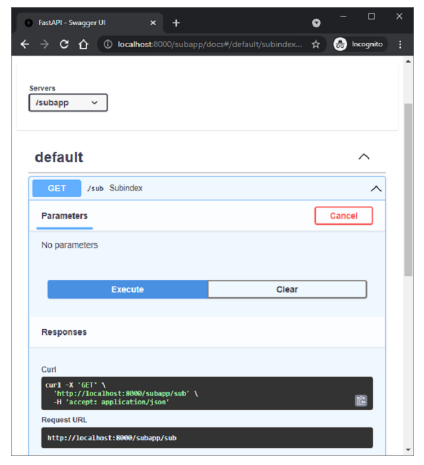
主應用程式和子應用程式都將有其自己的文件,可以使用 Swagger UI 進行檢查。
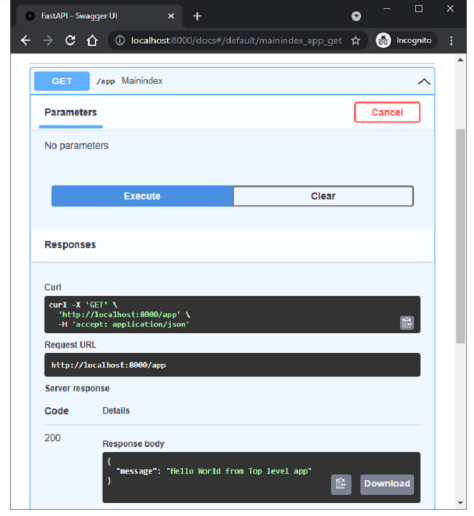
子應用程式的文件可以在 https://:8000/subapp/docs 中找到
廣告