
- FastAPI 教程
- FastAPI - 首頁
- FastAPI - 簡介
- FastAPI - Hello World
- FastAPI - OpenAPI
- FastAPI - Uvicorn
- FastAPI - 型別提示
- FastAPI - IDE 支援
- FastAPI - REST 架構
- FastAPI - 路徑引數
- FastAPI - 查詢引數
- FastAPI - 引數驗證
- FastAPI - Pydantic
- FastAPI - 請求體
- FastAPI - 模板
- FastAPI - 靜態檔案
- FastAPI - HTML 表單模板
- FastAPI - 訪問表單資料
- FastAPI - 上傳檔案
- FastAPI - Cookie 引數
- FastAPI - Header 引數
- FastAPI - 響應模型
- FastAPI - 巢狀模型
- FastAPI - 依賴項
- FastAPI - CORS
- FastAPI - CRUD 操作
- FastAPI - SQL 資料庫
- FastAPI - 使用 MongoDB
- FastAPI - 使用 GraphQL
- FastAPI - Websockets
- FastAPI - FastAPI 事件處理器
- FastAPI - 掛載子應用
- FastAPI - 中介軟體
- FastAPI - 掛載 Flask 應用
- FastAPI - 部署
- FastAPI 有用資源
- FastAPI - 快速指南
- FastAPI - 有用資源
- FastAPI - 討論
FastAPI - 查詢引數
將請求資料傳遞到伺服器的一種經典方法是將查詢字串附加到 URL。假設伺服器上的 Python 指令碼 (hello.py) 作為CGI執行,由與號 (&) 連線的一系列鍵值對構成查詢字串,透過新增問號 (?) 作為分隔符將其附加到 URL。例如:
https:///cgi-bin/hello.py?name=Ravi&age=20
URL 的尾部,在 (?) 之後,是查詢字串,然後由伺服器端指令碼解析以進行進一步處理。
如前所述,查詢字串是由 & 符號連線的引數=值對列表。FastAPI 自動將端點中不是路徑引數的部分視為查詢字串,並將其解析為引數及其值。這些引數傳遞給操作裝飾器下面的函式。
示例
from fastapi import FastAPI
app = FastAPI()
@app.get("/hello")
async def hello(name:str,age:int):
   return {"name": name, "age":age}
啟動 Uvicorn 伺服器並在瀏覽器中輸入此 URL:
https://:8000/hello?name=Ravi&age=20
您應該會得到相同的 JSON 響應。但是,檢查表明 FastAPI 檢測到 /hello 端點沒有路徑引數,但有查詢引數。
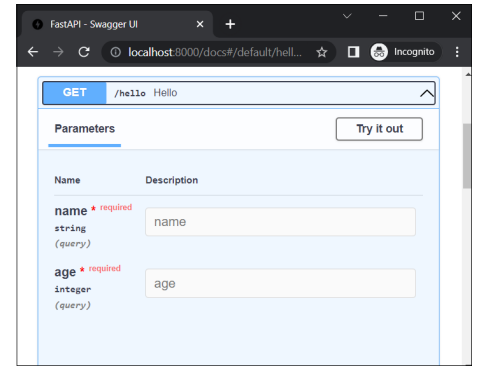
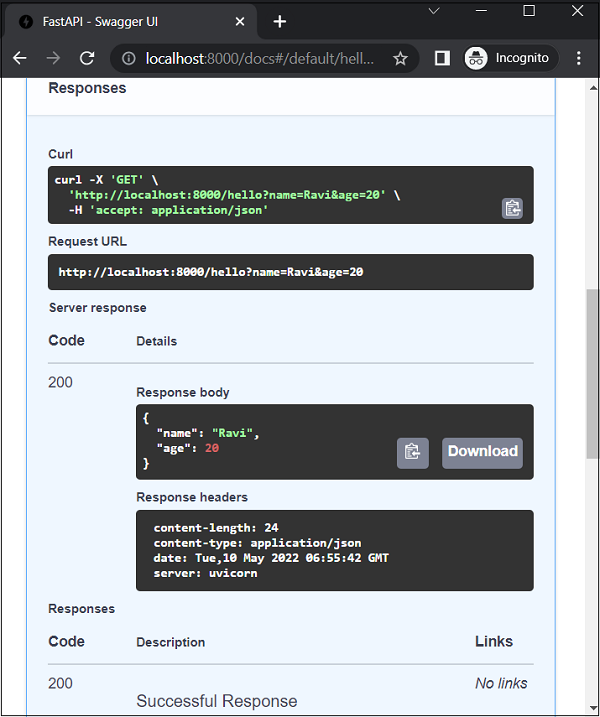
點選試一下按鈕,輸入“Ravi”和“20”作為值,然後按下執行按鈕。文件頁面現在顯示 Curl 命令、請求 URL 以及 HTTP 響應的主體和標頭。
示例
您可以使用 Python 的型別提示為要裝飾的函式的引數進行定義。在這種情況下,將 name 定義為 str,將 age 定義為 int。
from fastapi import FastAPI
app = FastAPI()
@app.get("/hello/{name}")
async def hello(name:str,age:int):
   return {"name": name, "age":age}
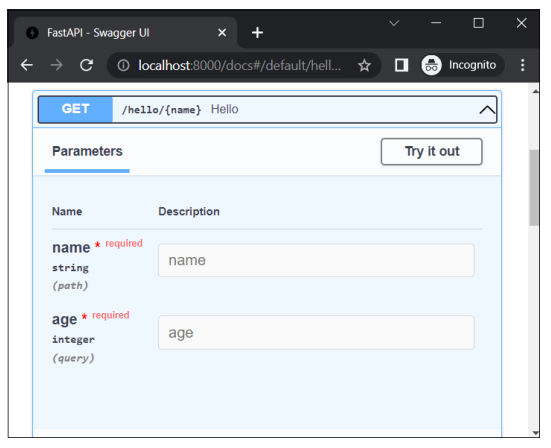
嘗試輸入 https://:8000/docs 作為 URL。這將開啟 Swagger UI (OpenAPI) 文件。引數 'name' 是路徑引數,'age' 是查詢引數。
廣告