
- 設計模式教程
- 設計模式 - 首頁
- 設計模式 - 概述
- 設計模式 - 工廠模式
- 抽象工廠模式
- 設計模式 - 單例模式
- 設計模式 - 建造者模式
- 設計模式 - 原型模式
- 設計模式 - 介面卡模式
- 設計模式 - 橋接模式
- 設計模式 - 過濾器模式
- 設計模式 - 組合模式
- 設計模式 - 裝飾器模式
- 設計模式 - 外觀模式
- 設計模式 - 享元模式
- 設計模式 - 代理模式
- 責任鏈模式
- 設計模式 - 命令模式
- 設計模式 - 直譯器模式
- 設計模式 - 迭代器模式
- 設計模式 - 中介者模式
- 設計模式 - 備忘錄模式
- 設計模式 - 觀察者模式
- 設計模式 - 狀態模式
- 設計模式 - 空物件模式
- 設計模式 - 策略模式
- 設計模式 - 模板模式
- 設計模式 - 訪問者模式
- 設計模式 - MVC模式
- 業務代表模式
- 組合實體模式
- 資料訪問物件模式
- 前端控制器模式
- 攔截過濾器模式
- 服務定位器模式
- 傳輸物件模式
- 設計模式資源
- 設計模式 - 問答
- 設計模式 - 快速指南
- 設計模式 - 有用資源
- 設計模式 - 討論
設計模式 - 橋接模式
當我們需要將抽象與其實現解耦,以便兩者可以獨立變化時,可以使用橋接模式。這種設計模式屬於結構型模式,因為它透過在實現類和抽象類之間提供橋接結構來解耦實現類和抽象類。
此模式包含一個充當橋接的介面,它使具體類的功能獨立於介面實現類。兩種型別的類都可以進行結構更改,而不會相互影響。
我們透過以下示例演示橋接模式的使用,其中可以使用相同的抽象類方法但在不同的橋接實現類中繪製不同顏色的圓圈。
實現
我們有一個DrawAPI介面,它充當橋接實現者,而具體類RedCircle、GreenCircle實現了DrawAPI介面。Shape是一個抽象類,並將使用DrawAPI的物件。BridgePatternDemo,我們的演示類將使用Shape類來繪製不同顏色的圓圈。
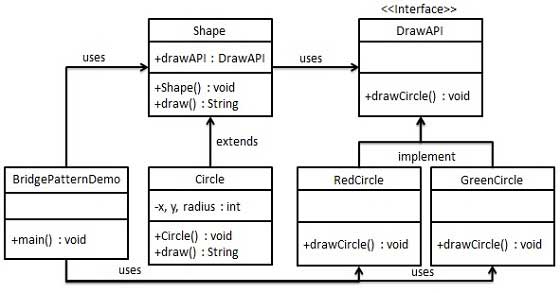
步驟 1
建立橋接實現者介面。
DrawAPI.java
public interface DrawAPI {
   public void drawCircle(int radius, int x, int y);
}
步驟 2
建立實現DrawAPI介面的具體橋接實現類。
RedCircle.java
public class RedCircle implements DrawAPI {
   @Override
   public void drawCircle(int radius, int x, int y) {
      System.out.println("Drawing Circle[ color: red, radius: " + radius + ", x: " + x + ", " + y + "]");
   }
}
GreenCircle.java
public class GreenCircle implements DrawAPI {
   @Override
   public void drawCircle(int radius, int x, int y) {
      System.out.println("Drawing Circle[ color: green, radius: " + radius + ", x: " + x + ", " + y + "]");
   }
}
步驟 3
使用DrawAPI介面建立一個抽象類Shape。
Shape.java
public abstract class Shape {
   protected DrawAPI drawAPI;

   protected Shape(DrawAPI drawAPI){
      this.drawAPI = drawAPI;
   }
   public abstract void draw();
}
步驟 4
建立實現Shape介面的具體類。
Circle.java
public class Circle extends Shape {
   private int x, y, radius;

   public Circle(int x, int y, int radius, DrawAPI drawAPI) {
      super(drawAPI);
      this.x = x;
      this.y = y;
      this.radius = radius;
   }

   public void draw() {
      drawAPI.drawCircle(radius,x,y);
   }
}
步驟 5
使用Shape和DrawAPI類繪製不同顏色的圓圈。
BridgePatternDemo.java
public class BridgePatternDemo {
   public static void main(String[] args) {
      Shape redCircle = new Circle(100,100, 10, new RedCircle());
      Shape greenCircle = new Circle(100,100, 10, new GreenCircle());

      redCircle.draw();
      greenCircle.draw();
   }
}
步驟 6
驗證輸出。
Drawing Circle[ color: red, radius: 10, x: 100, 100]
Drawing Circle[  color: green, radius: 10, x: 100, 100]
廣告