
- Google Plus 教程
- Google Plus - 首頁
- Google Plus - 簡介
- Google Plus - 人脈拓展
- Google Plus - 圈子
- Google Plus - 社群
- Google Plus - 環聊
- Google Plus - 活動
- Google Plus - 釋出內容
- Google Plus - 上傳帖子
- Google Plus - 編輯帖子
- Google Plus - 刪除帖子
- Google Plus - 分享帖子
- Google Plus - 報告帖子
- 培養使用者參與度
- Google Plus - 檢視通知
- Google Plus - 新增管理員
- Google Plus - 設定設定
- Google Plus - 通知設定
- Google Plus - 圈子設定
- Google Plus - 照片和影片設定
- Google Plus - 個人資料設定
- Google Plus - 刪除帳戶
- Google Plus - 資料分析
- Google Plus - 最佳化流程
- Google Plus - 最佳化頁面
- Google Plus - 認領個性化網址
- Google Plus - +Post 廣告
- Google Plus - 整合流程
- Google Plus - 徽章
- Google Plus - 建立徽章
- 連線 YouTube
- Google Plus - 社交連結
- Google Plus 有用資源
- Google Plus - 快速指南
- Google Plus - 有用資源
- Google Plus - 討論
Google Plus - 分享帖子
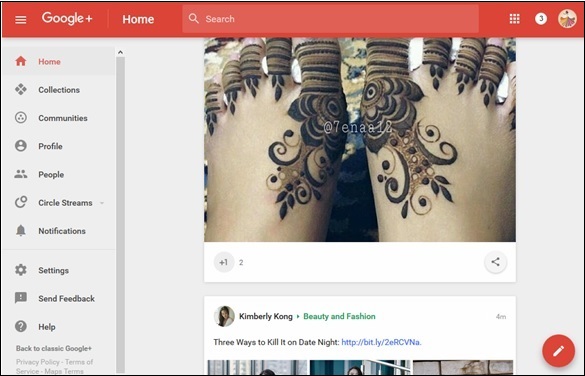
步驟 1 - 要重新分享他人的帖子,請點選帖子中顯示的分享 圖示,如下圖所示。
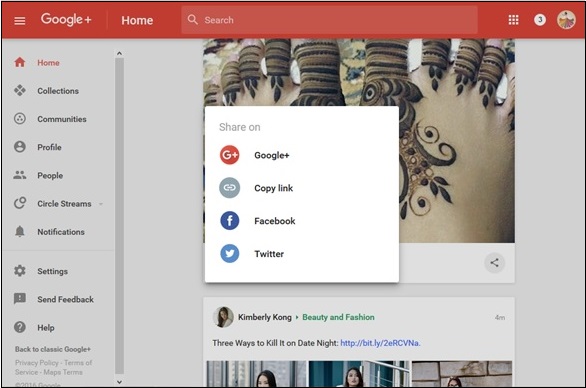
步驟 2 - 點選我們想要分享的選項。例如,在 Google+ 上分享。
步驟 3 - 選擇我們想要與之分享帖子的使用者。
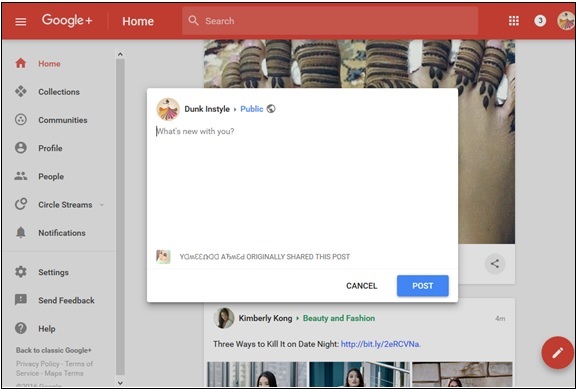
步驟 4 - 點選“釋出”選項。
阻止使用者評論或分享帖子
步驟 1 - 開啟帖子。釋出時關閉評論或重新分享。
步驟 2 - 點選選單 圖示。
圖示。
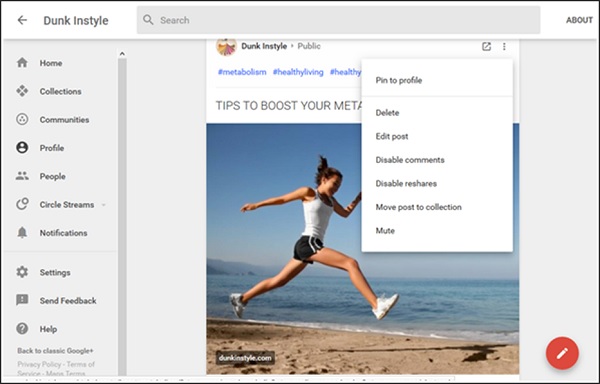
步驟 3 - 選擇“停用評論”和“停用重新分享”選項。
廣告