
- Google Plus 教程
- Google Plus - 首頁
- Google Plus - 簡介
- Google Plus - 人脈拓展
- Google Plus - 圈子
- Google Plus - 社群
- Google Plus - 環聊
- Google Plus - 活動
- Google Plus - 釋出內容
- Google Plus - 上傳帖子
- Google Plus - 編輯帖子
- Google Plus - 刪除帖子
- Google Plus - 重新分享帖子
- Google Plus - 報告帖子
- 培養使用者參與度
- Google Plus - 檢視通知
- Google Plus - 新增管理員
- Google Plus - 設定設定
- Google Plus - 通知設定
- Google Plus - 圈子設定
- Google Plus - 照片和影片設定
- Google Plus - 個人資料設定
- Google Plus - 刪除帳戶
- Google Plus - 資料分析
- Google Plus - 最佳化流程
- Google Plus - 最佳化頁面
- Google Plus - 認領個性化網址
- Google Plus - +Post 廣告
- Google Plus - 整合流程
- Google Plus - 徽章
- Google Plus - 建立徽章
- 連線 YouTube
- Google Plus - 社交連結
- Google Plus 有用資源
- Google Plus - 快速指南
- Google Plus - 有用資源
- Google Plus - 討論
Google Plus - 通知設定
可以根據我們的方便開啟或關閉通知設定。例如,如果有人邀請我們加入他們的社群,而我們有興趣瞭解關於它的所有資訊,那麼我們可以開啟通知。如果任何社群或群組討論令人厭煩,那麼可以在不離開群組/社群的情況下關閉通知。
開啟/關閉通知設定
讓我們看看如何開啟或關閉通知設定。請按照以下步驟操作。
步驟 1 - 開啟 Google+ 帳戶。
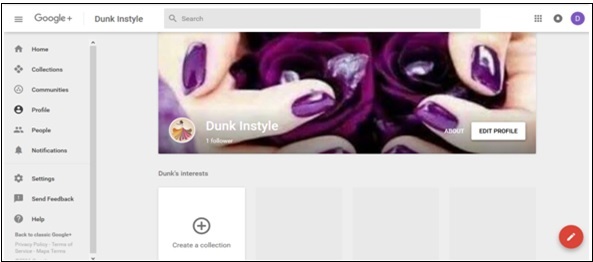
步驟 2 - 點選頁面左上角的漢堡選單  圖示。
圖示。
步驟 3 - 點選設定。
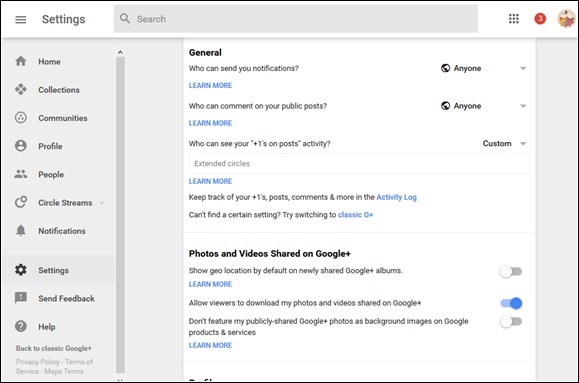
步驟 4 - 在“常規”標題下,點選“經典 Google+”。這裡有一個選項“誰可以向您傳送通知?”。
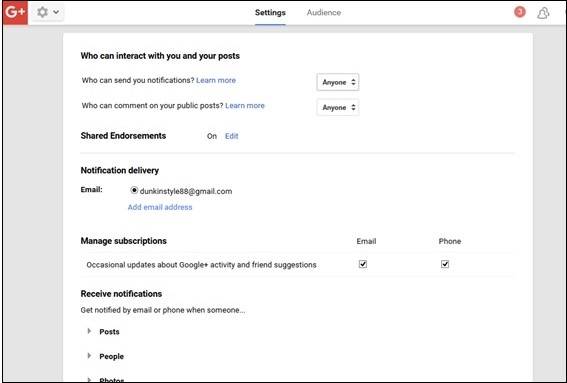
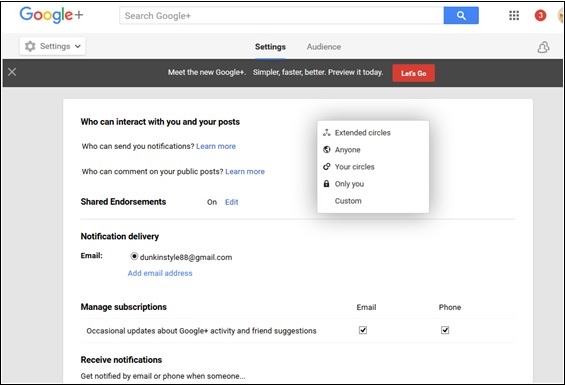
步驟 5 - 從以下選項中選擇 -
- 擴充套件圈子
- 所有人
- 你的圈子
- 僅限你
- 自定義
步驟 6 - 選擇通知傳送到哪個郵箱。
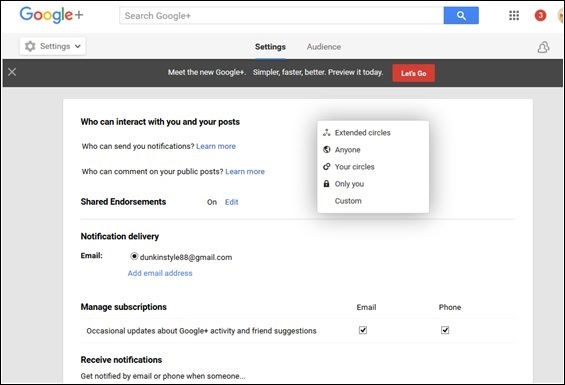
步驟 7 - 還有一個“新增郵箱地址”選項。我們可以新增另一個郵箱地址來接收通知。
步驟 8 - 前往“接收通知”選項。
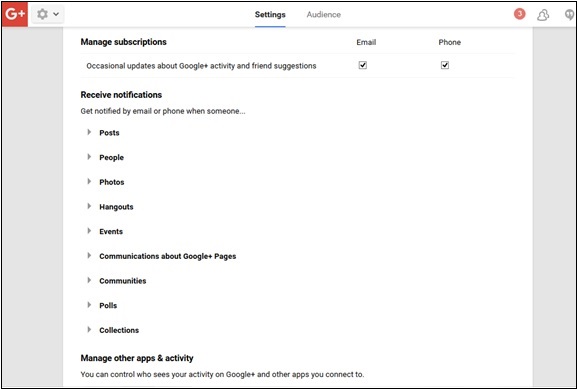
步驟 9 - 選中或取消選中以下選項以管理通知設定。
- 帖子
- 人員
- 環聊
- 活動
- 關於 Google+ 頁面的通訊
- 社群
- 投票
- 收藏集
廣告