
- Google Plus 教程
- Google Plus - 主頁
- Google Plus - 簡介
- Google Plus - 人脈拓展
- Google Plus - 圈子
- Google Plus - 社群
- Google Plus - 聊天
- Google Plus - 活動
- Google Plus - 釋出內容
- Google Plus - 上傳帖子
- Google Plus - 編輯帖子
- Google Plus - 刪除帖子
- Google Plus - 重新分享帖子
- Google Plus - 報告帖子
- 培養使用者參與度
- Google Plus - 檢視通知
- Google Plus - 新增管理員
- Google Plus - 設定設定
- Google Plus - 通知設定
- Google Plus - 圈子設定
- Google Plus - 照片和影片設定
- Google Plus - 個人資料設定
- Google Plus - 刪除賬戶
- Google Plus - 洞察
- Google Plus - 最佳化流程
- Google Plus - 最佳化頁面
- Google Plus - 認領個性化網址
- Google Plus - +帖子廣告
- Google Plus - 整合流程
- Google Plus - 徽章
- Google Plus - 建立徽章
- 連線 YouTube
- Google Plus - 社交連結
- Google Plus 有用資源
- Google Plus - 快速指南
- Google Plus - 有用資源
- Google Plus - 討論
Google Plus - 個人資料設定
我們可以更改個人資料設定並限制檢視者檢視個人資料資訊。我們還可以控制我們的個人資料在搜尋過程中是否可以被未知的人發現。我們的個人資料包括 - 我們釋出的帖子或我們被標記的帖子,我們建立的社群或我們正在關注的社群,我們自己的收藏或我們正在關注的其他人的收藏。
控制誰可以檢視個人資料
步驟 1 - 開啟 Google+ 賬戶。
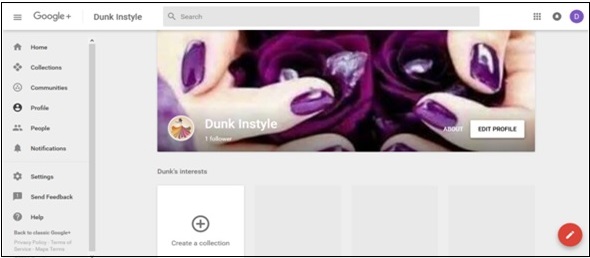
步驟 2 - 點選頁面左角的漢堡包  圖示。
圖示。
步驟 3 - 點選設定。
步驟 4 - 在“常規”標題下,點選“個人資料”選項。
步驟 5 - 轉到“個人資料”並根據需要從可用選項中進行選擇。
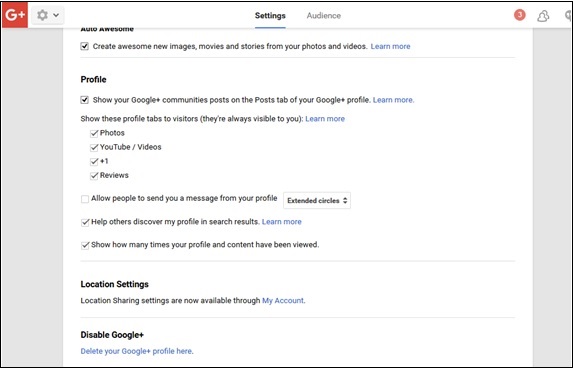
步驟 6 - 勾選或取消勾選內容和個人資料被檢視的次數。
步驟 7 - 勾選或取消勾選社群是否應該顯示在我們的個人資料上。
步驟 8 - 從以下選項中勾選我們希望檢視者看到的內容。
- 照片
- YouTube/影片
- +1
- 評論
步驟 9 - 勾選或取消勾選我們是否希望在搜尋結果中被發現。
步驟 10 - 選擇誰可以看到圈子中的人。
- 僅您
- 公開
- 您的圈子
步驟 11 - 勾選或取消勾選以顯示誰將我們新增到圈子中。
廣告