
- Bokeh 教程
- Bokeh - 主頁
- Bokeh - 簡介
- Bokeh - 環境設定
- Bokeh - 入門
- Bokeh - Jupyter Notebook
- Bokeh - 基本概念
- Bokeh - 帶有字形的繪圖
- Bokeh - 面積繪圖
- Bokeh - 圓形字形
- Bokeh - 矩形、橢圓和多邊形
- Bokeh - 扇形和弧形
- Bokeh - 專用曲線
- Bokeh - 設定範圍
- Bokeh - 座標軸
- Bokeh - 註釋和圖例
- Bokeh - Pandas
- Bokeh - ColumnDataSource
- Bokeh - 過濾資料
- Bokeh - 佈局
- Bokeh - 繪圖工具
- Bokeh - 樣式視覺屬性
- Bokeh - 自訂圖例
- Bokeh - 新增小工具
- Bokeh - 伺服器
- Bokeh - 使用 Bokeh 子命令
- Bokeh - 匯出圖表
- Bokeh - 嵌入圖表和應用程式
- Bokeh - 擴充套件 Bokeh
- Bokeh - WebGL
- Bokeh - 使用 JavaScript 進行開發
- Bokeh 實用資源
- Bokeh - 快速指南
- Bokeh - 實用資源
- Bokeh - 討論
Bokeh - 扇形和弧形
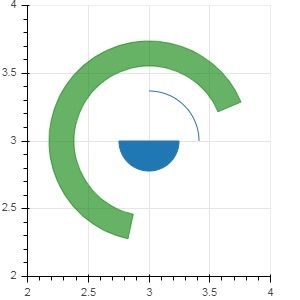
arc() 方法根據 x 和 y 座標、起始角和結束角以及半徑繪製一條簡單的弧線。角度以弧度為單位,而半徑可能是螢幕單位或資料單位。扇形是一個填滿的圓弧。
wedge() 方法具有與 arc() 方法相同的屬性。這兩個方法都允許新增方向屬性(可為順時針或逆時針),它決定了繪製圓弧/扇形的方向。annular_wedge() 函式在內半徑和外半徑組成的圓弧之間繪製一個填充區域。
示例
下面是一個將圓弧和扇形字形新增到 Bokeh 圖形中的示例 −
from bokeh.plotting import figure, output_file, show
import math
fig = figure(plot_width = 300, plot_height = 300)
fig.arc(x = 3, y = 3, radius = 50, radius_units = 'screen', start_angle = 0.0, end_angle = math.pi/2)
fig.wedge(x = 3, y = 3, radius = 30, radius_units = 'screen',
start_angle = 0, end_angle = math.pi, direction = 'clock')
fig.annular_wedge(x = 3,y = 3, inner_radius = 100, outer_radius = 75,outer_radius_units = 'screen',
inner_radius_units = 'screen',start_angle = 0.4, end_angle = 4.5,color = "green", alpha = 0.6)
show(fig)
輸出
廣告