
- Bokeh 教程
- Bokeh - 主頁
- Bokeh - 簡介
- Bokeh - 設定環境
- Bokeh - 入門
- Bokeh - Jupyter Notebook
- Bokeh - 基本概念
- Bokeh - 帶影像的繪圖
- Bokeh - 區域繪圖
- Bokeh - 圓形影像
- Bokeh - 矩形、橢圓和多邊形
- Bokeh - 扇形和弧形
- Bokeh - 專業曲線
- Bokeh - 設定範圍
- Bokeh - 座標軸
- Bokeh - 註釋和圖例
- Bokeh - Pandas
- Bokeh - 欄式資料來源
- Bokeh - 過濾資料
- Bokeh - 佈局
- Bokeh - 繪圖工具
- Bokeh - 設定視覺屬性的樣式
- Bokeh - 自定義圖例
- Bokeh - 新增小工具
- Bokeh - 伺服器
- Bokeh - 使用 Bokeh 子命令
- Bokeh - 匯出繪圖
- Bokeh - 嵌入繪圖和應用
- Bokeh - 擴充套件 Bokeh
- Bokeh - WebGL
- Bokeh - 使用 JavaScript 進行開發
- Bokeh 實用資源
- Bokeh - 快速指南
- Bokeh - 實用資源
- Bokeh - 討論
Bokeh - 使用 JavaScript 進行開發
Bokeh Python 庫以及其他語言的庫,如 R、Scala 和 Julia,主要以高級別的方式與 BokehJS 進行互動。Python 程式無需擔心 JavaScript 或網頁開發。但是,可以用 BokehJS API 使用 BokehJS 直接進行純 JavaScript 開發。
BokehJS 物件,如影像和小工具,構建的方式與 Bokeh Python API 中類似。通常,任何 Python 類名均可用作 JavaScript 中的 Bokeh.類名。例如,在 Python 中獲取的 Range1d 物件。
xrange = Range1d(start=-0.5, end=20.5)
它還可以透過 BokehJS 獲取 −
var xrange = new Bokeh.Range1d({ start: -0.5, end: 20.5 });
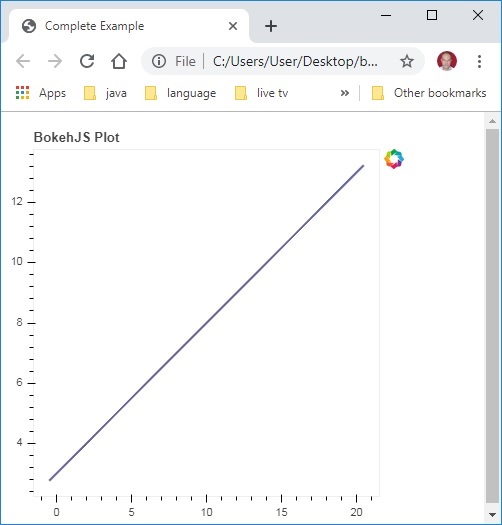
當以下 JavaScript 程式碼嵌入到 HTML 檔案中時,便會在瀏覽器中呈現一個簡單的折線圖。
首先,在網頁的 <head>..</head> 部分包含所有 BokehJS 庫,如下所示:
<head>
<script type="text/javascript" src="https://cdn.pydata.org/bokeh/release/bokeh-1.3.4.min.js"></script>
<script type="text/javascript" src="https://cdn.pydata.org/bokeh/release/bokeh-widgets-1.3.4.min.js"></script>
<script type="text/javascript" src="https://cdn.pydata.org/bokeh/release/bokeh-tables-1.3.4.min.js"></script>
<script type="text/javascript" src="https://cdn.pydata.org/bokeh/release/bokeh-gl-1.3.4.min.js"></script>
<script type="text/javascript" src="https://cdn.pydata.org/bokeh/release/bokeh-api-1.3.4.min.js"></script>
<script type="text/javascript" src="https://cdn.pydata.org/bokeh/release/bokeh-api-1.3.4.min.js"></script>
</head>
在下文部分中,將構造 Bokeh 繪圖的各種部分的一些 JavaScript 程式碼段。
<script>
// create some data and a ColumnDataSource
var x = Bokeh.LinAlg.linspace(-0.5, 20.5, 10);
var y = x.map(function (v) { return v * 0.5 + 3.0; });
var source = new Bokeh.ColumnDataSource({ data: { x: x, y: y } });
// make the plot
var plot = new Bokeh.Plot({
   title: "BokehJS Plot",
   plot_width: 400,
   plot_height: 400
});

// add axes to the plot
var xaxis = new Bokeh.LinearAxis({ axis_line_color: null });
var yaxis = new Bokeh.LinearAxis({ axis_line_color: null });
plot.add_layout(xaxis, "below");
plot.add_layout(yaxis, "left");

// add a Line glyph
var line = new Bokeh.Line({
   x: { field: "x" },
   y: { field: "y" },
   line_color: "#666699",
   line_width: 2
});
plot.add_glyph(line, source);

Bokeh.Plotting.show(plot);
</script>
將上述程式碼儲存為網頁,然後在瀏覽器中開啟。
廣告