
- Bokeh 教程
- Bokeh - 主頁
- Bokeh - 導言
- Bokeh - 環境設定
- Bokeh - 入門
- Bokeh - Jupyter Notebook
- Bokeh - 基礎概念
- Bokeh - 帶有字元的繪圖
- Bokeh - 區域繪圖
- Bokeh - 圓形字元
- Bokeh - 矩形、橢圓形和多邊形
- Bokeh - 扇形和弧
- Bokeh - 專業型曲線
- Bokeh - 設定範圍
- Bokeh - 座標軸
- Bokeh - 註解和圖例
- Bokeh - Pandas
- Bokeh - 列資料來源
- Bokeh - 過濾資料
- Bokeh - 佈局
- Bokeh - 繪圖工具
- Bokeh - 美化視覺屬性
- Bokeh - 自定義圖例
- Bokeh - 新增小部件
- Bokeh - 伺服器
- Bokeh - 使用 Bokeh 子命令
- Bokeh - 匯出繪圖
- Bokeh - 嵌入繪圖和應用
- Bokeh - 擴充套件 Bokeh
- Bokeh - WebGL
- Bokeh - 使用 JavaScript 開發
- Bokeh 有用的資源
- Bokeh - 快速指南
- Bokeh - 有用的資源
- Bokeh - 討論
Bokeh - 列資料來源
Bokeh API 中的大多數繪圖方法都可以透過 ColumnDatasource 物件接收資料來源引數。這使得繪圖和“資料表”之間共享資料成為可能。
ColumnDatasource 可被視為列名和資料列表之間的對映關係。一個包含一個或多個字串鍵以及列表或 numpy 陣列作為值的 Python dict 物件傳遞給 ColumnDataSource 建構函式。
示例
如下示例
from bokeh.models import ColumnDataSource
data = {'x':[1, 4, 3, 2, 5],
   'y':[6, 5, 2, 4, 7]}
cds = ColumnDataSource(data = data)
然後使用此物件作為字元方法中 source 屬性的值。下面的程式碼使用 ColumnDataSource 生成了一個散點圖。
from bokeh.plotting import figure, output_file, show
from bokeh.models import ColumnDataSource
data = {'x':[1, 4, 3, 2, 5],
   'y':[6, 5, 2, 4, 7]}
cds = ColumnDataSource(data = data)
fig = figure()
fig.scatter(x = 'x', y = 'y',source = cds, marker = "circle", size = 20, fill_color = "grey")
show(fig)
輸出
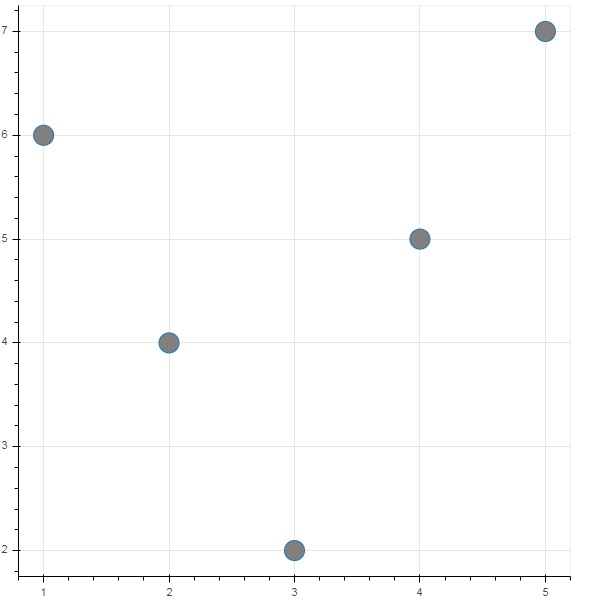
除了向 ColumnDataSource 指定 Python 字典之外,我們還可以使用 Pandas DataFrame。
讓我們使用“test.csv”(本節前面已使用過)來獲取一個 DataFrame,並使用它獲取 ColumnDataSource 和呈現折線圖。
from bokeh.plotting import figure, output_file, show
import pandas as pd
from bokeh.models import ColumnDataSource
df = pd.read_csv('test.csv')
cds = ColumnDataSource(df)
fig = figure(y_axis_type = 'log')
fig.line(x = 'x', y = 'pow',source = cds, line_color = "grey")
show(fig)
輸出
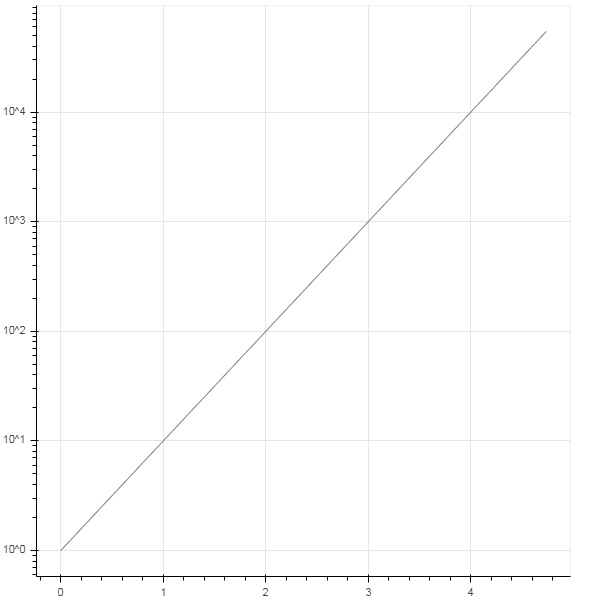
廣告