
- Sublime Text 教程
- Sublime Text - 首頁
- Sublime Text – 簡介
- Sublime Text – 安裝
- Sublime Text – 資料目錄
- 建立第一個文件
- 編輯第一個文字文件
- 程式碼編輯模式
- Sublime Text – Sublime Linter
- Sublime Text – 快捷鍵
- Sublime Text – 程式碼片段
- Sublime Text – 宏
- Sublime Text – 鍵繫結
- Sublime Text – 列選擇
- Sublime Text – 縮排
- Sublime Text – 基本設定
- Sublime Text – 主題管理
- 理解 Vintage 模式
- Sublime Text – Vintage 命令
- Sublime Text – 測試 Javascript 程式碼
- Sublime Text – 測試 Python 程式碼
- Sublime Text – 拼寫檢查
- Sublime Text – 外掛
- Sublime Text – 選單
- Sublime Text – 字型子選單
- Sublime Text – 外掛開發
- Sublime Text – 命令面板
- 除錯 PHP 應用
- 除錯 Javascript 應用
- Sublime Text – 批次處理
- 無干擾模式
- SublimeCodeIntel 外掛
- Sublime Text 有用資源
- Sublime Text - 快速指南
- Sublime Text - 有用資源
- Sublime Text - 討論
Sublime Text - SublimeCodeIntel 外掛
SublimeCodeIntel 是 Sublime Text 編輯器的一個重要外掛。它提供以下功能:
跳轉到符號功能,幫助使用者跳轉到符號所在的文 件和指定行。
包含自動完成庫,並即時顯示模組/符號。
工具提示在狀態列中顯示有關關聯函式的資訊。
安裝
您可以透過以下步驟安裝 SublimeCodeIntel 外掛:
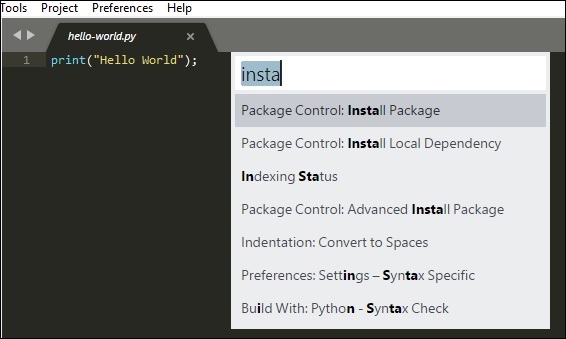
步驟 1 - 使用快捷鍵 Ctrl+Shift+P(Windows)或 Cmd+Shift+P(OSX) 獲取 Sublime Text 編輯器的安裝包功能。請參考以下截圖以便更好地理解:
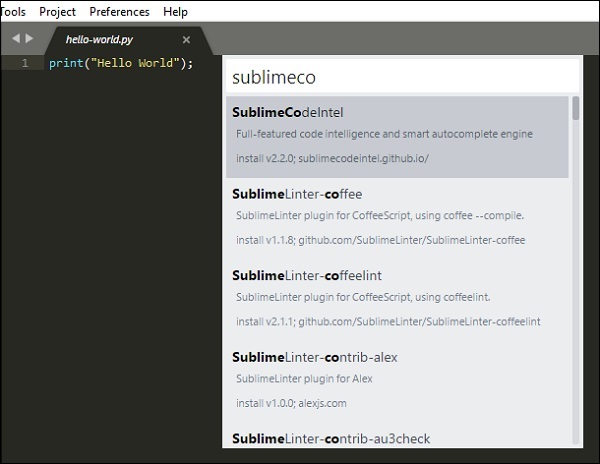
步驟 2 - 現在,選擇SublimeCodeIntel 外掛進行安裝,然後重啟 Sublime Text 編輯器。
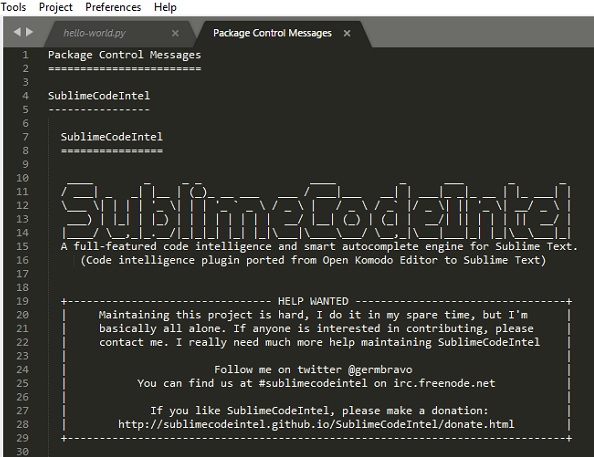
步驟 3 - 成功安裝SublimeCodeIntel 外掛後,您的螢幕將如下所示:
配置
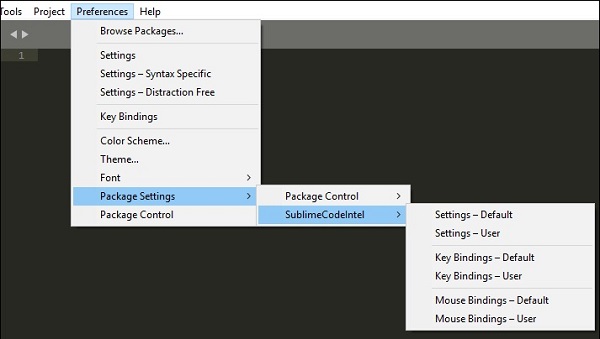
SublimeCodeIntel 有兩個內建配置:
- 設定 - 預設
- 設定 - 使用者
請參考以下截圖,其中顯示了這些配置:
SublimeCodeIntel 的配置包含在名為SublimeCodeIntel.sublime-settings 的 JSON 檔案中。每種語言所需的配置包含在 SublimeCodeIntel 外掛中,如下所示:
/*
   Defines a configuration for each language.
*/

"codeintel_language_settings": {
   "Python3": {
      "python3": "/usr/local/bin/python3.3",
      "codeintel_scan_extra_dir": [
         "/Applications/Sublime Text.app/Contents/MacOS",
         "~/Library/Application Support/Sublime Text 3/Packages/SublimeCodeIntel/arch",
         "~/Library/Application Support/Sublime Text 3/Packages/SublimeCodeIntel/libs"
      ],
      "codeintel_scan_files_in_project": true,
      "codeintel_selected_catalogs": []
   },

   "JavaScript": {
      "codeintel_scan_extra_dir": [],
      "codeintel_scan_exclude_dir":["/build/", "/min/"],
      "codeintel_scan_files_in_project": false,
      "codeintel_max_recursive_dir_depth": 2,
      "codeintel_selected_catalogs": ["jQuery"]
   },

   "PHP": {
      "php": "/Applications/MAMP/bin/php/php5.5.3/bin/php",
      "codeintel_scan_extra_dir": [],
      "codeintel_scan_files_in_project": true,
      "codeintel_max_recursive_dir_depth": 15,
      "codeintel_scan_exclude_dir":["/Applications/MAMP/bin/php/php5.5.3/"]
   }
}
這些配置可以根據需要進行自定義。這取決於使用者安裝的模組/庫的數量,以及使用者正在處理的專案的規模和複雜性等各種引數。
廣告