
- Sublime Text 教程
- Sublime Text——首頁
- Sublime Text——簡介
- Sublime Text——安裝
- Sublime Text——資料目錄
- 建立第一個文件
- 編輯第一個文字文件
- 程式碼編輯的模式
- Sublime Text——Sublime Linter
- Sublime Text——快捷方式
- Sublime Text——程式碼段
- Sublime Text——宏
- Sublime Text——鍵繫結
- Sublime Text——列選擇
- Sublime Text——縮排
- Sublime Text——基本設定
- Sublime Text——主題管理
- 理解 Vintage 模式
- Sublime Text——Vintage 命令
- Sublime Text——測試 JavaScript
- Sublime Text —— 測試 Python 程式碼
- Sublime Text——拼寫檢查
- Sublime Text——軟體包
- Sublime Text——選單
- Sublime Text——字型子選單
- Sublime Text——開發外掛
- Sublime Text——命令面板
- 除錯 PHP 應用程式
- 除錯 JavaScript 應用程式
- Sublime Text——批處理
- 無干擾模式
- SublimeCodeIntel 外掛
- Sublime Text 有用資源
- Sublime Text——快速指南
- Sublime Text——有用資源
- Sublime Text——討論
Sublime Text——無干擾模式
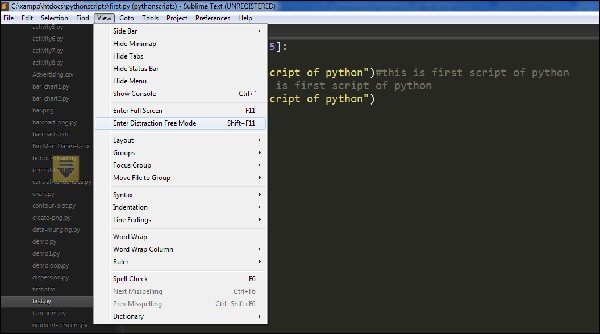
Sublime Text 編輯器的無干擾模式允許全屏顯示程式碼和檔案。你可以透過選項檢視 → 進入無干擾模式選單項進入無干擾模式。
一旦在 Sublime Text 編輯器中啟用了無干擾模式,輸出將如下所示 −
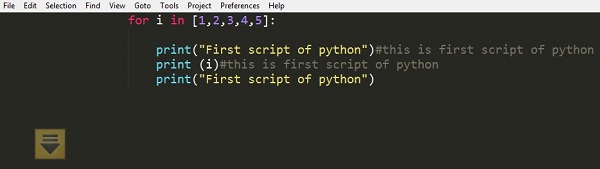
所有可訪問的 UI 專案都將隱藏,但可以在無干擾模式中訪問。
定製
Sublime Text 編輯器的無干擾模式的所有定製屬性都包含在Distraction Free.sublime-settings JSON 檔案中,如下面的截圖所示。
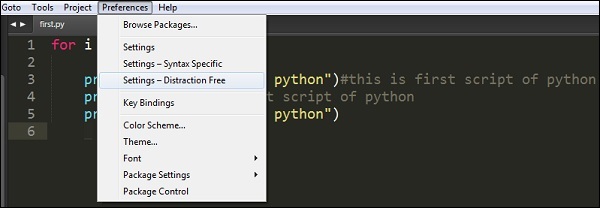
以下截圖顯示了 Sublime 編輯器中無干擾模式中包含的屬性 −
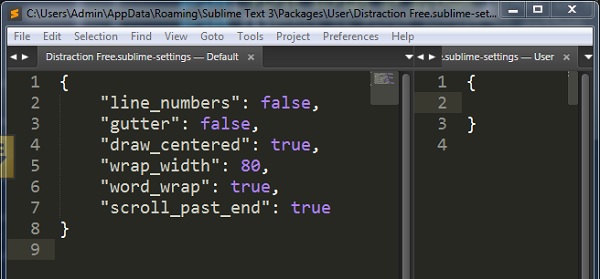
請注意,line_numbers、gutter、draw_centered、wrap_width、word_wrap 和 scroll_past_end 等屬性可以啟用有吸引力的無干擾模式。
廣告