
- TestLodge 教程
- TestLodge - 首頁
- TestLodge - 簡介
- TestLodge - 功能
- TestLodge - 免費試用許可權
- TestLodge - 登入
- TestLodge - 控制面板
- TestLodge - 新增使用者
- TestLodge - 新增專案
- TestLodge - 測試計劃
- TestLodge - 複製測試計劃
- TestLodge - 需求
- TestLodge - 複製要求
- TestLodge - 測試套件
- TestLodge - 複製測試用例
- TestLodge - 匯入測試用例
- TestLodge - 新增測試執行
- TestLodge - 執行測試執行
- TestLodge - 測試執行摘要
- TestLodge - 報告
- TestLodge - 匯出內容
- 問題跟蹤器整合
- TestLodge - 搜尋
- TestLodge - 登出
- TestLodge 有用資源
- TestLodge - 快速指南
- TestLodge - 有用資源
- TestLodge - 討論
TestLodge - 登出
建議在完成工作後始終登出 TestLodge 帳戶,以保護資料安全。
注− TestLodge 沒有非活動會話超時。在單擊登出按鈕之前,您將永遠不會自動登出。如果直接關閉瀏覽器,您將被登出,但這並不是一個好習慣。
例如,如果您已登入 TestLodge 帳戶,但既未從該帳戶登出,也沒有關閉瀏覽器,那麼您在 10 小時後仍可以檢視所有內容,並繼續工作,無需再次登入。
強烈建議在完成工作後立即從帳戶登出。
以下是從帳戶登出的方法。
登出按鈕位於頁面右上角。此按鈕存在於 TestLodge 的所有選項卡/頁面中。
以下螢幕截圖顯示頁面上的登出按鈕。
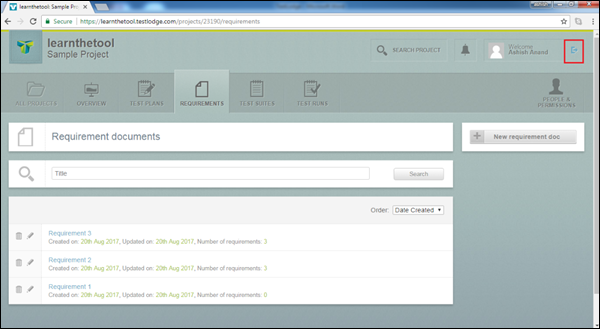
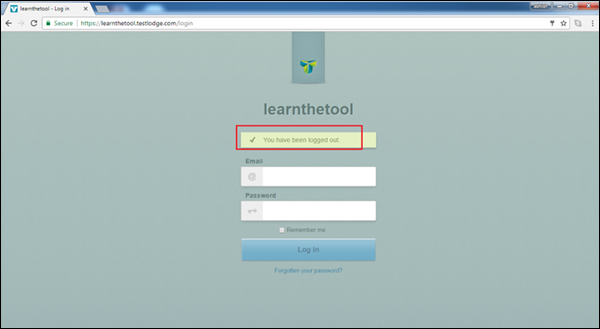
無論何時您希望登出頁面,請單擊上述按鈕。一旦您單擊按鈕,您將被登出,TestLodge 登入頁面將顯示登出訊息“您已登出”。
您可以重新輸入憑據以再次登入帳戶。
以下螢幕截圖顯示登出頁面。
廣告