- Kivy 教程
- Kivy - 首頁
- Kivy 基礎
- Kivy - 入門
- Kivy - 安裝
- Kivy - 架構
- Kivy - 檔案語法
- Kivy - 應用程式
- Kivy - Hello World
- Kivy - 應用生命週期
- Kivy - 事件
- Kivy - 屬性
- Kivy - 輸入
- Kivy - 行為
- Kivy 按鈕
- Kivy - 按鈕
- Kivy - 按鈕事件
- Kivy - 按鈕顏色
- Kivy - 按鈕大小
- Kivy - 按鈕位置
- Kivy - 圓形按鈕
- Kivy - 停用按鈕
- Kivy - 圖片按鈕
- Kivy 小部件
- Kivy - 小部件
- Kivy - 標籤
- Kivy - 文字輸入
- Kivy - 畫布
- Kivy - 線
- Kivy - 複選框
- Kivy - 下拉列表
- Kivy - 視窗
- Kivy - 滾動檢視
- Kivy - 走馬燈
- Kivy - 滑塊
- Kivy - 圖片
- Kivy - 彈出視窗
- Kivy - 開關
- Kivy - 微調器
- Kivy - 分隔器
- Kivy - 進度條
- Kivy - 氣泡
- Kivy - 標籤頁面板
- Kivy - 散點圖
- Kivy - 手風琴
- Kivy - 檔案選擇器
- Kivy - 顏色拾取器
- Kivy - 程式碼輸入
- Kivy - 模態檢視
- Kivy - 切換按鈕
- Kivy - 相機
- Kivy - 樹檢視
- Kivy - reStructuredText
- Kivy - 操作欄
- Kivy - 播放器
- Kivy - 模板檢視
- Kivy - 虛擬鍵盤
- Kivy - 觸控波紋
- Kivy - 音訊
- Kivy - 影片
- Kivy - 拼寫檢查
- Kivy - 效果
- Kivy - 輸入記錄器
- Kivy - OpenGL
- Kivy - 文字
- Kivy - 文字標記
- Kivy - 設定
- Kivy 佈局
- Kivy - 佈局
- Kivy - 浮動佈局
- Kivy - 網格佈局
- Kivy - 箱式佈局
- Kivy - 堆疊佈局
- Kivy - 錨點佈局
- Kivy - 相對佈局
- Kivy - 頁面佈局
- Kivy - 回收佈局
- Kivy - 佈局巢狀
- Kivy 高階概念
- Kivy - 配置物件
- Kivy - 圖集
- Kivy - 資料載入器
- Kivy - 快取管理器
- Kivy - 控制檯
- Kivy - 動畫
- Kivy - 多筆畫
- Kivy - 時鐘
- Kivy - SVG
- Kivy - UrlRequest
- Kivy - 剪貼簿
- Kivy - 工廠
- Kivy - 手勢
- Kivy - 語言
- Kivy - 圖形
- Kivy - 繪製
- Kivy - 打包
- Kivy - 花園
- Kivy - 儲存
- Kivy - 向量
- Kivy - 工具
- Kivy - 檢查器
- Kivy - 工具
- Kivy - 日誌記錄器
- Kivy - 幀緩衝區
- Kivy 應用程式和專案
- Kivy - 繪圖應用程式
- Kivy - 計算器應用程式
- Kivy - 計時器應用程式
- Kivy - 相機處理
- Kivy - 圖片檢視器
- Kivy - 貝塞爾曲線
- Kivy - 畫布壓力測試
- Kivy - 圓形繪製
- Kivy - 小部件動畫
- Kivy - 其他
- Kivy 有用資源
- Kivy - 快速指南
- Kivy - 有用資源
- Kivy - 討論
Kivy - UrlRequest
Kivy 框架中的 UrlRequest 類允許您對網路進行非同步請求,並在請求完成後獲取結果。其功能與 JavaScript 中的 XHR 物件相同。
UrlRequest 類定義在 "kivy.network.urlrequest" 模組中。建構函式只需要一個名為 "url" 的必填引數。該類繼承了 Python threading 模組中的 Thread 類。
UrlRequest 建構函式的引數如下:
url - 表示要呼叫的完整 URL 字串。
on_success - 獲取結果後要呼叫的回撥函式。
on_redirect - 如果伺服器返回重定向,則要呼叫的回撥函式。
on_failure - 如果伺服器返回客戶端或伺服器錯誤,則要呼叫的回撥函式。
on_error - 如果發生錯誤,則要呼叫的回撥函式。
on_progress - 將被呼叫的回撥函式,用於報告下載進度。
on_cancel - 如果使用者透過 .cancel() 方法請求取消下載操作,則要呼叫的回撥函式。
on_finish - 請求完成後要呼叫的附加回調函式。
req_body - 表示要與請求一起傳送的資料的字串。如果包含此引數,則將執行 POST 操作。否則,將傳送 GET 請求。
req_headers - dict,預設為 None。要新增到請求的自定義標頭。
chunk_size - 要讀取的每個塊的大小,僅在設定了 on_progress 回撥時使用。
timeout - 一個整數,如果設定,阻塞操作將在這麼多秒後超時。
method - 要使用的 HTTP 方法,預設為 'GET'(如果指定了 body,則為 'POST')。
decode - bool,預設為 True。如果為 False,則跳過響應的解碼。
debug - bool,預設為 False。
auth - HTTPBasicAuth,預設為 None。如果設定,請求將使用基本身份驗證進行身份驗證。
UrlRequest 物件的 cancel() 方法取消當前請求,並將呼叫回撥 on_cancel。
示例
首先,我們設計一個使用者介面,其中包含一個包含 httpbin.org URL(帶有多個引數)的微調器,兩個只讀文字框 - 一個顯示獲取的 URL 結果,另一個顯示響應標頭的 JSON 字串。在它們之間放置了一個 Image 小部件。如果 content_type 為影像型別,則它會顯示影像。這些小部件放置在一個垂直的 box 佈局中。
佈局使用以下 kv 語言指令碼構建。
#:import json json

BoxLayout:
   orientation: 'vertical'
   TextInput:
      id: ti
      hint_text: 'type url or select from dropdown'
      size_hint_y: None
      height: 48
      multiline: False
   BoxLayout:
      size_hint_y: None
      height: 48
      Spinner:
         id: spinner
         text: 'select'
         values:
            [
               'http://httpbin.org/ip',
               'http://httpbin.org/headers',
               'http://httpbin.org/delay/3',
               'https://httpbin.org/image/png',
            ]
         on_text: ti.text = self.text
      Button:
         text: 'GET'
         on_press: app.fetch_content(ti.text)
         size_hint_x: None
         width: 50
   TextInput:
      readonly: True
      text: app.result_text
   Image:
      source: app.result_image
      nocache: True
   TextInput
      readonly: True
      text: json.dumps(app.headers, indent=2)
Kivy App 類程式碼如下所示。它基本上向 httpbin.org 傳送不同的 HTTP 請求。httpbin.org 是一種簡單的 HTTP 請求和響應服務。該應用程式將 UrlRequest 的結果儲存在三個字串變數中,並在小部件中顯示。
當從下拉選單中選擇 URL 並按下 GET 按鈕時,它將呼叫 fetch_content() 方法並收集響應。
如果響應標頭包含 content_type 為影像,則 Image 小部件將載入影像。
from kivy.lang import Builder
from kivy.app import App
from kivy.network.urlrequest import UrlRequest
from kivy.properties import NumericProperty, StringProperty, DictProperty
import json
from kivy.core.window import Window

Window.size = (720,400)

class UrlExample(App):
   status = NumericProperty()
   result_text = StringProperty()
   result_image = StringProperty()
   headers = DictProperty()

   def build(self):
      pass

   def fetch_content(self, url):
      self.cleanup()
      UrlRequest(
         url,
         on_success=self.on_success,
         on_failure=self.on_failure,
         on_error=self.on_error
      )

   def cleanup(self):
      self.result_text = ''
      self.result_image = ''
      self.status = 0
      self.headers = {}

   def on_success(self, req, result):
      self.cleanup()
      headers = req.resp_headers
      content_type = headers.get('content-type', headers.get('Content-Type'))
      if content_type.startswith('image/'):
         fn = 'tmpfile.{}'.format(content_type.split('/')[1])
         with open(fn, 'wb') as f:
            f.write(result)
         self.result_image = fn
      else:
         if isinstance(result, dict):
            self.result_text = json.dumps(result, indent=2)
         else:
            self.result_text = result
            self.status = req.resp_status
            self.headers = headers

   def on_failure(self, req, result):
      self.cleanup()
      self.result_text = result
      self.status = req.resp_status
      self.headers = req.resp_headers

   def on_error(self, req, result):
      self.cleanup()
      self.result_text = str(result)

UrlExample().run()
輸出
執行以上程式碼。從微調器下拉選單中選擇 'http://httpbin.org/headers' 並按下 GET 按鈕。您應該在文字框中看到響應標頭。

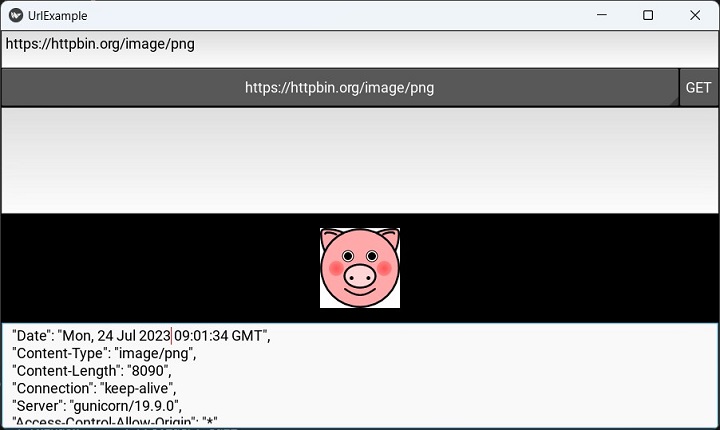
選擇 'https://httpbin.org/image/png' URL。將顯示影像,如下所示。
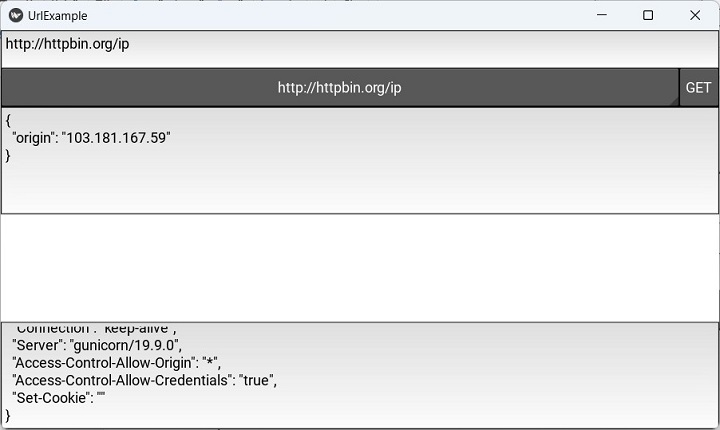
在微調器下拉選單中的選項之一是指向客戶端 IP 地址的 URL。從列表中選擇 'http://httpbin.org/ip'。將顯示 IP 地址,如下所示: