
- Kivy 教程
- Kivy - 首頁
- Kivy 基礎
- Kivy - 入門
- Kivy - 安裝
- Kivy - 架構
- Kivy - 檔案語法
- Kivy - 應用
- Kivy - Hello World
- Kivy - 應用生命週期
- Kivy - 事件
- Kivy - 屬性
- Kivy - 輸入
- Kivy - 行為
- Kivy 按鈕
- Kivy - 按鈕
- Kivy - 按鈕事件
- Kivy - 按鈕顏色
- Kivy - 按鈕大小
- Kivy - 按鈕位置
- Kivy - 圓形按鈕
- Kivy - 停用按鈕
- Kivy - 圖片按鈕
- Kivy 元件
- Kivy - 元件
- Kivy - 標籤
- Kivy - 文字輸入
- Kivy - 畫布
- Kivy - 線
- Kivy - 複選框
- Kivy - 下拉列表
- Kivy - 視窗
- Kivy - 滾動檢視
- Kivy - 輪播圖
- Kivy - 滑塊
- Kivy - 圖片
- Kivy - 彈出視窗
- Kivy - 開關
- Kivy - 微調器
- Kivy - 分隔器
- Kivy - 進度條
- Kivy - 氣泡
- Kivy - 標籤面板
- Kivy - 散點圖
- Kivy - 手風琴
- Kivy - 檔案選擇器
- Kivy - 顏色選擇器
- Kivy - 程式碼輸入
- Kivy - 模態檢視
- Kivy - 切換按鈕
- Kivy - 相機
- Kivy - 樹檢視
- Kivy - reStructuredText
- Kivy - 動作欄
- Kivy - 媒體播放器
- Kivy - 模板檢視
- Kivy - 虛擬鍵盤
- Kivy - 觸控漣漪
- Kivy - 音訊
- Kivy - 影片
- Kivy - 拼寫檢查
- Kivy - 效果
- Kivy - 輸入記錄器
- Kivy - OpenGL
- Kivy - 文字
- Kivy - 文字標記
- Kivy - 設定
- Kivy 佈局
- Kivy - 佈局
- Kivy - 浮動佈局
- Kivy - 網格佈局
- Kivy - 盒式佈局
- Kivy - 堆疊佈局
- Kivy - 錨點佈局
- Kivy - 相對佈局
- Kivy - 分頁佈局
- Kivy - 迴圈佈局
- Kivy - 佈局巢狀
- Kivy 高階概念
- Kivy - 配置物件
- Kivy - 圖集
- Kivy - 資料載入器
- Kivy - 快取管理器
- Kivy - 控制檯
- Kivy - 動畫
- Kivy - 多筆畫
- Kivy - 時鐘
- Kivy - SVG
- Kivy - UrlRequest
- Kivy - 剪貼簿
- Kivy - 工廠
- Kivy - 手勢
- Kivy - 語言
- Kivy - 圖形
- Kivy - 繪圖
- Kivy - 打包
- Kivy - Garden
- Kivy - 儲存
- Kivy - 向量
- Kivy - 工具函式
- Kivy - 檢查器
- Kivy - 工具
- Kivy - 日誌記錄器
- Kivy - 幀緩衝區
- Kivy 應用和專案
- Kivy - 繪圖應用
- Kivy - 計算器應用
- Kivy - 計時器應用
- Kivy - 相機處理
- Kivy - 圖片檢視器
- Kivy - 貝塞爾曲線
- Kivy - 畫布壓力測試
- Kivy - 圓形繪製
- Kivy - 元件動畫
- Kivy - 其他
- Kivy 有用資源
- Kivy - 快速指南
- Kivy - 有用資源
- Kivy - 討論
Kivy - 計算器應用
本章,我們將學習如何使用 Kivy 庫構建一個計算器應用程式。計算器包含每個數字和運算子的按鈕。它應該有一個帶有“=”標題的按鈕來計算運算,還有一個按鈕來清除結果。
讓我們從以下設計開始:
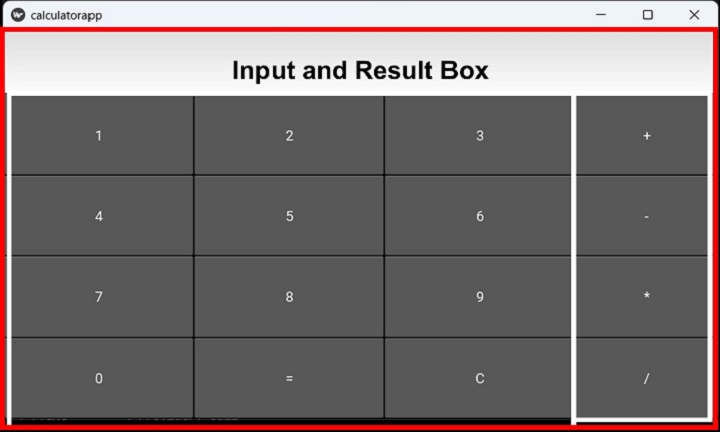
上述佈局顯示頂部有一個輸入框,後面跟著一個用於按鈕的 3 列布局,此外,四個運算子按鈕排列在一列中。
我們將使用一個只有一列的頂部網格佈局,並在其下方新增一個右對齊的 TextInput,然後在其下方放置另一個兩列的網格。此網格的左側單元格包含三列的數字、“=”和“C”按鈕。第二列是另一個只有一列的網格,用於所有算術運算子。
以下“kv”檔案採用了此邏輯:
<calcy>:
   GridLayout:
      cols:1
      TextInput:
         id:t1
         halign:'right'
         size_hint:1,.2
         font_size:60
      GridLayout:
         cols:2
         GridLayout:
            cols:3
            size:root.width, root.height
            Button:
               id:one
               text:'1'
               on_press:root.onpress(*args)
            Button:
               id:two
               text:'2'
               on_press:root.onpress(*args)
            Button:
               id:thee
               text:'3'
               on_press:root.onpress(*args)
            Button:
               id:four
               text:'4'
               on_press:root.onpress(*args)
            Button:
               id:five
               text:'5'
               on_press:root.onpress(*args)
            Button:
               id:six
               text:'6'
               on_press:root.onpress(*args)
            Button:
               id:seven
               text:'7'
               on_press:root.onpress(*args)
            Button:
               id:eight
               text:'8'
               on_press:root.onpress(*args)
            Button:
               id:nine
               text:'9'
               on_press:root.onpress(*args)
            Button:
               id:zero
               text:'0'
               on_press:root.onpress(*args)
            Button:
               id:eq
               text:'='
               on_press:root.onpress(*args)
            Button:
               id:clr
               text:'C'
               on_press:root.onpress(*args)
      GridLayout:
         cols:1
         size_hint:(.25, root.height)
         Button:
            id:plus
            text:'+'
            on_press:root.onpress(*args)
         Button:
            id:minus
            text:'-'
            on_press:root.onpress(*args)
         Button:
            id:mult
            text:'*'
            on_press:root.onpress(*args)
         Button:
            id:divide
            text:'/'
            on_press:root.onpress(*args)
請注意,每個按鈕在其 on_press 事件上都綁定了 onpress() 方法。
onpress() 方法基本上讀取按鈕標題(其 text 屬性)並確定操作過程。
如果按鈕的標題是數字,則將其附加到 TextInput 框的 text 屬性。
self.ids.t1.text=self.ids.t1.text+instance.text
如果按鈕代表任何算術運算子 (+, -, *, /),則此時文字框中的數字將儲存在一個變數中以供進一步操作,並且文字框將被清除。
if instance.text in "+-*/":
self.first=int(self.ids.t1.text)
self.ids.t1.text='0'
self.op=instance.text
如果按鈕的 text 屬性是“=”,則此時文字框中的數字為第二個運算元。執行相應的算術運算,並將結果顯示在文字框中。
if instance.text=='=':
if self.first==0: return
self.second=int(self.ids.t1.text)
if self.op=='+': result=self.first+self.second
if self.op=='-': result=self.first-self.second
if self.op=='*': result=self.first*self.second
if self.op=='/': result=self.first/self.second
self.ids.t1.text=str(result)
self.first=self.second=0
最後,如果按鈕的標題為“C”,則文字框將設定為空。
if instance.text=='C':
self.ids.t1.text=''
self.first=self.second=0
示例
上述“kv”檔案載入到 App 類的 build() 方法中。這是完整程式碼:
from kivy.app import App
from kivy.uix.button import Button
from kivy.uix.gridlayout import GridLayout
from kivy.core.window import Window

Window.size = (720,400)

class calcy(GridLayout):
   def __init__(self, **kwargs):
      super(calcy, self).__init__(**kwargs)
      self.first=self.second=0

   def onpress(self, instance):
      if instance.text=='C':
         self.ids.t1.text=''
         self.first=self.second=0
      elif instance.text in "+-*/":
         self.first=int(self.ids.t1.text)
         self.ids.t1.text='0'
         self.op=instance.text

      elif instance.text=='=':
         if self.first==0: return
            self.second=int(self.ids.t1.text)
         if self.op=='+': result=self.first+self.second
         if self.op=='-': result=self.first-self.second
         if self.op=='*': result=self.first*self.second
         if self.op=='/': result=self.first/self.second
         self.ids.t1.text=str(result)
         self.first=self.second=0
      else:
         self.ids.t1.text=self.ids.t1.text+instance.text

class calculatorapp(App):
   def build(self):
      return calcy(cols=3)

calculatorapp().run()
輸出
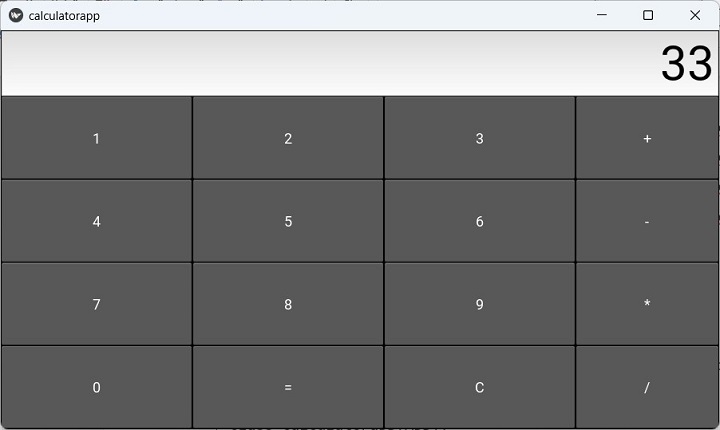
執行上述程式,並使用此應用程式執行所有基本的算術計算。
廣告